[GH-ISSUE #906] Postwoman Docker Container behind Reverse Proxy #322

Closed
opened 2026-03-16 14:42:04 +03:00 by kerem · 14 comments
Owner

Originally created by @woigl on GitHub (May 27, 2020).
Original GitHub issue: https://github.com/hoppscotch/hoppscotch/issues/906

We want to use the Postwoman Docker container begin an NGINX reverse proxy with a subpath i.e. http://hostname/postwoman

This is an extract of the NGINX config:

location /postwoman/ {
  proxy_pass http://postwoman:3000/;
  proxy_set_header Host $host;
}

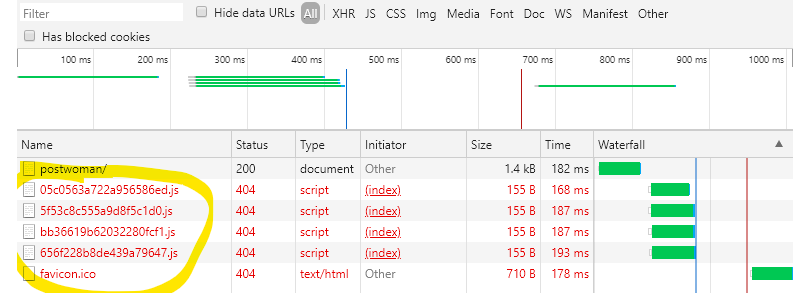
We would expect that the reverse proxy path would be used for the requests, but it seems not to work.
See this image:
Postwoman-Rever-Proxy-Issue

We are using the Docker Image v1.9.7.

How can we solve this?

Originally created by @woigl on GitHub (May 27, 2020). Original GitHub issue: https://github.com/hoppscotch/hoppscotch/issues/906 We want to use the Postwoman Docker container begin an NGINX reverse proxy with a subpath i.e. http://hostname/postwoman This is an extract of the NGINX config: ``` location /postwoman/ { proxy_pass http://postwoman:3000/; proxy_set_header Host $host; } ``` We would expect that the reverse proxy path would be used for the requests, but it seems not to work. See this image: ![Postwoman-Rever-Proxy-Issue](https://user-images.githubusercontent.com/17859431/83031293-6ec7d900-a045-11ea-8f49-5694a829102e.png) We are using the Docker Image v1.9.7. How can we solve this?
kerem 2026-03-16 14:42:04 +03:00
Author
Owner

@liyasthomas commented on GitHub (May 27, 2020):

@JanoschDeurer can you help me to resolve this issue?

<!-- gh-comment-id:634702057 --> @liyasthomas commented on GitHub (May 27, 2020): @JanoschDeurer can you help me to resolve this issue?
Author
Owner

@JanoschDeurer commented on GitHub (May 28, 2020):

@liyasthomas Yes, i'll give it a look later today

<!-- gh-comment-id:635306985 --> @JanoschDeurer commented on GitHub (May 28, 2020): @liyasthomas Yes, i'll give it a look later today
Author
Owner

@JanoschDeurer commented on GitHub (May 28, 2020):

I wrote a small test setup and got the same errors.

This doesn't look like a Docker problem to me. I'm not really good with web development, but it looks to me like the paths to the .js files in the head section of the index.html should be relative links instead of absolute ones. @liyasthomas if you give me a hint where these links are generated I'll test it.

Here is my test setup:

$ cat docker-compose.yml
version: '3.7'
services:
  postwoman:
    image: liyasthomas/postwoman:v1.9.7
  nginx:
    image: nginx:latest
    volumes:
      - ./nginx.conf:/etc/nginx/nginx.conf:ro
    ports:
      - "80:80"
cat nginx.conf
events {
  worker_connections  4096;  ## Default: 1024
}

http {
  server { # simple reverse-proxy
    listen       80;
    location /postwoman {
      proxy_pass      http://postwoman:3000;
    }
  }
}
<!-- gh-comment-id:635614725 --> @JanoschDeurer commented on GitHub (May 28, 2020): I wrote a small test setup and got the same errors. This doesn't look like a Docker problem to me. I'm not really good with web development, but it looks to me like the paths to the .js files in the head section of the index.html should be relative links instead of absolute ones. @liyasthomas if you give me a hint where these links are generated I'll test it. Here is my test setup: ``` $ cat docker-compose.yml version: '3.7' services: postwoman: image: liyasthomas/postwoman:v1.9.7 nginx: image: nginx:latest volumes: - ./nginx.conf:/etc/nginx/nginx.conf:ro ports: - "80:80" ``` ``` cat nginx.conf events { worker_connections 4096; ## Default: 1024 } http { server { # simple reverse-proxy listen 80; location /postwoman { proxy_pass http://postwoman:3000; } } } ```
Author
Owner

@AndrewBastin commented on GitHub (May 28, 2020):

The index.html file is generated by the Nuxt build process and there is no way currently to make Nuxt generate relative URLs (see issue https://github.com/nuxt/nuxt.js/issues/1380).

If you are using subpaths, I am pretty sure you can override the router.base to generate code based on the subpath.

<!-- gh-comment-id:635629854 --> @AndrewBastin commented on GitHub (May 28, 2020): The `index.html` file is generated by the Nuxt build process and there is no way currently to make Nuxt generate relative URLs (see issue https://github.com/nuxt/nuxt.js/issues/1380). If you are using subpaths, I am pretty sure you can override the [`router.base`](https://nuxtjs.org/api/configuration-router#base) to generate code based on the subpath.
Author
Owner

@JanoschDeurer commented on GitHub (May 29, 2020):

I looked into the nuxt.config.js file and it seems there is already an evn variable that does exactly what we need:
https://github.com/liyasthomas/postwoman/blob/master/nuxt.config.js#L17
But I think this is only triggered on build time right?

<!-- gh-comment-id:635839752 --> @JanoschDeurer commented on GitHub (May 29, 2020): I looked into the `nuxt.config.js` file and it seems there is already an evn variable that does exactly what we need: https://github.com/liyasthomas/postwoman/blob/master/nuxt.config.js#L17 But I think this is only triggered on build time right?
Author
Owner

@liyasthomas commented on GitHub (May 29, 2020):

@JanoschDeurer yes you're right - it's only triggered at the build time. Let me know if there's a workaround that would allow docker deployment in a subpath.

<!-- gh-comment-id:635843525 --> @liyasthomas commented on GitHub (May 29, 2020): @JanoschDeurer yes you're right - it's only triggered at the build time. Let me know if there's a workaround that would allow docker deployment in a subpath.
Author
Owner

@JanoschDeurer commented on GitHub (May 29, 2020):

What we can do is add an env variable and then one has to set it in the Dockerfile or pass it to docker build with

docker build --build-arg BASE_PATH=/postwoman

However, I can't get this to work in my local setup, maybe the line I referenced above is not the right one, because I changed that variable and it didn't have any effect for me.

<!-- gh-comment-id:636100681 --> @JanoschDeurer commented on GitHub (May 29, 2020): What we can do is add an env variable and then one has to set it in the Dockerfile or pass it to docker build with ``` docker build --build-arg BASE_PATH=/postwoman ``` However, I can't get this to work in my local setup, maybe the line I referenced above is not the right one, because I changed that variable and it didn't have any effect for me.
Author
Owner

@liyasthomas commented on GitHub (May 30, 2020):

@woigl change the router.base value to your desired subpath in nuxt.config.js
ie: to serve image in /pw subpath, make the following change:

nuxt.config.js

export const routerBase =
  process.env.DEPLOY_ENV === "GH_PAGES"
    ? {
        router: {
          base: `/${repoName}/`,
        },
      }
    : {
        router: {
          base: "/pw", // 👈 desired subpath
        },
      }

for convenience, you can set:

base: process.env.BASE_PATH

and pass it to docker build with:

docker build --build-arg BASE_PATH=/postwoman

shall we provide an env var in .env for router.base?

<!-- gh-comment-id:636251269 --> @liyasthomas commented on GitHub (May 30, 2020): @woigl change the `router.base` value to your desired subpath in [nuxt.config.js](https://github.com/liyasthomas/postwoman/blob/master/nuxt.config.js) ie: to serve image in `/pw` subpath, make the following change: **nuxt.config.js** ``` export const routerBase = process.env.DEPLOY_ENV === "GH_PAGES" ? { router: { base: `/${repoName}/`, }, } : { router: { base: "/pw", // 👈 desired subpath }, } ``` for convenience, you can set: ``` base: process.env.BASE_PATH ``` and pass it to docker build with: ``` docker build --build-arg BASE_PATH=/postwoman ``` shall we provide an env var in `.env` for `router.base`?
Author
Owner

@woigl commented on GitHub (May 30, 2020):

@liyasthomas does this mean, that we have to make a full build or just a build based on your image?

Can you provide me a sample Dockerfile?

<!-- gh-comment-id:636279696 --> @woigl commented on GitHub (May 30, 2020): @liyasthomas does this mean, that we have to make a full build or just a build based on your image? Can you provide me a sample Dockerfile?
Author
Owner

@liyasthomas commented on GitHub (May 30, 2020):

Build have to be tweaked on nuxt.config.js file. Current docker file works good.

<!-- gh-comment-id:636280167 --> @liyasthomas commented on GitHub (May 30, 2020): Build have to be tweaked on nuxt.config.js file. Current docker file works good.
Author
Owner

@JanoschDeurer commented on GitHub (May 30, 2020):

@woigl you can set an environment variable in the Dockerfile by adding:

ENV BASE_PATH=/postwoman

to your Dockerfile.
If you want to set the variable with:

docker build --build-arg BASE_PATH=/postwoman

use ARG instead:

ARG BASE_PATH=/postwoman

In any case you always have to run a docker build when you change the path. And to your question, yes this build has to be for the container in this project, not one that is based on it.

I know this was not your question, but in my personal experience it is often a lot easier to use subdomains instead of path based routing, also I can recommend using traefik as a reverse proxy, it has a really nice docker integration and it handles LetsEncrypt for you.

<!-- gh-comment-id:636315069 --> @JanoschDeurer commented on GitHub (May 30, 2020): @woigl you can set an environment variable in the Dockerfile by adding: ``` ENV BASE_PATH=/postwoman ``` to your Dockerfile. If you want to set the variable with: ``` docker build --build-arg BASE_PATH=/postwoman ``` use `ARG` instead: ``` ARG BASE_PATH=/postwoman ``` In any case you always have to run a `docker build` when you change the path. And to your question, yes this build has to be for the container in this project, not one that is based on it. I know this was not your question, but in my personal experience it is often a lot easier to use subdomains instead of path based routing, also I can recommend using [traefik](https://containo.us/traefik/) as a reverse proxy, it has a really nice docker integration and it handles LetsEncrypt for you.
Author
Owner

@W1M0R commented on GitHub (Jun 10, 2020):

How can I get this to work if I make use of the image on DockerHub?

<!-- gh-comment-id:642221281 --> @W1M0R commented on GitHub (Jun 10, 2020): How can I get this to work if I make use of the image on DockerHub?
Author
Owner

@JanoschDeurer commented on GitHub (Jun 10, 2020):

@W1M0R you can't really. Setting the path variable must happen before npm build is run. Maybe you can run the build step again, but I think it would make more sense to just alter the Dockerfile in this project for your purposes.

<!-- gh-comment-id:642318265 --> @JanoschDeurer commented on GitHub (Jun 10, 2020): @W1M0R you can't really. Setting the path variable must happen before `npm build` is run. Maybe you can run the build step again, but I think it would make more sense to just alter the Dockerfile in this project for your purposes.
Author
Owner

@e-mikh commented on GitHub (Mar 17, 2023):

any update on this with current version? still possible?

<!-- gh-comment-id:1473742755 --> @e-mikh commented on GitHub (Mar 17, 2023): any update on this with current version? still possible?
Sign in to join this conversation.
No milestone
No project
No assignees
1 participant
Notifications
Due date
The due date is invalid or out of range. Please use the format "yyyy-mm-dd".

No due date set.

Dependencies

No dependencies set.

Reference
starred/hoppscotch#322
No description provided.