[GH-ISSUE #704] Error: Network Error. Check console for details #245

Closed
opened 2026-03-16 14:12:30 +03:00 by kerem · 18 comments
Owner

Originally created by @HappinerWinnie on GitHub (Mar 24, 2020).
Original GitHub issue: https://github.com/hoppscotch/hoppscotch/issues/704

Describe the bug

To Reproduce
Steps to reproduce the behavior:

  1. Open Postwoman
  2. Click on Send
  3. Scroll down to console
  4. See error

Expected behavior
response OK

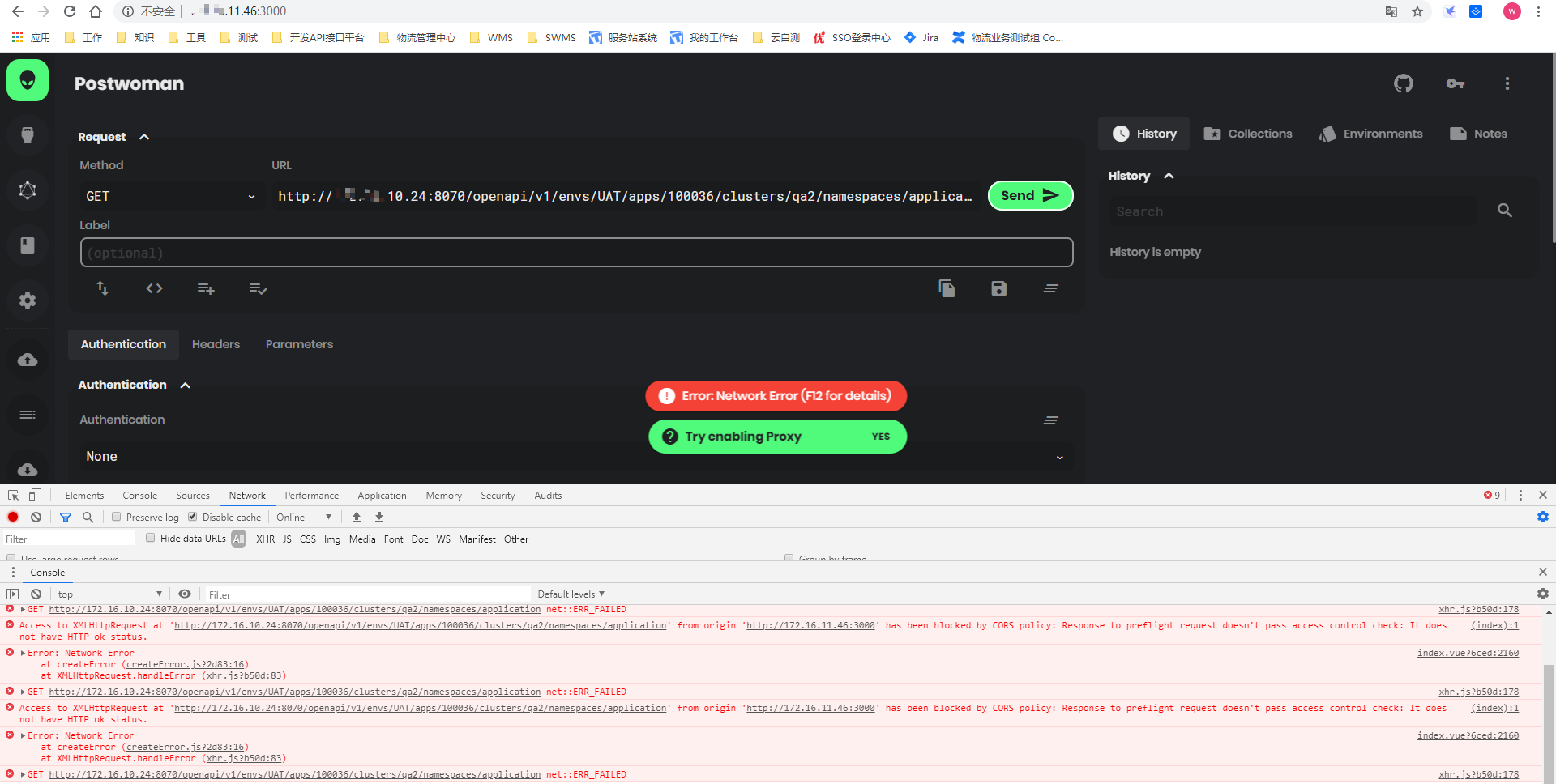
Screenshots
image

Desktop (please complete the following information):

  • OS: Win10
  • Browser chrome, safari
  • Version 79.0.3945.117
Originally created by @HappinerWinnie on GitHub (Mar 24, 2020). Original GitHub issue: https://github.com/hoppscotch/hoppscotch/issues/704 **Describe the bug** **To Reproduce** Steps to reproduce the behavior: 1. Open Postwoman 2. Click on Send 3. Scroll down to console 4. See error **Expected behavior** response OK **Screenshots** ![image](https://user-images.githubusercontent.com/31788525/77426905-68806b00-6e10-11ea-9e3b-b18c1f1d8c15.png) **Desktop (please complete the following information):** - OS: Win10 - Browser chrome, safari - Version 79.0.3945.117
kerem closed this issue 2026-03-16 14:12:35 +03:00
Author
Owner

@liyasthomas commented on GitHub (Mar 24, 2020):

If your endpoint is in localhost, please install official browser extensions to support localhost endpoints and fix CORS errors.

Official extensions

<!-- gh-comment-id:603219828 --> @liyasthomas commented on GitHub (Mar 24, 2020): If your endpoint is in `localhost`, please install official browser extensions to support `localhost` endpoints and fix `CORS` errors. **Official extensions** - [Firefox](https://addons.mozilla.org/en-US/firefox/addon/postwoman/) - [Chrome](https://chrome.google.com/webstore/detail/postwoman-browser-extensi/amknoiejhlmhancpahfcfcfhllgkpbld)
Author
Owner

@HappinerWinnie commented on GitHub (Mar 24, 2020):

It's the same effect if I use ip
image

<!-- gh-comment-id:603224167 --> @HappinerWinnie commented on GitHub (Mar 24, 2020): It's the same effect if I use ip ![image](https://user-images.githubusercontent.com/31788525/77427876-1e988480-6e12-11ea-99af-d521f2c4ba70.png)
Author
Owner

@liyasthomas commented on GitHub (Mar 24, 2020):

Are you sure the requested endpoint have CROS disabled?

<!-- gh-comment-id:603225273 --> @liyasthomas commented on GitHub (Mar 24, 2020): Are you sure the requested endpoint have CROS disabled?
Author
Owner

@Slaviusz commented on GitHub (Mar 27, 2020):

Can we reopen this? I have the same issue, with/without the extension. I cannot open any connection to localhost.

<!-- gh-comment-id:605006072 --> @Slaviusz commented on GitHub (Mar 27, 2020): Can we reopen this? I have the same issue, with/without the extension. I cannot open any connection to localhost.
Author
Owner

@liyasthomas commented on GitHub (Mar 27, 2020):

@AndrewBastin

<!-- gh-comment-id:605006655 --> @liyasthomas commented on GitHub (Mar 27, 2020): @AndrewBastin
Author
Owner

@Slaviusz commented on GitHub (Mar 27, 2020):

Thanks.
Basically, my symptoms are exactly the same. Trying to call rest API endpoint on localhost results in :

Access to XMLHttpRequest at 'http://127.0.0.1:9000/api/auth/login' from origin 'http://localhost:3000' has been blocked by CORS policy: Response to preflight request doesn't pass access control check: No 'Access-Control-Allow-Origin' header is present on the requested resource.

I tried installing the extension and also including the URL into unsafely-treat-insecure-origin-as-secure origins to no avail.

Thanks for help.

<!-- gh-comment-id:605008978 --> @Slaviusz commented on GitHub (Mar 27, 2020): Thanks. Basically, my symptoms are exactly the same. Trying to call rest API endpoint on localhost results in : `Access to XMLHttpRequest at 'http://127.0.0.1:9000/api/auth/login' from origin 'http://localhost:3000' has been blocked by CORS policy: Response to preflight request doesn't pass access control check: No 'Access-Control-Allow-Origin' header is present on the requested resource.` I tried installing the extension and also including the URL into unsafely-treat-insecure-origin-as-secure origins to no avail. Thanks for help.
Author
Owner

@liyasthomas commented on GitHub (Mar 27, 2020):

Please check these hotfixes:

  1. Check you've installed the latest version of browser extension. Kindly go through the extension's link (in readme) and verify the installed version number.
  2. Check Postwoman is allowed to use extensions. Navigate to Settings > Extensions section on web app. Make sure "Use extension" toggle switch is turned on.
  3. Check endpoints don't have CROS restrictions.
<!-- gh-comment-id:605011009 --> @liyasthomas commented on GitHub (Mar 27, 2020): Please check these hotfixes: 1. Check you've installed the latest version of browser extension. Kindly go through the extension's link (in readme) and verify the installed version number. 2. Check Postwoman is allowed to use extensions. Navigate to Settings > Extensions section on web app. Make sure "Use extension" toggle switch is turned on. 3. Check endpoints don't have CROS restrictions.
Author
Owner

@Slaviusz commented on GitHub (Mar 27, 2020):

  1. compiled Postwoman 30 minutes ago from latest git commit. Installed the extension 15 minutes ago from official link provided within Postwoman. The version reported is 0.5. I also tried manual update in browser's extensions config page.
  2. Extension is allowed, active and configured with access to URLs and in Incognito.
  3. CORS is NOT enabled on this app (I'm the developer)

However when I explicitly enabled CORS with Access-Control-Allow-Origin: * everything works now. Is it now enforced that the host MUST enable CORS otherwise the behavior is equal to invalid origin?
Honestly I don't remember such behavior and it is enforced at the application level. When I do plain cURL request everything works just fine. Is maybe one of your dependency packages enforcing this?

<!-- gh-comment-id:605032815 --> @Slaviusz commented on GitHub (Mar 27, 2020): 1. compiled Postwoman 30 minutes ago from latest git commit. Installed the extension 15 minutes ago from official link provided within Postwoman. The version reported is 0.5. I also tried manual update in browser's extensions config page. 2. Extension is allowed, active and configured with access to URLs and in Incognito. 3. CORS is NOT enabled on this app (I'm the developer) However when I explicitly enabled CORS with Access-Control-Allow-Origin: * everything works now. Is it now enforced that the host MUST enable CORS otherwise the behavior is equal to invalid origin? Honestly I don't remember such behavior and it is enforced at the application level. When I do plain cURL request everything works just fine. Is maybe one of your dependency packages enforcing this?
Author
Owner

@liyasthomas commented on GitHub (Mar 27, 2020):

If that's the case, we'll have to look further into it. Huge thanks for debugging and reporting the issue.

<!-- gh-comment-id:605047522 --> @liyasthomas commented on GitHub (Mar 27, 2020): If that's the case, we'll have to look further into it. Huge thanks for debugging and reporting the issue.
Author
Owner

@Slaviusz commented on GitHub (Mar 27, 2020):

You're welcome. Thanks for having a look.

<!-- gh-comment-id:605048337 --> @Slaviusz commented on GitHub (Mar 27, 2020): You're welcome. Thanks for having a look.
Author
Owner

@AndrewBastin commented on GitHub (Mar 27, 2020):

Hi there,

Sorry for the late response, I am really swamped with personal stuff and end of the semester university work.

Due to security concerns of allowing open access to the extension hooks, the Postwoman Extension only hooks into the following domains

http(s)://postwoman.io/
http(s)://postwoman.netlify.com/

What that implies is that, you aren't allowed to access the extension if you are not in the above domains, so your locally hosted Postwoman builds can't access the official browser extension.

If you are using localhost, you will need to make your own build of the extension (more info on that here) with the permissions activated for your localhost page in the manifest.

I would love to make the extension an open system but this is implemented to prevent unauthorized bypassing of CORS by malicious sites that are not Postwoman.

Feel free to ask questions regarding this though, but I am closing this issue as this is an intended safeguard.

Thanks for using Postwoman ❤️

<!-- gh-comment-id:605089067 --> @AndrewBastin commented on GitHub (Mar 27, 2020): Hi there, Sorry for the late response, I am really swamped with personal stuff and end of the semester university work. Due to security concerns of allowing open access to the extension hooks, the Postwoman Extension only hooks into the following domains ``` http(s)://postwoman.io/ http(s)://postwoman.netlify.com/ ``` What that implies is that, you aren't allowed to access the extension if you are not in the above domains, so your locally hosted Postwoman builds can't access the official browser extension. If you are using localhost, you will need to make your own build of the extension (more info on that [here](https://github.com/AndrewBastin/postwoman-extension)) with the permissions activated for your localhost page in the manifest. I would love to make the extension an open system but this is implemented to prevent unauthorized bypassing of CORS by malicious sites that are not Postwoman. Feel free to ask questions regarding this though, but I am closing this issue as this is an intended safeguard. Thanks for using Postwoman ❤️
Author
Owner

@liuxueyiTest commented on GitHub (Dec 4, 2020):

3. Check endpoints don't have CROS restrictions

how to do ?

<!-- gh-comment-id:738704211 --> @liuxueyiTest commented on GitHub (Dec 4, 2020): > 3\. Check endpoints don't have CROS restrictions how to do ?
Author
Owner

@liyasthomas commented on GitHub (Dec 4, 2020):

  1. Check endpoints don't have CROS restrictions

how to do ?

CORS is a security mechanism imposed on API endpoints. Its easily discoverable from the developers side. You can simply try hitting the endpoint from Hoppscotch.io and if there's no issue, and you got Okay 200 response, then it doesn't have CORS. If API response got any error, check console logs to know whether it's due to CORS restrictions. You can fix CORS issues with Hoppscotch Extension.

<!-- gh-comment-id:738708528 --> @liyasthomas commented on GitHub (Dec 4, 2020): > > 3. Check endpoints don't have CROS restrictions > > how to do ? [`CORS`](https://developer.mozilla.org/en-US/docs/Web/HTTP/CORS) is a security mechanism imposed on API endpoints. Its easily discoverable from the developers side. You can simply try hitting the endpoint from Hoppscotch.io and if there's no issue, and you got `Okay 200` response, then it doesn't have CORS. If API response got any error, check console logs to know whether it's due to CORS restrictions. You can fix CORS issues with Hoppscotch Extension.
Author
Owner

@liuxueyiTest commented on GitHub (Dec 4, 2020):

 thank you very much.
Could you tell me how to turn off the cros ?I am is tester。 I would appreciate it if you could give me some advice at your convenience.
 
------------------ Original ------------------
From:  "Liyas Thomas"<notifications@github.com>;
Date:  Fri, Dec 4, 2020 06:36 PM
To:  "hoppscotch/hoppscotch"<hoppscotch@noreply.github.com>;
Cc:  "刘学义"<liuxueyi@xsyxsc.com>; "Comment"<comment@noreply.github.com>;
Subject:  Re: [hoppscotch/hoppscotch] Error: Network Error. Check console for details (#704)


Check endpoints don't have CROS restrictions

how to do ?

CORS is a security mechanism imposed on API endpoints. Its easily discoverable from the developers side. You can simple try hitting the endpoint from Hoppscotch.io and if there's no issue, and you got Okay 200 response, then it doesn't have CORS. If API response got any error, check console to know where it's due to CORS restrictions. You can fix CORS issues with Hoppscotch Extension.


You are receiving this because you commented.
Reply to this email directly, view it on GitHub, or unsubscribe.

<!-- gh-comment-id:738711506 --> @liuxueyiTest commented on GitHub (Dec 4, 2020): &nbsp;thank you very much. Could&nbsp;you tell me how to turn off the cros ?I am is tester。&nbsp;I would appreciate it if you could give me some advice at your convenience. &nbsp; ------------------&nbsp;Original&nbsp;------------------ From: &nbsp;"Liyas Thomas"<notifications@github.com&gt;; Date: &nbsp;Fri, Dec 4, 2020 06:36 PM To: &nbsp;"hoppscotch/hoppscotch"<hoppscotch@noreply.github.com&gt;; Cc: &nbsp;"刘学义"<liuxueyi@xsyxsc.com&gt;; "Comment"<comment@noreply.github.com&gt;; Subject: &nbsp;Re: [hoppscotch/hoppscotch] Error: Network Error. Check console for details (#704) &nbsp; Check endpoints don't have CROS restrictions how to do ? CORS is a security mechanism imposed on API endpoints. Its easily discoverable from the developers side. You can simple try hitting the endpoint from Hoppscotch.io and if there's no issue, and you got Okay 200 response, then it doesn't have CORS. If API response got any error, check console to know where it's due to CORS restrictions. You can fix CORS issues with Hoppscotch Extension. — You are receiving this because you commented. Reply to this email directly, view it on GitHub, or unsubscribe.
Author
Owner
<!-- gh-comment-id:738712671 --> @liyasthomas commented on GitHub (Dec 4, 2020): https://stackoverflow.com/questions/3102819/disable-same-origin-policy-in-chrome
Author
Owner

@liuxueyiTest commented on GitHub (Dec 4, 2020):

Thank you very much for your help.Hoppscotch is installed to my local computer, which is the same computer as my browser.According to your information, There is something wrong with my Browser extension.


------------------ Original ------------------
From:  "Liyas Thomas"<notifications@github.com>;
Date:  Fri, Dec 4, 2020 06:45 PM
To:  "hoppscotch/hoppscotch"<hoppscotch@noreply.github.com>;
Cc:  "刘学义"<liuxueyi@xsyxsc.com>; "Comment"<comment@noreply.github.com>;
Subject:  Re: [hoppscotch/hoppscotch] Error: Network Error. Check console for details (#704)


https://stackoverflow.com/questions/3102819/disable-same-origin-policy-in-chrome


You are receiving this because you commented.
Reply to this email directly, view it on GitHub, or unsubscribe.

<!-- gh-comment-id:738730250 --> @liuxueyiTest commented on GitHub (Dec 4, 2020): Thank you very much for your help.Hoppscotch is installed to my local computer, which is the same computer as my browser.According to your information, There is something wrong with my Browser extension. &nbsp; &nbsp; ------------------ Original ------------------ From: &nbsp;"Liyas Thomas"<notifications@github.com&gt;; Date: &nbsp;Fri, Dec 4, 2020 06:45 PM To: &nbsp;"hoppscotch/hoppscotch"<hoppscotch@noreply.github.com&gt;; Cc: &nbsp;"刘学义"<liuxueyi@xsyxsc.com&gt;; "Comment"<comment@noreply.github.com&gt;; Subject: &nbsp;Re: [hoppscotch/hoppscotch] Error: Network Error. Check console for details (#704) &nbsp; https://stackoverflow.com/questions/3102819/disable-same-origin-policy-in-chrome — You are receiving this because you commented. Reply to this email directly, view it on GitHub, or unsubscribe.
Author
Owner

@liuxueyiTest commented on GitHub (Dec 4, 2020):

Why can't My self-installed server show Extension Version. Could you please tell me where I am wrong? If you are convenient, please guide me.


------------------ Original ------------------
From:  "刘学义"<liuxueyi@xsyxsc.com>;
Date:  Fri, Dec 4, 2020 07:21 PM
To:  "hoppscotch/hoppscotch"<reply@reply.github.com>;

Subject:  Re: [hoppscotch/hoppscotch] Error: Network Error. Check console for details (#704)


Thank you very much for your help.Hoppscotch is installed to my local computer, which is the same computer as my browser.According to your information, There is something wrong with my Browser extension.


------------------ Original ------------------
From:  "Liyas Thomas"<notifications@github.com>;
Date:  Fri, Dec 4, 2020 06:45 PM
To:  "hoppscotch/hoppscotch"<hoppscotch@noreply.github.com>;
Cc:  "刘学义"<liuxueyi@xsyxsc.com>; "Comment"<comment@noreply.github.com>;
Subject:  Re: [hoppscotch/hoppscotch] Error: Network Error. Check console for details (#704)


https://stackoverflow.com/questions/3102819/disable-same-origin-policy-in-chrome


You are receiving this because you commented.
Reply to this email directly, view it on GitHub, or unsubscribe.

<!-- gh-comment-id:738755638 --> @liuxueyiTest commented on GitHub (Dec 4, 2020): Why can't My self-installed server show Extension Version.&nbsp;Could you please tell me where I am wrong? If you are convenient, please guide me. &nbsp; &nbsp; ------------------&nbsp;Original&nbsp;------------------ From: &nbsp;"刘学义"<liuxueyi@xsyxsc.com&gt;; Date: &nbsp;Fri, Dec 4, 2020 07:21 PM To: &nbsp;"hoppscotch/hoppscotch"<reply@reply.github.com&gt;; Subject: &nbsp;Re: [hoppscotch/hoppscotch] Error: Network Error. Check console for details (#704) &nbsp; Thank you very much for your help.Hoppscotch is installed to my local computer, which is the same computer as my browser.According to your information, There is something wrong with my Browser extension. &nbsp; &nbsp; ------------------ Original ------------------ From: &nbsp;"Liyas Thomas"<notifications@github.com&gt;; Date: &nbsp;Fri, Dec 4, 2020 06:45 PM To: &nbsp;"hoppscotch/hoppscotch"<hoppscotch@noreply.github.com&gt;; Cc: &nbsp;"刘学义"<liuxueyi@xsyxsc.com&gt;; "Comment"<comment@noreply.github.com&gt;; Subject: &nbsp;Re: [hoppscotch/hoppscotch] Error: Network Error. Check console for details (#704) &nbsp; https://stackoverflow.com/questions/3102819/disable-same-origin-policy-in-chrome — You are receiving this because you commented. Reply to this email directly, view it on GitHub, or unsubscribe.
Author
Owner

@liuxueyiTest commented on GitHub (Dec 4, 2020):

如果我访问我本地的自己部署的 hoppscotch 意思我要自己弄个浏览器扩展。

<!-- gh-comment-id:738771279 --> @liuxueyiTest commented on GitHub (Dec 4, 2020): 如果我访问我本地的自己部署的 hoppscotch 意思我要自己弄个浏览器扩展。
Sign in to join this conversation.
No milestone
No project
No assignees
1 participant
Notifications
Due date
The due date is invalid or out of range. Please use the format "yyyy-mm-dd".

No due date set.

Dependencies

No dependencies set.

Reference
starred/hoppscotch#245
No description provided.