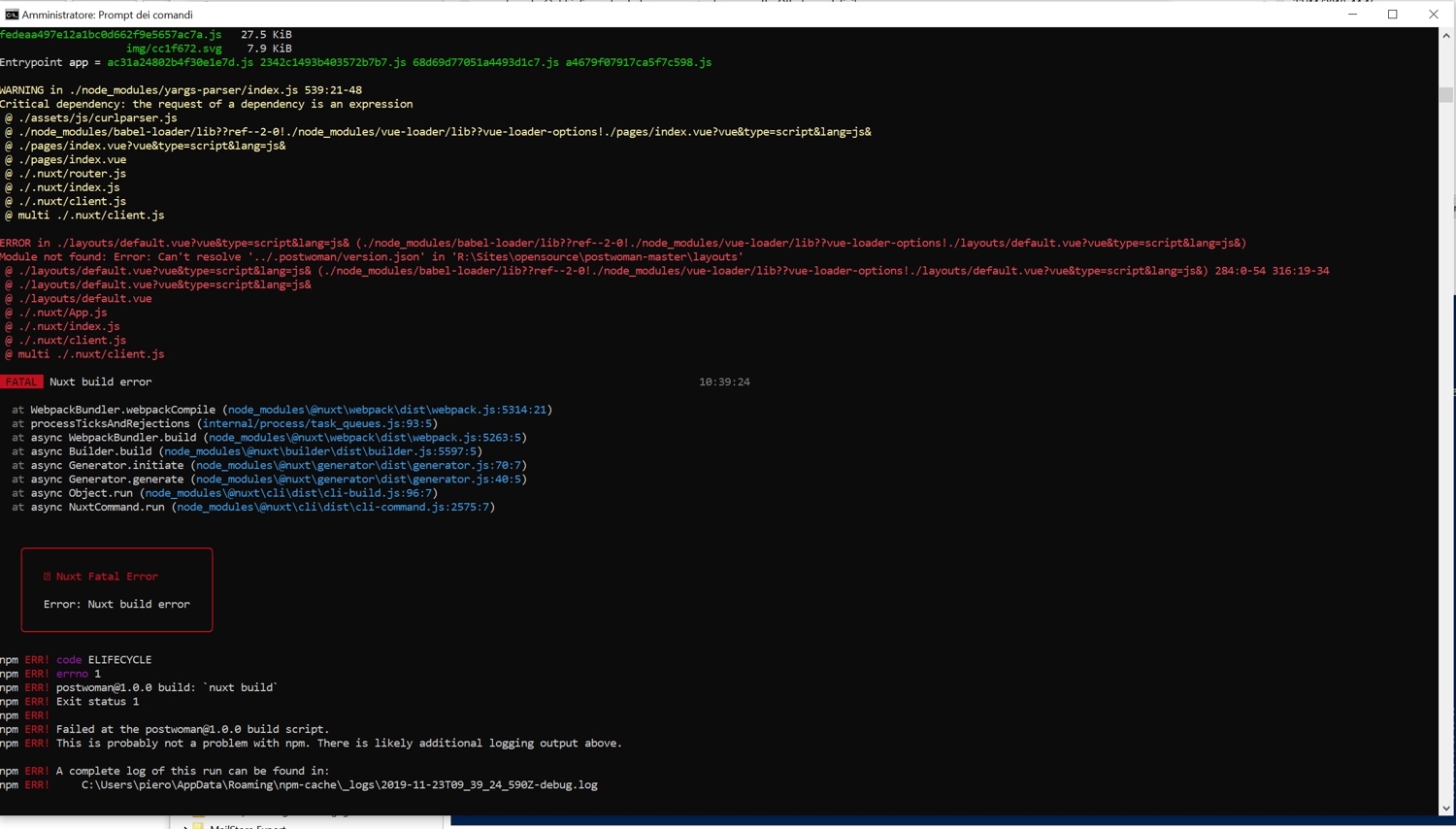
[GH-ISSUE #327] Build failed #122

Closed
opened 2026-03-16 13:32:32 +03:00 by kerem · 26 comments
Owner

Originally created by @pierol on GitHub (Nov 22, 2019).
Original GitHub issue: https://github.com/hoppscotch/hoppscotch/issues/327

Originally assigned to: @liyasthomas on GitHub.

Describe the bug
Trying to build the package on Windows 10 machine with

npm run build

WARNING in ./node_modules/yargs-parser/index.js 539:21-48
Critical dependency: the request of a dependency is an expression
 @ ./assets/js/curlparser.js
 @ ./node_modules/babel-loader/lib??ref--2-0!./node_modules/vue-loader/lib??vue-loader-options!./pages/index.vue?vue&type=script&lang=js&
 @ ./pages/index.vue?vue&type=script&lang=js&
 @ ./pages/index.vue
 @ ./.nuxt/router.js
 @ ./.nuxt/index.js
 @ ./.nuxt/client.js
 @ multi ./.nuxt/client.js

ERROR in ./layouts/default.vue?vue&type=script&lang=js& (./node_modules/babel-loader/lib??ref--2-0!./node_modules/vue-loader/lib??vue-loader-options!./layouts/default.vue?vue&type=script&lang=js&)
Module not found: Error: Can't resolve '../.postwoman/version.json' in 'R:\Sites\opensource\postwoman-master\layouts'
 @ ./layouts/default.vue?vue&type=script&lang=js& (./node_modules/babel-loader/lib??ref--2-0!./node_modules/vue-loader/lib??vue-loader-options!./layouts/default.vue?vue&type=script&lang=js&) 284:0-54 316:19-34
 @ ./layouts/default.vue?vue&type=script&lang=js&
 @ ./layouts/default.vue
 @ ./.nuxt/App.js
 @ ./.nuxt/index.js
 @ ./.nuxt/client.js
 @ multi ./.nuxt/client.js

 FATAL  Nuxt build error                                                                                      22:29:04

  at WebpackBundler.webpackCompile (node_modules\@nuxt\webpack\dist\webpack.js:5314:21)
  at processTicksAndRejections (internal/process/task_queues.js:93:5)
  at async WebpackBundler.build (node_modules\@nuxt\webpack\dist\webpack.js:5263:5)
  at async Builder.build (node_modules\@nuxt\builder\dist\builder.js:5597:5)
  at async Generator.initiate (node_modules\@nuxt\generator\dist\generator.js:70:7)
  at async Generator.generate (node_modules\@nuxt\generator\dist\generator.js:40:5)
  at async Object.run (node_modules\@nuxt\cli\dist\cli-build.js:96:7)
  at async NuxtCommand.run (node_modules\@nuxt\cli\dist\cli-command.js:2575:7)


   ╭─────────────────────────────╮
   │                             │
   │   ✖ Nuxt Fatal Error        │
   │                             │
   │   Error: Nuxt build error   │
   │                             │
   ╰─────────────────────────────╯

npm ERR! code ELIFECYCLE
npm ERR! errno 1
npm ERR! postwoman@1.0.0 build: `nuxt build`
npm ERR! Exit status 1
npm ERR!
npm ERR! Failed at the postwoman@1.0.0 build script.
npm ERR! This is probably not a problem with npm. There is likely additional logging output above.

npm ERR! A complete log of this run can be found in:
npm ERR!     C:\Users\piero\AppData\Roaming\npm-cache\_logs\2019-11-22T21_29_04_067Z-debug.log

To Reproduce

Steps to reproduce the behavior (npm version 6.12.0, node version 12.13.0, SO Windows 10 1909):

  1. Download the ZIP and unzip it
  2. from inside the project folder run npm install
  3. npm run build
  4. See error
Originally created by @pierol on GitHub (Nov 22, 2019). Original GitHub issue: https://github.com/hoppscotch/hoppscotch/issues/327 Originally assigned to: @liyasthomas on GitHub. **Describe the bug** Trying to build the package on Windows 10 machine with `npm run build` ```dos WARNING in ./node_modules/yargs-parser/index.js 539:21-48 Critical dependency: the request of a dependency is an expression @ ./assets/js/curlparser.js @ ./node_modules/babel-loader/lib??ref--2-0!./node_modules/vue-loader/lib??vue-loader-options!./pages/index.vue?vue&type=script&lang=js& @ ./pages/index.vue?vue&type=script&lang=js& @ ./pages/index.vue @ ./.nuxt/router.js @ ./.nuxt/index.js @ ./.nuxt/client.js @ multi ./.nuxt/client.js ERROR in ./layouts/default.vue?vue&type=script&lang=js& (./node_modules/babel-loader/lib??ref--2-0!./node_modules/vue-loader/lib??vue-loader-options!./layouts/default.vue?vue&type=script&lang=js&) Module not found: Error: Can't resolve '../.postwoman/version.json' in 'R:\Sites\opensource\postwoman-master\layouts' @ ./layouts/default.vue?vue&type=script&lang=js& (./node_modules/babel-loader/lib??ref--2-0!./node_modules/vue-loader/lib??vue-loader-options!./layouts/default.vue?vue&type=script&lang=js&) 284:0-54 316:19-34 @ ./layouts/default.vue?vue&type=script&lang=js& @ ./layouts/default.vue @ ./.nuxt/App.js @ ./.nuxt/index.js @ ./.nuxt/client.js @ multi ./.nuxt/client.js FATAL Nuxt build error 22:29:04 at WebpackBundler.webpackCompile (node_modules\@nuxt\webpack\dist\webpack.js:5314:21) at processTicksAndRejections (internal/process/task_queues.js:93:5) at async WebpackBundler.build (node_modules\@nuxt\webpack\dist\webpack.js:5263:5) at async Builder.build (node_modules\@nuxt\builder\dist\builder.js:5597:5) at async Generator.initiate (node_modules\@nuxt\generator\dist\generator.js:70:7) at async Generator.generate (node_modules\@nuxt\generator\dist\generator.js:40:5) at async Object.run (node_modules\@nuxt\cli\dist\cli-build.js:96:7) at async NuxtCommand.run (node_modules\@nuxt\cli\dist\cli-command.js:2575:7) ╭─────────────────────────────╮ │ │ │ ✖ Nuxt Fatal Error │ │ │ │ Error: Nuxt build error │ │ │ ╰─────────────────────────────╯ npm ERR! code ELIFECYCLE npm ERR! errno 1 npm ERR! postwoman@1.0.0 build: `nuxt build` npm ERR! Exit status 1 npm ERR! npm ERR! Failed at the postwoman@1.0.0 build script. npm ERR! This is probably not a problem with npm. There is likely additional logging output above. npm ERR! A complete log of this run can be found in: npm ERR! C:\Users\piero\AppData\Roaming\npm-cache\_logs\2019-11-22T21_29_04_067Z-debug.log ``` **To Reproduce** Steps to reproduce the behavior (npm version 6.12.0, node version 12.13.0, SO Windows 10 1909): 1. Download the ZIP and unzip it 2. from inside the project folder run `npm install` 3. `npm run build` 4. See error
kerem 2026-03-16 13:32:32 +03:00
Author
Owner

@liyasthomas commented on GitHub (Nov 22, 2019):

Oh! That seems critical then. Let us investigate what went wrong and get back to you ASAP.
Thanks for reporting.

<!-- gh-comment-id:557730430 --> @liyasthomas commented on GitHub (Nov 22, 2019): Oh! That seems critical then. Let us investigate what went wrong and get back to you ASAP. Thanks for reporting.
Author
Owner

@liyasthomas commented on GitHub (Nov 23, 2019):

I just built the project on Windows platform and everything seems to be working 😕

Capture

Make sure you build the master branch.

<!-- gh-comment-id:557759264 --> @liyasthomas commented on GitHub (Nov 23, 2019): I just built the project on Windows platform and everything seems to be working 😕 ![Capture](https://user-images.githubusercontent.com/10395817/69471940-a4f07b80-0dca-11ea-83f6-48b37f3547aa.PNG) Make sure you build the master branch.
Author
Owner

@pierol commented on GitHub (Nov 23, 2019):

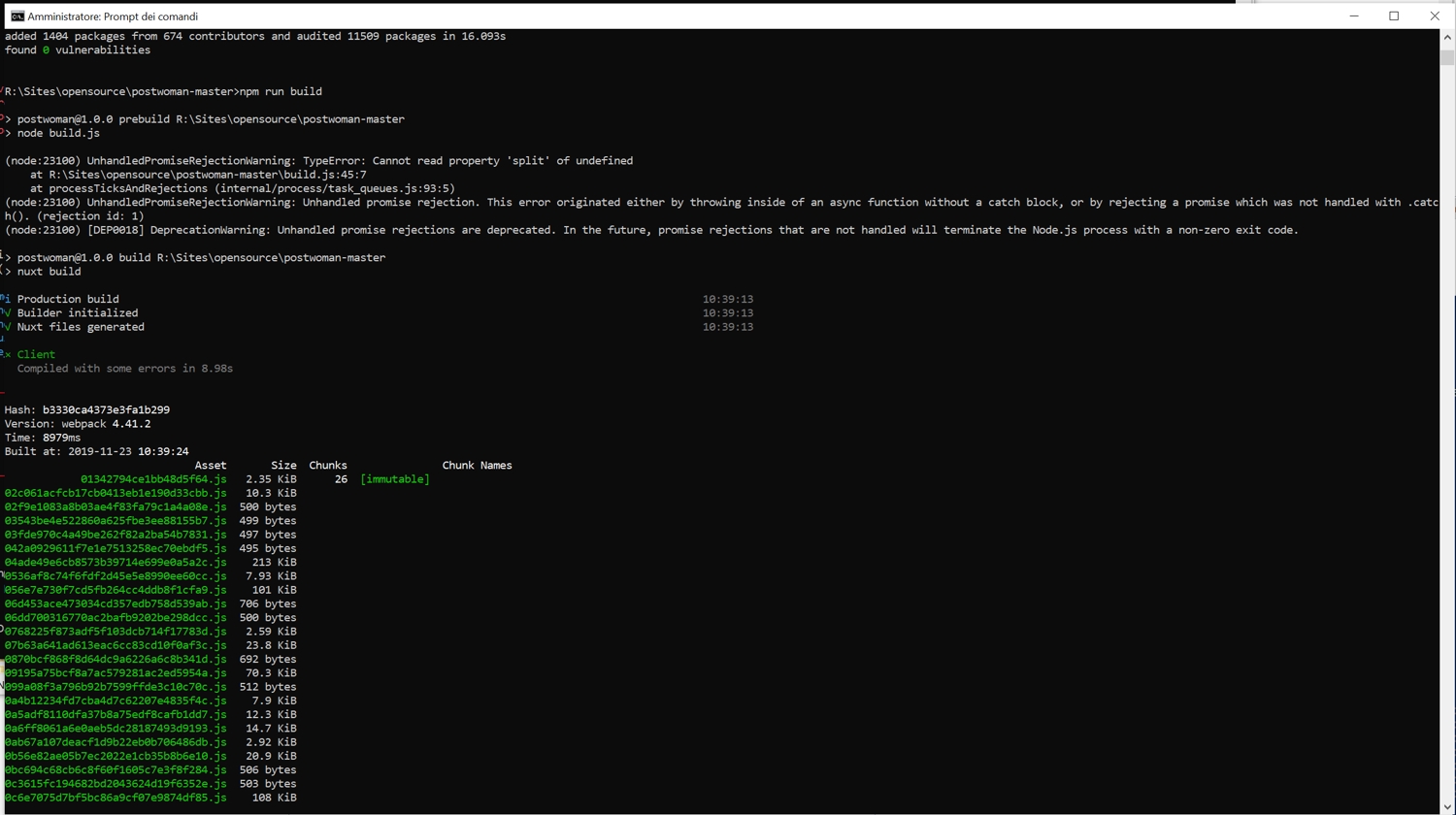
I tried with a fresh install but the problem persist
Untitled
Untitled

<!-- gh-comment-id:557782941 --> @pierol commented on GitHub (Nov 23, 2019): I tried with a fresh install but the problem persist ![Untitled](https://user-images.githubusercontent.com/433875/69476721-d757a400-0ddd-11ea-8a7c-a4ec023343cb.jpg) ![Untitled](https://user-images.githubusercontent.com/433875/69476743-256ca780-0dde-11ea-9c82-999fb04c4e94.jpg)
Author
Owner

@liyasthomas commented on GitHub (Nov 23, 2019):

Can you do a npm run dev and let me know.

<!-- gh-comment-id:557783093 --> @liyasthomas commented on GitHub (Nov 23, 2019): Can you do a `npm run dev` and let me know.
Author
Owner

@pierol commented on GitHub (Nov 23, 2019):

Untitled
Untitled-02

<!-- gh-comment-id:557783306 --> @pierol commented on GitHub (Nov 23, 2019): ![Untitled](https://user-images.githubusercontent.com/433875/69476782-af1c7500-0dde-11ea-811e-872bb54fca86.jpg) ![Untitled-02](https://user-images.githubusercontent.com/433875/69476783-afb50b80-0dde-11ea-82fd-6ce0bf433a80.jpg)
Author
Owner

@liyasthomas commented on GitHub (Nov 23, 2019):

Check the root directory and if there exists a folder named .postwoman delete it. And again run npm run dev

That folder will be created at npm run dev.
Don't forget to close current localhost:3000 windows in browser if there any.

<!-- gh-comment-id:557783556 --> @liyasthomas commented on GitHub (Nov 23, 2019): Check the root directory and if there exists a folder named `.postwoman` delete it. And again run `npm run dev` That folder will be created at `npm run dev`. Don't forget to close current `localhost:3000` windows in browser if there any.
Author
Owner

@pierol commented on GitHub (Nov 23, 2019):

Untitled

<!-- gh-comment-id:557783784 --> @pierol commented on GitHub (Nov 23, 2019): ![Untitled](https://user-images.githubusercontent.com/433875/69476891-cc9e0e80-0ddf-11ea-848a-640c6bd865ff.jpg)
Author
Owner

@liyasthomas commented on GitHub (Nov 23, 2019):

I'll run some more tests and get back to you.

<!-- gh-comment-id:557783876 --> @liyasthomas commented on GitHub (Nov 23, 2019): I'll run some more tests and get back to you.
Author
Owner

@FatDoge commented on GitHub (Nov 25, 2019):

I meet the same problem, delete the .postwoman directory seems useless.
System infomation: Linux VM_202_150_centos 3.10.0-514.21.1.el7.x86_64
I use the cloud server offered by Tencent Cloud.

<!-- gh-comment-id:557998074 --> @FatDoge commented on GitHub (Nov 25, 2019): I meet the same problem, delete the ```.postwoman``` directory seems useless. System infomation: ```Linux VM_202_150_centos 3.10.0-514.21.1.el7.x86_64``` I use the cloud server offered by Tencent Cloud.
Author
Owner

@liyasthomas commented on GitHub (Nov 25, 2019):

Issue has been identified. Will patch soon with a fix.

<!-- gh-comment-id:557999371 --> @liyasthomas commented on GitHub (Nov 25, 2019): Issue has been identified. Will patch soon with a fix.
Author
Owner

@FatDoge commented on GitHub (Nov 25, 2019):

.postwoman/version.json file is not normally generated in build.js. if you need to use it urgently, you can delete the corresponding import statement and the related code in layout/default.vue file first.(Unrecommended)

<!-- gh-comment-id:558005558 --> @FatDoge commented on GitHub (Nov 25, 2019): ```.postwoman/version.json``` file is not normally generated in ```build.js```. if you need to use it urgently, you can delete the corresponding import statement and the related code in ```layout/default.vue``` file first.(**Unrecommended**)
Author
Owner

@ghost commented on GitHub (Nov 25, 2019):

ths, please fix it cause i met also some issue like this.
or give me s solution to avoid this

<!-- gh-comment-id:558153760 --> @ghost commented on GitHub (Nov 25, 2019): ths, please fix it cause i met also some issue like this. or give me s solution to avoid this
Author
Owner

@liyasthomas commented on GitHub (Nov 25, 2019):

We couldn't reproduce the issue at our end.
The .postwoman/version.json is created at npm run generate as well as at npm run build.

After investigating more, we think this might be an issue with the host system. Since this is device and architecture dependent, we need debug logs to find out what went wrong. Please provide that so that we could reproduce the issues at our end.

<!-- gh-comment-id:558166201 --> @liyasthomas commented on GitHub (Nov 25, 2019): We couldn't reproduce the issue at our end. The `.postwoman/version.json` is created at `npm run generate` as well as at `npm run build`. After investigating more, we think this might be an issue with the host system. Since this is device and architecture dependent, we need debug logs to find out what went wrong. Please provide that so that we could reproduce the issues at our end.
Author
Owner

@hosseinnedaee commented on GitHub (Nov 25, 2019):

npm run generate and npm run build woks for me on Ubuntu 18.04

<!-- gh-comment-id:558229986 --> @hosseinnedaee commented on GitHub (Nov 25, 2019): `npm run generate` and `npm run build` woks for me on Ubuntu 18.04
Author
Owner

@liyasthomas commented on GitHub (Nov 25, 2019):

Our CI build is on Linux and it's working fine.
I can also confirm npm run generate works on Windows build 1803.

<!-- gh-comment-id:558231061 --> @liyasthomas commented on GitHub (Nov 25, 2019): Our CI build is on Linux and it's working fine. I can also confirm `npm run generate` works on Windows build 1803.
Author
Owner

@FatDoge commented on GitHub (Nov 26, 2019):

I just clone the code to my pc again.

> git clone https://github.com/liyasthomas/postwoman.git
> cd postwoman
> npm i
> npm run build

And everything is okay now...
Below is some information of my local enviroment:

> nvm version
1.1.7
> node -v
v12.0.0
> npm -v
v6.10.3

My PC OS is Windows10 Home Chinese Edition 1903.


That's weird, I can't repoduce the problem and I want to know why, I even change the local PC date to yestoday.
I will try again on my linux server and let us see if there is something strange.


The server works fine today.

<!-- gh-comment-id:558407137 --> @FatDoge commented on GitHub (Nov 26, 2019): I just clone the code to my pc again. ``` shell > git clone https://github.com/liyasthomas/postwoman.git > cd postwoman > npm i > npm run build ``` And everything is okay now... Below is some information of my local enviroment: ``` shell > nvm version 1.1.7 > node -v v12.0.0 > npm -v v6.10.3 ``` My PC OS is Windows10 Home Chinese Edition 1903. --- That's weird, I can't repoduce the problem and I want to know why, I even change the local PC date to yestoday. **I will try again on my linux server and let us see if there is something strange.** --- The server works fine today.
Author
Owner

@liyasthomas commented on GitHub (Nov 26, 2019):

Usually these kinda errors happen when npm cache exists with lower version of dependencies. Delete node_modules, clean the cache, npm install again will solve most of it.

<!-- gh-comment-id:558407937 --> @liyasthomas commented on GitHub (Nov 26, 2019): Usually these kinda errors happen when npm cache exists with lower version of dependencies. Delete node_modules, clean the cache, npm install again will solve most of it.
Author
Owner

@liyasthomas commented on GitHub (Nov 26, 2019):

Some workarounds:

  1. Delete node_modules
  2. npm cache clean
  3. npm i
  4. npm run build or npm run generate to build

If the above steps fails, try:

  1. npm rebuild node-sass
  2. npm run generate
<!-- gh-comment-id:558417184 --> @liyasthomas commented on GitHub (Nov 26, 2019): Some workarounds: 0. Delete node_modules 1. `npm cache clean` 2. `npm i` 3. `npm run build` or `npm run generate` to build If the above steps fails, try: 0. `npm rebuild node-sass` 1. `npm run generate`
Author
Owner

@NBTX commented on GitHub (Nov 26, 2019):

@liyasthomas I think this can be closed?

<!-- gh-comment-id:558670382 --> @NBTX commented on GitHub (Nov 26, 2019): @liyasthomas I think this can be closed?
Author
Owner

@liyasthomas commented on GitHub (Nov 26, 2019):

This issue is stale and hence closing

<!-- gh-comment-id:558671645 --> @liyasthomas commented on GitHub (Nov 26, 2019): This issue is stale and hence closing
Author
Owner

@ccenjie commented on GitHub (Dec 19, 2019):

so , how to let it work, i do not see any solution,

Delete node_modules
npm cache clean
npm i
npm run dev or npm run generate
If the above steps fails, try:

npm rebuild node-sass
npm run generate

i do that, but no work

<!-- gh-comment-id:567356227 --> @ccenjie commented on GitHub (Dec 19, 2019): so , how to let it work, i do not see any solution, Delete node_modules npm cache clean npm i npm run dev or npm run generate If the above steps fails, try: npm rebuild node-sass npm run generate i do that, but no work
Author
Owner

@liyasthomas commented on GitHub (Dec 19, 2019):

Is the error log as same as mentioned in this issue?

<!-- gh-comment-id:567356464 --> @liyasthomas commented on GitHub (Dec 19, 2019): Is the error log as same as mentioned in this issue?
Author
Owner

@NBTX commented on GitHub (Dec 19, 2019):

Just noticed in this case it may be because they downloaded a zip of the project rather than using git clone.

I believe the build script relies on the directory being a git repository in order to obtain certain information, so the project needs to be cloned rather than a ZIP file simply downloaded.

If I'm right though, I can just update the build script to accommodate this.

<!-- gh-comment-id:567443553 --> @NBTX commented on GitHub (Dec 19, 2019): Just noticed in this case it may be because they downloaded a zip of the project rather than using git clone. I believe the build script relies on the directory being a git repository in order to obtain certain information, so the project needs to be cloned rather than a ZIP file simply downloaded. If I'm right though, I can just update the build script to accommodate this.
Author
Owner

@liyasthomas commented on GitHub (Dec 19, 2019):

@NBTX build.js is tailored for CI, remove git dependency / online version fetch and if possible, get version from package.json. Or else, completely comment out version section from footer. 👍

<!-- gh-comment-id:567445909 --> @liyasthomas commented on GitHub (Dec 19, 2019): @NBTX `build.js` is tailored for CI, remove git dependency / online version fetch and if possible, get version from `package.json`. Or else, completely comment out version section from footer. 👍
Author
Owner

@AndrewBastin commented on GitHub (Feb 9, 2020):

Closing this issue as it seems to be fixed.

<!-- gh-comment-id:583805405 --> @AndrewBastin commented on GitHub (Feb 9, 2020): Closing this issue as it seems to be fixed.
Author
Owner

@Cedric4real commented on GitHub (Feb 20, 2020):

Cloning definetely solves the issue, thank you.

<!-- gh-comment-id:589096405 --> @Cedric4real commented on GitHub (Feb 20, 2020): Cloning definetely solves the issue, thank you.
Sign in to join this conversation.
No milestone
No project
No assignees
1 participant
Notifications
Due date
The due date is invalid or out of range. Please use the format "yyyy-mm-dd".

No due date set.

Dependencies

No dependencies set.

Reference
starred/hoppscotch#122
No description provided.