mirror of
https://github.com/hoppscotch/hoppscotch.git
synced 2026-04-25 16:55:59 +03:00
[GH-ISSUE #333] ⏬ Import a Postman's Collection #121
Labels
No labels
CodeDay
a11y
browser limited
bug
bug fix
cli
core
critical
design
desktop
discussion
docker
documentation
duplicate
enterprise
feature
feature
fosshack
future
good first issue
hacktoberfest
help wanted
i18n
invalid
major
minor
need information
need testing
not applicable to hoppscotch
not reproducible
pull-request
question
refactor
resolved
sandbox
self-host
spam
stale
testmu
wip
wont fix
No milestone
No project
No assignees
1 participant

Notifications
Due date
No due date set.
Dependencies
No dependencies set.
Reference
starred/hoppscotch#121
Loading…
Add table
Add a link
Reference in a new issue
No description provided.
Delete branch "%!s()"
Deleting a branch is permanent. Although the deleted branch may continue to exist for a short time before it actually gets removed, it CANNOT be undone in most cases. Continue?
Originally created by @FMGordillo on GitHub (Nov 25, 2019).
Original GitHub issue: https://github.com/hoppscotch/hoppscotch/issues/333
Is your feature request related to a problem? Please describe.
Auth0.com offers a "Try with Postman" button that gives you a Collection of different APIs, but the schema of the output JSON is different from the one that Postwoman needs.
Describe the solution you'd like
An embedded transformer from Postman's Collection to Postwoman's Collection
Current Postman's schema:
Current Postwoman's Schema:
@FMGordillo commented on GitHub (Nov 25, 2019):
And when I try to insert my collection, the console error is:
Uncaught TypeError: Invalid attempt to spread non-iterable instance@liyasthomas commented on GitHub (Nov 25, 2019):
I haven't look deep into it. But it seems like Postwoman does follow the same export format. Except the sample collection file. PW have provision for multiple Collections export as JSON array.
Try a sample collection export with multiple connection on Postwoman. It would be similar to this:
The above export contains 2 Collections and is in array. Try multiple Collections export in PM and check it solves the import issue.
@sheldon-markk commented on GitHub (Dec 9, 2019):
How to we import a postman collection? is there a way to do this?
@Aditya94A commented on GitHub (Jan 25, 2020):
Just saw this, I tried to import postman collection here:
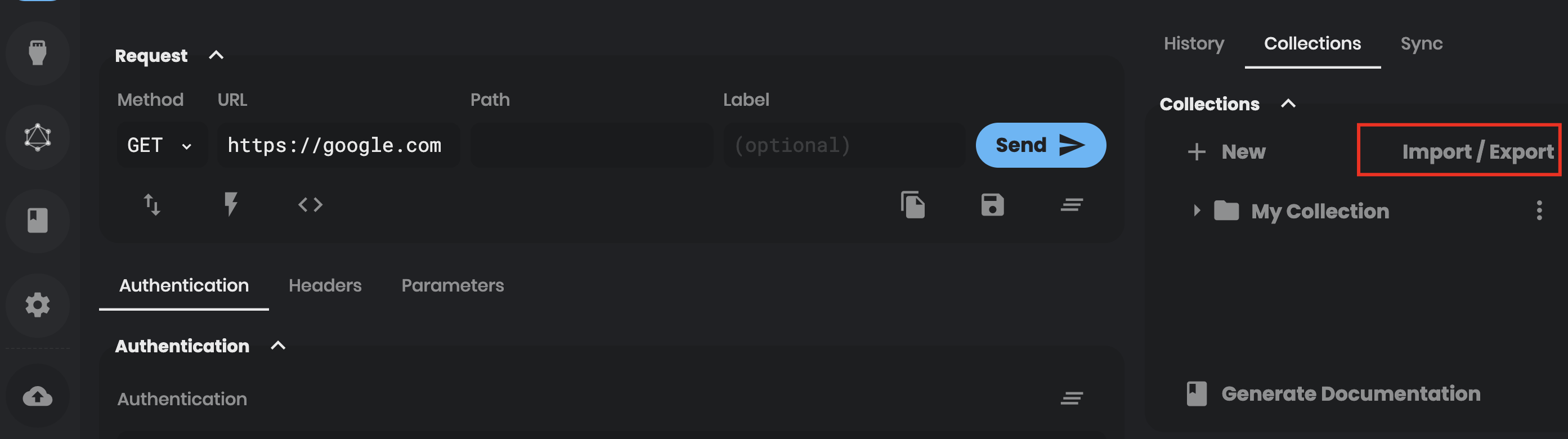
It doesn't seem to be working. No new collection is created.
@liyasthomas commented on GitHub (Jan 25, 2020):
That option is for Postwoman Collections.
@Aditya94A commented on GitHub (Jan 27, 2020):
Strongly recommend re-opening.
Just as an example (my use-case): There are a few things stopping me from using postwoman, the second biggest one is the fact that I already have 10+ collection with on average 20+ requests in each collection on Postman (the biggest one is teams). So, the prospect of manually re-inputting all of my 200 requests is daunting enough that I'll probably never get around to it. However, if it was one-click it would be really enticing for me (and I imagine most postman users to give this a shot, likely correlating with a direct spike in the usage and popularity of postwoman as an alternative)
Should be relatively straightforward to dig into postman collection export format as they export it in a human-readable way and even encourage applications (like testing) to be built on top of it since it's so simple. 😄
@liyasthomas commented on GitHub (Feb 9, 2020):
Considering the backward compatibility for this feature, I think its not possible to implement "Postman' s collection import" feature. I'll investigate more into this and already synced Collections for its practical integration.
@bee22193 commented on GitHub (Feb 9, 2020):
ในข้อความดังต้นนัน.. ทีมgoogle ได้ตัดสินใจเอาเพราะมีการเข้าระบบบันชีจริง..
จับได้คือสองจุด... จะให้ตอบบไหนอีก.. สนุกเหรอหัวเราะ
กิตติพันธ์
ในวันที่ อา. 9 ก.พ. 2020 12:29 น. Liyas Thomas notifications@github.com
เขียนว่า:
@Aditya94A commented on GitHub (Feb 9, 2020):
How about a simple one-to-one converter for postman collection format to postwoman collection format? Then it becomes a simple abstraction on top of the already existing code to import postwoman collections.
Input a postman collection, it internally reformats it to the same format as a normal postwoman collection and then uses that.
To lower the effort required when dealing with backward compatibility, perhaps picking only one format version (say, only the current latest v2.1 postman collection format can be imported to postwoman) should make it easier, since v2.1 collection schema will never change (as Postman follows semver for collection versions).
@JacobAnavisca commented on GitHub (Feb 15, 2020):
Just created a PR for this https://github.com/liyasthomas/postwoman/pull/574 and also added an import check
@liyasthomas commented on GitHub (Feb 17, 2020):
Resolved in #574 huge thanks to @JacobAnavisca
Postwoman now supports importing Postman Collections
v2.1.0@allthesignals commented on GitHub (Mar 23, 2020):
How do you use this?
@liyasthomas commented on GitHub (Mar 23, 2020):
@allthesignals
Navigate to Collection tab on right side bar.
Click "Import/Export"
Click "Import from JSON"
Select any Postman_collection.json file
@mahoriR commented on GitHub (Jul 1, 2020):
I really want to try postwoman as a replacement to postman but inability to import postman collection is a deal breaker. This is the console log on chrome-
Note: I'm able to import the same collection in insomnia.
@liyasthomas commented on GitHub (Jul 1, 2020):
It's a known issue that Importing Postman Collections fails on nested Collections.
Kindly track this issue: https://github.com/liyasthomas/postwoman/issues/850
@hyfydistro commented on GitHub (May 20, 2022):
Is it possible to export for postman?
@AndrewBastin commented on GitHub (May 20, 2022):
@hyfydistro not yet, but there is an open issue for this. Follow #2092 for tracking implementation.