[GH-ISSUE #298] File/binary request body support #111

Closed
opened 2026-03-16 13:27:29 +03:00 by kerem · 9 comments
Owner

Originally created by @matus-m on GitHub (Nov 13, 2019).
Original GitHub issue: https://github.com/hoppscotch/hoppscotch/issues/298

Originally assigned to: @liyasthomas on GitHub.

First of all - thanks for the work on this cool project.

Describe the solution you'd like
In order to post file content as request body, it would be comfortable to add a simple button(next to 'raw request data', or maybe as another tab) to load file from disk to sent as request body

Describe alternatives you've considered
Its possible to specify request body by pasting in file contents, but its cumbersome for binary files.

Additional context
A nice addition would be to automatically set content-type based on file extension.

Originally created by @matus-m on GitHub (Nov 13, 2019). Original GitHub issue: https://github.com/hoppscotch/hoppscotch/issues/298 Originally assigned to: @liyasthomas on GitHub. First of all - thanks for the work on this cool project. **Describe the solution you'd like** In order to post file content as request body, it would be comfortable to add a simple button(next to 'raw request data', or maybe as another tab) to load file from disk to sent as request body **Describe alternatives you've considered** Its possible to specify request body by pasting in file contents, but its cumbersome for binary files. **Additional context** A nice addition would be to automatically set content-type based on file extension.
kerem 2026-03-16 13:27:29 +03:00
  • closed this issue
  • added the
    feature
    label
Author
Owner

@liyasthomas commented on GitHub (Nov 13, 2019):

That's a cool suggestion! Will consider it.

<!-- gh-comment-id:553296579 --> @liyasthomas commented on GitHub (Nov 13, 2019): That's a cool suggestion! Will consider it.
Author
Owner

@liyasthomas commented on GitHub (Nov 13, 2019):

@yntelectual Upload payload feature is now live 🎉
On POST request method, there'll be an "Upload file" icon button under right side of Content Type. Click that to upload files (JSON, XML etc..) from PC. And just "Send"! payload will posted.
Thanks for the feature suggestion. Send more 😃

<!-- gh-comment-id:553470110 --> @liyasthomas commented on GitHub (Nov 13, 2019): @yntelectual Upload payload feature is now live 🎉 On `POST` request method, there'll be an "Upload file" icon button under right side of `Content Type`. Click that to upload files (JSON, XML etc..) from PC. And just "Send"! payload will posted. Thanks for the feature suggestion. Send more 😃
Author
Owner

@matus-m commented on GitHub (Nov 14, 2019):

Awesome! 🥇 That might have been the fastest feature request completion I have ever seen.

One remark though: When posting binary data, it is usually not practical to show the actual payload byte content in the raw input field. At least if the file is not textual( .json|yamletc...) otherwise you get massive bloat in the UI, without much benefit to the user(try uploading a jpeg for instance), plus the whole page perf suffers.
My suggestion would be to just show file name from the file upload event in the box, sth like Binary file: my_path.jpeg Or at least make the input collapsed by default if file upload was used.
image
Thanks again and I will try to think about other suggestions :)

<!-- gh-comment-id:553839866 --> @matus-m commented on GitHub (Nov 14, 2019): Awesome! :1st_place_medal: That might have been the fastest feature request completion I have ever seen. One remark though: When posting binary data, it is usually not practical to show the actual payload byte content in the raw input field. At least if the file is not textual( `.json|yamletc...`) otherwise you get massive bloat in the UI, without much benefit to the user(try uploading a jpeg for instance), plus the whole page perf suffers. My suggestion would be to just show file name from the file upload event in the box, sth like `Binary file: my_path.jpeg` Or at least make the input collapsed by default if file upload was used. ![image](https://user-images.githubusercontent.com/1354787/68851953-28c5ac00-06d7-11ea-863d-1bb583bb443d.png) Thanks again and I will try to think about other suggestions :)
Author
Owner

@liyasthomas commented on GitHub (Nov 14, 2019):

Yeah, i too had this issue. I'm working on it. Will probably fix it today itself.

<!-- gh-comment-id:553851637 --> @liyasthomas commented on GitHub (Nov 14, 2019): Yeah, i too had this issue. I'm working on it. Will probably fix it today itself.
Author
Owner

@liyasthomas commented on GitHub (Nov 15, 2019):

These changes were introduced last night 🎉

  • Payload textarea will be collapsed by default (can be expanded as we want by dragging at the corner). This solves the long textarea for hoge payload.
  • Regarding not showing the payload at all: Well, what if the user want to make a tiny change before sending, user would've to go and edit the raw file to do that, which sucks. So payload should (and will) be shown so that it could be edited.
  • The above feature introduces abrupt UI while uploading binary and files except (JSON,HTML,XML,YAML etc..). Well, this could be solved by restricting upload file types to known/supported extensions. But there's this problem that on POST, there's support for almost all file type :/

Anyway, will figure out a workaround for that too 👍

<!-- gh-comment-id:554203571 --> @liyasthomas commented on GitHub (Nov 15, 2019): These changes were introduced last night 🎉 - Payload textarea will be collapsed by default (can be expanded as we want by dragging at the corner). This solves the long textarea for hoge payload. - Regarding not showing the payload at all: Well, what if the user want to make a tiny change before sending, user would've to go and edit the raw file to do that, which sucks. So payload should (and will) be shown so that it could be edited. - The above feature introduces abrupt UI while uploading binary and files except (JSON,HTML,XML,YAML etc..). Well, this could be solved by restricting upload file types to known/supported extensions. But there's this problem that on `POST`, there's support for almost all file type :/ Anyway, will figure out a workaround for that too 👍
Author
Owner

@Roffely commented on GitHub (Dec 26, 2019):

which version will support it

<!-- gh-comment-id:568949696 --> @Roffely commented on GitHub (Dec 26, 2019): which version will support it
Author
Owner

@liyasthomas commented on GitHub (Dec 26, 2019):

On v2

There will be form data support too

<!-- gh-comment-id:568950348 --> @liyasthomas commented on GitHub (Dec 26, 2019): On v2 There will be form data support too✨
Author
Owner

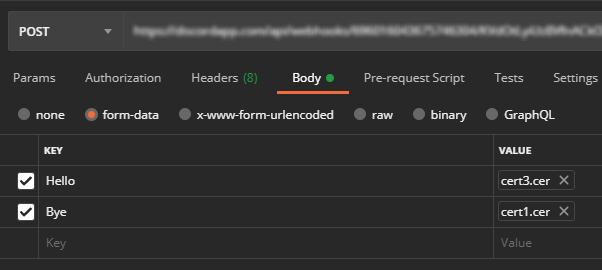
@semkeijsper commented on GitHub (Feb 1, 2021):

Hello, I can only find the upload files button and that seems to use --data-binary.
How do you reference a file (or multiple files) with form-data?
image
Similar to this feature in Postman.

Thank you in advance

<!-- gh-comment-id:770910061 --> @semkeijsper commented on GitHub (Feb 1, 2021): Hello, I can only find the upload files button and that seems to use --data-binary. How do you reference a file (or multiple files) with form-data? ![image](https://user-images.githubusercontent.com/78076164/106473868-96a8ef80-64a4-11eb-96e6-fe156bdcd6fb.png) Similar to this feature in Postman. Thank you in advance
Author
Owner

@liyasthomas commented on GitHub (Feb 1, 2021):

Referencing multiple files with a name is not implemented. We're working on this feature in current sprint. Hopefully it'll be out in couple of days.

<!-- gh-comment-id:770929072 --> @liyasthomas commented on GitHub (Feb 1, 2021): Referencing multiple files with a name is not implemented. We're working on this feature in current sprint. Hopefully it'll be out in couple of days.
Sign in to join this conversation.
No milestone
No project
No assignees
1 participant
Notifications
Due date
The due date is invalid or out of range. Please use the format "yyyy-mm-dd".

No due date set.

Dependencies

No dependencies set.

Reference
starred/hoppscotch#111
No description provided.