[GH-ISSUE #689] Telegram integration without webhook but with chat-id #497

Open
opened 2026-02-25 23:42:40 +03:00 by kerem · 12 comments
Owner

Originally created by @stevenengland on GitHub (Aug 4, 2022).
Original GitHub issue: https://github.com/healthchecks/healthchecks/issues/689

Hi, I like the selfhosted version of healthchecks. But I don't want a public availability to use the Telegram integration (webhook). It would be so much easier if one could only provide the bot token and an chat id as the target. Uptime Kuma for example does it exactly this way. Healthchecks would then need to call the API endpoint https://core.telegram.org/bots/api#sendmessage with the given data.

Originally created by @stevenengland on GitHub (Aug 4, 2022). Original GitHub issue: https://github.com/healthchecks/healthchecks/issues/689 Hi, I like the selfhosted version of healthchecks. But I don't want a public availability to use the Telegram integration (webhook). It would be so much easier if one could only provide the bot token and an chat id as the target. Uptime Kuma for example does it exactly this way. Healthchecks would then need to call the API endpoint https://core.telegram.org/bots/api#sendmessage with the given data.
Author
Owner

@cuu508 commented on GitHub (Aug 4, 2022):

The problem is that sending and receiving the "/start" command requires the Healthchecks instance to be at least partially open to the world, right?

One workaround you can use right now is to create the Telegram integration manually from admin. Put the bot token in the TELEGRAM_TOKEN env var, and create the integration in Django admin. For the integration to work, you will need to set the Project, Kind and Value fields:

image

The value of the id field is the chat id. The bot must already be invited to that chat.

<!-- gh-comment-id:1205125235 --> @cuu508 commented on GitHub (Aug 4, 2022): The problem is that sending and receiving the "/start" command requires the Healthchecks instance to be at least partially open to the world, right? One workaround you can use right now is to create the Telegram integration manually from admin. Put the bot token in the `TELEGRAM_TOKEN` env var, and create the integration in Django admin. For the integration to work, you will need to set the Project, Kind and Value fields: ![image](https://user-images.githubusercontent.com/661859/182835263-730a74e1-bf8c-44a5-90bd-9eaa58f5e80d.png) The value of the `id` field is the chat id. The bot must already be invited to that chat.
Author
Owner

@stevenengland commented on GitHub (Aug 4, 2022):

Mh, I might be wrong but I think you don't need the start command at all if the bot is invited to the group and is able to read messages from there that ar not commands (seperate bot setting). The only "problem" then is to find out the chat id by yourself because otherwise you would need to call getUpdates from within healthchecks to automate this too.

Thank you for your workaround. I'll look into this.

<!-- gh-comment-id:1205129660 --> @stevenengland commented on GitHub (Aug 4, 2022): Mh, I might be wrong but I think you don't need the start command at all if the bot is invited to the group and is able to read messages from there that ar not commands (seperate bot setting). The only "problem" then is to find out the chat id by yourself because otherwise you would need to call getUpdates from within healthchecks to automate this too. Thank you for your workaround. I'll look into this.
Author
Owner

@stevenengland commented on GitHub (Aug 4, 2022):

Workaround works :) Can you name a dedicated command to realize the same? So I can add it to my IaC Runbook (Ansible).

<!-- gh-comment-id:1205134806 --> @stevenengland commented on GitHub (Aug 4, 2022): Workaround works :) Can you name a dedicated command to realize the same? So I can add it to my IaC Runbook (Ansible).
Author
Owner

@cuu508 commented on GitHub (Aug 4, 2022):

There currently isn't a command or API call to automate this.

<!-- gh-comment-id:1205136270 --> @cuu508 commented on GitHub (Aug 4, 2022): There currently isn't a command or API call to automate this.
Author
Owner

@cuu508 commented on GitHub (Aug 4, 2022):

PS. Except for running a SQL INSERT query, which would be even more of a workaround :-)

<!-- gh-comment-id:1205136995 --> @cuu508 commented on GitHub (Aug 4, 2022): PS. Except for running a SQL INSERT query, which would be even more of a workaround :-)
Author
Owner

@stevenengland commented on GitHub (Aug 4, 2022):

Ok. I thought of something like this which I use to pre-install an admin user to my derived image:

RUN \
    /opt/healthchecks/manage.py migrate && \
    /opt/healthchecks/manage.py shell -c "from django.contrib.auth.models import User; User.objects.create_superuser('ad******', 'ad*********@***********', '********************"
<!-- gh-comment-id:1205141001 --> @stevenengland commented on GitHub (Aug 4, 2022): Ok. I thought of something like this which I use to pre-install an admin user to my derived image: ``` RUN \ /opt/healthchecks/manage.py migrate && \ /opt/healthchecks/manage.py shell -c "from django.contrib.auth.models import User; User.objects.create_superuser('ad******', 'ad*********@***********', '********************" ```
Author
Owner

@DerDanilo commented on GitHub (Aug 6, 2022):

The value of the id field is the chat id. The bot must already be invited to that chat.

Can we add this as alternative to the Telegram integration setup? When clicking to add the integration that it gives the option to provide the chat-id instead?

<!-- gh-comment-id:1207246811 --> @DerDanilo commented on GitHub (Aug 6, 2022): > The value of the `id` field is the chat id. The bot must already be invited to that chat. Can we add this as alternative to the Telegram integration setup? When clicking to add the integration that it gives the option to provide the chat-id instead?
Author
Owner

@setop commented on GitHub (Aug 26, 2022):

The thing is, to avoid spam, a bot can't talk to a user directly. The user has to initiate the conversation. That is talk first, send the first message. Hense the usage of "/start" in the onboarding of tg integration of HC.

<!-- gh-comment-id:1228420578 --> @setop commented on GitHub (Aug 26, 2022): The thing is, to avoid spam, a bot can't talk to a user directly. The user has to initiate the conversation. That is talk first, send the first message. Hense the usage of "/start" in the onboarding of tg integration of HC.
Author
Owner

@stevenengland commented on GitHub (Aug 28, 2022):

The thing is, to avoid spam, a bot can't talk to a user directly. The user has to initiate the conversation. That is talk first, send the first message. Hense the usage of "/start" in the onboarding of tg integration of HC.

The /start thing is okay so far. But the Webhook thing should not be the only option to setup Telegram. As mentioned, providing a chat id is all it takes to set up HC <-> Telegram. If someone (like me) would like to set this up without the webhook it is still no problem. Create a group, invite the bot, text around including the /start command, use the bot API to find out the chat id and provide it to HC. That is a bit more manual but does not require webhooks.

<!-- gh-comment-id:1229488742 --> @stevenengland commented on GitHub (Aug 28, 2022): > The thing is, to avoid spam, a bot can't talk to a user directly. The user has to initiate the conversation. That is talk first, send the first message. Hense the usage of "/start" in the onboarding of tg integration of HC. The /start thing is okay so far. But the Webhook thing should not be the only option to setup Telegram. As mentioned, providing a chat id is all it takes to set up HC <-> Telegram. If someone (like me) would like to set this up without the webhook it is still no problem. Create a group, invite the bot, text around including the /start command, use the bot API to find out the chat id and provide it to HC. That is a bit more manual but does not require webhooks.
Author
Owner

@cuu508 commented on GitHub (Oct 7, 2022):

Can we add this as alternative to the Telegram integration setup? When clicking to add the integration that it gives the option to provide the chat-id instead?

I'm not planning to work on this myself, but would accept a PR.

<!-- gh-comment-id:1271444969 --> @cuu508 commented on GitHub (Oct 7, 2022): > Can we add this as alternative to the Telegram integration setup? When clicking to add the integration that it gives the option to provide the chat-id instead? I'm not planning to work on this myself, but would accept a PR.
Author
Owner

@kiler129 commented on GitHub (Jan 31, 2023):

There's an easy workaround for this issue - simply use ... a webhook to Telegram API.

1. Create your bot by messaging @BotFather

  • Start by sending a message /newbot and follow the prompts
  • You will get a bot token looking like 1234567:foobarbaz

2. Get chat_id

  • Visit https://api.telegram.org/bot<BOT_TOKEN>/getUpdates, replacing <BOT_TOKEN> (including < and >) with your token (e.g. 1234567:foobarbaz)
    • You will see a JSON like below (formatter here with JSONLint for clarity, API returns a single line)
    • Your chat_id is the one in chat => id (444 in this example)
     {
         "ok": true,
          "result": [{
     	    "update_id": 111,
     	    "message": {
     		    "message_id": 222,
     		    "from": {
     		  	    //...
     		    },
     		    "chat": {
     		 	    "id": 444,
     			    "first_name": "John",
     			    "last_name": "Doe",
     			    //...
     		    },
     		    //...
    

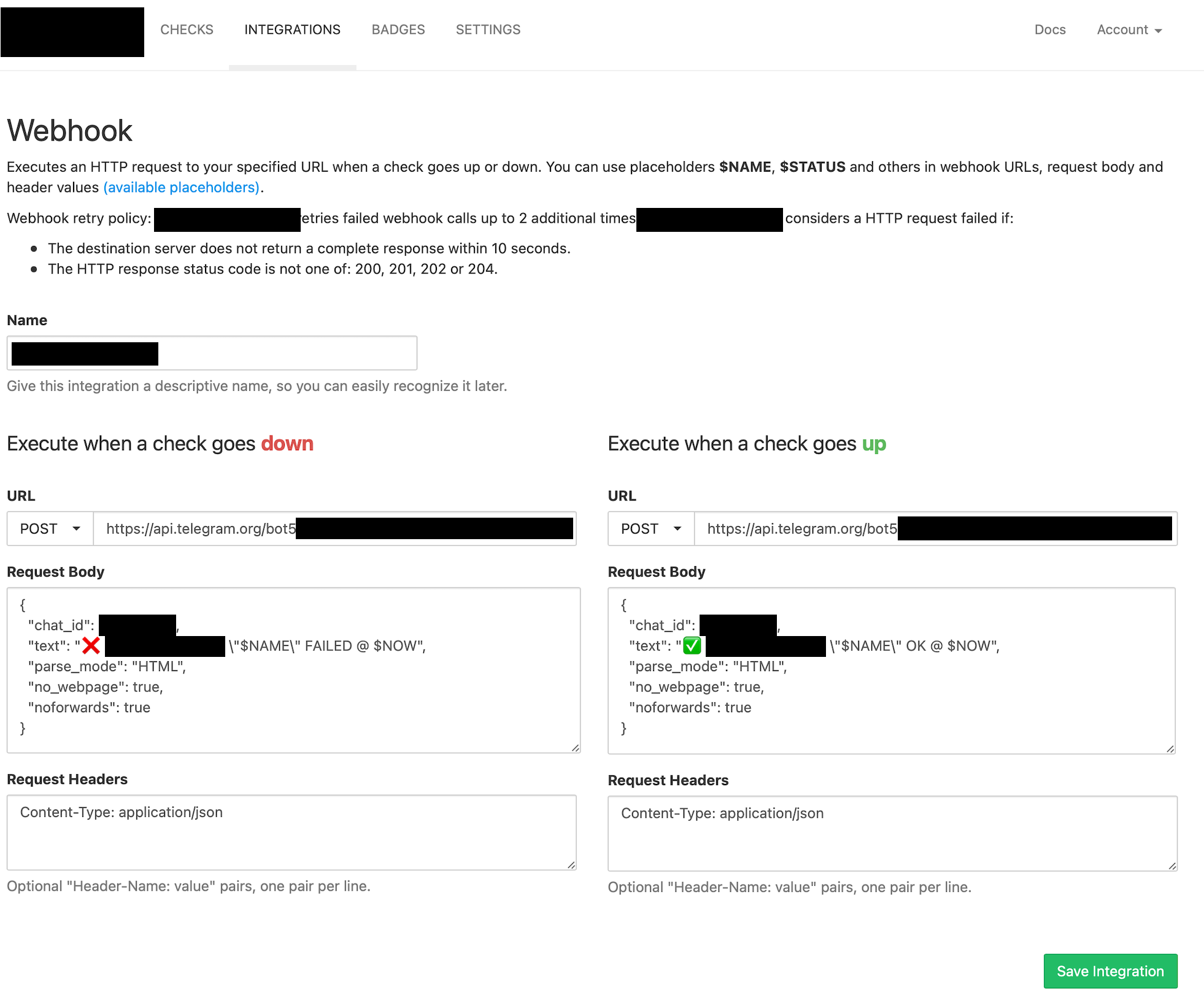
3. Configure HealthChecks

  • Integrations > Webhook > Add Integration
  • Configure as follows:
    • URL for both:
      • POST
      • https://api.telegram.org/bot<BOT_TOKEN>/sendMessage (replace <BOT_TOKEN> with your token from step 1)
    • Request Headers for both:
    Content-Type: application/json
    
    • Request Body for DOWN:
    {
      "chat_id": <YOUR_CHAT_ID>,
      "text": "❌ <b>HealthChecks:</b> \"$NAME\" FAILED @ $NOW",
      "parse_mode": "HTML",
      "no_webpage": true
    }
    
    • Request Body for UP:
    {
      "chat_id": <YOUR_CHAT_ID>,
      "text": "✅ <b>HealthChecks:</b> \"$NAME\" OK @ $NOW",
      "parse_mode": "HTML",
      "no_webpage": true
    }
    
  1. Test it in the integrations tab ;)
    • It should work perfectly
    • If you see an error message stating that it failed with error "400" the JSON has some syntax error - check it with JSONLint
    • Note: @cuu508 - would it be possible to show the API response, at least on the initial test?

Example configuration:
image

<!-- gh-comment-id:1409847685 --> @kiler129 commented on GitHub (Jan 31, 2023): There's an easy workaround for this issue - simply use ... a webhook to Telegram API. **1. Create your bot** by [messaging @BotFather](https://t.me/BotFather) - Start by sending a message `/newbot` and follow the prompts - You will get a bot token looking like `1234567:foobarbaz` **2. Get `chat_id`** - Visit `https://api.telegram.org/bot<BOT_TOKEN>/getUpdates`, replacing `<BOT_TOKEN>` *(including `<` and `>`)* with your token (e.g. `1234567:foobarbaz`) - You will see a JSON like below ([formatter here with JSONLint](https://jsonlint.com) for clarity, API returns a single line) - Your `chat_id` is the one in `chat` => `id` (444 in this example) ``` { "ok": true, "result": [{ "update_id": 111, "message": { "message_id": 222, "from": { //... }, "chat": { "id": 444, "first_name": "John", "last_name": "Doe", //... }, //... ``` **3. Configure HealthChecks** - Integrations > Webhook > Add Integration - Configure as follows: - URL for both: - `POST` - `https://api.telegram.org/bot<BOT_TOKEN>/sendMessage` *(replace `<BOT_TOKEN>` with your token from step 1)* - Request Headers for both: ``` Content-Type: application/json ``` - Request Body for DOWN: ```json { "chat_id": <YOUR_CHAT_ID>, "text": "❌ <b>HealthChecks:</b> \"$NAME\" FAILED @ $NOW", "parse_mode": "HTML", "no_webpage": true } ``` - Request Body for UP: ```json { "chat_id": <YOUR_CHAT_ID>, "text": "✅ <b>HealthChecks:</b> \"$NAME\" OK @ $NOW", "parse_mode": "HTML", "no_webpage": true } ``` 4. Test it in the integrations tab ;) - It should work perfectly - If you see an error message stating that it failed with error "400" the JSON has some syntax error - check it with [JSONLint](https://jsonlint.com) - *Note: @cuu508 - would it be possible to show the API response, at least on the initial test?* **Example configuration:** <img width="981" alt="image" src="https://user-images.githubusercontent.com/1227834/215686032-71f01e77-e4be-43f3-9063-2b063f7d77a5.png">
Author
Owner

@jjscaria commented on GitHub (Jun 23, 2023):

In addition to the above, you can also add message_thread_id for targeting a topic in a group. You can find topic id in the topic info. It will be the digits after the last /.

Ex: t.me/c/12345678/13

"message_thread_id": 13

All available parameters are here: https://core.telegram.org/bots/api#sendmessage

<!-- gh-comment-id:1605035490 --> @jjscaria commented on GitHub (Jun 23, 2023): In addition to the above, you can also add `message_thread_id` for targeting a topic in a group. You can find topic id in the topic info. It will be the digits after the last `/`. Ex: `t.me/c/12345678/13` `"message_thread_id": 13` All available parameters are here: https://core.telegram.org/bots/api#sendmessage
Sign in to join this conversation.
No milestone
No project
No assignees
1 participant
Notifications
Due date
The due date is invalid or out of range. Please use the format "yyyy-mm-dd".

No due date set.

Dependencies

No dependencies set.

Reference
starred/healthchecks#497
No description provided.