[GH-ISSUE #611] Log entries disappear when the uploaded logfile has a BOM #446

Closed
opened 2026-02-25 23:42:29 +03:00 by kerem · 4 comments
Owner

Originally created by @rafaelorafaelo on GitHub (Feb 23, 2022).
Original GitHub issue: https://github.com/healthchecks/healthchecks/issues/611

Hi,
I try to write some powershell code and use Invoke-RestMethod -Infile to upload a logfile. Powershell creates textfiles with byte order mark https://en.wikipedia.org/wiki/Byte_order_mark When I upload such a file, the complete log entry isn't shown on the checks page.
bom
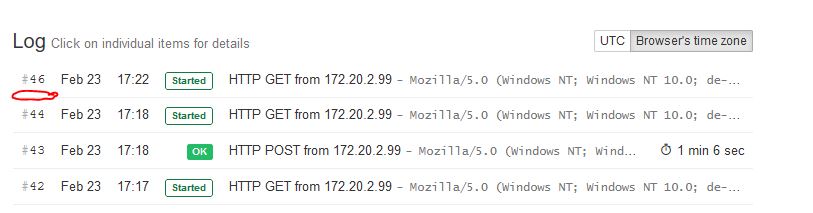
On the screenshot you see entry 42 a /start and entry 43 a ping with a logfile without BOM. Entry 44 is a /start, entry 45 is an invisible ping with a logfile with BOM. The ping is recorded, but it's not shown in the Log. Entry 46 is another /start to show the missing entry 45.

There is no way to let Powershell 5 write the file without BOM. It requires additional code to remove the BOM. Powershell 5 is the default Powershell version on current Windows systems.

Regards,
Ralf

Originally created by @rafaelorafaelo on GitHub (Feb 23, 2022). Original GitHub issue: https://github.com/healthchecks/healthchecks/issues/611 Hi, I try to write some powershell code and use `Invoke-RestMethod -Infile` to upload a logfile. Powershell creates textfiles with byte order mark https://en.wikipedia.org/wiki/Byte_order_mark When I upload such a file, the complete log entry isn't shown on the checks page. ![bom](https://user-images.githubusercontent.com/16400804/155363234-24e00a78-23e0-4aac-8a0e-8a77834645ba.JPG) On the screenshot you see entry 42 a /start and entry 43 a ping with a logfile without BOM. Entry 44 is a /start, entry 45 is an invisible ping with a logfile with BOM. The ping is recorded, but it's not shown in the Log. Entry 46 is another /start to show the missing entry 45. There is no way to let Powershell 5 write the file without BOM. It requires additional code to remove the BOM. Powershell 5 is the default Powershell version on current Windows systems. Regards, Ralf
kerem closed this issue 2026-02-25 23:42:29 +03:00
Author
Owner

@cuu508 commented on GitHub (Feb 25, 2022):

Thanks for the report!
Are you using the hosted service or self-hosting? If self-hosting, are you on the latest version?
Can you give an example request body (as hex) that triggers this? I tried to reproduce with the following Python snippet but it did not trigger the issue:

payload = bytes.fromhex("EFBBBF") + b"hey"
requests.post(ping_url, payload)
<!-- gh-comment-id:1050819532 --> @cuu508 commented on GitHub (Feb 25, 2022): Thanks for the report! Are you using the hosted service or self-hosting? If self-hosting, are you on the latest version? Can you give an example request body (as hex) that triggers this? I tried to reproduce with the following Python snippet but it did not trigger the issue: ```python payload = bytes.fromhex("EFBBBF") + b"hey" requests.post(ping_url, payload) ```
Author
Owner

@rafaelorafaelo commented on GitHub (Mar 1, 2022):

Hi, I use the latest Docker image from https://hub.docker.com/r/linuxserver/healthchecks

This is my simpe Powershell code.

"healtchecks test" > c:\healtchecks.log
$i = Invoke-RestMethod -Uri MyPingURL -TimeoutSec 10 -Method Post -InFile "c:\healtchecks.log"

I get a 500 response, but the check is somehow registered.

Here I remove the BOM and everything works great.

function Remove-BomFromFile ($OldPath, $NewPath)
{
  $Content = Get-Content $OldPath -Raw
  $Utf8NoBomEncoding = New-Object System.Text.UTF8Encoding $False
  [IO.File]::WriteAllLines($NewPath, $Content, $Utf8NoBomEncoding)
}

"healtchecks test" > c:\healtchecks.log
Remove-BomFromFile -OldPath c:\healtchecks.log -NewPath c:\healtchecks_woBOM.log

$i = Invoke-RestMethod -Uri MyPingURL -TimeoutSec 10 -Method Post -InFile "c:\healtchecks_woBOM.log"

<!-- gh-comment-id:1055176125 --> @rafaelorafaelo commented on GitHub (Mar 1, 2022): Hi, I use the latest Docker image from https://hub.docker.com/r/linuxserver/healthchecks This is my simpe Powershell code. ``` "healtchecks test" > c:\healtchecks.log $i = Invoke-RestMethod -Uri MyPingURL -TimeoutSec 10 -Method Post -InFile "c:\healtchecks.log" ``` I get a 500 response, but the check is somehow registered. Here I remove the BOM and everything works great. ``` function Remove-BomFromFile ($OldPath, $NewPath) { $Content = Get-Content $OldPath -Raw $Utf8NoBomEncoding = New-Object System.Text.UTF8Encoding $False [IO.File]::WriteAllLines($NewPath, $Content, $Utf8NoBomEncoding) } "healtchecks test" > c:\healtchecks.log Remove-BomFromFile -OldPath c:\healtchecks.log -NewPath c:\healtchecks_woBOM.log $i = Invoke-RestMethod -Uri MyPingURL -TimeoutSec 10 -Method Post -InFile "c:\healtchecks_woBOM.log" ```
Author
Owner

@cuu508 commented on GitHub (Mar 9, 2022):

Thanks for the additional details!
I managed to reproduce the issue. This is already fixed in the current master (by storing ping body in the database as bytes, not as text – github.com/healthchecks/healthchecks@5ecd625c0b).

PS. Healthchecks registers every ping by running two SQL queries:

  1. update a row in the api_check table: update last ping time, update the n_pings counter
  2. insert a row in the api_ping table: store ip, user agent, request body etc.

If a request body contains bad UTF8 data, the first query succeeds (this is why the ping gets registered, the counter goes up and monitoring still works), but the second one fails (and you get a HTTP 500 response because of that).

When it comes time to show the ping log, you would see gaps in the numbering: 42, 43, 44, ???, 46. The api_ping entry for the missing number didn't get saved to the database, and so it doesn't show up in the log.

<!-- gh-comment-id:1062696826 --> @cuu508 commented on GitHub (Mar 9, 2022): Thanks for the additional details! I managed to reproduce the issue. This is already fixed in the current master (by storing ping body in the database as bytes, not as text – https://github.com/healthchecks/healthchecks/commit/5ecd625c0b41df8fe7ddc9f4e8d29ce79e3b7c73). PS. Healthchecks registers every ping by running two SQL queries: 1. update a row in the `api_check` table: update last ping time, update the n_pings counter 2. insert a row in the `api_ping` table: store ip, user agent, request body etc. If a request body contains bad UTF8 data, the first query succeeds (this is why the ping gets registered, the counter goes up and monitoring still works), but the second one fails (and you get a HTTP 500 response because of that). When it comes time to show the ping log, you would see gaps in the numbering: 42, 43, 44, ???, 46. The `api_ping` entry for the missing number didn't get saved to the database, and so it doesn't show up in the log.
Author
Owner

@rafaelorafaelo commented on GitHub (Mar 9, 2022):

thanks for this fix

<!-- gh-comment-id:1062710317 --> @rafaelorafaelo commented on GitHub (Mar 9, 2022): thanks for this fix
Sign in to join this conversation.
No milestone
No project
No assignees
1 participant
Notifications
Due date
The due date is invalid or out of range. Please use the format "yyyy-mm-dd".

No due date set.

Dependencies

No dependencies set.

Reference
starred/healthchecks#446
No description provided.