[GH-ISSUE #499] forward muti port not success #400

Open
opened 2026-02-27 23:16:47 +03:00 by kerem · 3 comments
Owner

Originally created by @weironz on GitHub (Sep 8, 2022).
Original GitHub issue: https://github.com/snail007/goproxy/issues/499

Expected Behavior

access proxy 33080 port should forward to 192.168.22.33 33080 port

Current Behavior

access proxy 33080 port not forward to 192.168.22.33 33080 port

Possible Solution

no

Steps to Reproduce

at proxy server

proxy tcp -p ":33080-33085" -T tcp -P "192.168.22.33:0"

Context (Environment)

  1. proxy version is : v12.1
  2. full command is :proxy tcp -p ":33080-33085" -T tcp -P "192.168.22.33:0"
  3. system is : centos7.6
  4. full log is: ?

Detailed Description

Possible Implementation

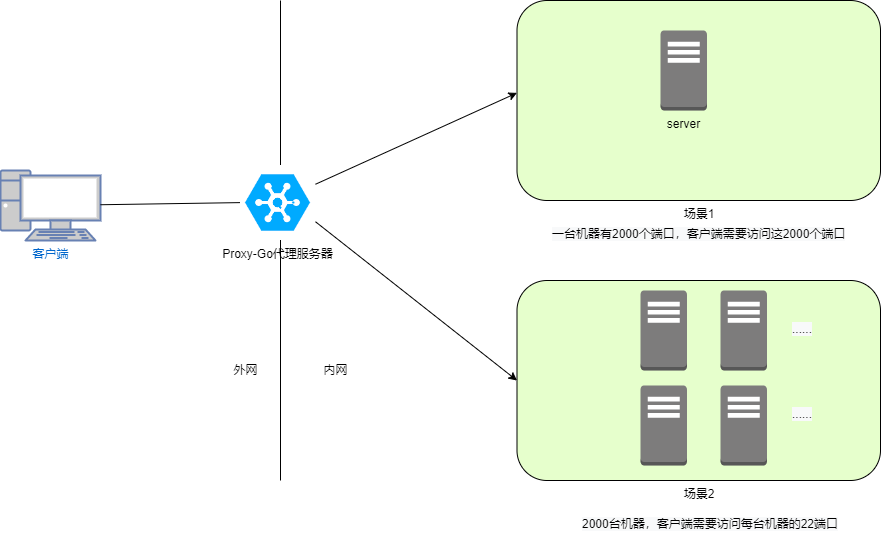
场景,
proxygo.drawio.png

需求:每个场景只需一条命令或者一个配置文件就直接搞定。

1、功能点1
proxy tcp -p ":33080-33085" -T tcp -P "192.168.22.33:33080-33085"
访问代理服务器33080端口 转发到后端192.168.22.33 33080端口
访问代理服务器33081端口 转发到后端192.168.22.33 33081端口
以此类推......

或者说访问代理服务器某个端口转到后端某个对应端口
proxy tcp -p ":0" -T tcp -P "192.168.22.33:0"

2、功能点2
proxy tcp -p ":2033-2044" -T tcp -P "192.168.22.33-192.168.22.44:22"

访问代理服务器2033端口 转发到后端192.168.22.33 22端口
访问代理服务器2034端口 转发到后端192.168.22.34 22端口
以此类推......

Originally created by @weironz on GitHub (Sep 8, 2022). Original GitHub issue: https://github.com/snail007/goproxy/issues/499 <!--- Provide a general summary of the issue in the Title above --> ## Expected Behavior access proxy 33080 port should forward to 192.168.22.33 33080 port ## Current Behavior access proxy 33080 port not forward to 192.168.22.33 33080 port ## Possible Solution no ## Steps to Reproduce at proxy server ``` proxy tcp -p ":33080-33085" -T tcp -P "192.168.22.33:0" ``` ## Context (Environment) <!--- How has this issue affected you? What are you trying to accomplish? --> <!--- Providing context helps us come up with a solution that is most useful in the real world --> 1. proxy version is : v12.1 1. full command is :`proxy tcp -p ":33080-33085" -T tcp -P "192.168.22.33:0"` 1. system is : centos7.6 1. full log is: ? <!--- Provide a general summary of the issue in the Title above --> ## Detailed Description <!--- Provide a detailed description of the change or addition you are proposing --> ## Possible Implementation 场景, ![proxygo.drawio.png](https://s2.loli.net/2022/09/08/wZFv6KnBXdYVl7t.png) 需求:每个场景只需一条命令或者一个配置文件就直接搞定。 1、功能点1 proxy tcp -p ":33080-33085" -T tcp -P "192.168.22.33:33080-33085" 访问代理服务器33080端口 转发到后端192.168.22.33 33080端口 访问代理服务器33081端口 转发到后端192.168.22.33 33081端口 以此类推...... 或者说访问代理服务器某个端口转到后端某个对应端口 proxy tcp -p ":0" -T tcp -P "192.168.22.33:0" 2、功能点2 proxy tcp -p ":2033-2044" -T tcp -P "192.168.22.33-192.168.22.44:22" 访问代理服务器2033端口 转发到后端192.168.22.33 22端口 访问代理服务器2034端口 转发到后端192.168.22.34 22端口 以此类推......
Author
Owner

@snail007 commented on GitHub (Sep 8, 2022):

端口范围是商业版功能

<!-- gh-comment-id:1240386998 --> @snail007 commented on GitHub (Sep 8, 2022): 端口范围是商业版功能
Author
Owner

@weironz commented on GitHub (Sep 8, 2022):

端口范围是商业版功能

明白了,第二个功能商业版支持吗?除了一条一条配置,有没有简单办法?

第二个场景是这样的:比如阿里云上有50台机器,只有一台机器购买了公网IP地址,但是想从本地直接通过22端口访问剩余的49台机器。目前我没看到可以一条命令完成配置的功能。

使用配置文件,一个配置文件批量刷进去,但是好像一个配置文件只能指定一条配置。

<!-- gh-comment-id:1240399960 --> @weironz commented on GitHub (Sep 8, 2022): > 端口范围是商业版功能 明白了,第二个功能商业版支持吗?除了一条一条配置,有没有简单办法? 第二个场景是这样的:比如阿里云上有50台机器,只有一台机器购买了公网IP地址,但是想从本地直接通过22端口访问剩余的49台机器。目前我没看到可以一条命令完成配置的功能。 使用配置文件,一个配置文件批量刷进去,但是好像一个配置文件只能指定一条配置。
Author
Owner

@snail007 commented on GitHub (Sep 8, 2022):

第二个不支持

<!-- gh-comment-id:1240418363 --> @snail007 commented on GitHub (Sep 8, 2022): 第二个不支持
Sign in to join this conversation.
No milestone
No project
No assignees
1 participant
Notifications
Due date
The due date is invalid or out of range. Please use the format "yyyy-mm-dd".

No due date set.

Dependencies

No dependencies set.

Reference
starred/goproxy#400
No description provided.