mirror of
https://github.com/floccusaddon/floccus.git
synced 2026-04-25 22:26:06 +03:00
[GH-ISSUE #1150] Android: top bar disappearing #768
Labels
No labels
browser-specific
bug
correctness issues
enhancement
feature: Google Drive
feature: Linkwarden
feature: git
feature: nextcloud-bookmarks
feature: tabs
feature: webdav
help wanted
native-app
priority: high
priority: low
priority: medium
pull-request
question
question
stale
upstream
waiting for more information
wontfix
🙁 Not following issue template
No milestone
No project
No assignees
1 participant

Notifications
Due date
No due date set.
Dependencies
No dependencies set.
Reference
starred/floccus#768
Loading…
Add table
Add a link
Reference in a new issue
No description provided.
Delete branch "%!s()"
Deleting a branch is permanent. Although the deleted branch may continue to exist for a short time before it actually gets removed, it CANNOT be undone in most cases. Continue?
Originally created by @pinpontitit on GitHub (May 2, 2022).
Original GitHub issue: https://github.com/floccusaddon/floccus/issues/1150
Which version of floccus are you using?
4.13.1
Sync method
{"label"=>"Google Drive"}
Which browser are you using?
Android app
Which version of Nextcloud Bookmarks are you using? (if relevant)
No response
Which version of Nextcloud? (if relevant)
No response
What kind of WebDAV server are you using? (if relevant)
No response
Describe the Bug
It happened two times today.
It happens exactly like this:
I am on the floccus app, and while I am on the app, I decide I am tired of using my phone and decide to lock my phone by clicking the button on the side of the phone. So the screen turns off and I put my phone on my pocket.
If after some time, I decide to take my phone and unlock it, the first thing appearing is the Floccus app, of course, because thats the thing on which I was before locking the phone.
I noticed that Floccus starts syncing automatically, but whatever, I don't need Floccus right now, I just unlocked the phone to do something else.
So i click on the "show running apps" button. (You know, on android, there's this main toolbar all down the screen (=the Android Navigation Bar: < O ||| )
with the "Return" Button at the left (<), the "Go to main screen where all the apps icons are" Button at the center (O) , and at the right the "Show me which apps are currently running" ( ||| ). So I click on this last one. I see an animation of Floccus app being downsized.
And during the animation I can see the top toolbar of the Floccus bar (the toolbar that shows the search bar, the sync icon, and the settings icon) disappearing and being replaced by black background.
If i go back to the app, the black background is still there, and the buttons are still missing.
I have to close definitely the app and reopen it to see those buttons reappear.
Pictures:
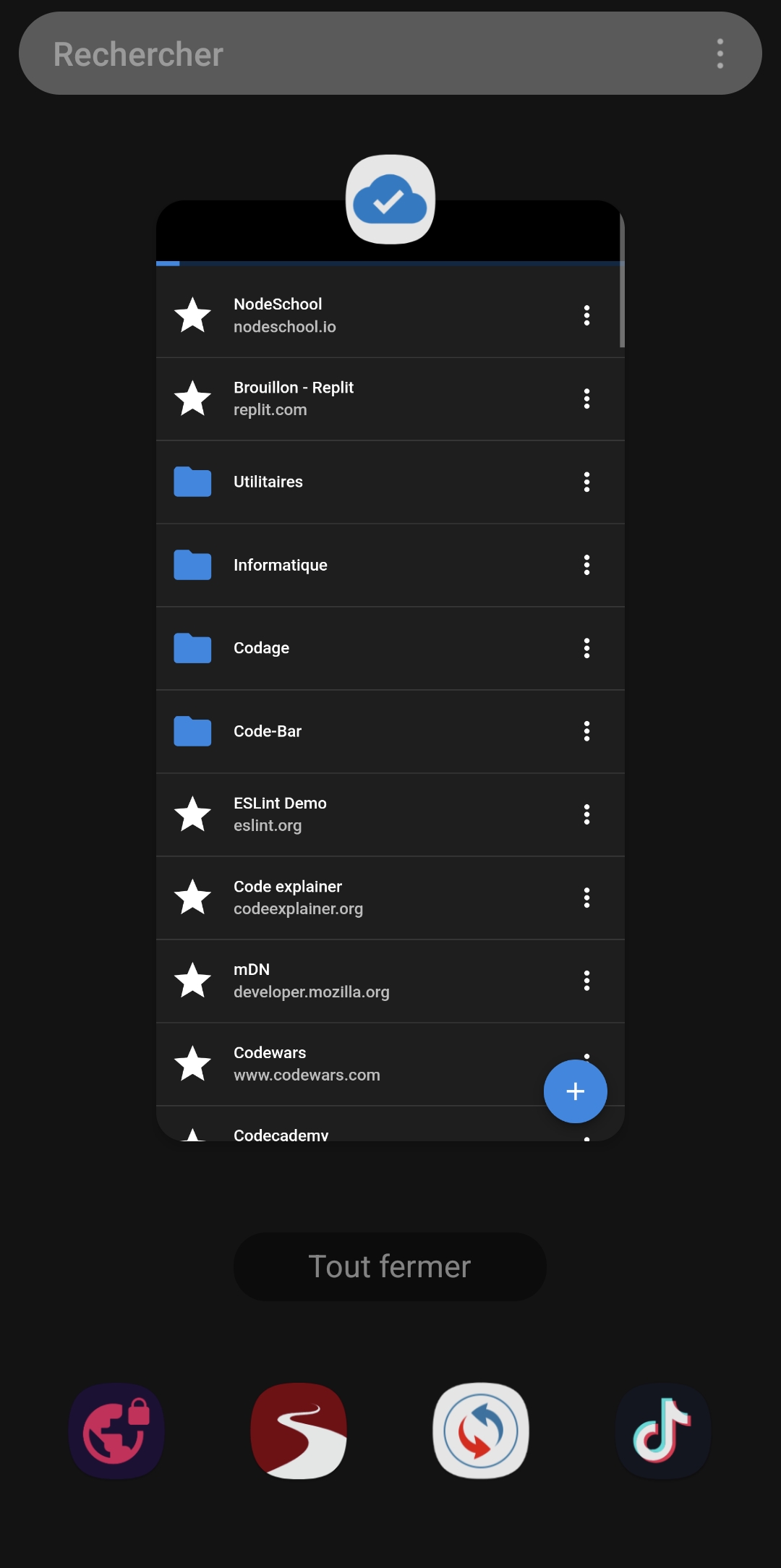
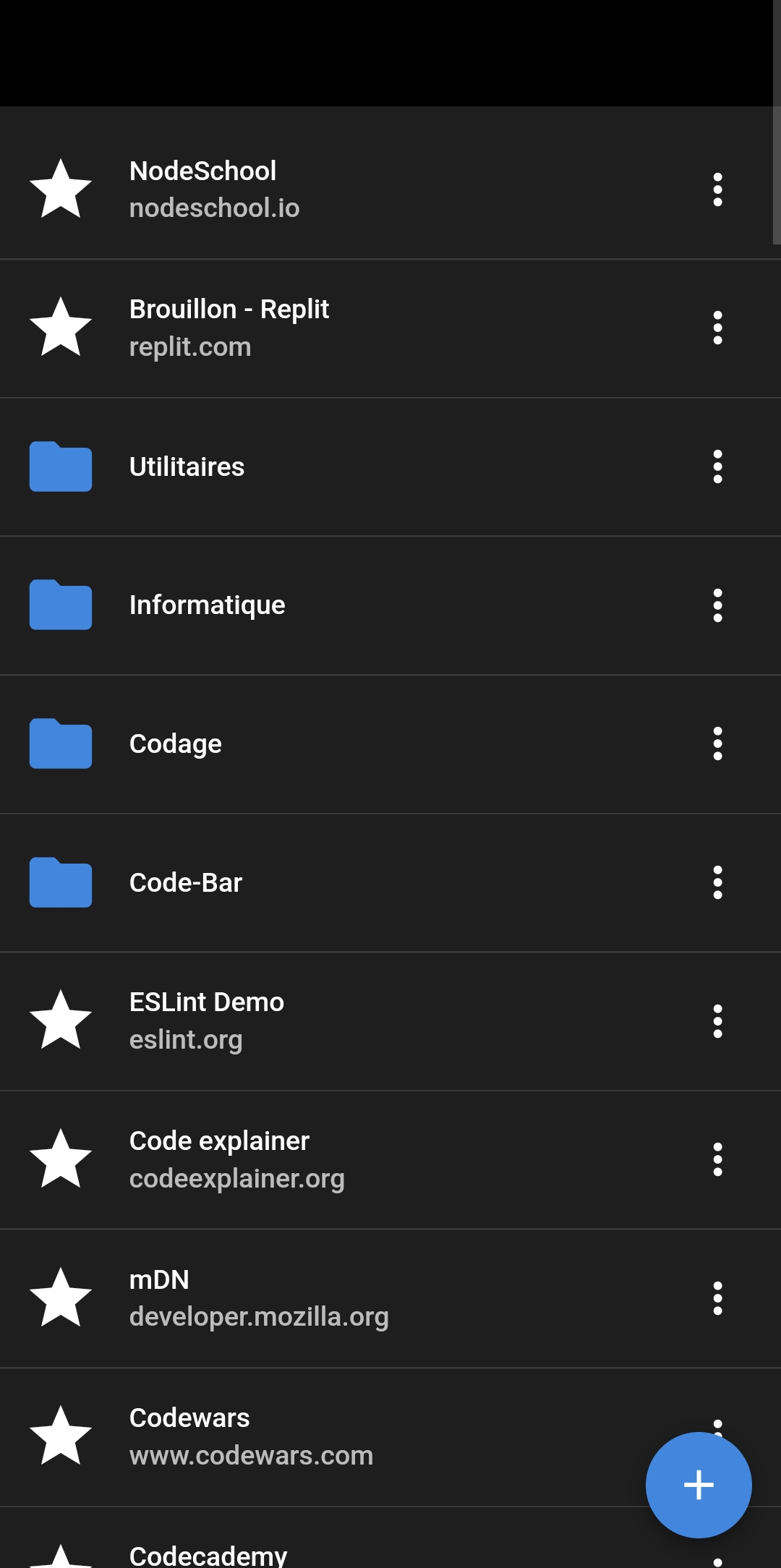
Expected Behavior
..
To Reproduce
..
Debug log provided
@pinpontitit commented on GitHub (May 2, 2022):
More details:
It happened again today. No need to lock the phone and so on.
I made a test on purpose, to see if it does it today again: just by going to Floccus App, swipe down and the most rapidly possible click on the "Running apps" button ( ||| ) as I explained on my previous message.
And it disappeared again. (The bar being disappeared, the button that were in the bar(settings and sync for example) are no longer clickable of course.
And cliking on bookmarks or whatever wont fix this, I have to close the app from running apps)
I tried doing it more times and it doesnt do that anymore and just works normally. So I don't know exactly the good steps to reproduce. I just know it does it enough to be noticed but not always.
@marcelklehr commented on GitHub (May 6, 2022):
I think I've fixed this. Can you try running the latest develop branch? (I hope it works for you)
@pinpontitit commented on GitHub (May 6, 2022):
Thanks! I'll try as soon as I can.
@marcelklehr commented on GitHub (May 21, 2022):
Is this still happening in the latest version?
@pinpontitit commented on GitHub (May 21, 2022):
For now, it doesnt seem to happen in the latest version.
I'll continue trying to induce it on purpose just to be sure, but for now it seems solved.
@github-actions[bot] commented on GitHub (May 23, 2023):
This issue has been automatically locked since there has not been any recent activity after it was closed. Please open a new issue for related bugs.