mirror of
https://github.com/floccusaddon/floccus.git
synced 2026-04-27 07:05:59 +03:00
[GH-ISSUE #1147] Change loading bar behavior #766
Labels
No labels
browser-specific
bug
correctness issues
enhancement
feature: Google Drive
feature: Linkwarden
feature: git
feature: nextcloud-bookmarks
feature: tabs
feature: webdav
help wanted
native-app
priority: high
priority: low
priority: medium
pull-request
question
question
stale
upstream
waiting for more information
wontfix
🙁 Not following issue template
No milestone
No project
No assignees
1 participant

Notifications
Due date
No due date set.
Dependencies
No dependencies set.
Reference
starred/floccus#766
Loading…
Add table
Add a link
Reference in a new issue
No description provided.
Delete branch "%!s()"
Deleting a branch is permanent. Although the deleted branch may continue to exist for a short time before it actually gets removed, it CANNOT be undone in most cases. Continue?
Originally created by @pinpontitit on GitHub (Apr 30, 2022).
Original GitHub issue: https://github.com/floccusaddon/floccus/issues/1147
Describe the feature you'd like to request
Currently, when you click on "Sync", there's a blue loading bar that appears on top, that simulate the syncing process.
In my case, his behaviour is always the same:
-it starts at 0 (lets say on a scale of 10=blue bar is full
-then goes to 1
-then goes to 2
-and then directly disappear, indicating that the sync process has finished.
It always follow the same pattern for me, I never see the bar half full(at 5) for example.
Thats a bit disturbing because when a loading bar is progressing you expect it to go to the end.
The first time I saw that, I reckoned it was a bug.
Now i am used to it.
This is not only an aesthetic issue but also to avoid misunderstanding, let me explain:
I think that I read few times here, in the bug section, people asking how to be sure if the loading has succeeded or not, or if its working correctly.
Describe the solution you'd like
I think in browser it opens a message saying ”last sync at 0 min"
But in Android there's no message.
We could implement also a message in Android, or we could just, and I think its simplier, in both android and browser:
-let the blue bar go to the end (because if it goes its so fast that we dont see it)
-and when it has arrived at the end let the blue bar "On", like that we know it's finish.
Currently the bar disappearing gives the impression the sync was canceled, a bug occured, or a glitch.
What do you think ?
thanks
Describe alternatives you've considered
..
@marcelklehr commented on GitHub (May 1, 2022):
Hi
I completely agree. This is something I've had at the back of my mind as well. If you'd like to play with the code a bit to fix this, the relevant portions are here and here
@pinpontitit commented on GitHub (May 1, 2022):
OK I'll look into it :)
Thanks for giving me the snippets where I have to look, that helps me 👍
@pinpontitit commented on GitHub (May 1, 2022):
So after trying to implement changes to the v-progress-linear bar, I must admit I coulndt do anything that didnt break the design.
I tried using this doc https://vuetifyjs.com/en/api/v-progress-linear/#links
I first tried to let the bar always visible by putting
active="false"
to see if when always visible the bar goes to 100% and stays there, but it didnt work.
Or instead of using as "value":
account.data.syncing * 100 || 0
(which to be honest I don't understand how it works..)
use many values one after the other, one replacing the other each time, for example:
:value="10"
:value="20"
not related to the syncing status (i mean it continues to go to 100 even if the sync has finished) ?
But I guess it doesnt work like that, I think I have to write something like:
:value="changingValueScript"
and then add a script at the bottom named changingValueScript and write some javascript code like "value +=10" ?
I didn't find the right way to improve this progress line.
And after I thinked: in the browser extension even if the bar disappear thats allright, because its quite clear the sync was succesfull (its written "last sync 0min", and a "check" icon with "all good").
So maybe its enough to change the behavior on the android app.
And instead of changing the progress line, and to avoid writing something as "Sync successfull" because the app is already so tiny, i thinked about maybe just changing the mdi-sync icon.
For example now the 'sync' icon is static, when you press it it spins, and when it's over it turns back static.
Instead of that, a static 'sync' icon, when you press it it spins, and when its over it becomes a blue 'check' icon for 3 seconds or so ?
So I guess there should have a script saying:
if (syncing successfull) {show check icon and a setTimeout to replace it by the normal static sync icon after 3 sec ?
LOL thats so hard mate
By the way I could succesfully work and see the changes on the browser extension with "gulp watch".
But how do you do that for the Android app.
I guess I need to install Android Studio ?
One last thing:
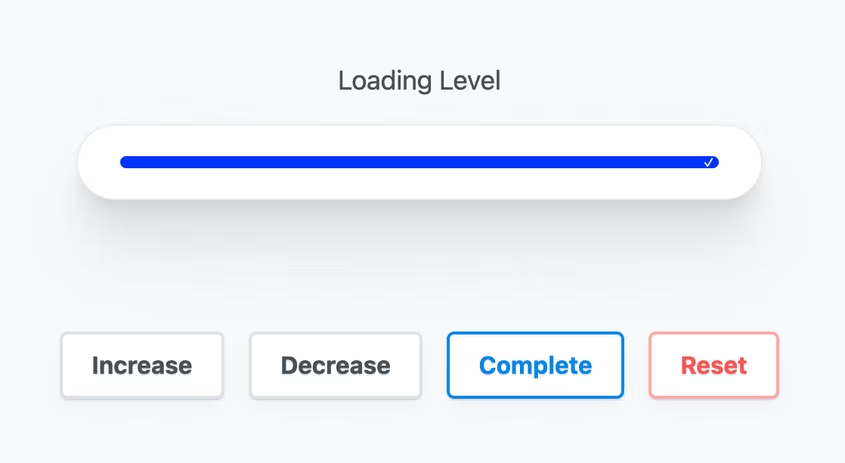
I found on the web a good loading bar design.
When the bar is full we can see a small check mark that indicates that everything is good.
For the android app it could fit nicely. But of course thats not a Vue component.
Maybe its possible to recreate it by tweaking the progress-linear component (height and ...?) and by letting the bar always on.
How do you let the bar always on ? I tried taking out the "v-if="account.data.syncing", the active=false, and putting value to 100% but that didnt worked...
Thanks
@marcelklehr commented on GitHub (May 5, 2022):
Hey @pinpontitit
It's indeed a bit complicated, because the account.data.syncing value comes from the sync process which only handles the case of 100% when it actually does something and not in the case of no changes necessary. I've made a commit which should fix this. (see below)
@marcelklehr commented on GitHub (May 5, 2022):
I'll extend the README on how to develop for android.
@github-actions[bot] commented on GitHub (May 7, 2023):
This issue has been automatically locked since there has not been any recent activity after it was closed. Please open a new issue for related bugs.