[GH-ISSUE #554] Cannot add account after 4.2.0 upgrade, FF 68esr #387

Closed
opened 2026-02-25 22:36:59 +03:00 by kerem · 26 comments
Owner

Originally created by @wohali on GitHub (Jun 4, 2020).
Original GitHub issue: https://github.com/floccusaddon/floccus/issues/554

Describe the bug
I have re-enabled floccus with the 4.2.0 upgrade on my Firefox 68 ESR Linux install, trying to test if the fix for #505 fixes my problem reported in #482 .

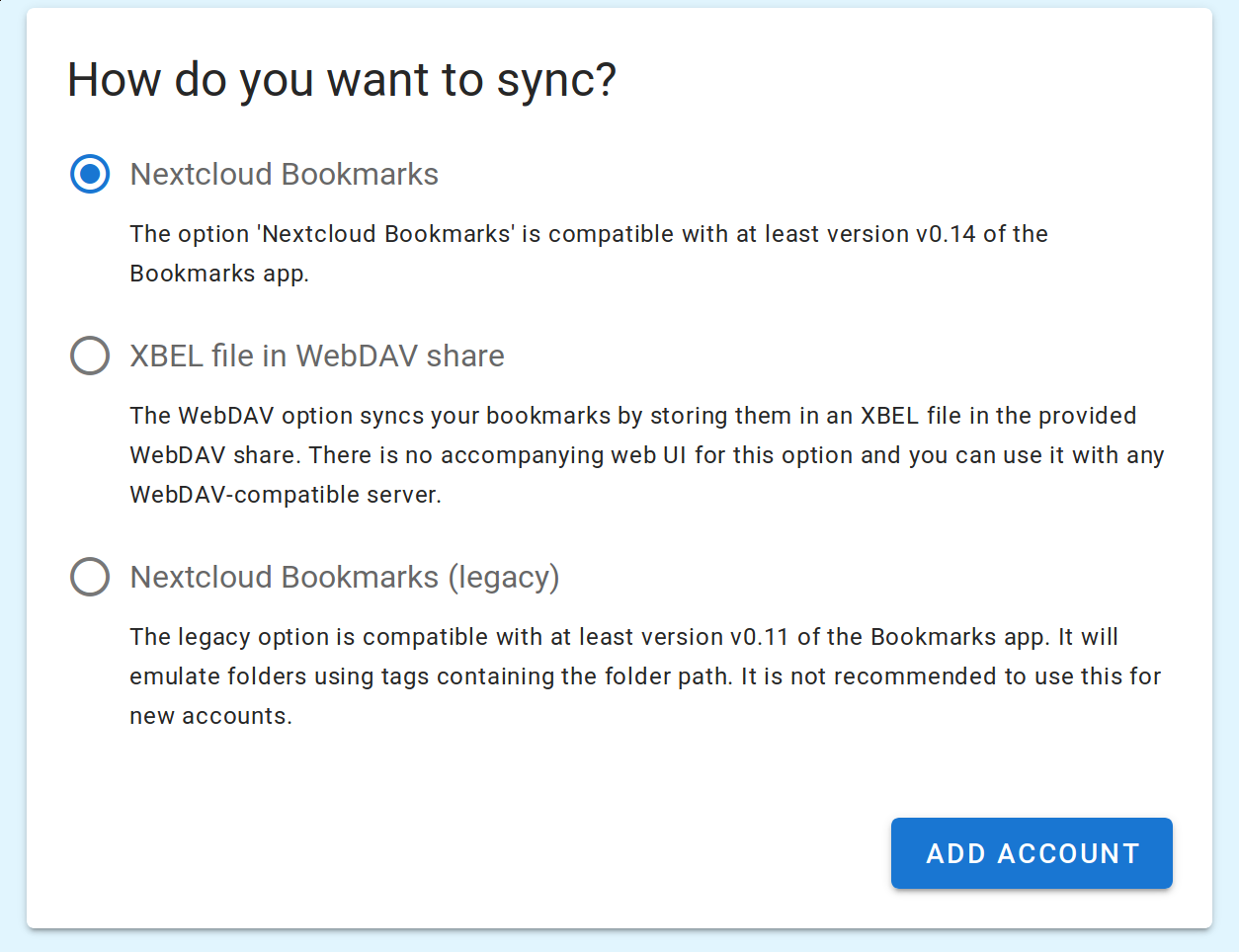
I pressed the big "+" button to create a new account. This opens a tab with the 3 options for a new account: NextCloud bookmarks, XBEL, NextCloud Legacy.

The Add Account button has a "click" animation but does nothing.

To Reproduce
See above.

Expected behavior
I should be able to add a new account, but can't.

Screenshots
2020-06-04-190501_1254x964_scrot

This is where I get stuck.

Desktop (please complete the following information):

  • OS: Linux (Debian buster)
  • Browser: Firefox
  • Browser Version: 68.9.0esr
  • Floccus version: 4.2.0
  • Floccus sync method: any

Server (please complete the following information):
n/a

Note: Please write down the actual version numbers instead of writing 'latest'.

Debug log
Unable to provide debug log since no link to retrieve the debug log is possible without an account.

Originally created by @wohali on GitHub (Jun 4, 2020). Original GitHub issue: https://github.com/floccusaddon/floccus/issues/554 **Describe the bug** I have re-enabled floccus with the 4.2.0 upgrade on my Firefox 68 ESR Linux install, trying to test if the fix for #505 fixes my problem reported in #482 . I pressed the big "+" button to create a new account. This opens a tab with the 3 options for a new account: NextCloud bookmarks, XBEL, NextCloud Legacy. The Add Account button has a "click" animation but does nothing. **To Reproduce** See above. **Expected behavior** I should be able to add a new account, but can't. **Screenshots** ![2020-06-04-190501_1254x964_scrot](https://user-images.githubusercontent.com/112292/83818835-d6ba9700-a6b7-11ea-8e6a-705e0d795abd.png) This is where I get stuck. **Desktop (please complete the following information):** - OS: Linux (Debian buster) - Browser: Firefox - Browser Version: 68.9.0esr - Floccus version: 4.2.0 - Floccus sync method: any **Server (please complete the following information):** n/a Note: Please write down the actual version numbers instead of writing 'latest'. **Debug log** Unable to provide debug log since no link to retrieve the debug log is possible without an account.
kerem 2026-02-25 22:36:59 +03:00
  • closed this issue
  • added the
    bug
    label
Author
Owner

@marcelklehr commented on GitHub (Jun 5, 2020):

Could you check the javascript console for errors on that page?

<!-- gh-comment-id:639398209 --> @marcelklehr commented on GitHub (Jun 5, 2020): Could you check the javascript console for errors on that page?
Author
Owner

@elfacht commented on GitHub (Jun 5, 2020):

Same in FF 78.

<!-- gh-comment-id:639424542 --> @elfacht commented on GitHub (Jun 5, 2020): Same in FF 78.
Author
Owner

@elfacht commented on GitHub (Jun 5, 2020):

Maybe this helps:

Screenshot 2020-06-05 um 14 15 22

<!-- gh-comment-id:639445589 --> @elfacht commented on GitHub (Jun 5, 2020): Maybe this helps: ![Screenshot 2020-06-05 um 14 15 22](https://user-images.githubusercontent.com/529443/83875262-107eb280-a737-11ea-8b33-16840cef0c0f.jpg)
Author
Owner

@marcelklehr commented on GitHub (Jun 5, 2020):

Ooph, that's strange. Looks like there is some b0rked state in the extension storage. It may help to uninstall the extension and reinstall to get rid of that. 🤔

<!-- gh-comment-id:639468488 --> @marcelklehr commented on GitHub (Jun 5, 2020): Ooph, that's strange. Looks like there is some b0rked state in the extension storage. It may help to uninstall the extension and reinstall to get rid of that. :thinking:
Author
Owner

@user-51 commented on GitHub (Jun 5, 2020):

Same problem with FF 78.0b2 (64-bit) on Linux. Uninstalling and reinstalling was not enough, but removing browser-extension-data/floccus@handmadeideas.org and extensions/staged/floccus@handmadeideas.org before reinstalling did the job.

<!-- gh-comment-id:639750141 --> @user-51 commented on GitHub (Jun 5, 2020): Same problem with FF 78.0b2 (64-bit) on Linux. Uninstalling and reinstalling was not enough, but removing browser-extension-data/floccus@handmadeideas.org and extensions/staged/floccus@handmadeideas.org before reinstalling did the job.
Author
Owner

@wohali commented on GitHub (Jun 5, 2020):

I tried this - extension uninstall, then find ~/.mozilla -name \*floccus\* -exec rm -rf {} \;, which deleted the directories you mention. I then reinstalled.

Now, on trying to save an account again, it always comes up as bob@example.org.

Logfile is full of:

2020-06-05T21:34:38.700Z Using normal strategy
2020-06-05T21:34:39.000Z Fetching bookmarks
2020-06-05T21:34:39.000Z Syncing failed with E019: HTTP status 404. Failed GET request. Check your server configuration and log.
2020-06-05T21:34:39.600Z Starting sync process for account bob@example.org
2020-06-05T21:34:39.600Z Using normal strategy
2020-06-05T21:34:39.900Z Fetching bookmarks
2020-06-05T21:34:39.900Z Syncing failed with E019: HTTP status 404. Failed GET request. Check your server configuration and log.

The "Floccus bookmark sync" tab is still open with all of my credentials in it, but every time I press Save (and see the green checkmark), it doesn't change the plugin, dropdown, which continues to say my account is bob@example.org and is erroring with a 404. 😕

<!-- gh-comment-id:639834716 --> @wohali commented on GitHub (Jun 5, 2020): I tried this - extension uninstall, then `find ~/.mozilla -name \*floccus\* -exec rm -rf {} \;`, which deleted the directories you mention. I then reinstalled. Now, on trying to save an account again, it always comes up as `bob@example.org`. Logfile is full of: ``` 2020-06-05T21:34:38.700Z Using normal strategy 2020-06-05T21:34:39.000Z Fetching bookmarks 2020-06-05T21:34:39.000Z Syncing failed with E019: HTTP status 404. Failed GET request. Check your server configuration and log. 2020-06-05T21:34:39.600Z Starting sync process for account bob@example.org 2020-06-05T21:34:39.600Z Using normal strategy 2020-06-05T21:34:39.900Z Fetching bookmarks 2020-06-05T21:34:39.900Z Syncing failed with E019: HTTP status 404. Failed GET request. Check your server configuration and log. ``` The "Floccus bookmark sync" tab is still open with all of my credentials in it, but every time I press Save (and see the green checkmark), it doesn't change the plugin, dropdown, which continues to say my account is `bob@example.org` and is erroring with a 404. :confused:
Author
Owner

@wohali commented on GitHub (Jun 5, 2020):

Nothing useful in the JS console:

2020-06-05-173900_2528x1833_scrot

Could it be related to https://bugzilla.mozilla.org/show_bug.cgi?id=1267027 ?

<!-- gh-comment-id:639836006 --> @wohali commented on GitHub (Jun 5, 2020): Nothing useful in the JS console: ![2020-06-05-173900_2528x1833_scrot](https://user-images.githubusercontent.com/112292/83924805-05e30e00-a775-11ea-9d5e-a43a61dad11f.png) Could it be related to https://bugzilla.mozilla.org/show_bug.cgi?id=1267027 ?
Author
Owner

@ChrisWiegman commented on GitHub (Jun 5, 2020):

I can confirm the bug in FF 77.0.1 on Pop_OS 20.04. Clearing the extension data manually does not fix it either

<!-- gh-comment-id:639839095 --> @ChrisWiegman commented on GitHub (Jun 5, 2020): I can confirm the bug in FF 77.0.1 on Pop_OS 20.04. Clearing the extension data manually does not fix it either
Author
Owner

@ChrisWiegman commented on GitHub (Jun 5, 2020):

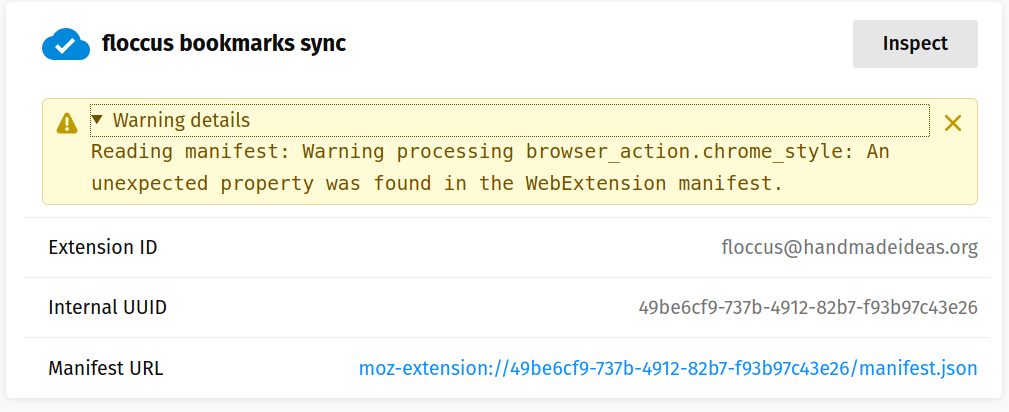
When looking into it I see plenty of console errors that it can't connect (as storage has been cleared that isn't for an existing account) and the following when looking at the debugging screen.
Screenshot from 2020-06-05 17-54-22

<!-- gh-comment-id:639844867 --> @ChrisWiegman commented on GitHub (Jun 5, 2020): When looking into it I see plenty of console errors that it can't connect (as storage has been cleared that isn't for an existing account) and the following when looking at the debugging screen. ![Screenshot from 2020-06-05 17-54-22](https://user-images.githubusercontent.com/394675/83925717-61160000-a777-11ea-85aa-e90620506abd.png)
Author
Owner

@joelmaxuel commented on GitHub (Jun 6, 2020):

Floccus Add-in for Firefox (68.8.0esr) updated yesterday to v4.2.0 - as I already had a NextCloud account already set up, this update now stalls with the icon permanently having a <-> overlay.

Debug log has stopped recording anything in this past day.

serverItem:
+ #-1[undefined] parentId: undefined, hash: 579723962ff206a3a488ebdc4e29682db069c0241774ec2b2e61307201497b97
}
2020-06-05T01:48:06.635Z Skipping subtree
2020-06-05T01:48:06.829Z Successfully ended sync process for account [redacted]

Bookmarks app version 2.3.1 for NextCloud 15.0.13 (yes, I do have some point-updates to attend to).

<!-- gh-comment-id:639945542 --> @joelmaxuel commented on GitHub (Jun 6, 2020): Floccus Add-in for Firefox (68.8.0esr) updated yesterday to v4.2.0 - as I already had a NextCloud account already set up, this update now stalls with the icon permanently having a `<->` overlay. Debug log has stopped recording anything in this past day. > serverItem: > + #-1[undefined] parentId: undefined, hash: 579723962ff206a3a488ebdc4e29682db069c0241774ec2b2e61307201497b97 > } > 2020-06-05T01:48:06.635Z Skipping subtree > 2020-06-05T01:48:06.829Z Successfully ended sync process for account [redacted] Bookmarks app version 2.3.1 for NextCloud 15.0.13 (yes, I do have some point-updates to attend to).
Author
Owner

@marcelklehr commented on GitHub (Jun 6, 2020):

I was finally able to reproduce and fix this. Thanks for your feedback and patience :)

<!-- gh-comment-id:640017955 --> @marcelklehr commented on GitHub (Jun 6, 2020): I was finally able to reproduce and fix this. Thanks for your feedback and patience :)
Author
Owner

@elfacht commented on GitHub (Jun 6, 2020):

Now it stucks in synchronisation on FF (also in Chrome).

<!-- gh-comment-id:640028328 --> @elfacht commented on GitHub (Jun 6, 2020): Now it stucks in synchronisation on FF (also in Chrome).
Author
Owner

@marcelklehr commented on GitHub (Jun 6, 2020):

Now it stucks in synchronisation on FF (also in Chrome).

Can you elaborate?

<!-- gh-comment-id:640028979 --> @marcelklehr commented on GitHub (Jun 6, 2020): > Now it stucks in synchronisation on FF (also in Chrome). Can you elaborate?
Author
Owner

@elfacht commented on GitHub (Jun 6, 2020):

This is happening since half an hour and nothing is syncing (FF and Chrome, latest versions):

Screenshot 2020-06-06 um 12 11 05
<!-- gh-comment-id:640029648 --> @elfacht commented on GitHub (Jun 6, 2020): This is happening since half an hour and nothing is syncing (FF and Chrome, latest versions): <img width="481" alt="Screenshot 2020-06-06 um 12 11 05" src="https://user-images.githubusercontent.com/529443/83941883-2c458f80-a7ef-11ea-8a30-acc99d67882e.png">
Author
Owner

@marcelklehr commented on GitHub (Jun 6, 2020):

Mh, can you try restarting the browser? If it's stuck in limbo this usually helps. If it doesn't, logs might be useful to tackle this one.

<!-- gh-comment-id:640030193 --> @marcelklehr commented on GitHub (Jun 6, 2020): Mh, can you try restarting the browser? If it's stuck in limbo this usually helps. If it doesn't, logs might be useful to tackle this one.
Author
Owner

@elfacht commented on GitHub (Jun 6, 2020):

Already tried that.

From the debug log:

2020-06-06T10:16:39.001Z Starting sync process for account xxxx.xx
2020-06-06T10:16:39.099Z onSyncStart: begin
2020-06-06T10:16:39.100Z https://xxxx.xx:5006/sync/bookmarks/firefox.xbel.lock
2020-06-06T10:16:40.106Z https://xxxx.xx:5006/sync/bookmarks/firefox.xbel.lock
2020-06-06T10:16:41.434Z https://xxxx.xx:5006/sync/bookmarks/firefox.xbel.lock
2020-06-06T10:16:43.187Z https://xxxx.xx:5006/sync/bookmarks/firefox.xbel.lock
2020-06-06T10:16:45.502Z https://xxxx.xx:5006/sync/bookmarks/firefox.xbel.lock
2020-06-06T10:16:48.561Z https://xxxx.xx:5006/sync/bookmarks/firefox.xbel.lock
2020-06-06T10:16:52.601Z https://xxxx.xx:5006/sync/bookmarks/firefox.xbel.lock
2020-06-06T10:16:57.939Z https://xxxx.xx:5006/sync/bookmarks/firefox.xbel.lock
2020-06-06T10:17:04.989Z https://xxxx.xx:5006/sync/bookmarks/firefox.xbel.lock
2020-06-06T10:17:14.310Z https://xxxx.xx:5006/sync/bookmarks/firefox.xbel.lock
2020-06-06T10:17:26.629Z https://xxxx.xx:5006/sync/bookmarks/firefox.xbel.lock
2020-06-06T10:17:42.906Z https://xxxx.xx:5006/sync/bookmarks/firefox.xbel.lock
<!-- gh-comment-id:640030879 --> @elfacht commented on GitHub (Jun 6, 2020): Already tried that. From the debug log: ``` 2020-06-06T10:16:39.001Z Starting sync process for account xxxx.xx 2020-06-06T10:16:39.099Z onSyncStart: begin 2020-06-06T10:16:39.100Z https://xxxx.xx:5006/sync/bookmarks/firefox.xbel.lock 2020-06-06T10:16:40.106Z https://xxxx.xx:5006/sync/bookmarks/firefox.xbel.lock 2020-06-06T10:16:41.434Z https://xxxx.xx:5006/sync/bookmarks/firefox.xbel.lock 2020-06-06T10:16:43.187Z https://xxxx.xx:5006/sync/bookmarks/firefox.xbel.lock 2020-06-06T10:16:45.502Z https://xxxx.xx:5006/sync/bookmarks/firefox.xbel.lock 2020-06-06T10:16:48.561Z https://xxxx.xx:5006/sync/bookmarks/firefox.xbel.lock 2020-06-06T10:16:52.601Z https://xxxx.xx:5006/sync/bookmarks/firefox.xbel.lock 2020-06-06T10:16:57.939Z https://xxxx.xx:5006/sync/bookmarks/firefox.xbel.lock 2020-06-06T10:17:04.989Z https://xxxx.xx:5006/sync/bookmarks/firefox.xbel.lock 2020-06-06T10:17:14.310Z https://xxxx.xx:5006/sync/bookmarks/firefox.xbel.lock 2020-06-06T10:17:26.629Z https://xxxx.xx:5006/sync/bookmarks/firefox.xbel.lock 2020-06-06T10:17:42.906Z https://xxxx.xx:5006/sync/bookmarks/firefox.xbel.lock ```
Author
Owner

@marcelklehr commented on GitHub (Jun 6, 2020):

Aha! This means that it's waiting for the lock file to be released. It'll give up after a while, but you can remove the lock file manually to get it working again.

<!-- gh-comment-id:640031278 --> @marcelklehr commented on GitHub (Jun 6, 2020): Aha! This means that it's waiting for the lock file to be released. It'll give up after a while, but you can remove the lock file manually to get it working again.
Author
Owner

@elfacht commented on GitHub (Jun 6, 2020):

Also did that, still no luck. ;)

<!-- gh-comment-id:640031441 --> @elfacht commented on GitHub (Jun 6, 2020): Also did that, still no luck. ;)
Author
Owner

@elfacht commented on GitHub (Jun 6, 2020):

I have 2 FF running: regular and Developer Edition. On the regular it's working, on the Developer and Chrome it's not working.

<!-- gh-comment-id:640031591 --> @elfacht commented on GitHub (Jun 6, 2020): I have 2 FF running: regular and Developer Edition. On the regular it's working, on the Developer and Chrome it's not working.
Author
Owner

@marcelklehr commented on GitHub (Jun 6, 2020):

Does the log file still say the same thing?

<!-- gh-comment-id:640049793 --> @marcelklehr commented on GitHub (Jun 6, 2020): Does the log file still say the same thing?
Author
Owner

@marcelklehr commented on GitHub (Jun 6, 2020):

@wohali Now, on trying to save an account again, it always comes up as bob@example.org.

Ah, I can confirm that. If you reload that tab or reopen the account settings, saving should work. For some reason the initial settings screen after creating the account doesn't save correctly :( see #557

<!-- gh-comment-id:640050175 --> @marcelklehr commented on GitHub (Jun 6, 2020): > @wohali Now, on trying to save an account again, it always comes up as bob@example.org. Ah, I can confirm that. If you reload that tab or reopen the account settings, saving should work. For some reason the initial settings screen after creating the account doesn't save correctly :( see #557
Author
Owner

@wohali commented on GitHub (Jun 7, 2020):

@marcelklehr I'm still stuck - will wait until 4.2.1 is actually pushed to the channel (I still have "4.2.0.5" here) and test again.

<!-- gh-comment-id:640138744 --> @wohali commented on GitHub (Jun 7, 2020): @marcelklehr I'm still stuck - will wait until 4.2.1 is actually pushed to the channel (I still have "4.2.0.5" here) and test again.
Author
Owner

@wohali commented on GitHub (Jun 7, 2020):

@marcelklehr No, this is not fixed. Reloading the tab or reopening the account settings, it still sees bob@example.com and is *still trying to connect to it. It won't let me actually add an account at all.

Version: 4.2.1

<!-- gh-comment-id:640169526 --> @wohali commented on GitHub (Jun 7, 2020): @marcelklehr No, this is not fixed. Reloading the tab or reopening the account settings, it still sees bob@example.com and is **still* trying to connect to it. It won't let me actually add an account at all. Version: 4.2.1
Author
Owner

@elfacht commented on GitHub (Jun 7, 2020):

@marcelklehr Yes, the logfile is still the same.

<!-- gh-comment-id:640198041 --> @elfacht commented on GitHub (Jun 7, 2020): @marcelklehr Yes, the logfile is still the same.
Author
Owner

@elfacht commented on GitHub (Jun 7, 2020):

Now this shows up:

Screenshot 2020-06-07 um 13 00 34

Now it works after hitting the sync button!

<!-- gh-comment-id:640198628 --> @elfacht commented on GitHub (Jun 7, 2020): Now this shows up: ![Screenshot 2020-06-07 um 13 00 34](https://user-images.githubusercontent.com/529443/83967111-e9eb8380-a8be-11ea-977d-f8d091b56cc2.jpg) Now it works after hitting the sync button!
Author
Owner

@github-actions[bot] commented on GitHub (Mar 21, 2023):

This issue has been automatically locked since there has not been any recent activity after it was closed. Please open a new issue for related bugs.

<!-- gh-comment-id:1477198119 --> @github-actions[bot] commented on GitHub (Mar 21, 2023): This issue has been automatically locked since there has not been any recent activity after it was closed. Please open a new issue for related bugs.
Sign in to join this conversation.
No milestone
No project
No assignees
1 participant
Notifications
Due date
The due date is invalid or out of range. Please use the format "yyyy-mm-dd".

No due date set.

Dependencies

No dependencies set.

Reference
starred/floccus#387
No description provided.