[GH-ISSUE #397] Container won't start with very large file in Docker bind mount (Memory leak?) #77

Open
opened 2026-03-03 12:08:05 +03:00 by kerem · 9 comments
Owner

Originally created by @ChrisWhealy on GitHub (Jan 21, 2021).
Original GitHub issue: https://github.com/fsouza/fake-gcs-server/issues/397

I need to use fake-gcs-server for serving up some CSV files. Most of these files are pretty small (< 2Mb), but one is >6Gb

If I start the container with data bind mounted to the directory data/raw_csv containing 4 small CSV files, then everything is fine.

However, if I add the very large CSV to the bind mount directory, then at start up, the container's memory usage just climbs until it hits the allocation limit and crashes.

At first if thought this was due to Docker's experimental feature "Use gRPC FUSE for file sharing" being switched on, but switching this off has no effect in case this.

Update

I’ve chopped the huge CSV file down to the first 58 million rows (from the original 170 million) to create a file that’s 2.06Gb.

With 16Gb allocated, the container now starts up successfully, but uses 12.4Gb of memory. Then when I fire a simple query to request the storage objects in bucket raw_csv, the memory usages climbs to 15.2Gb

Originally created by @ChrisWhealy on GitHub (Jan 21, 2021). Original GitHub issue: https://github.com/fsouza/fake-gcs-server/issues/397 I need to use `fake-gcs-server` for serving up some CSV files. Most of these files are pretty small (< 2Mb), but one is >6Gb If I start the container with `data` bind mounted to the directory `data/raw_csv` containing 4 small CSV files, then everything is fine. However, if I add the very large CSV to the bind mount directory, then at start up, the container's memory usage just climbs until it hits the allocation limit and crashes. At first if thought this was due to Docker's experimental feature "Use gRPC FUSE for file sharing" being switched on, but switching this off has no effect in case this. # Update I’ve chopped the huge CSV file down to the first 58 million rows (from the original 170 million) to create a file that’s 2.06Gb. With 16Gb allocated, the container now starts up successfully, but uses 12.4Gb of memory. Then when I fire a simple query to request the storage objects in bucket `raw_csv`, the memory usages climbs to 15.2Gb
Author
Owner

@fsouza commented on GitHub (Jan 21, 2021):

What command are you running to start the container? Are you using the memory backend?

<!-- gh-comment-id:764624907 --> @fsouza commented on GitHub (Jan 21, 2021): What command are you running to start the container? Are you using the memory backend?
Author
Owner

@ChrisWhealy commented on GitHub (Jan 21, 2021):

I'm starting the container with the command

docker run -d --memory=16g --name fake-gcs-server -p 4443:4443 -v ${PWD}/data:/data fsouza/fake-gcs-server:latest

The Docker VM is set to use 20Gb and "Use gRPC FuSE for file sharing" is switched off

<!-- gh-comment-id:764652243 --> @ChrisWhealy commented on GitHub (Jan 21, 2021): I'm starting the container with the command `docker run -d --memory=16g --name fake-gcs-server -p 4443:4443 -v ${PWD}/data:/data fsouza/fake-gcs-server:latest` The Docker VM is set to use 20Gb and "Use gRPC FuSE for file sharing" is switched off
Author
Owner

@fsouza commented on GitHub (Oct 7, 2021):

This is probably not a memory leak, the code is just not very smart when loading stuff from the disk. There were some improvements to the list endpoint recently, but there's definitely room to improve other parts of the code.

<!-- gh-comment-id:937428993 --> @fsouza commented on GitHub (Oct 7, 2021): This is probably not a memory leak, the code is just not very smart when loading stuff from the disk. There were some improvements to the list endpoint recently, but there's definitely room to improve other parts of the code.
Author
Owner

@warent commented on GitHub (Nov 11, 2021):

I'm mounting an empty directory, so the bucket has no contents.

command: -port 8080 -public-host gcs:8080 -backend filesystem -filesystem-root /data
volumes:
  - ./buckets:/data
Screen Shot 2021-11-11 at 10 04 24 AM

I had to force quit because my 16gb macbook pro isn't powerful enough for a single go program running in 1 docker container somehow? This is definitely not normal

l
<!-- gh-comment-id:966469303 --> @warent commented on GitHub (Nov 11, 2021): I'm mounting an empty directory, so the bucket has no contents. ``` command: -port 8080 -public-host gcs:8080 -backend filesystem -filesystem-root /data volumes: - ./buckets:/data ``` <img width="295" alt="Screen Shot 2021-11-11 at 10 04 24 AM" src="https://user-images.githubusercontent.com/13342266/141338983-faad9067-cf70-40bf-aaf6-9da4fe9fca07.png"> I had to force quit because my 16gb macbook pro isn't powerful enough for a single go program running in 1 docker container somehow? This is definitely not normal <img width="404" alt="l" src="https://user-images.githubusercontent.com/13342266/141339319-4bf3beb2-f447-4b75-9204-8e42360ee8fb.png">
Author
Owner

@warent commented on GitHub (Nov 11, 2021):

I ran a profiler and here's the result.

docker run -v $(pwd)/buckets:/data -p 6060:6060 docker-compose_gcs --port 8080 --public-host gcs:8080 --backend filesystem --filesystem-root /data

profile004

<!-- gh-comment-id:966505057 --> @warent commented on GitHub (Nov 11, 2021): I ran a profiler and here's the result. `docker run -v $(pwd)/buckets:/data -p 6060:6060 docker-compose_gcs --port 8080 --public-host gcs:8080 --backend filesystem --filesystem-root /data` ![profile004](https://user-images.githubusercontent.com/13342266/141346171-96b97d49-cc7f-4586-bc42-d3ab5de5e546.png)
Author
Owner

@warent commented on GitHub (Nov 11, 2021):

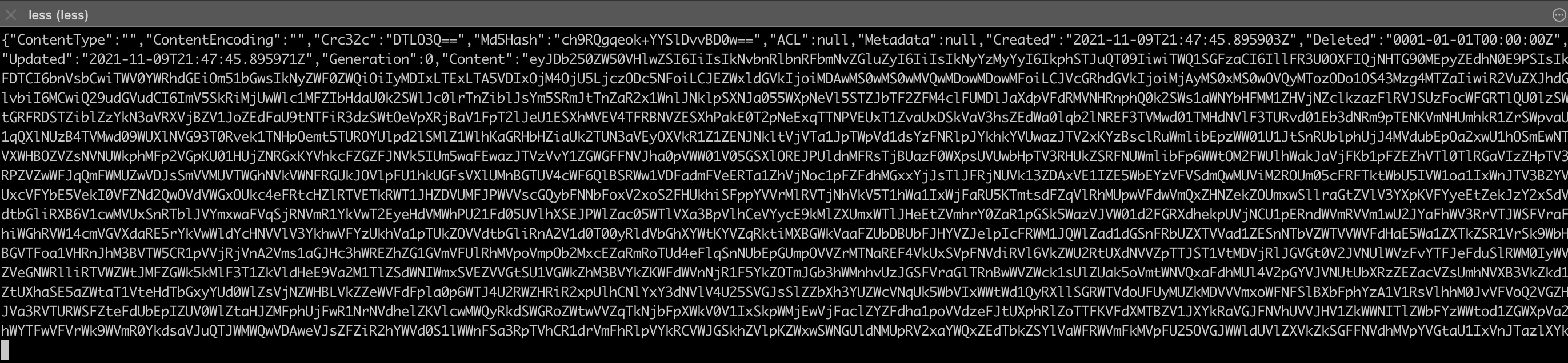
Wait a minute, I logged out what files it was walking, and it only found .gitkeep as shown in the screenshot above... and it hangs. Then looked and saw this

Screen Shot 2021-11-11 at 11 07 21 AM

lol apparently it has been writing to .gitkeep this entire time and I have no idea what. If I look at the file it's just this monster
Screen Shot 2021-11-11 at 11 07 57 AM

If you use a memory backend, this might propagate as some kind of memory leak? Using a filesystem backend, make sure you don't have any hidden files that are ballooning.

The bug here seems to be that fake-gcs-server is writing to something it shouldn't. Unless this is expected behavior. Maybe introducing some kind of a --ignore param or .gcsignore file would help with this.

Thanks for all your work on this @fsouza, it's an awesome project and has helped me with my work a lot!

<!-- gh-comment-id:966516245 --> @warent commented on GitHub (Nov 11, 2021): Wait a minute, I logged out what files it was walking, and it only found `.gitkeep` as shown in the screenshot above... and it hangs. Then looked and saw this <img width="216" alt="Screen Shot 2021-11-11 at 11 07 21 AM" src="https://user-images.githubusercontent.com/13342266/141347560-4d966e3e-f867-45b4-81c2-30e99425ad3f.png"> lol apparently it has been writing to .gitkeep this entire time and I have no idea what. If I look at the file it's just this monster <img width="1372" alt="Screen Shot 2021-11-11 at 11 07 57 AM" src="https://user-images.githubusercontent.com/13342266/141347707-cd9200e3-b078-45ea-8e1c-0e0a990eabe8.png"> If you use a memory backend, this might propagate as some kind of memory leak? Using a filesystem backend, make sure you don't have any hidden files that are ballooning. The bug here seems to be that fake-gcs-server is writing to something it shouldn't. Unless this is expected behavior. Maybe introducing some kind of a --ignore param or .gcsignore file would help with this. Thanks for all your work on this @fsouza, it's an awesome project and has helped me with my work a lot!
Author
Owner

@fsouza commented on GitHub (Nov 11, 2021):

Wait, is fake-gcs-server writing that file? That's unexpected 🤔

<!-- gh-comment-id:966672318 --> @fsouza commented on GitHub (Nov 11, 2021): Wait, is fake-gcs-server writing that file? That's unexpected 🤔
Author
Owner

@warent commented on GitHub (Nov 12, 2021):

So I created an empty folder for the bucket and then I added a .gitkeep file to it so that the bucket structure would exist in github when empty. It was empty when I made it, and somewhere along the way fake-gcs-server populated it with all that stuff

<!-- gh-comment-id:967206021 --> @warent commented on GitHub (Nov 12, 2021): So I created an empty folder for the bucket and then I added a `.gitkeep` file to it so that the bucket structure would exist in github when empty. It was empty when I made it, and somewhere along the way fake-gcs-server populated it with all that stuff
Author
Owner

@gaul commented on GitHub (Feb 7, 2022):

Related to #669.

<!-- gh-comment-id:1031000936 --> @gaul commented on GitHub (Feb 7, 2022): Related to #669.
Sign in to join this conversation.
No milestone
No project
No assignees
1 participant
Notifications
Due date
The due date is invalid or out of range. Please use the format "yyyy-mm-dd".

No due date set.

Dependencies

No dependencies set.

Reference
starred/fake-gcs-server#77
No description provided.