mirror of
https://github.com/electerm/electerm.git
synced 2026-04-25 21:45:56 +03:00
Closed
opened 2026-02-27 00:01:43 +03:00 by kerem
·
4 comments
No Branch/Tag specified
master
gh-pages
build
widget
linux-rpm-snap
title-temp
loong
test-npm2
copilot/fix-1cb8af11-1bce-40d4-956d-09f37d6761a6
copilot/fix-08f655b1-c7b3-454e-b1ed-94b5784e0247
copilot/fix-f0838905-e826-428b-8826-a4dac9a4303a
revert-3295-features/putty-like-ssh-tunnel-destination
v3.6.16
v3.6.6
v3.5.6
v3.3.8
v3.2.0
v3.1.26
v3.1.16
v3.1.6
v3.0.18
v3.0.6
v2.17.16
v2.17.8
v2.16.9
v2.15.8
v2.13.6
v2.13.0
v2.12.0
v2.11.16
v2.11.6
v2.10.26
v2.10.6
v2.8.16
v2.8.6
v2.7.8
v2.6.0
v2.5.16
v2.5.9
v2.5.6
v2.4.38
2.4.35
v2.4.28
v2.3.198
v2.3.191
v2.3.190
v2.3.181
v2.3.176
v2.3.166
v2.3.151
v2.3.136
v2.3.126
v2.3.118
v2.3.113
v2.3.103
v2.3.100
v2.3.85
v2.3.75
v2.3.65
v2.3.58
v2.3.48
v2.3.36
v2.3.30
v2.3.18
v2.3.6
v2.2.0
v2.1.26
v2.1.16
v2.1.8
v1.101.20
v1.101.16
v1.101.10
v1.100.60
v1.100.56
v1.100.50
v1.100.46
v1.100.30
v1.100.20
v1.100.18
v1.100.8
v1.91.16
v1.91.8
v1.91.1
v1.90.8
v1.90.6
v1.80.18
v1.80.6
v1.80.5
v1.80.3
v1.80.2
v1.72.48
v1.72.36
v1.72.26
v1.72.18
v1.72.6
v1.70.6
v1.70.0
v1.60.56
v1.60.50
v1.60.48
v1.60.36
v1.60.32
v1.60.29
v1.60.16
v1.60.6
v1.51.18
v1.51.8
v1.51.3
v1.51.0
v1.50.66
v1.50.65
v1.50.59
v1.50.46
v1.50.40
v1.50.21
v1.40.20
v1.40.18
v1.40.16
v1.40.6
v1.39.119
v1.39.109
v1.39.103
v1.39.99
v1.39.88
v1.39.76
v1.39.68
v1.39.56
v1.39.47
v1.39.46
v1.39.35
v1.39.31
v1.39.18
v1.39.5
v1.39.2
v1.38.86
v1.38.81
v1.38.80
v1.38.70
v1.38.65
v1.38.60
v1.38.50
v1.38.43
v1.38.42
v1.38.41
v1.38.30
v1.38.19
v1.38.11
v1.38.8
v1.37.126
v1.37.121
v1.37.110
v1.37.106
v1.37.96
v1.37.93
v1.37.92
v1.37.88
v1.37.80
v1.37.68
v1.37.66
v1.37.60
v1.37.58
v1.37.46
v1.37.38
v1.37.36
v1.37.20
v1.37.16
v1.37.6
v1.37.1
v1.36.1
v1.35.6
v1.35.0
v1.34.68
v1.34.58
v1.34.48
v1.34.46
v1.34.39
v1.34.38
v1.34.30
v1.34.26
v1.34.20
v1.34.10
v1.34.6
v1.34.0
v1.33.36
v1.33.26
v1.33.6
v1.33.0
v1.32.46
v1.32.38
v1.32.28
v1.32.6
v1.31.1
v1.30.9
v1.29.5
v1.29.4
v1.29.2
v1.28.4
v1.28.3
v1.28.1
v1.28.0
v1.27.30
v1.27.20
v1.27.19
v1.27.5
v1.26.2
v1.26.1
v1.26.0
v1.25.50
v1.25.41
v1.25.40
v1.25.30
v1.25.22
v1.25.20
v1.25.16
v1.25.14
v1.25.12
v1.25.10
v1.25.6
v1.24.13
v1.23.32
v1.23.28
v1.23.22
v1.23.20
v1.23.15
v1.23.8
v1.23.6
v1.23.4
v1.23.3
v1.23.2
v1.22.33
v1.22.30
v1.22.27
v1.22.24
v1.22.20
v1.22.8
v1.22.1
v1.21.93
v1.21.91
v1.21.88
v1.21.74
v1.21.73
v1.21.57
v1.21.48
v1.21.40
v1.21.34
v1.21.20
v1.21.18
v1.21.14
v1.21.9
v1.20.10
v1.20.6
v1.20.4
v1.19.5
v1.19.0
v1.18.5
v1.18.1
v1.18.0
v1.17.26
v1.17.21
v1.17.19
v1.17.16
v1.17.15
v1.17.3
v1.16.21
v1.16.11
v1.16.5
v1.16.3
v1.16.1
v1.15.3
v1.14.0
1.13.4
v1.13.3
v1.13.1
v1.12.24
v1.12.21
v1.12.19
v1.12.15
v1.12.9
v1.12.7
v1.12.6
v1.12.2
v1.12.1
v1.12.0
v1.11.16
v1.11.13
v1.11.12
v1.11.11
v1.11.8
v1.11.6
v1.11.5
v1.11.1
v1.11.0
v1.10.39
v1.10.35
v1.10.31
v1.10.14
v1.10.13
v1.10.9
1.10.0
v1.9.31
v1.9.27
v1.9.24
v1.9.19
v1.9.14
v1.9.12
v1.9.7
v1.9.0
v1.8.3
v1.7.18
v1.7.17
v1.7.10
v1.5.19
v1.5.18
v1.5.15
v1.5.13
v1.5.7
v1.5.4
v1.5.0
v1.4.4
v1.4.2
v1.3.55
v1.3.54
v1.3.49
v1.3.46
v1.3.45
v1.3.42
v1.3.38
v1.3.36
v1.3.35
v1.3.34
v1.3.31
v1.3.28
v1.3.25
v1.3.21
v1.3.18
v1.3.15
v1.3.12
v1.3.10
v1.3.8
v1.3.7
v1.3.5
v1.3.4
v1.3.2
v1.3.1
v1.3.0
v1.2.2
v1.0.33
v1.0.31
v1.0.28
v1.0.27
v1.0.26
v1.0.24
v1.0.23
v1.0.21
v1.0.19
v1.0.18
v1.0.13
v1.0.7
v1.0.1
v1.0.0
v0.27.105
v0.27.100
v0.27.97
v0.27.96
v0.27.89
v0.27.84
v0.27.83
v0.27.82
v0.27.80
v0.27.79
v0.27.78
v0.27.76
v0.27.74
v0.27.72
v0.27.70
v0.27.68
v0.27.67
v0.27.65
v0.27.63
v0.27.60
v0.27.57
v0.27.53
v0.27.52
v0.27.50
v0.27.48
v0.27.44
v0.27.41
v0.27.37
v0.27.34
v0.27.31
v0.27.27
v0.27.25
v0.27.22
v0.27.20
v0.27.12
v0.27.11
v0.27.5
v0.27.0
v0.26.76
v0.26.75
v0.26.73
v0.26.71
v0.26.67
v0.26.63
v0.26.62
v0.26.59
v0.26.57
v0.26.55
v0.26.54
v0.26.51
v0.26.47
v0.26.46
v0.26.44
v0.26.43
v0.26.40
v0.26.38
v0.26.31
v0.26.27
v0.26.24
v0.26.23
v0.26.22
v0.26.21
v0.26.20
v0.26.18
v0.26.14
v0.26.12
v0.26.10
v0.26.9
v0.26.2
v0.25.66
v0.25.65
v0.25.61
v0.25.60
v0.25.56
v0.25.52
v0.25.48
v0.25.43
v0.25.41
v0.25.39
v0.25.37
v0.25.33
v0.25.21
v0.25.18
v0.25.12
v0.25.9
v0.25.1
v0.25.0
v0.24.45
v0.24.44
v0.24.39
v0.24.36
v0.24.35
v0.24.33
v0.24.32
v0.24.28
v0.24.26
v0.24.25
v0.24.23
v0.24.20
v0.24.16
v0.24.11
v0.24.9
v0.24.7
v0.24.5
v0.24.4
v0.24.3
v0.24.1
v0.24.0
v0.23.41
v0.23.38
v0.23.34
v0.23.32
v0.23.29
v0.23.27
v0.23.25
v0.23.24
v0.23.21
v0.23.20
v0.23.18
v0.23.16
v0.23.12
v0.23.11
v0.23.10
v0.23.9
v0.23.8
v0.23.5
v0.23.1
v0.22.24
v0.22.23
v0.22.21
v0.22.18
v0.22.17
v0.22.14
v0.22.11
v0.22.9
v0.22.6
v0.22.4
v0.22.3
v0.22.2
v0.22.1
v0.22.0
v0.21.14
v0.21.13
v0.21.10
v0.21.7
v0.21.4
v0.21.0
v0.20.9
v0.20.6
v0.20.1
v0.20.0
v0.19.12
v0.19.8
v0.19.6
v0.19.1
v0.19.0
v0.18.7
v0.18.6
v0.18.5
v0.18.4
v0.18.0
v0.17.3
v0.17.0
v0.16.30
v0.16.29
v0.16.28
v0.16.27
v0.16.26
v0.16.25
v0.16.24
v0.16.22
v0.16.1
v0.16.0
v0.15.10
v0.15.6
v0.15.3
v0.15.0
v0.14.8
v0.14.4
v0.14.3
v0.14.2
v0.14.1
v0.14.0
v0.13.3
v0.13.2
v0.13.1
v0.13.0
v0.12.0
v0.11.1
v0.11.0
v0.10.0
v0.9.5
v0.9.0
v0.8.5
v0.8.0
v0.7.0
v0.6.1
v0.6.0
v0.5.0
v0.4.0
v0.3.3
v0.3.2
v0.3.0
v0.2.3
v0.2.1
v0.2.0
v0.1.0
v0.0.1
Labels
No labels
Linux
Mac
Windows
bug
chor
developing
doc
duplicate
enhancement
feature
feature
feature
help wanted
invalid
need investigate
pull-request
question
test
wontfix
Milestone
Clear milestone
No items
No milestone
Projects
Clear projects
No items
No project
Assignees
Clear assignees
No assignees
1 participant

Notifications
Due date
The due date is invalid or out of range. Please use the format "yyyy-mm-dd".
No due date set.
Dependencies
No dependencies set.
Reference
starred/electerm#967
Loading…
Add table
Add a link
Reference in a new issue
No description provided.
Delete branch "%!s()"
Deleting a branch is permanent. Although the deleted branch may continue to exist for a short time before it actually gets removed, it CANNOT be undone in most cases. Continue?
Originally created by @zzhzero on GitHub (Apr 20, 2020).
Original GitHub issue: https://github.com/electerm/electerm/issues/1662
比如条件语句 检测回显之类的
@zxdong262 commented on GitHub (Apr 20, 2020):
是说登陆后运行的脚本吗?那就是sh脚本(对于linux服务器而言)
@ViCrack commented on GitHub (Dec 30, 2021):
@zxdong262 我搜了一下好像只有比较简单的登陆后运行的脚本,自动化处理的能力不强。
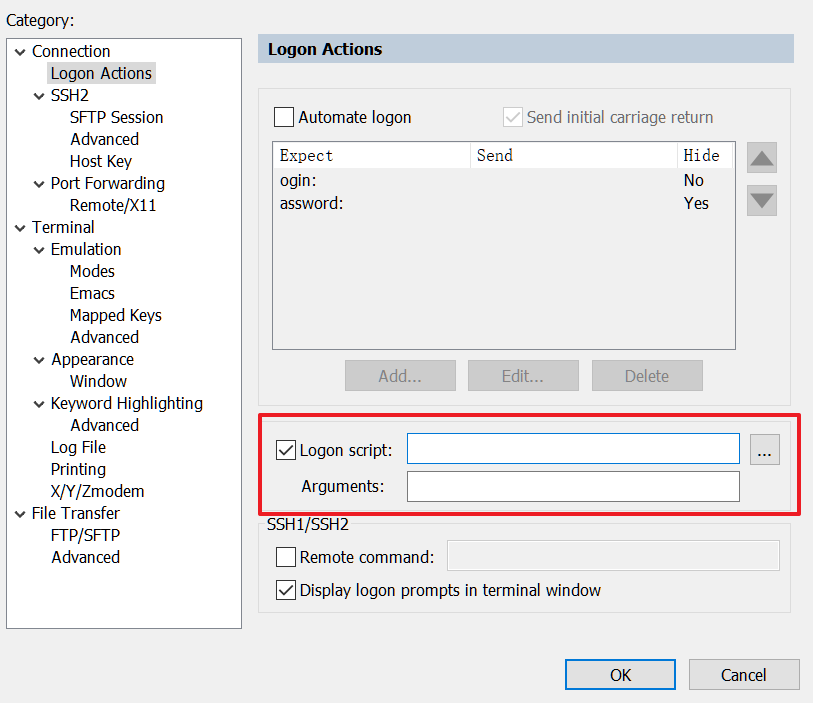
是否考虑以后增加自动化脚本的功能
就像SecureCRT的logon script (支持python)
一些传递过去的命令参数值是通过编程的方式获得,比如用于登录2FA认证
@zxdong262 commented on GitHub (Dec 30, 2021):
方便详细说说吗,这个自动脚本是怎么个工作流程?
@ViCrack commented on GitHub (Dec 30, 2021):
以SecureCRT为例,它会提供一些内置的扩展Api给python或js等脚本来使用,当连接到ssh上,比如脚本中调用了
Send则会发送命令到服务端,用FileTransfer可以传输文件,调用了WaitForString则是等待服务端的回显输出,效果上看有点像expect的命令脚本,实现上可能是采取了某种插件扩展的机制,启动时加载脚本,注入crt的全局对象,可编程实现自动化操作。https://documentation.help/SecureCRT/Application_Object.htm
https://www.vandyke.com/products/securecrt/scripts.html