mirror of
https://github.com/electerm/electerm.git
synced 2026-04-25 21:45:56 +03:00
Closed
opened 2026-02-27 00:01:26 +03:00 by kerem
·
11 comments
No Branch/Tag specified
master
gh-pages
build
widget
linux-rpm-snap
title-temp
loong
test-npm2
copilot/fix-1cb8af11-1bce-40d4-956d-09f37d6761a6
copilot/fix-08f655b1-c7b3-454e-b1ed-94b5784e0247
copilot/fix-f0838905-e826-428b-8826-a4dac9a4303a
revert-3295-features/putty-like-ssh-tunnel-destination
v3.6.16
v3.6.6
v3.5.6
v3.3.8
v3.2.0
v3.1.26
v3.1.16
v3.1.6
v3.0.18
v3.0.6
v2.17.16
v2.17.8
v2.16.9
v2.15.8
v2.13.6
v2.13.0
v2.12.0
v2.11.16
v2.11.6
v2.10.26
v2.10.6
v2.8.16
v2.8.6
v2.7.8
v2.6.0
v2.5.16
v2.5.9
v2.5.6
v2.4.38
2.4.35
v2.4.28
v2.3.198
v2.3.191
v2.3.190
v2.3.181
v2.3.176
v2.3.166
v2.3.151
v2.3.136
v2.3.126
v2.3.118
v2.3.113
v2.3.103
v2.3.100
v2.3.85
v2.3.75
v2.3.65
v2.3.58
v2.3.48
v2.3.36
v2.3.30
v2.3.18
v2.3.6
v2.2.0
v2.1.26
v2.1.16
v2.1.8
v1.101.20
v1.101.16
v1.101.10
v1.100.60
v1.100.56
v1.100.50
v1.100.46
v1.100.30
v1.100.20
v1.100.18
v1.100.8
v1.91.16
v1.91.8
v1.91.1
v1.90.8
v1.90.6
v1.80.18
v1.80.6
v1.80.5
v1.80.3
v1.80.2
v1.72.48
v1.72.36
v1.72.26
v1.72.18
v1.72.6
v1.70.6
v1.70.0
v1.60.56
v1.60.50
v1.60.48
v1.60.36
v1.60.32
v1.60.29
v1.60.16
v1.60.6
v1.51.18
v1.51.8
v1.51.3
v1.51.0
v1.50.66
v1.50.65
v1.50.59
v1.50.46
v1.50.40
v1.50.21
v1.40.20
v1.40.18
v1.40.16
v1.40.6
v1.39.119
v1.39.109
v1.39.103
v1.39.99
v1.39.88
v1.39.76
v1.39.68
v1.39.56
v1.39.47
v1.39.46
v1.39.35
v1.39.31
v1.39.18
v1.39.5
v1.39.2
v1.38.86
v1.38.81
v1.38.80
v1.38.70
v1.38.65
v1.38.60
v1.38.50
v1.38.43
v1.38.42
v1.38.41
v1.38.30
v1.38.19
v1.38.11
v1.38.8
v1.37.126
v1.37.121
v1.37.110
v1.37.106
v1.37.96
v1.37.93
v1.37.92
v1.37.88
v1.37.80
v1.37.68
v1.37.66
v1.37.60
v1.37.58
v1.37.46
v1.37.38
v1.37.36
v1.37.20
v1.37.16
v1.37.6
v1.37.1
v1.36.1
v1.35.6
v1.35.0
v1.34.68
v1.34.58
v1.34.48
v1.34.46
v1.34.39
v1.34.38
v1.34.30
v1.34.26
v1.34.20
v1.34.10
v1.34.6
v1.34.0
v1.33.36
v1.33.26
v1.33.6
v1.33.0
v1.32.46
v1.32.38
v1.32.28
v1.32.6
v1.31.1
v1.30.9
v1.29.5
v1.29.4
v1.29.2
v1.28.4
v1.28.3
v1.28.1
v1.28.0
v1.27.30
v1.27.20
v1.27.19
v1.27.5
v1.26.2
v1.26.1
v1.26.0
v1.25.50
v1.25.41
v1.25.40
v1.25.30
v1.25.22
v1.25.20
v1.25.16
v1.25.14
v1.25.12
v1.25.10
v1.25.6
v1.24.13
v1.23.32
v1.23.28
v1.23.22
v1.23.20
v1.23.15
v1.23.8
v1.23.6
v1.23.4
v1.23.3
v1.23.2
v1.22.33
v1.22.30
v1.22.27
v1.22.24
v1.22.20
v1.22.8
v1.22.1
v1.21.93
v1.21.91
v1.21.88
v1.21.74
v1.21.73
v1.21.57
v1.21.48
v1.21.40
v1.21.34
v1.21.20
v1.21.18
v1.21.14
v1.21.9
v1.20.10
v1.20.6
v1.20.4
v1.19.5
v1.19.0
v1.18.5
v1.18.1
v1.18.0
v1.17.26
v1.17.21
v1.17.19
v1.17.16
v1.17.15
v1.17.3
v1.16.21
v1.16.11
v1.16.5
v1.16.3
v1.16.1
v1.15.3
v1.14.0
1.13.4
v1.13.3
v1.13.1
v1.12.24
v1.12.21
v1.12.19
v1.12.15
v1.12.9
v1.12.7
v1.12.6
v1.12.2
v1.12.1
v1.12.0
v1.11.16
v1.11.13
v1.11.12
v1.11.11
v1.11.8
v1.11.6
v1.11.5
v1.11.1
v1.11.0
v1.10.39
v1.10.35
v1.10.31
v1.10.14
v1.10.13
v1.10.9
1.10.0
v1.9.31
v1.9.27
v1.9.24
v1.9.19
v1.9.14
v1.9.12
v1.9.7
v1.9.0
v1.8.3
v1.7.18
v1.7.17
v1.7.10
v1.5.19
v1.5.18
v1.5.15
v1.5.13
v1.5.7
v1.5.4
v1.5.0
v1.4.4
v1.4.2
v1.3.55
v1.3.54
v1.3.49
v1.3.46
v1.3.45
v1.3.42
v1.3.38
v1.3.36
v1.3.35
v1.3.34
v1.3.31
v1.3.28
v1.3.25
v1.3.21
v1.3.18
v1.3.15
v1.3.12
v1.3.10
v1.3.8
v1.3.7
v1.3.5
v1.3.4
v1.3.2
v1.3.1
v1.3.0
v1.2.2
v1.0.33
v1.0.31
v1.0.28
v1.0.27
v1.0.26
v1.0.24
v1.0.23
v1.0.21
v1.0.19
v1.0.18
v1.0.13
v1.0.7
v1.0.1
v1.0.0
v0.27.105
v0.27.100
v0.27.97
v0.27.96
v0.27.89
v0.27.84
v0.27.83
v0.27.82
v0.27.80
v0.27.79
v0.27.78
v0.27.76
v0.27.74
v0.27.72
v0.27.70
v0.27.68
v0.27.67
v0.27.65
v0.27.63
v0.27.60
v0.27.57
v0.27.53
v0.27.52
v0.27.50
v0.27.48
v0.27.44
v0.27.41
v0.27.37
v0.27.34
v0.27.31
v0.27.27
v0.27.25
v0.27.22
v0.27.20
v0.27.12
v0.27.11
v0.27.5
v0.27.0
v0.26.76
v0.26.75
v0.26.73
v0.26.71
v0.26.67
v0.26.63
v0.26.62
v0.26.59
v0.26.57
v0.26.55
v0.26.54
v0.26.51
v0.26.47
v0.26.46
v0.26.44
v0.26.43
v0.26.40
v0.26.38
v0.26.31
v0.26.27
v0.26.24
v0.26.23
v0.26.22
v0.26.21
v0.26.20
v0.26.18
v0.26.14
v0.26.12
v0.26.10
v0.26.9
v0.26.2
v0.25.66
v0.25.65
v0.25.61
v0.25.60
v0.25.56
v0.25.52
v0.25.48
v0.25.43
v0.25.41
v0.25.39
v0.25.37
v0.25.33
v0.25.21
v0.25.18
v0.25.12
v0.25.9
v0.25.1
v0.25.0
v0.24.45
v0.24.44
v0.24.39
v0.24.36
v0.24.35
v0.24.33
v0.24.32
v0.24.28
v0.24.26
v0.24.25
v0.24.23
v0.24.20
v0.24.16
v0.24.11
v0.24.9
v0.24.7
v0.24.5
v0.24.4
v0.24.3
v0.24.1
v0.24.0
v0.23.41
v0.23.38
v0.23.34
v0.23.32
v0.23.29
v0.23.27
v0.23.25
v0.23.24
v0.23.21
v0.23.20
v0.23.18
v0.23.16
v0.23.12
v0.23.11
v0.23.10
v0.23.9
v0.23.8
v0.23.5
v0.23.1
v0.22.24
v0.22.23
v0.22.21
v0.22.18
v0.22.17
v0.22.14
v0.22.11
v0.22.9
v0.22.6
v0.22.4
v0.22.3
v0.22.2
v0.22.1
v0.22.0
v0.21.14
v0.21.13
v0.21.10
v0.21.7
v0.21.4
v0.21.0
v0.20.9
v0.20.6
v0.20.1
v0.20.0
v0.19.12
v0.19.8
v0.19.6
v0.19.1
v0.19.0
v0.18.7
v0.18.6
v0.18.5
v0.18.4
v0.18.0
v0.17.3
v0.17.0
v0.16.30
v0.16.29
v0.16.28
v0.16.27
v0.16.26
v0.16.25
v0.16.24
v0.16.22
v0.16.1
v0.16.0
v0.15.10
v0.15.6
v0.15.3
v0.15.0
v0.14.8
v0.14.4
v0.14.3
v0.14.2
v0.14.1
v0.14.0
v0.13.3
v0.13.2
v0.13.1
v0.13.0
v0.12.0
v0.11.1
v0.11.0
v0.10.0
v0.9.5
v0.9.0
v0.8.5
v0.8.0
v0.7.0
v0.6.1
v0.6.0
v0.5.0
v0.4.0
v0.3.3
v0.3.2
v0.3.0
v0.2.3
v0.2.1
v0.2.0
v0.1.0
v0.0.1
Labels
No labels
Linux
Mac
Windows
bug
chor
developing
doc
duplicate
enhancement
feature
feature
feature
help wanted
invalid
need investigate
pull-request
question
test
wontfix
Milestone
Clear milestone
No items
No milestone
Projects
Clear projects
No items
No project
Assignees
Clear assignees
No assignees
1 participant

Notifications
Due date
The due date is invalid or out of range. Please use the format "yyyy-mm-dd".
No due date set.
Dependencies
No dependencies set.
Reference
starred/electerm#894
Loading…
Add table
Add a link
Reference in a new issue
No description provided.
Delete branch "%!s()"
Deleting a branch is permanent. Although the deleted branch may continue to exist for a short time before it actually gets removed, it CANNOT be undone in most cases. Continue?
Originally created by @saulperez2905 on GitHub (Feb 5, 2020).
Original GitHub issue: https://github.com/electerm/electerm/issues/1549
Electerm version:
1.0.19
Operating system(linux, macos, or windows7/8/10?):
RHEL7.7
Expected Behavior
connect to my servers clients using toxsocks proxy.
Current Behavior
nothing, electerm not connected
Possible Solution
Steps to Reproduce
Context (Environment)
Detailed Description
Suggestions?
@zxdong262 commented on GitHub (Feb 6, 2020):
@saulperez2905 Can you provide more detail?
@saulperez2905 commented on GitHub (Feb 7, 2020):
In my work we use toxsocks as a proxy to connect to servers.
electerm is added to toxsock with the app allowed, however the connection to the servers cannot be made. It was tested with putty and works normally
@saulperez2905 commented on GitHub (Feb 7, 2020):
execute: toxsocks electerm
@saulperez2905 commented on GitHub (Feb 7, 2020):
and view new issues
[sperez@oc1178881380 ~]$ electerm
Gtk-Message: 12:10:07.269: Failed to load module "pk-gtk-module"
Gtk-Message: 12:10:07.273: Failed to load module "pk-gtk-module"
12:10:07 › error parsing $HOME/.ssh/config
12:10:07 › maybe no $HOME/.ssh/config, but it is ok
12:10:07 › no ../../install-src file
(electron) 'getName function' is deprecated and will be removed. Please use 'name property' instead.
12:10:07 › App starting...
12:10:07 › no /home/sperez/snap/electerm/x2/.config/electerm-config.js but it is ok
[12366:0207/121007.673378:ERROR:buffer_manager.cc(488)] [.DisplayCompositor]GL ERROR :GL_INVALID_OPERATION : glBufferData: <- error from previous GL command
12:10:07 › no ../../install-src file
12:10:07 › server runs on localhost 3075
12:10:09 › Created terminal with PID: rNgBE3_1
12:10:09 › Connected to terminal rNgBE3_1
12:10:09 › Resized terminal rNgBE3_1 to 153 cols and 34 rows.
12:10:16 › close app
12:10:16 › close app
[sperez@oc1178881380 ~]$
@zxdong262 commented on GitHub (Feb 8, 2020):
I really want to look into this, but I can not even google toxsocks for its document, no result for that, any suggestions? anywhere I can find docs about how it works? Does it provide mannually proxy method, like give a proxy addr like sock5://127.0.0.1:xxxx?
@saulperez2905
@saulperez2905 commented on GitHub (Feb 12, 2020):
hi
@zxdong262
Overview
SOCKS is a protocol that allows you to access hosts on the other side of a firewall. A SOCKS server either allows or rejects connection requests, based on the requested internet destination or user identification. After a connection and a subsequent bind request have been set up, the flow of information exchange follows the usual protocol, i.e., HTTP. It secures privacy by hiding your IP address.
Use the Toxsocks Socks Client to socksify a remote host connection to a customer site from your Linux computer. Toxsocks only runs on the Linux, not in a Windows Kernel Virtual Machine (KVM).
Install Toxsocks
Toxsocks requires two packages :
ibm-config-toxsocks
toxsocks
Important: These are 64-bit packages. There is also a 32-bit version of toxsocks. Don't install both.
Installation Process
To install the Toxsocks client:
To start the installation click Activities and type tox in the search field. Click the toxclient icon.
The application installer starts. Click Install to install the required software packages.
After the installation completes, click Activities and type tox in the search field again. You're now ready to either configure or start the ToxClient.
Alternative Install Option via Command Line
Alternatively you can install toxsocks via the command line. To install from a command line, open a Terminal window and type:
sudo yum install toxsocks ibm-config-toxsocks
Confirm the Installation
You can use Add/Remove Software to confirm that the software is installed. If selected with a check mark, it's installed.
You can also confirm what packages are installed with a command, which also provides details in the terminal screen. Type:
Launch Toxsocks
To launch the client, click Activities on the Dash to Dock and type socks. Click the client to launch it.
The first time you launch the client, you're asked if you want to integrate Toxsocks with Citrix. Click Install.
When it launches, the Toxsox Management Tool opens.
Note: If the Socks Client doesn't show up when you search for it, you might need to log out and log back in.
Profiles and Applications
You must configure the Toxsocks client on your PC before using it. If you have a preconfigured profile, you don't have to configure it manually.
Some markets, countries, and accounts maintain a common configuration file that supports all of the customers in that market or account. The Global Service Network Infrastructure (GSNI) profiles are dynamically imported from both US and Brazil GSNI websites.
If you're a member of one or more of these subcommunities, check in the GSNI profiles listed here for a shared SOCKS profile that you can use.
Create a GSNI Connection
To configure a GSNI connection:
Click Profiles and then "Import from GSNI Sites."
Select the country (Brazil or United States).
Select a profile. If you would like to import more than one profile, hold down the control key and select any number of them. When selecting only one profile to import, you can find the name of it by just typing in the name.
When finished, select "Import all selected profiles."
When asked to confirm, click Close. A message confirms that the profiles imported successfully.
Click Close again, unless you have more profiles to import.
For non-GSNI sites, select Profiles, Add New, fill in the information needed to connect to the server, and select Save.
Notes:
In the following example screenshot, two profiles are imported, one for Coca Cola, and another for BNSF Railway. By default, you don't need to edit these profiles, unless you need to add credentials.
Each profile appears with a row of associated icons.
Available Socksified Applications for Each Profile
After starting the Socks Client, a set of icons displays under the profile name (e.g., BSNF Railway). These applications have been associated with the Socks Client.
This list is dynamically built and only displays those applications you have installed. The example displays the applications for BNSF Railway.
Terminal: A socksified terminal can be used to launch socksified applications or connect to a host in a more traditional way, telnet, SSH, or FTP.
If you launch a terminal session, you can use it to start other socksified applications.
Firefox: Enables socksified web use.
Remmina: A Windows terminal server, VNC, SSH and more
SAPGUI.
TS Client: A Windows terminal server and more.
RDesktop: A remote desktop takeover tool.
PuTTY: A common terminal application used for Telnet and SSH.
TigerVNC Viewer: A commonly used VNC connection tool.
Edit Profile.
Delete Profile.
Move the mouse over an icon to get a description of the application.
If you want to add an application to ToxSocks that isn't in the list:
Shut down ToxSocks.
Install the application and filter on the name (e.g. remmina).
Launch ToxSocks again. This refreshes the list of available applications.
Edit a Connection/Profile
After you have one or more profiles imported, click the Edit button of a profile to confirm the configuration. If you need to enter a username and password, do it here and click Save.
Create a New Profile
To create a new profile:
From the Toxocks Profiles menu, select Add New.
The source where you want to connect should provide you with connection information. Fill in the form with this Socks information.
Server Name
Server IP
Port
Server Type
Default Username
Default Password
Click Save.
You've added a new profile, and you can now launch it.
Launch a Profile/Connection
You can launch a profile or connection by selecting one of the tools listed under the name of the GSNI profile where you want to connect.
Location of Profile Configuration Files
Your configuration is stored in your home folder under .toxsocks. When navigating using Nautilus (File Browser), select View, and then Show Hidden Files.
Create a Connection Using Firefox
You can create a socksified connection using Firefox:
Start Toxsocks, locate the GNSI site where you want to connect, and then start Firefox.
Enter the URL, and click "Run application." The IP address is typically used. If you want to use the host names for the remote sites, you must create and maintain a hosts file in Linux.
When Firefox launches, it uses your default account, or you must create a new profile.
Firefox now launches and starts the socksified connection to your remote account.
Always launch the URL from toxsocks by clicking the Firefox icon, or launch Firefox from a socksified Terminal window.
@saulperez2905 commented on GitHub (Feb 22, 2020):
Hi any update?
@zxdong262 commented on GitHub (Feb 24, 2020):
Not yet @saulperez2905
@saulperez2905 commented on GitHub (Mar 23, 2020):
hi @zxdong262 could you get any progress with toxsocks?
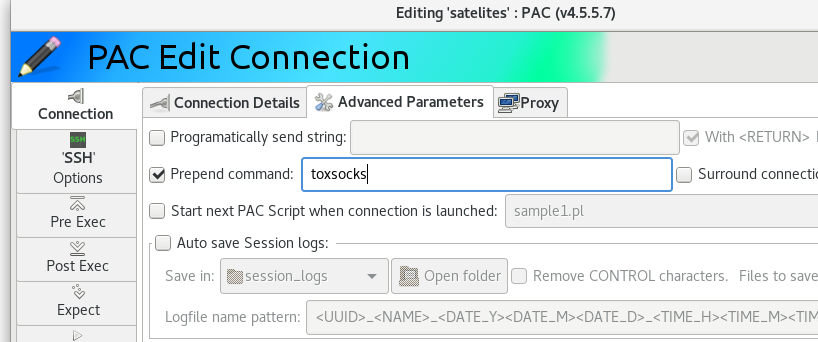
When I use Putty, since toxsocks this works fine.
Another tool that I have used with toxsocks is "PAC Manager". but in PAC if there is an additional configuration to be made in each session created.
@zxdong262 commented on GitHub (Mar 23, 2020):
@saulperez2905 No pregress yet, seems more issues than I can handle, may take a while to do this.
@zxdong262 commented on GitHub (May 7, 2022):
Seems no need to do this, since electerm now can set proxy in settings