[GH-ISSUE #346] Centos on Bandwagon host 部署 docker setup-ipsec-vpn,OS X可以连接,可以使用SSH,没有互联网。 #318

Closed
opened 2026-03-02 08:01:20 +03:00 by kerem · 3 comments
Owner

Originally created by @bubersome on GitHub (Feb 10, 2023).
Original GitHub issue: https://github.com/hwdsl2/docker-ipsec-vpn-server/issues/346

Checklist

Describe the issue

  1. 可以在Centos VPS 部署 在Docker 容器中。
  2. 需要注意的是该Docker 已经成功部署Zerotier 并且可以正常使用。
  3. 可以在OSX 使用 vpnclien.mobileconfig 自动部署并且连接。
  4. 可以成功连接,可以使用SSH,但是无法使用Safari 或者 Edge 浏览互联网。
  5. 更换另外一台Mac 使用同样的步骤,也是同样症状。
    请帮忙支教应该如何debug, 我有使用一键脚本成功部署的经验。

To Reproduce
Steps to reproduce the behavior:

  1. ...
  2. ...

Expected behavior
A clear and concise description of what you expected to happen.

Logs
Check logs and VPN status, and add error logs to help explain the problem, if applicable.

Server (please complete the following information)

  • OS: [e.g. Debian 11]
  • Hosting provider (if applicable): [e.g. GCP, AWS]

Client (please complete the following information)

  • Device: [e.g. iPhone 12]
  • OS: [e.g. iOS 15]
  • VPN mode: [IPsec/L2TP, IPsec/XAuth ("Cisco IPsec") or IKEv2]

Additional context
Add any other context about the problem here.

Originally created by @bubersome on GitHub (Feb 10, 2023). Original GitHub issue: https://github.com/hwdsl2/docker-ipsec-vpn-server/issues/346 **Checklist** - [x] I read the [README](https://github.com/hwdsl2/setup-ipsec-vpn/blob/master/README.md) - [x] I read the [Important notes](https://github.com/hwdsl2/setup-ipsec-vpn/blob/master/README.md#important-notes) - [x] I followed instructions to [configure VPN clients](https://github.com/hwdsl2/setup-ipsec-vpn/blob/master/README.md#next-steps) - [x] I checked [IKEv1 troubleshooting](https://github.com/hwdsl2/setup-ipsec-vpn/blob/master/docs/clients.md#ikev1-troubleshooting), [IKEv2 troubleshooting](https://github.com/hwdsl2/setup-ipsec-vpn/blob/master/docs/ikev2-howto.md#ikev2-troubleshooting) and [VPN status](https://github.com/hwdsl2/setup-ipsec-vpn/blob/master/docs/clients.md#check-logs-and-vpn-status) - [ ] I searched existing [Issues](https://github.com/hwdsl2/setup-ipsec-vpn/issues?q=is%3Aissue) - [ ] This bug is about the VPN setup scripts, and not IPsec VPN itself <!--- If you found a reproducible bug for the IPsec VPN, open a bug report at https://github.com/libreswan/libreswan. Ask VPN-related questions on the [Libreswan](https://lists.libreswan.org/mailman/listinfo/swan) or [strongSwan](https://lists.strongswan.org/mailman/listinfo/users) users mailing list, or search e.g. [Stack Overflow](https://stackoverflow.com/questions/tagged/vpn). ---> **Describe the issue** 1. 可以在Centos VPS 部署 在Docker 容器中。 2. 需要注意的是该Docker 已经成功部署Zerotier 并且可以正常使用。 3. 可以在OSX 使用 vpnclien.mobileconfig 自动部署并且连接。 4. 可以成功连接,可以使用SSH,但是无法使用Safari 或者 Edge 浏览互联网。 5. 更换另外一台Mac 使用同样的步骤,也是同样症状。 请帮忙支教应该如何debug, 我有使用一键脚本成功部署的经验。 **To Reproduce** Steps to reproduce the behavior: 1. ... 7. ... **Expected behavior** A clear and concise description of what you expected to happen. **Logs** [Check logs and VPN status](https://github.com/hwdsl2/setup-ipsec-vpn/blob/master/docs/clients.md#check-logs-and-vpn-status), and add error logs to help explain the problem, if applicable. **Server (please complete the following information)** - OS: [e.g. Debian 11] - Hosting provider (if applicable): [e.g. GCP, AWS] **Client (please complete the following information)** - Device: [e.g. iPhone 12] - OS: [e.g. iOS 15] - VPN mode: [IPsec/L2TP, IPsec/XAuth ("Cisco IPsec") or IKEv2] **Additional context** Add any other context about the problem here.
kerem closed this issue 2026-03-02 08:01:20 +03:00
Author
Owner

@hwdsl2 commented on GitHub (Feb 11, 2023):

@bubersome 你好!如果可以成功连接但是无法访问网站,有可能是 MTU/MSS 问题。解决方案请参见以下链接:
连接 IKEv2 后不能打开网站
Android MTU/MSS 问题

另外也可能是 DNS 的问题,可以尝试访问网站比如 https://1.1.1.1 以排除该原因。

<!-- gh-comment-id:1426607771 --> @hwdsl2 commented on GitHub (Feb 11, 2023): @bubersome 你好!如果可以成功连接但是无法访问网站,有可能是 MTU/MSS 问题。解决方案请参见以下链接: [连接 IKEv2 后不能打开网站](https://github.com/hwdsl2/setup-ipsec-vpn/blob/master/docs/ikev2-howto-zh.md#%E8%BF%9E%E6%8E%A5-ikev2-%E5%90%8E%E4%B8%8D%E8%83%BD%E6%89%93%E5%BC%80%E7%BD%91%E7%AB%99) [Android MTU/MSS 问题](https://github.com/hwdsl2/setup-ipsec-vpn/blob/master/docs/clients-zh.md#android-mtumss-%E9%97%AE%E9%A2%98) 另外也可能是 DNS 的问题,可以尝试访问网站比如 https://1.1.1.1 以排除该原因。
Author
Owner

@bubersome commented on GitHub (Feb 11, 2023):

hwdsl2大神好,

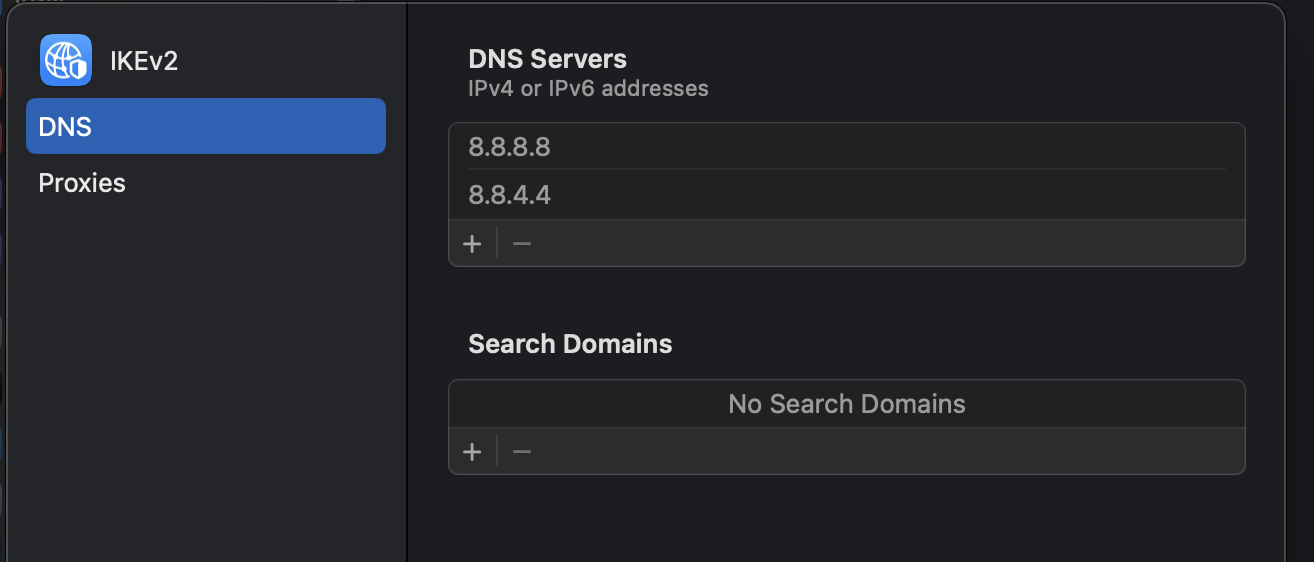
  1. 无法访问,https://1.1.1.1/ 检查了DNS配置如下
    Screenshot 2023-02-10 at 10 24 12 PM
    请问还有别的方法排除吗?

  2. 这个方法不知道如何检查: 连接 IKEv2 后不能打开网站

  3. 用ifconfig 检查了MTU 都是1500.
    [Android MTU/MSS 问题]

希望大神能够指点迷津。我有两个VPS 另外一个直接一键安装的运行了数年一直没有问题。今天尝试Docker就吃瘪了。

<!-- gh-comment-id:1426610931 --> @bubersome commented on GitHub (Feb 11, 2023): hwdsl2大神好, 1. 无法访问,https://1.1.1.1/ 检查了DNS配置如下 <img width="657" alt="Screenshot 2023-02-10 at 10 24 12 PM" src="https://user-images.githubusercontent.com/7904383/218239799-fb1eb138-99a2-477c-b905-0975da81bd18.png"> 请问还有别的方法排除吗? 2. 这个方法不知道如何检查: [连接 IKEv2 后不能打开网站]() 3. 用ifconfig 检查了MTU 都是1500. [Android MTU/MSS 问题] 希望大神能够指点迷津。我有两个VPS 另外一个直接一键安装的运行了数年一直没有问题。今天尝试Docker就吃瘪了。
Author
Owner

@hwdsl2 commented on GitHub (Feb 11, 2023):

@bubersome 对于 MTU/MSS 问题,请尝试在你的 env 文件中添加 VPN_ANDROID_MTU_FIX=yes,然后重新创建 Docker 容器。在这里有说明:
https://github.com/hwdsl2/setup-ipsec-vpn/blob/master/docs/clients-zh.md#android-mtumss-%E9%97%AE%E9%A2%98

对于此问题,我暂时没有其他比较好的解决方案的建议。你再自己尝试一下。

<!-- gh-comment-id:1426623342 --> @hwdsl2 commented on GitHub (Feb 11, 2023): @bubersome 对于 MTU/MSS 问题,请尝试在你的 env 文件中添加 VPN_ANDROID_MTU_FIX=yes,然后重新创建 Docker 容器。在这里有说明: https://github.com/hwdsl2/setup-ipsec-vpn/blob/master/docs/clients-zh.md#android-mtumss-%E9%97%AE%E9%A2%98 对于此问题,我暂时没有其他比较好的解决方案的建议。你再自己尝试一下。
Sign in to join this conversation.
No milestone
No project
No assignees
1 participant
Notifications
Due date
The due date is invalid or out of range. Please use the format "yyyy-mm-dd".

No due date set.

Dependencies

No dependencies set.

Reference
starred/docker-ipsec-vpn-server#318
No description provided.