[GH-ISSUE #298] IKEv2 fails to connect with NO_PROPOSAL_CHOSEN (Docker Image) #273

Closed
opened 2026-03-02 08:01:00 +03:00 by kerem · 3 comments
Owner

Originally created by @NLJM on GitHub (Jun 14, 2022).
Original GitHub issue: https://github.com/hwdsl2/docker-ipsec-vpn-server/issues/298

Describe the issue
I am running the docker container using auto-setup. Am able to connect to the VPN using Cisco IPSec however IKEv2 is not happening.

To Reproduce
Steps to reproduce the behavior:

  1. Deploy docker image using default auto script
  2. Download vpnclient.mobileconfig from container.
  3. Install mobileconfig file in MacOS/ iOS
  4. Try to connect and fails to connect

When I try to connect using Cisco IPSec the VPN is working.

Expected behavior
I expect IKEv2 to connect.

Logs
This is all I get in the logs.

1cb06121aa01:/opt/src# grep pluto /var/log/messages
2022-06-14T16:40:59.626148+00:00 1cb06121aa01 /etc/init.d/ipsec[1877]: checkpath: /var/run/pluto: could not open run: No such device or address
2022-06-14T16:42:21.540793+00:00 1cb06121aa01 /etc/init.d/ipsec[229]: checkpath: /var/run/pluto: could not open run: No such device or address
1cb06121aa01:/opt/src#

I did however also trace on my macOS using wireshark
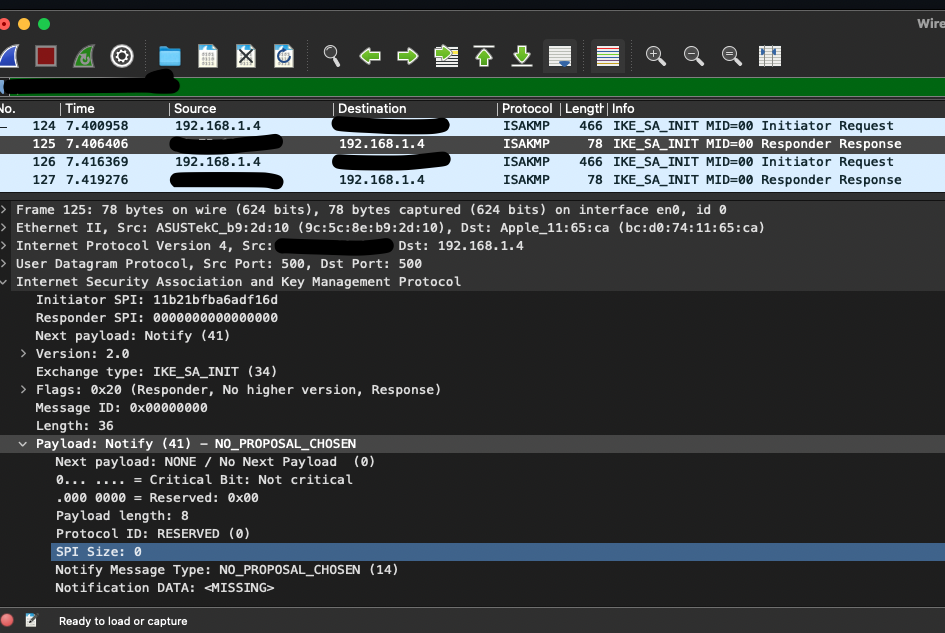
Wireshark Trace of problem

Server (please complete the following information)

  • OS: Alpine (However I've also tried Debian with same result)

Client (please complete the following information)

  • Device: iPhone 12 Pro
  • OS: iOS 15.5
  • VPN mode: IKEv2]

Client (please complete the following information)

  • Device: Macbook Pro 2021
  • OS: macOS Montery 12.4
  • VPN mode: IKEv2]
Originally created by @NLJM on GitHub (Jun 14, 2022). Original GitHub issue: https://github.com/hwdsl2/docker-ipsec-vpn-server/issues/298 **Describe the issue** I am running the docker container using auto-setup. Am able to connect to the VPN using Cisco IPSec however IKEv2 is not happening. **To Reproduce** Steps to reproduce the behavior: 1. Deploy docker image using default auto script 2. Download vpnclient.mobileconfig from container. 3. Install mobileconfig file in MacOS/ iOS 4. Try to connect and fails to connect When I try to connect using Cisco IPSec the VPN is working. **Expected behavior** I expect IKEv2 to connect. **Logs** This is all I get in the logs. 1cb06121aa01:/opt/src# grep pluto /var/log/messages 2022-06-14T16:40:59.626148+00:00 1cb06121aa01 /etc/init.d/ipsec[1877]: checkpath: /var/run/pluto: could not open run: No such device or address 2022-06-14T16:42:21.540793+00:00 1cb06121aa01 /etc/init.d/ipsec[229]: checkpath: /var/run/pluto: could not open run: No such device or address 1cb06121aa01:/opt/src# I did however also trace on my macOS using wireshark ![Wireshark Trace of problem](https://i.postimg.cc/NGZ9WDm2/Schermafbeelding-2022-06-14-om-19-10-03.png) **Server (please complete the following information)** - OS: Alpine (However I've also tried Debian with same result) **Client (please complete the following information)** - Device: iPhone 12 Pro - OS: iOS 15.5 - VPN mode: IKEv2] **Client (please complete the following information)** - Device: Macbook Pro 2021 - OS: macOS Montery 12.4 - VPN mode: IKEv2]
kerem closed this issue 2026-03-02 08:01:00 +03:00
Author
Owner

@hwdsl2 commented on GitHub (Jun 15, 2022):

@NLJM Hello! What is your Docker host's Linux distribution and version? I could not reproduce this issue on a Ubuntu 22.04 Docker host with the Alpine-based hwdsl2/ipsec-vpn-server Docker image. IKEv2 works fine in my tests.

Your logs show /var/run/pluto: could not open run: No such device or address, but the run.sh script inside the container does create the /var/run/pluto directory before starting IPsec. This is most likely an issue with your specific Docker container. Try updating the Docker image to the latest version, then re-create the Docker container [1].

[1] https://github.com/hwdsl2/docker-ipsec-vpn-server#update-docker-image

<!-- gh-comment-id:1155986552 --> @hwdsl2 commented on GitHub (Jun 15, 2022): @NLJM Hello! What is your Docker host's Linux distribution and version? I could not reproduce this issue on a Ubuntu 22.04 Docker host with the Alpine-based hwdsl2/ipsec-vpn-server Docker image. IKEv2 works fine in my tests. Your logs show `/var/run/pluto: could not open run: No such device or address`, but the `run.sh` script inside the container does create the `/var/run/pluto` directory before starting IPsec. This is most likely an issue with your specific Docker container. Try updating the Docker image to the latest version, then re-create the Docker container [1]. [1] https://github.com/hwdsl2/docker-ipsec-vpn-server#update-docker-image
Author
Owner

@NLJM commented on GitHub (Jun 16, 2022):

Hi @hwdsl2,

I am running Docker version 20.10.3, build 55f0773 on a Synolgoy NAS (DSM 7.1-42661 Update 1). Everything is updated to the most recent verslons (DSM, Docker and Docker Image).

I've recreated the container without --priviledged and now I am getting the pluto logs:

2022-06-16T16:43:00.852183+00:00 05be34b19461 pluto[374]: packet from 172.18.0.1:41287: ISAKMP_v2_IKE_SA_INIT message received on 172.18.0.15:500 but no suitable connection found with IKEv2 policy
2022-06-16T16:43:00.852204+00:00 05be34b19461 pluto[374]: packet from 172.18.0.1:41287: responding to IKE_SA_INIT (34) message (Message ID 0) with unencrypted notification NO_PROPOSAL_CHOSEN
2022-06-16T16:43:00.869171+00:00 05be34b19461 pluto[374]: packet from 172.18.0.1:41287: ISAKMP_v2_IKE_SA_INIT message received on 172.18.0.15:500 but no suitable connection found with IKEv2 policy
2022-06-16T16:43:00.869192+00:00 05be34b19461 pluto[374]: packet from 172.18.0.1:41287: responding to IKE_SA_INIT (34) message (Message ID 0) with unencrypted notification NO_PROPOSAL_CHOSEN

Ok, it seems Synology doesn't support MOBIKE. After disabling it it does connect however for some reason my Synology crashes completely and reboots. So I guess it is requesting access to some resource it can't handle.

<!-- gh-comment-id:1157878790 --> @NLJM commented on GitHub (Jun 16, 2022): Hi @hwdsl2, I am running Docker version 20.10.3, build 55f0773 on a Synolgoy NAS (DSM 7.1-42661 Update 1). Everything is updated to the most recent verslons (DSM, Docker and Docker Image). I've recreated the container without --priviledged and now I am getting the pluto logs: 2022-06-16T16:43:00.852183+00:00 05be34b19461 pluto[374]: packet from 172.18.0.1:41287: ISAKMP_v2_IKE_SA_INIT message received on 172.18.0.15:500 but no suitable connection found with IKEv2 policy 2022-06-16T16:43:00.852204+00:00 05be34b19461 pluto[374]: packet from 172.18.0.1:41287: responding to IKE_SA_INIT (34) message (Message ID 0) with unencrypted notification NO_PROPOSAL_CHOSEN 2022-06-16T16:43:00.869171+00:00 05be34b19461 pluto[374]: packet from 172.18.0.1:41287: ISAKMP_v2_IKE_SA_INIT message received on 172.18.0.15:500 but no suitable connection found with IKEv2 policy 2022-06-16T16:43:00.869192+00:00 05be34b19461 pluto[374]: packet from 172.18.0.1:41287: responding to IKE_SA_INIT (34) message (Message ID 0) with unencrypted notification NO_PROPOSAL_CHOSEN Ok, it seems Synology doesn't support MOBIKE. After disabling it it does connect however for some reason my Synology crashes completely and reboots. So I guess it is requesting access to some resource it can't handle.
Author
Owner

@hwdsl2 commented on GitHub (Jun 17, 2022):

@NLJM Thanks for the update! Regarding MOBIKE, I think you're right. The IKEv2 setup script (which runs as part of the Docker container initialization) cannot currently detect Synology host OS from within the Docker container (although it can try to detect e.g. Ubuntu). When MOBIKE is set to "on" on an unsupported OS, the IKEv2 connection will fail to initialize and not be enabled. Turning off MOBIKE manually in ikev2.conf resolves it. But it looks like Synology doesn't support running IKEv2 in the Docker container due to other reasons, as you mentioned.

<!-- gh-comment-id:1158593803 --> @hwdsl2 commented on GitHub (Jun 17, 2022): @NLJM Thanks for the update! Regarding MOBIKE, I think you're right. The IKEv2 setup script (which runs as part of the Docker container initialization) cannot currently detect Synology host OS from within the Docker container (although it can try to detect e.g. Ubuntu). When MOBIKE is set to "on" on an unsupported OS, the IKEv2 connection will fail to initialize and not be enabled. Turning off MOBIKE manually in ikev2.conf resolves it. But it looks like Synology doesn't support running IKEv2 in the Docker container due to other reasons, as you mentioned.
Sign in to join this conversation.
No milestone
No project
No assignees
1 participant
Notifications
Due date
The due date is invalid or out of range. Please use the format "yyyy-mm-dd".

No due date set.

Dependencies

No dependencies set.

Reference
starred/docker-ipsec-vpn-server#273
No description provided.