[GH-ISSUE #278] No password show after installing as always #260

Closed
opened 2026-03-02 08:00:51 +03:00 by kerem · 1 comment
Owner

Originally created by @dsmh on GitHub (Feb 15, 2022).
Original GitHub issue: https://github.com/hwdsl2/docker-ipsec-vpn-server/issues/278

Checklist

Describe the issue
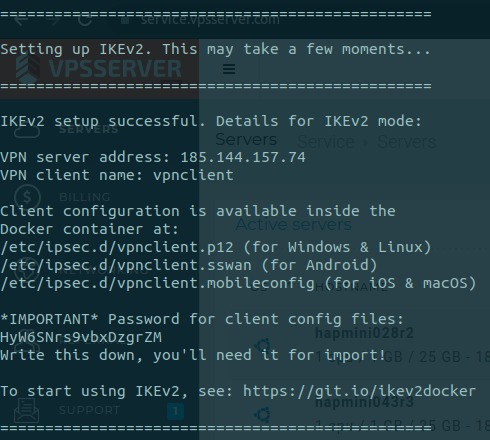
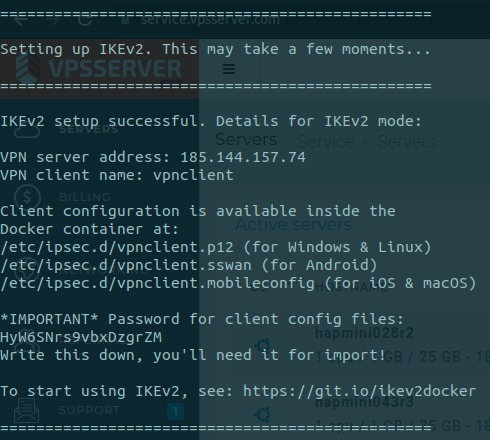
When installing I was seeing this log, which tells me the password for the client config files.
image
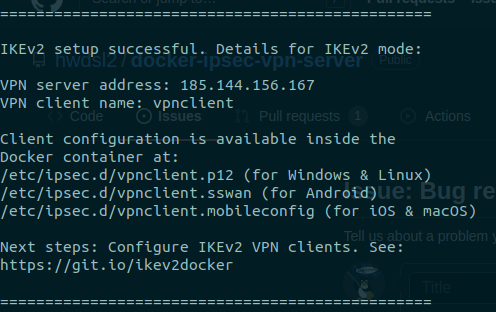
After last update (of this repository) it stops working and now shows me this:
image
Where can I find the password for client config files now?

To Reproduce
Steps to reproduce the behavior:

  1. Install the lastest versión of hwdsl2/docker-ipsec-vpn-server
  2. run docker logs ipsec-vpn-server
  3. No password for client config files are showed

Expected behavior
Expecting to work as before, showing the password for client config files:
image
Where can I find the password for client config files now?

**Server **

  • Docker host OS: Ubuntu 20.04
  • Hosting provider: VPSSERVER

Client (please complete the following information)

  • VPN mode: IKEv2
Originally created by @dsmh on GitHub (Feb 15, 2022). Original GitHub issue: https://github.com/hwdsl2/docker-ipsec-vpn-server/issues/278 **Checklist** - [ x] I read the [README](https://github.com/hwdsl2/docker-ipsec-vpn-server/blob/master/README.md) - [x ] I read the [Important notes](https://github.com/hwdsl2/docker-ipsec-vpn-server/blob/master/README.md#important-notes) - [ x] I followed instructions to [configure VPN clients](https://github.com/hwdsl2/docker-ipsec-vpn-server/blob/master/README.md#next-steps) - [ x] I checked [Troubleshooting](https://github.com/hwdsl2/setup-ipsec-vpn/blob/master/docs/clients.md#troubleshooting), [enabled logs](https://github.com/hwdsl2/docker-ipsec-vpn-server/blob/master/docs/advanced-usage.md#enable-libreswan-logs) and checked [VPN status](https://github.com/hwdsl2/setup-ipsec-vpn/blob/master/docs/clients.md#check-logs-and-vpn-status) - [ x] I searched existing [Issues](https://github.com/hwdsl2/docker-ipsec-vpn-server/issues?q=is%3Aissue) - [x ] This bug is about the IPsec VPN server Docker image, and not IPsec VPN itself **Describe the issue** When installing I was seeing this log, which tells me the password for the client config files. ![image](https://user-images.githubusercontent.com/2769971/154104571-e819cd89-13cd-4823-aeb6-b835b8c2c967.png) After last update (of this repository) it stops working and now shows me this: ![image](https://user-images.githubusercontent.com/2769971/154104946-e5d60ea9-1647-4f4c-b375-5b13c4fe9cfb.png) Where can I find the password for client config files now? **To Reproduce** Steps to reproduce the behavior: 1. Install the lastest versión of hwdsl2/docker-ipsec-vpn-server 2. run docker logs ipsec-vpn-server 3. No password for client config files are showed **Expected behavior** Expecting to work as before, showing the password for client config files: ![image](https://user-images.githubusercontent.com/2769971/154105486-a59dc43a-4acb-4187-96dc-023706c35f87.png) Where can I find the password for client config files now? **Server ** - Docker host OS: Ubuntu 20.04 - Hosting provider: VPSSERVER **Client (please complete the following information)** - VPN mode: IKEv2
kerem closed this issue 2026-03-02 08:00:51 +03:00
Author
Owner

@hwdsl2 commented on GitHub (Feb 15, 2022):

@dsmh Hello! The password for client config files was removed in [1] in an effort to simplify the IKEv2 config import process. If no password is displayed in the output, then you do not need to enter a password when importing to client devices. Note: For Windows clients, press Enter if prompted for the password, or leave the password field blank.

[1] github.com/hwdsl2/setup-ipsec-vpn@dbc3527448

<!-- gh-comment-id:1040903920 --> @hwdsl2 commented on GitHub (Feb 15, 2022): @dsmh Hello! The password for client config files was removed in [1] in an effort to simplify the IKEv2 config import process. If no password is displayed in the output, then you do not need to enter a password when importing to client devices. Note: For Windows clients, press Enter if prompted for the password, or leave the password field blank. [1] https://github.com/hwdsl2/setup-ipsec-vpn/commit/dbc3527448111697937f0cc7969a9f2583a8d87e
Sign in to join this conversation.
No milestone
No project
No assignees
1 participant
Notifications
Due date
The due date is invalid or out of range. Please use the format "yyyy-mm-dd".

No due date set.

Dependencies

No dependencies set.

Reference
starred/docker-ipsec-vpn-server#260
No description provided.