[GH-ISSUE #282] Slow Performance #259

Closed
opened 2026-03-02 08:00:51 +03:00 by kerem · 5 comments
Owner

Originally created by @squishycat92 on GitHub (Mar 1, 2022).
Original GitHub issue: https://github.com/hwdsl2/docker-ipsec-vpn-server/issues/282

Hi, I really like this Docker image and the ease of configuring the container!

However, upon running a few speedtests, it seems like the VPN server is not performing well (not even close to the host network speed). Is this something that could be fixed or is it an inherent limitation of VPNs? I was expecting a performance hit with a VPN, but this performance gap seems extremely large.

Docker host connection:
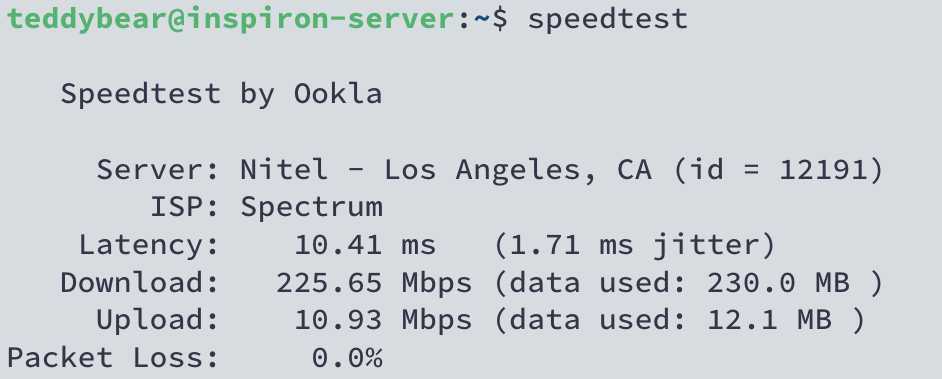
1632BA36-960B-450B-BC56-0BD885F1151A

Underlying connection (no VPN activated):
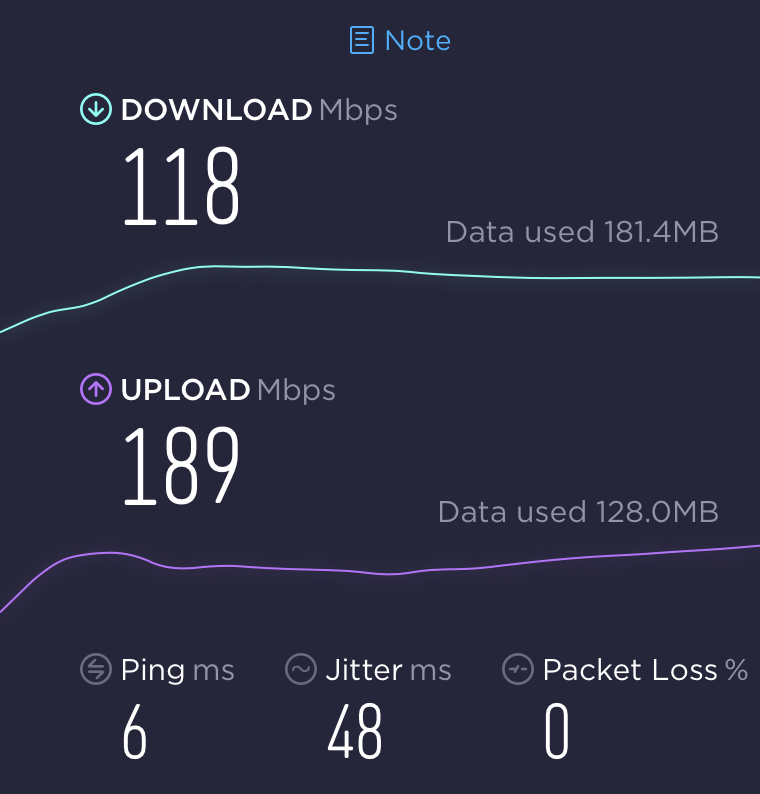
B0627536-C5A9-4E5A-9D31-47B8BF5105A2

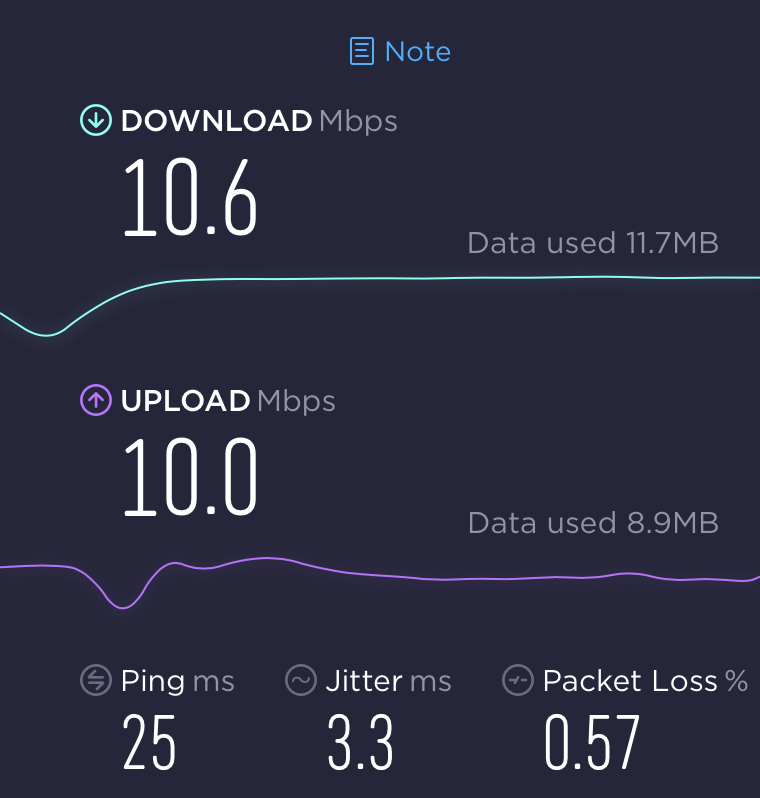
VPN connection (VPN activated):
78260E9D-871F-4EAF-8062-EDB9E780C8AD

I have noticed that the upstream/downstream connections seem to be bottlenecked to the upload speed, although I am not quite sure why this would affect the downstream speed.

System Information:

  • Ubuntu 20.04.4 LTS
  • Docker Engine 20.10.12 (Community)
  • Connection Method: IKEv2
Originally created by @squishycat92 on GitHub (Mar 1, 2022). Original GitHub issue: https://github.com/hwdsl2/docker-ipsec-vpn-server/issues/282 Hi, I really like this Docker image and the ease of configuring the container! However, upon running a few speedtests, it seems like the VPN server is not performing well (not even close to the host network speed). Is this something that could be fixed or is it an inherent limitation of VPNs? I was expecting a performance hit with a VPN, but this performance gap seems extremely large. Docker host connection: ![1632BA36-960B-450B-BC56-0BD885F1151A](https://user-images.githubusercontent.com/62223616/156244392-d894d325-fbbe-4329-9bd1-4d9af1a33d15.jpeg) Underlying connection (no VPN activated): ![B0627536-C5A9-4E5A-9D31-47B8BF5105A2](https://user-images.githubusercontent.com/62223616/156244537-de1e9f84-ce0c-448f-a903-9255877cfe7c.jpeg) VPN connection (VPN activated): ![78260E9D-871F-4EAF-8062-EDB9E780C8AD](https://user-images.githubusercontent.com/62223616/156244665-50450424-a58f-405c-9564-5fb91367b4bc.jpeg) I have noticed that the upstream/downstream connections *seem* to be bottlenecked to the upload speed, although I am not quite sure why this would affect the downstream speed. System Information: - Ubuntu 20.04.4 LTS - Docker Engine 20.10.12 (Community) - Connection Method: IKEv2
kerem closed this issue 2026-03-02 08:00:51 +03:00
Author
Owner

@squishycat92 commented on GitHub (Mar 1, 2022):

Oh also a quick question about using Docker's NAT: will setting the networking option to host improve latency and/or performance? I've read that routing through Docker increases latency and decreases performance, but I'm not sure if this is required (due to the fact that the container creates a subnet for clients).

<!-- gh-comment-id:1055972782 --> @squishycat92 commented on GitHub (Mar 1, 2022): Oh also a quick question about using Docker's NAT: will setting the networking option to `host` improve latency and/or performance? I've read that routing through Docker increases latency and decreases performance, but I'm not sure if this is required (due to the fact that the container creates a subnet for clients).
Author
Owner

@hwdsl2 commented on GitHub (Mar 2, 2022):

@squishycat92 Hello! When connected to the VPN, the client's network speed is limited by the server's upload or download speed, whichever is lower. This is because data must be transferred into the VPN server from the 3rd party host/website you visit (e.g. a speed test server), then transferred out from the VPN server to the VPN client. There is also some additional overhead for the VPN encryption and encapsulation.

For your other question, I think setting the networking option to "host" probably won't make a noticeable difference in performance.

<!-- gh-comment-id:1056119700 --> @hwdsl2 commented on GitHub (Mar 2, 2022): @squishycat92 Hello! When connected to the VPN, the client's network speed is limited by the server's upload or download speed, whichever is lower. This is because data must be transferred into the VPN server from the 3rd party host/website you visit (e.g. a speed test server), then transferred out from the VPN server to the VPN client. There is also some additional overhead for the VPN encryption and encapsulation. For your other question, I think setting the networking option to "host" probably won't make a noticeable difference in performance.
Author
Owner

@squishycat92 commented on GitHub (Mar 2, 2022):

Oh yes, that makes sense. So in this case if I wanted a better internet connection, I would need to upgrade my upstream internet speeds, correct?

<!-- gh-comment-id:1056121665 --> @squishycat92 commented on GitHub (Mar 2, 2022): Oh yes, that makes sense. So in this case if I wanted a better internet connection, I would need to upgrade my upstream internet speeds, correct?
Author
Owner

@hwdsl2 commented on GitHub (Mar 2, 2022):

@squishycat92 Yes, most likely your server's upload speed.

<!-- gh-comment-id:1056190897 --> @hwdsl2 commented on GitHub (Mar 2, 2022): @squishycat92 Yes, most likely your server's upload speed.
Author
Owner

@squishycat92 commented on GitHub (Mar 2, 2022):

I see, thank you so much for clarifying!

<!-- gh-comment-id:1056261111 --> @squishycat92 commented on GitHub (Mar 2, 2022): I see, thank you so much for clarifying!
Sign in to join this conversation.
No milestone
No project
No assignees
1 participant
Notifications
Due date
The due date is invalid or out of range. Please use the format "yyyy-mm-dd".

No due date set.

Dependencies

No dependencies set.

Reference
starred/docker-ipsec-vpn-server#259
No description provided.