[GH-ISSUE #130] 连接没有任何反应,服务器超时 #119

Closed
opened 2026-03-02 07:27:53 +03:00 by kerem · 10 comments
Owner

Originally created by @haohetao on GitHub (Mar 27, 2019).
Original GitHub issue: https://github.com/hwdsl2/docker-ipsec-vpn-server/issues/130

如题
显示timeout或服务器没有响应,没有任何日志

Originally created by @haohetao on GitHub (Mar 27, 2019). Original GitHub issue: https://github.com/hwdsl2/docker-ipsec-vpn-server/issues/130 如题 显示timeout或服务器没有响应,没有任何日志
kerem closed this issue 2026-03-02 07:27:53 +03:00
Author
Owner

@hwdsl2 commented on GitHub (Mar 27, 2019):

@haohetao 你好!启用 Libreswan 日志 [1] 之后尝试连接客户端。如果仍然没有新的连接日志,则 VPN 流量没有到达你的服务器。你需要检查服务器的防火墙设置,以及客户端是否输入了正确的地址。

[1] https://github.com/hwdsl2/docker-ipsec-vpn-server/blob/master/README-zh.md#启用-libreswan-日志

<!-- gh-comment-id:476965766 --> @hwdsl2 commented on GitHub (Mar 27, 2019): @haohetao 你好!启用 Libreswan 日志 [1] 之后尝试连接客户端。如果仍然没有新的连接日志,则 VPN 流量没有到达你的服务器。你需要检查服务器的防火墙设置,以及客户端是否输入了正确的地址。 [1] https://github.com/hwdsl2/docker-ipsec-vpn-server/blob/master/README-zh.md#启用-libreswan-日志
Author
Owner

@haohetao commented on GitHub (Mar 27, 2019):

我怀疑流量没有到达服务器,但是我这是没有防火墙的,我不知道为什么收不到流量

<!-- gh-comment-id:476969650 --> @haohetao commented on GitHub (Mar 27, 2019): 我怀疑流量没有到达服务器,但是我这是没有防火墙的,我不知道为什么收不到流量
Author
Owner

@haohetao commented on GitHub (Mar 27, 2019):

我用的是l2tp,如果抓包应该抓1701还是哪个端口

<!-- gh-comment-id:476969867 --> @haohetao commented on GitHub (Mar 27, 2019): 我用的是l2tp,如果抓包应该抓1701还是哪个端口
Author
Owner

@hwdsl2 commented on GitHub (Mar 27, 2019):

@haohetao VPN 服务器需要打开 UDP 端口 500 和 UDP 端口 4500。抓包可以试一下 UDP 500。

<!-- gh-comment-id:476970136 --> @hwdsl2 commented on GitHub (Mar 27, 2019): @haohetao VPN 服务器需要打开 UDP 端口 500 和 UDP 端口 4500。抓包可以试一下 UDP 500。
Author
Owner

@haohetao commented on GitHub (Mar 27, 2019):

@hwdsl2 为什么docker日志显示也监听1701端口呢,是否还需要映射1701端口呢

<!-- gh-comment-id:476970466 --> @haohetao commented on GitHub (Mar 27, 2019): @hwdsl2 为什么docker日志显示也监听1701端口呢,是否还需要映射1701端口呢
Author
Owner

@hwdsl2 commented on GitHub (Mar 27, 2019):

@haohetao 1701 端口是 L2TP 使用,但是因为 L2TP 封装在 IPsec 加密通道中,这个端口不需要在防火墙上打开。注意,不带 IPsec 的 L2TP 模式不受支持(因为没有任何加密)。

<!-- gh-comment-id:476970951 --> @hwdsl2 commented on GitHub (Mar 27, 2019): @haohetao 1701 端口是 L2TP 使用,但是因为 L2TP 封装在 IPsec 加密通道中,这个端口不需要在防火墙上打开。注意,不带 IPsec 的 L2TP 模式不受支持(因为没有任何加密)。
Author
Owner

@haohetao commented on GitHub (Mar 27, 2019):

@hwdsl2
我用linux客户端是这样

root@211f83b53233:/opt/src# tcpdump -i eth0 src 172.25.0.1
tcpdump: verbose output suppressed, use -v or -vv for full protocol decode
listening on eth0, link-type EN10MB (Ethernet), capture size 262144 bytes
04:40:18.747435 ARP, Request who-has 211f83b53233 tell ip-172-25-0-1.us-west-1.compute.internal, length 28
04:40:18.747492 ARP, Reply ip-172-25-0-1.us-west-1.compute.internal is-at 02:42:a4:e6:27:02 (oui Unknown), length 28
04:40:21.282836 IP ip-172-25-0-1.us-west-1.compute.internal.l2f > 211f83b53233.l2f: l2tp:TLSNs=0,Nr=0 *MSGTYPE(SCCRQ) *PROTO_VER(1.0) *FRAMING_CAP(AS) *BEARER_CAP() FIRM_VER(1680) *HOST_NAME(ip-172-31-17-52) VENDOR_NAME(xelerance.com) *ASSND_TUN_ID(19507) *RECV_WIN_SIZE(4)
04:40:22.283817 IP ip-172-25-0-1.us-west-1.compute.internal.l2f > 211f83b53233.l2f: l2tp:TLSNs=0,Nr=0 *MSGTYPE(SCCRQ) *PROTO_VER(1.0) *FRAMING_CAP(AS) *BEARER_CAP() FIRM_VER(1680) *HOST_NAME(ip-172-31-17-52) VENDOR_NAME(xelerance.com) *ASSND_TUN_ID(19507) *RECV_WIN_SIZE(4)
04:40:24.285943 IP ip-172-25-0-1.us-west-1.compute.internal.l2f > 211f83b53233.l2f: l2tp:TLSNs=0,Nr=0 *MSGTYPE(SCCRQ) *PROTO_VER(1.0) *FRAMING_CAP(AS) *BEARER_CAP() FIRM_VER(1680) *HOST_NAME(ip-172-31-17-52) VENDOR_NAME(xelerance.com) *ASSND_TUN_ID(19507) *RECV_WIN_SIZE(4)
04:40:28.290064 IP ip-172-25-0-1.us-west-1.compute.internal.l2f > 211f83b53233.l2f: l2tp:TLSNs=0,Nr=0 *MSGTYPE(SCCRQ) *PROTO_VER(1.0) *FRAMING_CAP(AS) *BEARER_CAP() FIRM_VER(1680) *HOST_NAME(ip-172-31-17-52) VENDOR_NAME(xelerance.com) *ASSND_TUN_ID(19507) *RECV_WIN_SIZE(4)
04:40:36.298207 IP ip-172-25-0-1.us-west-1.compute.internal.l2f > 211f83b53233.l2f: l2tp:TLSNs=0,Nr=0 *MSGTYPE(SCCRQ) *PROTO_VER(1.0) *FRAMING_CAP(AS) *BEARER_CAP() FIRM_VER(1680) *HOST_NAME(ip-172-31-17-52) VENDOR_NAME(xelerance.com) *ASSND_TUN_ID(19507) *RECV_WIN_SIZE(4)
04:40:52.314354 IP ip-172-25-0-1.us-west-1.compute.internal.l2f > 211f83b53233.l2f: l2tp:TLSNs=1,Nr=0 *MSGTYPE(StopCCN) *ASSND_TUN_ID(19507) *RESULT_CODE(1/0 Timeout)
04:40:53.315475 IP ip-172-25-0-1.us-west-1.compute.internal.l2f > 211f83b53233.l2f: l2tp:TLSNs=1,Nr=0 *MSGTYPE(StopCCN) *ASSND_TUN_ID(19507) *RESULT_CODE(1/0 Timeout)
04:40:55.317581 IP ip-172-25-0-1.us-west-1.compute.internal.l2f > 211f83b53233.l2f: l2tp:TLSNs=1,Nr=0 *MSGTYPE(StopCCN) *ASSND_TUN_ID(19507) *RESULT_CODE(1/0 Timeout)
04:40:57.403409 ARP, Request who-has 211f83b53233 tell ip-172-25-0-1.us-west-1.compute.internal, length 28
04:40:59.321705 IP ip-172-25-0-1.us-west-1.compute.internal.l2f > 211f83b53233.l2f: l2tp:TLSNs=1,Nr=0 *MSGTYPE(StopCCN) *ASSND_TUN_ID(19507) *RESULT_CODE(1/0 Timeout)

<!-- gh-comment-id:476977113 --> @haohetao commented on GitHub (Mar 27, 2019): @hwdsl2 我用linux客户端是这样 > root@211f83b53233:/opt/src# tcpdump -i eth0 src 172.25.0.1 tcpdump: verbose output suppressed, use -v or -vv for full protocol decode listening on eth0, link-type EN10MB (Ethernet), capture size 262144 bytes 04:40:18.747435 ARP, Request who-has 211f83b53233 tell ip-172-25-0-1.us-west-1.compute.internal, length 28 04:40:18.747492 ARP, Reply ip-172-25-0-1.us-west-1.compute.internal is-at 02:42:a4:e6:27:02 (oui Unknown), length 28 04:40:21.282836 IP ip-172-25-0-1.us-west-1.compute.internal.l2f > 211f83b53233.l2f: l2tp:[TLS](0/0)Ns=0,Nr=0 *MSGTYPE(SCCRQ) *PROTO_VER(1.0) *FRAMING_CAP(AS) *BEARER_CAP() FIRM_VER(1680) *HOST_NAME(ip-172-31-17-52) VENDOR_NAME(xelerance.com) *ASSND_TUN_ID(19507) *RECV_WIN_SIZE(4) 04:40:22.283817 IP ip-172-25-0-1.us-west-1.compute.internal.l2f > 211f83b53233.l2f: l2tp:[TLS](0/0)Ns=0,Nr=0 *MSGTYPE(SCCRQ) *PROTO_VER(1.0) *FRAMING_CAP(AS) *BEARER_CAP() FIRM_VER(1680) *HOST_NAME(ip-172-31-17-52) VENDOR_NAME(xelerance.com) *ASSND_TUN_ID(19507) *RECV_WIN_SIZE(4) 04:40:24.285943 IP ip-172-25-0-1.us-west-1.compute.internal.l2f > 211f83b53233.l2f: l2tp:[TLS](0/0)Ns=0,Nr=0 *MSGTYPE(SCCRQ) *PROTO_VER(1.0) *FRAMING_CAP(AS) *BEARER_CAP() FIRM_VER(1680) *HOST_NAME(ip-172-31-17-52) VENDOR_NAME(xelerance.com) *ASSND_TUN_ID(19507) *RECV_WIN_SIZE(4) 04:40:28.290064 IP ip-172-25-0-1.us-west-1.compute.internal.l2f > 211f83b53233.l2f: l2tp:[TLS](0/0)Ns=0,Nr=0 *MSGTYPE(SCCRQ) *PROTO_VER(1.0) *FRAMING_CAP(AS) *BEARER_CAP() FIRM_VER(1680) *HOST_NAME(ip-172-31-17-52) VENDOR_NAME(xelerance.com) *ASSND_TUN_ID(19507) *RECV_WIN_SIZE(4) 04:40:36.298207 IP ip-172-25-0-1.us-west-1.compute.internal.l2f > 211f83b53233.l2f: l2tp:[TLS](0/0)Ns=0,Nr=0 *MSGTYPE(SCCRQ) *PROTO_VER(1.0) *FRAMING_CAP(AS) *BEARER_CAP() FIRM_VER(1680) *HOST_NAME(ip-172-31-17-52) VENDOR_NAME(xelerance.com) *ASSND_TUN_ID(19507) *RECV_WIN_SIZE(4) 04:40:52.314354 IP ip-172-25-0-1.us-west-1.compute.internal.l2f > 211f83b53233.l2f: l2tp:[TLS](0/0)Ns=1,Nr=0 *MSGTYPE(StopCCN) *ASSND_TUN_ID(19507) *RESULT_CODE(1/0 Timeout) 04:40:53.315475 IP ip-172-25-0-1.us-west-1.compute.internal.l2f > 211f83b53233.l2f: l2tp:[TLS](0/0)Ns=1,Nr=0 *MSGTYPE(StopCCN) *ASSND_TUN_ID(19507) *RESULT_CODE(1/0 Timeout) 04:40:55.317581 IP ip-172-25-0-1.us-west-1.compute.internal.l2f > 211f83b53233.l2f: l2tp:[TLS](0/0)Ns=1,Nr=0 *MSGTYPE(StopCCN) *ASSND_TUN_ID(19507) *RESULT_CODE(1/0 Timeout) 04:40:57.403409 ARP, Request who-has 211f83b53233 tell ip-172-25-0-1.us-west-1.compute.internal, length 28 04:40:59.321705 IP ip-172-25-0-1.us-west-1.compute.internal.l2f > 211f83b53233.l2f: l2tp:[TLS](0/0)Ns=1,Nr=0 *MSGTYPE(StopCCN) *ASSND_TUN_ID(19507) *RESULT_CODE(1/0 Timeout)
Author
Owner

@haohetao commented on GitHub (Mar 27, 2019):

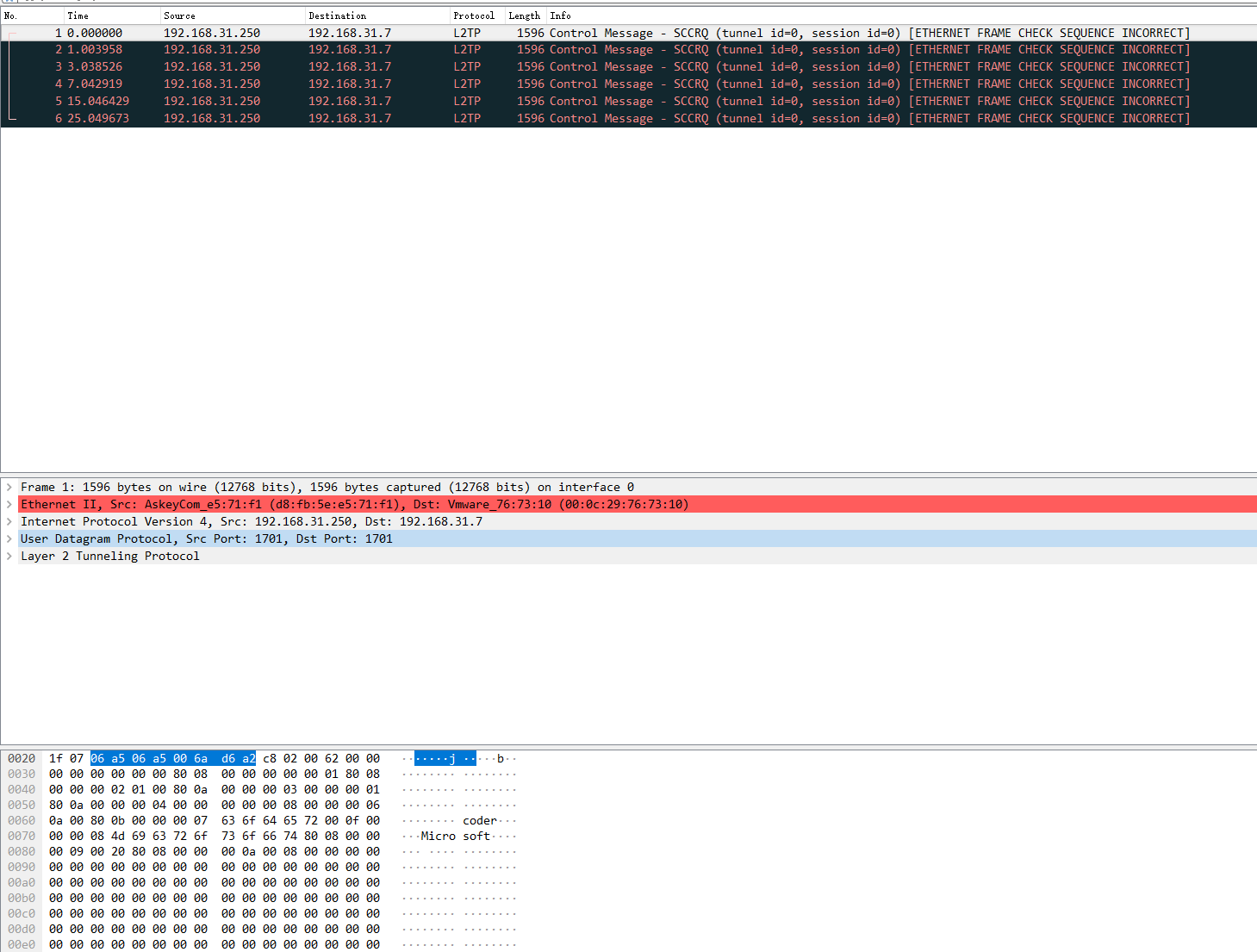
然后用windows客户端,只有1701端口的包,500和4
QQ截图20190327130724
500端口没有数据,难道是我客户端不对?而且是在windows客户端抓的包

<!-- gh-comment-id:476977354 --> @haohetao commented on GitHub (Mar 27, 2019): 然后用windows客户端,只有1701端口的包,500和4 ![QQ截图20190327130724](https://user-images.githubusercontent.com/4592571/55051734-62d33680-5091-11e9-89e9-2eaa5f9ac1db.png) 500端口没有数据,难道是我客户端不对?而且是在windows客户端抓的包
Author
Owner

@haohetao commented on GitHub (Mar 27, 2019):

问题解决了,这里面有两个问题
1,我端口映射错了,我自己写的docker-compose.yml文件,端口映射的是500/udp,4500/udp,我以为这样与500:500/udp,4500:4500/udp等效,后来查到没有冒号是随机映射的
2,我windows系统里的vpn客户端是有问题的,我iphone已经连上了windows还不能连。

<!-- gh-comment-id:477005634 --> @haohetao commented on GitHub (Mar 27, 2019): 问题解决了,这里面有两个问题 1,我端口映射错了,我自己写的docker-compose.yml文件,端口映射的是500/udp,4500/udp,我以为这样与500:500/udp,4500:4500/udp等效,后来查到没有冒号是随机映射的 2,我windows系统里的vpn客户端是有问题的,我iphone已经连上了windows还不能连。
Author
Owner

@haohetao commented on GitHub (Mar 27, 2019):

windows不能用是因为没有修改第2条注册表项并且没有重启

<!-- gh-comment-id:477016479 --> @haohetao commented on GitHub (Mar 27, 2019): windows不能用是因为没有修改第2条注册表项并且没有重启
Sign in to join this conversation.
No milestone
No project
No assignees
1 participant
Notifications
Due date
The due date is invalid or out of range. Please use the format "yyyy-mm-dd".

No due date set.

Dependencies

No dependencies set.

Reference
starred/docker-ipsec-vpn-server#119
No description provided.