[GH-ISSUE #118] Huawei 4G router not work with VPN #105

Closed
opened 2026-03-02 07:27:45 +03:00 by kerem · 2 comments
Owner

Originally created by @mario26 on GitHub (Jan 24, 2019).
Original GitHub issue: https://github.com/hwdsl2/docker-ipsec-vpn-server/issues/118

Hello !

I want to connect my Huawei 4G router (B525s-23a), your docker seems to work now.

But when i enter the parameters in the interface of Huawei, the VPN remains on disconnect:
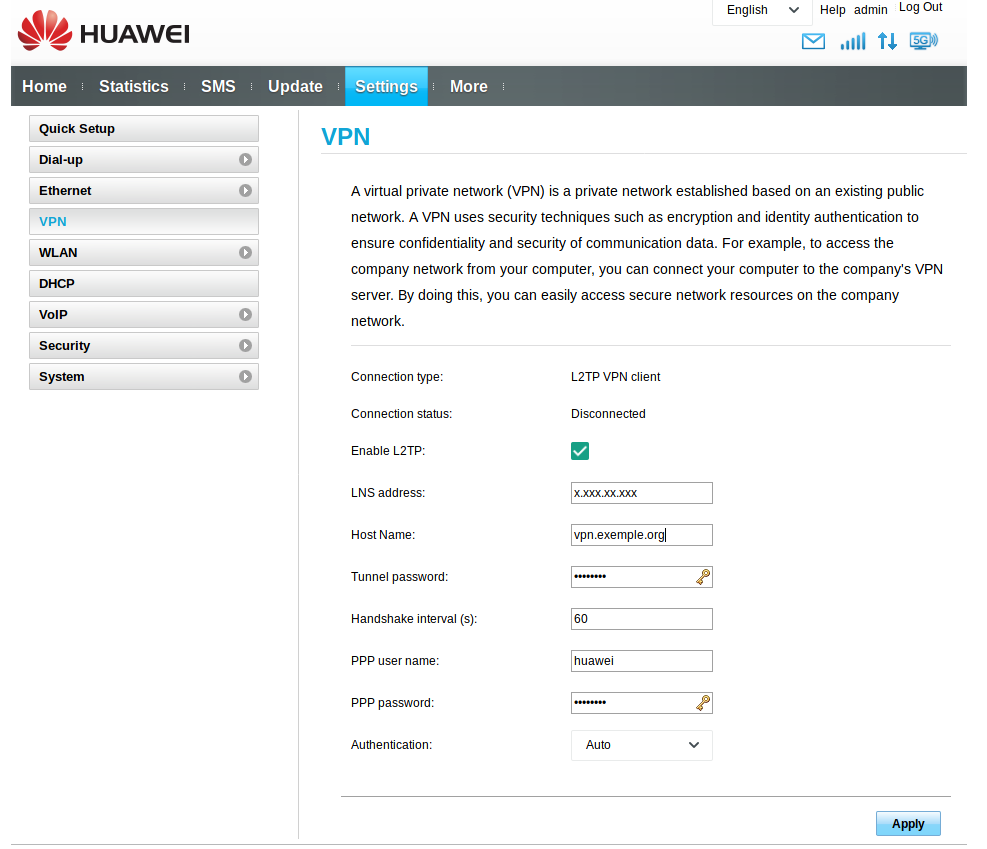
capture d ecran du 2019-01-24 12-20-37

Here are the parameters:

  • LNS address: public_IP_of_the_server
  • Host Name: domain_name
  • Tunnel password: my_ipsec_pre_shared_key
  • PPP user name: my_user
  • PPP password: my_password

Can you help me solve this problem?

Thank you in advance for your help !

Originally created by @mario26 on GitHub (Jan 24, 2019). Original GitHub issue: https://github.com/hwdsl2/docker-ipsec-vpn-server/issues/118 Hello ! I want to connect my Huawei 4G router (B525s-23a), your docker seems to work now. But when i enter the parameters in the interface of Huawei, the VPN remains on disconnect: ![capture d ecran du 2019-01-24 12-20-37](https://user-images.githubusercontent.com/1866325/51684236-e74efd80-1feb-11e9-8a97-8bc6c597fd33.png) Here are the parameters: - LNS address: public_IP_of_the_server - Host Name: domain_name - Tunnel password: my_ipsec_pre_shared_key - PPP user name: my_user - PPP password: my_password Can you help me solve this problem? Thank you in advance for your help !
kerem closed this issue 2026-03-02 07:27:45 +03:00
Author
Owner

@hwdsl2 commented on GitHub (Jan 24, 2019):

@mario26 I am not familiar with this router, I suggest that you ask in the relevant community forum. It could also be helpful to look at the VPN server logs. Watch the logs using the command below, then connect your VPN client. Check if there is any error in the logs.

# Ubuntu/Debian
tail -F /var/log/auth.log /var/log/syslog | grep -e xl2tpd -e pluto

# CentOS/RHEL
tail -F /var/log/secure /var/log/messages | grep -e xl2tpd -e pluto
<!-- gh-comment-id:457263648 --> @hwdsl2 commented on GitHub (Jan 24, 2019): @mario26 I am not familiar with this router, I suggest that you ask in the relevant community forum. It could also be helpful to look at the VPN server logs. Watch the logs using the command below, then connect your VPN client. Check if there is any error in the logs. ``` # Ubuntu/Debian tail -F /var/log/auth.log /var/log/syslog | grep -e xl2tpd -e pluto # CentOS/RHEL tail -F /var/log/secure /var/log/messages | grep -e xl2tpd -e pluto ```
Author
Owner

@MuhammedKalkan commented on GitHub (Feb 17, 2024):

@mario26 have you figured this out ? I am having same problem

<!-- gh-comment-id:1950362324 --> @MuhammedKalkan commented on GitHub (Feb 17, 2024): @mario26 have you figured this out ? I am having same problem
Sign in to join this conversation.
No milestone
No project
No assignees
1 participant
Notifications
Due date
The due date is invalid or out of range. Please use the format "yyyy-mm-dd".

No due date set.

Dependencies

No dependencies set.

Reference
starred/docker-ipsec-vpn-server#105
No description provided.