mirror of
https://github.com/budtmo/docker-android.git
synced 2026-04-25 20:25:57 +03:00
[GH-ISSUE #67] Getting "unable to remove port forward" and "Error executing adbExec" errors #55
Labels
No milestone
No project
No assignees
1 participant

Notifications
Due date
No due date set.
Dependencies
No dependencies set.
Reference
starred/docker-android#55
Loading…
Add table
Add a link
Reference in a new issue
No description provided.
Delete branch "%!s()"
Deleting a branch is permanent. Although the deleted branch may continue to exist for a short time before it actually gets removed, it CANNOT be undone in most cases. Continue?
Originally created by @jk79 on GitHub (Feb 13, 2018).
Original GitHub issue: https://github.com/budtmo/docker-android/issues/67
I'm trying to setup simple test against docker-android solution. I tried different emulators and still no-go.
I'm using this as a test package:
https://github.com/appium/sample-code/tree/master/sample-code/examples/node
Started server with following command:
docker run --privileged -d -p 6080:6080 -p 5554:5554 -p 5555:5555 -p 4723:4723 -e DEVICE="Samsung Galaxy S6" -e APPIUM=True --name android-container butomo1989/docker-android-arm-5.1.1Environment: Mac
Capabilities:
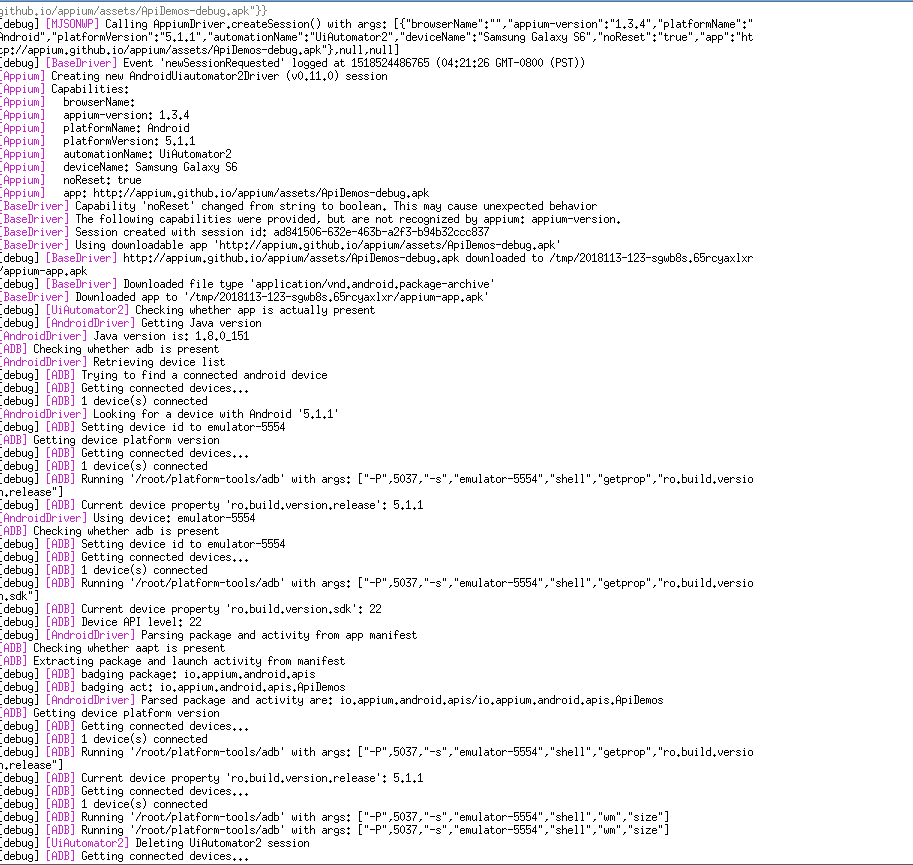
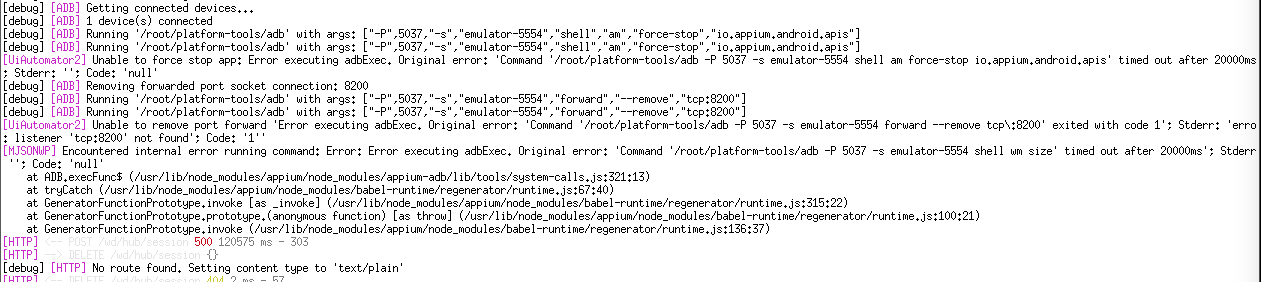
exports.android19 = { browserName: '', 'appium-version': '1.3.4', platformName: 'Android', platformVersion: '5.1.1', automationName: 'UiAutomator2', deviceName: 'Samsung Galaxy S6', noReset: 'true', app: undefined // will be set later };And full log:
@budtmo commented on GitHub (Feb 13, 2018):
Hi @jk79 ,
It is because of timeout. I can suggest 2 options:
I will close this issue for now. Please feel free to reopen it.
@jk79 commented on GitHub (Feb 14, 2018):
Hi @butomo1989, that works great.
I'm now able to run the tests on my Mac, I'll be porting this out to Jenkins CentOS machine, hope it will work there as well.
Good work, keep it up!
@budtmo commented on GitHub (Feb 14, 2018):
@jk79 I am happy that I can help. :) Don’t forget to give a star to the project. :b
@jk79 commented on GitHub (Feb 14, 2018):
My pleasure, just starred it.
@timsheng commented on GitHub (Feb 23, 2018):
@jk79 did you choose the solution 1 or 2 to fix this problem, i have met the same issue.
@timsheng commented on GitHub (Feb 23, 2018):
actually, I was waiting emulator to be ready for about 30 minutes, but it kept launching.
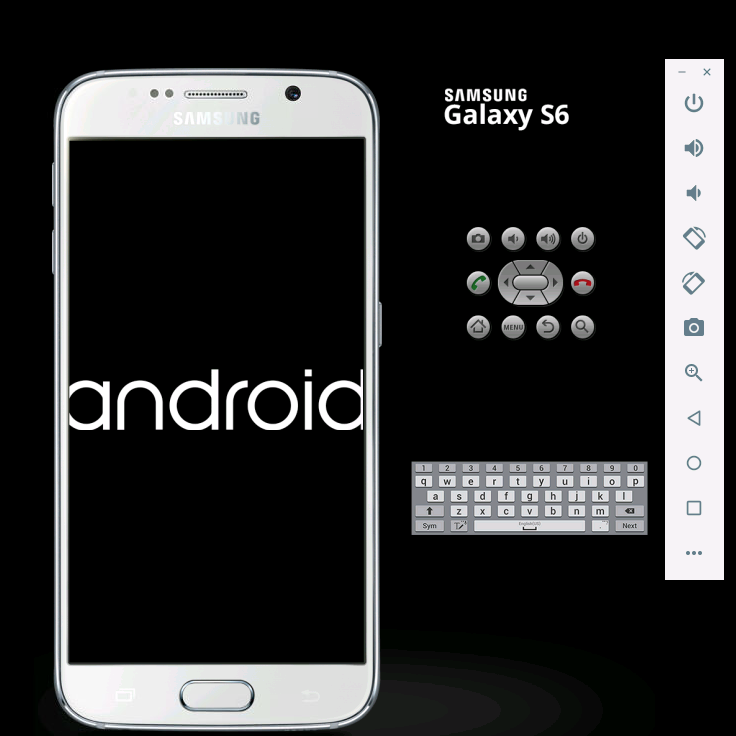
when I run my script, it return
ERROR: An unknown server-side error occurred while processing the command. Original error: Error getting device API level. Original error: Error executing adbExec. Original error: 'Command '/root/platform-tools/adb -P 5037 -s emulator-5554 shell getprop ro.build.version.sdk' timed out after 20000ms'; Stderr: ''; Code: 'null'@butomo1989 i will try to use solution 2 , hope it works fine.
@timsheng commented on GitHub (Feb 23, 2018):
when I use x86 image in VM on mac, it prompt error message
[HTTP] --> POST /wd/hub/session {"desiredCapabilities":{"javascriptEnabled":true,"locationContextEnabled":true,"handlesAlerts":true,"rotatable":true,"platformName":"Android","avd":"samsung_galaxy_s6_7.1.1","deviceName":"samsung_galaxy_s6_7.1.1","app":"/opt/student-stage.apk","automationName":"UiAutomator2","requestOrigins":{"url":"http://webdriver.io","version":"4.10.2","name":"webdriverio"}}} [debug] [MJSONWP] Calling AppiumDriver.createSession() with args: [{"javascriptEnabled":true,"locationContextEnabled":true,"handlesAlerts":true,"rotatable":true,"platformName":"Android","avd":"samsung_galaxy_s6_7.1.1","deviceName":"samsung_galaxy_s6_7.1.1","app":"/opt/student-stage.apk","automationName":"UiAutomator2","requestOrigins":{"url":"http://webdriver.io","version":"4.10.2","name":"webdriverio"}},null,null] [debug] [BaseDriver] Event 'newSessionRequested' logged at 1519363370950 (21:22:50 GMT-0800 (PST)) [Appium] Creating new AndroidUiautomator2Driver (v0.11.0) session [Appium] Capabilities: [Appium] javascriptEnabled: true [Appium] locationContextEnabled: true [Appium] handlesAlerts: true [Appium] rotatable: true [Appium] platformName: Android [Appium] avd: samsung_galaxy_s6_7.1.1 [Appium] deviceName: samsung_galaxy_s6_7.1.1 [Appium] app: /opt/student-stage.apk [Appium] automationName: UiAutomator2 [Appium] requestOrigins: { [Appium] url: http://webdriver.io [Appium] version: 4.10.2 [Appium] name: webdriverio [Appium] } [BaseDriver] The following capabilities were provided, but are not recognized by appium: javascriptEnabled, locationContextEnabled, handlesAlerts, rotatable, requestOrigins. [BaseDriver] Session created with session id: 6a9cedaa-7884-47d6-af3a-fd3df07713a1 [BaseDriver] Using local app '/opt/student-stage.apk' [debug] [UiAutomator2] Checking whether app is actually present [debug] [AndroidDriver] Getting Java version [AndroidDriver] Java version is: 1.8.0_151 [ADB] Checking whether adb is present [ADB] Using adb from /root/platform-tools/adb [debug] [ADB] Trying to find samsung_galaxy_s6_7.1.1 emulator [debug] [ADB] Getting connected emulators [debug] [ADB] Getting connected devices... [debug] [ADB] 0 device(s) connected [debug] [ADB] 0 emulator(s) connected [debug] [ADB] Emulator samsung_galaxy_s6_7.1.1 not running [debug] [ADB] Launching Emulator with AVD samsung_galaxy_s6_7.1.1, launchTimeout60000 ms and readyTimeout 60000 ms [ADB] Checking whether emulator is present [ADB] Using emulator from /root/emulator/emulator [ADB] Checking whether emulator is present [debug] [ADB] Running '/root/emulator/emulator' with args: ["-avd","samsung_galaxy_s6_7.1.1"] [debug] [ADB] Trying to find samsung_galaxy_s6_7.1.1 emulator [debug] [ADB] Getting connected emulators [debug] [ADB] Getting connected devices... [debug] [ADB] 0 device(s) connected [debug] [ADB] 0 emulator(s) connected [debug] [ADB] Emulator samsung_galaxy_s6_7.1.1 not running [ADB] [AVD OUTPUT] emulator: ERROR: x86_64 emulation currently requires hardware acceleration! [ADB] [AVD OUTPUT] Please ensure KVM is properly installed and usable. [ADB] [AVD OUTPUT] CPU acceleration status: KVM requires a CPU that supports vmx or svm [ADB] Error: Emulator avd samsung_galaxy_s6_7.1.1 exit with code 1, signal null at Object.wrappedLogger.errorAndThrow (/usr/lib/node_modules/appium/node_modules/appium-support/lib/logging.js:69:13) at SubProcess.<anonymous> (/usr/lib/node_modules/appium/node_modules/appium-adb/lib/tools/system-calls.js:619:11) at emitTwo (events.js:106:13) at SubProcess.emit (events.js:194:7) at ChildProcess.<anonymous> (/usr/lib/node_modules/appium/node_modules/teen_process/lib/teen_process.js:234:14) at emitTwo (events.js:106:13) at ChildProcess.emit (events.js:194:7) at Process.ChildProcess._handle.onexit (internal/child_process.js:215:12) Error: Emulator avd samsung_galaxy_s6_7.1.1 exit with code 1, signal null at Object.wrappedLogger.errorAndThrow (/usr/lib/node_modules/appium/node_modules/appium-support/lib/logging.js:69:13) at SubProcess.<anonymous> (/usr/lib/node_modules/appium/node_modules/appium-adb/lib/tools/system-calls.js:619:11) at emitTwo (events.js:106:13) at SubProcess.emit (events.js:194:7) at ChildProcess.<anonymous> (/usr/lib/node_modules/appium/node_modules/teen_process/lib/teen_process.js:234:14) at emitTwo (events.js:106:13) at ChildProcess.emit (events.js:194:7) at Process.ChildProcess._handle.onexit (internal/child_process.js:215:12) uncaughtException: Emulator avd samsung_galaxy_s6_7.1.1 exit with code 1, signal null {"date":"Thu Feb 22 2018 21:22:51 GMT-0800 (PST)","process":{"pid":231,"uid":0,"gid":0,"cwd":"/root","execPath":"/usr/bin/nodejs","version":"v7.10.1","argv":["/usr/bin/nodejs","/usr/bin/appium"],"memoryUsage":{"rss":164298752,"heapTotal":131747840,"heapUsed":104173288,"external":834692}},"os":{"loadavg":[0.083984375,0.1826171875,0.4375],"uptime":67888},"trace":[{"column":13,"file":"/usr/lib/node_modules/appium/node_modules/appium-support/lib/logging.js","function":"Object.wrappedLogger.errorAndThrow","line":69,"method":"errorAndThrow","native":false},{"column":11,"file":"/usr/lib/node_modules/appium/node_modules/appium-adb/lib/tools/system-calls.js","function":null,"line":619,"method":null,"native":false},{"column":13,"file":"events.js","function":"emitTwo","line":106,"method":null,"native":false},{"column":7,"file":"events.js","function":"SubProcess.emit","line":194,"method":"emit","native":false},{"column":14,"file":"/usr/lib/node_modules/appium/node_modules/teen_process/lib/teen_process.js","function":null,"line":234,"method":null,"native":false},{"column":13,"file":"events.js","function":"emitTwo","line":106,"method":null,"native":false},{"column":7,"file":"events.js","function":"ChildProcess.emit","line":194,"method":"emit","native":false},{"column":12,"file":"internal/child_process.js","function":"Process.ChildProcess._handle.onexit","line":215,"method":"onexit","native":false}],"stack":["Error: Emulator avd samsung_galaxy_s6_7.1.1 exit with code 1, signal null"," at Object.wrappedLogger.errorAndThrow (/usr/lib/node_modules/appium/node_modules/appium-support/lib/logging.js:69:13)"," at SubProcess.<anonymous> (/usr/lib/node_modules/appium/node_modules/appium-adb/lib/tools/system-calls.js:619:11)"," at emitTwo (events.js:106:13)"," at SubProcess.emit (events.js:194:7)"," at ChildProcess.<anonymous> (/usr/lib/node_modules/appium/node_modules/teen_process/lib/teen_process.js:234:14)"," at emitTwo (events.js:106:13)"," at ChildProcess.emit (events.js:194:7)"," at Process.ChildProcess._handle.onexit (internal/child_process.js:215:12)"]}how can I use docker-android for the emulator on mac? Actually, I can use appium-docker-android, and it works fine
@jk79 commented on GitHub (Feb 24, 2018):
@timsheng, there were couple of issues. First, I had to close Docker, it somehow interfere. Secondly, I used 5.1.1 image and it was working fine for me.
@timsheng commented on GitHub (Feb 24, 2018):
@jk79 thanks for your quick response, that's interesting, I never try close Docker, i will try
except 5.1.1 image, did you try others arm images, i tried 6.0 and 7.1.1 , both of them failed , the same error message with you paste in this ticket