mirror of
https://github.com/budtmo/docker-android.git
synced 2026-04-25 20:25:57 +03:00
[GH-ISSUE #208] Launching emulator, complains 32 bits #151
Labels
No milestone
No project
No assignees
1 participant

Notifications
Due date
No due date set.
Dependencies
No dependencies set.
Reference
starred/docker-android#151
Loading…
Add table
Add a link
Reference in a new issue
No description provided.
Delete branch "%!s()"
Deleting a branch is permanent. Although the deleted branch may continue to exist for a short time before it actually gets removed, it CANNOT be undone in most cases. Continue?
Originally created by @DavidPerezIngeniero on GitHub (Nov 8, 2019).
Original GitHub issue: https://github.com/budtmo/docker-android/issues/208
🐛 Bug Report
Operating System:
CentOS 7.2
Docker Image:
budtmo/docker-android-x86-8.1
Docker Version:
Docker version 19.03.2, build 6a30dfc
Docker-compose version (Only if you use it):
Not used
Docker Command to start docker-android:
docker run --privileged -d -p 6080:6080 -p 5554:5554 -p 5555:5555 -e DEVICE="Samsung Galaxy S6" -e LANGUAGE=es -e COUNTRY=ES --name android budtmo/docker-android-x86-8.1
Expected Behavior
Being able to launch android emulator
Actual Behavior
When launching:
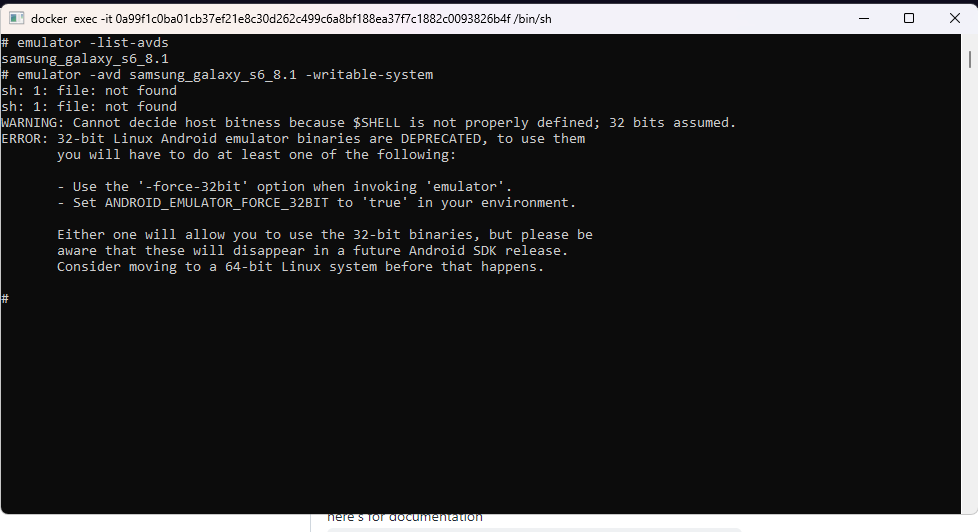
emulator
I receive this error:
WARNING: Cannot decide host bitness because $SHELL is not properly defined; 32 bits assumed.
ERROR: 32-bit Linux Android emulator binaries are DEPRECATED, to use them
you will have to do at least one of the following:
Setting SHELL variable to /bin/bash doesn't help.
Related problem:https://stackoverflow.com/questions/36482964/ubuntu-android-studio-error-running-emulator-cannot-decide-host-bitness-32-bit
@DavidPerezIngeniero commented on GitHub (Nov 8, 2019):
Another problem:
@DavidPerezIngeniero commented on GitHub (Nov 11, 2019):
Now testing with the
android budtmo/docker-android-x86-9.0image:@DavidPerezIngeniero commented on GitHub (Nov 11, 2019):
Possible workaround
@DavidPerezIngeniero commented on GitHub (Nov 11, 2019):
The problem is maybe related to the fact that my Linux host is a virtual machine, by using
vmware.@DavidPerezIngeniero commented on GitHub (Nov 12, 2019):
Solved by installing in my Linux host the CPU HAXM instruction emulation.
@gMan1990 commented on GitHub (Apr 26, 2020):
how ?
@sandikodev commented on GitHub (Feb 23, 2021):
here's for documentation
https://developer.android.com/studio/run/emulator-acceleration@Kalela commented on GitHub (Aug 22, 2022):
Do I install HAXM into the docker image? For me, It opens the emulator when I use the provided
docker run --privileged -d -p 6080:6080 -p 5554:5554 -p 5555:5555 -e DEVICE="Samsung Galaxy S6" --name android-container budtmo/docker-android-x86-8.1command. But I can't restart the emulator after rooting.