[GH-ISSUE #76] Manual Configuration: multiple environments #33

Closed
opened 2026-02-26 04:33:50 +03:00 by kerem · 10 comments
Owner

Originally created by @mageddo on GitHub (Jun 4, 2018).
Original GitHub issue: https://github.com/mageddo/dns-proxy-server/issues/76

Context
When you use DPS local storage you can register many hostname records referring a custom IP, that way you can use hostnames instead of static IPs then change the IPs when it comes necessary in one place. It have nothing with docker, just DPS working like a DNS with advanced settings

Use case Proposal
It would be nice if you can register many environments so you can register multiple IPs for the same hostname then you can point to a different IP by switching the environment.

Example

Let's say you own acme.com and is coding on that, you probably want to access acme.com pointing to your local machine instead of production, so you would use Dev environment that has a 127.0.0.1 entry at acme.com.

If you are testing QA then you swap to QA environment.

Then to default/prod when want to see it in prod, this environment probably have no entries so DPS will solve to the real IP

Requirements

  • Using GUI user can create/delete/update as many environments as wanted
  • User can choose what the active environment
  • Every environment has it's own hostnames entries
Originally created by @mageddo on GitHub (Jun 4, 2018). Original GitHub issue: https://github.com/mageddo/dns-proxy-server/issues/76 **Context** When you use DPS local storage you can register many hostname records referring a custom IP, that way you can use hostnames instead of static IPs then change the IPs when it comes necessary in one place. It have nothing with docker, just DPS working like a DNS with advanced settings **Use case Proposal** It would be nice if you can register many environments so you can register multiple IPs for the same hostname then you can point to a different IP by switching the environment. Example Let's say you own **acme.com** and is coding on that, you probably want to access acme.com pointing to your local machine instead of production, so you would use **Dev** environment that has a `127.0.0.1` entry at **acme.com**. If you are testing QA then you swap to **QA** environment. Then to default/prod when want to see it in prod, this environment probably have no entries so DPS will solve to the real IP **Requirements** * Using GUI user can create/delete/update as many environments as wanted * User can choose what the active environment * Every environment has it's own hostnames entries
kerem 2026-02-26 04:33:50 +03:00
  • closed this issue
  • added the
    feature
    label
Author
Owner

@josielrocha commented on GitHub (Jul 6, 2019):

Hello @mageddo!

I've forked your project (https://github.com/josielrocha/dns-proxy-server) and I'm trying to implement this feature.. I found something that I need to know from you about how to deal with it.

Step by step:

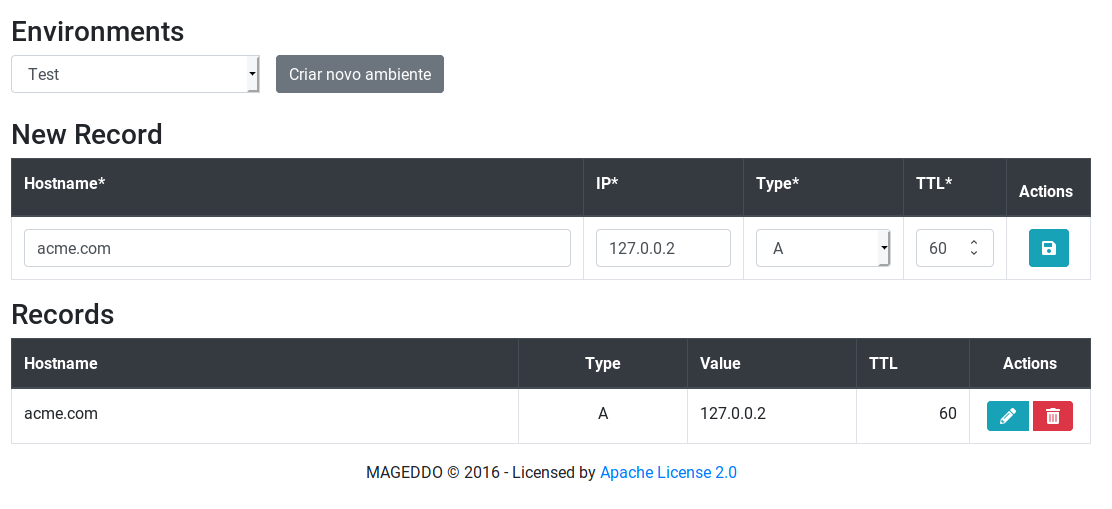
  1. Create a new Environment (Test)
  2. Add a host, (acme.com -> 127.0.0.2)
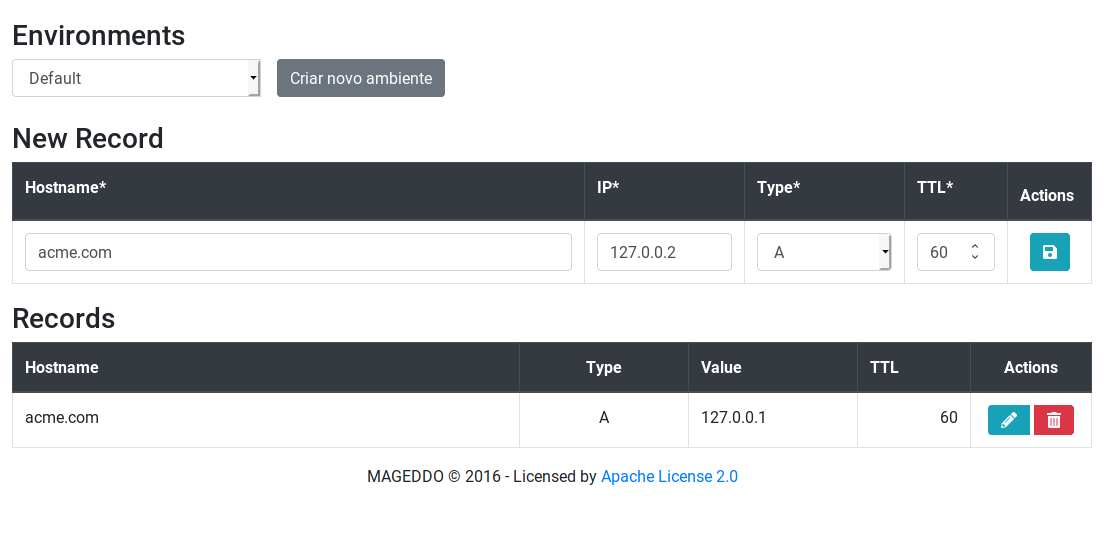
  3. Switch back to default environment
  4. Add a host, (acme.com -> 127.0.0.1)
  5. Query the hostname in the Test environment (dig acme.com => 127.0.0.1)
  6. Switch back to default envrionment
  7. Query the hostname in the default environment (dig acme.com => 127.0.0.1, I was expecting 127.0.0.2)

It seems to be caching the query result without respecting the environment.. It is like the cache key is composed only by hostname

UI with Test environment and acme.com host
image

UI with Default environment and acme.com host
image

$ curl -Ri http://localhost:5380/env/active
HTTP/1.1 200 OK
Content-Type: application/json
Date: Sat, 06 Jul 2019 04:03:35 GMT
Content-Length: 20

{
	"name": "Test"
}
$ dig acme.com

; <<>> DiG 9.14.3 <<>> acme.com
;; global options: +cmd
;; Got answer:
;; ->>HEADER<<- opcode: QUERY, status: NOERROR, id: 26209
;; flags: qr rd; QUERY: 1, ANSWER: 1, AUTHORITY: 0, ADDITIONAL: 0
;; WARNING: recursion requested but not available

;; QUESTION SECTION:
;acme.com.			IN	A

;; ANSWER SECTION:
acme.com.		60	IN	A	127.0.0.2  <---- IP from Test environment

;; Query time: 1 msec
;; SERVER: 192.168.1.50#53(192.168.1.50)
;; WHEN: Sat Jul 06 01:03:41 -03 2019
;; MSG SIZE  rcvd: 50

$ curl -Ri http://localhost:5380/env/active
HTTP/1.1 200 OK
Content-Type: application/json
Date: Sat, 06 Jul 2019 04:03:54 GMT
Content-Length: 16

{
	"name": ""
}
$ dig acme.com

; <<>> DiG 9.14.3 <<>> acme.com
;; global options: +cmd
;; Got answer:
;; ->>HEADER<<- opcode: QUERY, status: NOERROR, id: 749
;; flags: qr rd; QUERY: 1, ANSWER: 1, AUTHORITY: 0, ADDITIONAL: 0
;; WARNING: recursion requested but not available

;; QUESTION SECTION:
;acme.com.			IN	A

;; ANSWER SECTION:
acme.com.		45	IN	A	127.0.0.2  <------ Same IP as Test environment

;; Query time: 2 msec
;; SERVER: 192.168.1.50#53(192.168.1.50)
;; WHEN: Sat Jul 06 01:03:56 -03 2019
;; MSG SIZE  rcvd: 50

Is it expected? Do I need to clear caches after switching environments?

<!-- gh-comment-id:508895196 --> @josielrocha commented on GitHub (Jul 6, 2019): Hello @mageddo! I've forked your project (https://github.com/josielrocha/dns-proxy-server) and I'm trying to implement this feature.. I found something that I need to know from you about how to deal with it. Step by step: 1. Create a new Environment (Test) 2. Add a host, (acme.com -> 127.0.0.2) 3. Switch back to default environment 4. Add a host, (acme.com -> 127.0.0.1) 5. Query the hostname in the **Test** environment (dig acme.com => 127.0.0.1) 6. Switch back to default envrionment 7. Query the hostname in the **default** environment (dig acme.com => 127.0.0.1, I was expecting 127.0.0.2) It seems to be caching the query result without respecting the environment.. It is like the cache key is composed only by hostname **UI with Test environment and acme.com host** ![image](https://user-images.githubusercontent.com/1158643/60751295-7db72000-9f89-11e9-8c9b-9ee21396140f.png) **UI with Default environment and acme.com host** ![image](https://user-images.githubusercontent.com/1158643/60751433-b6a3c480-9f8a-11e9-846d-997895470cea.png) ``` $ curl -Ri http://localhost:5380/env/active HTTP/1.1 200 OK Content-Type: application/json Date: Sat, 06 Jul 2019 04:03:35 GMT Content-Length: 20 { "name": "Test" } $ dig acme.com ; <<>> DiG 9.14.3 <<>> acme.com ;; global options: +cmd ;; Got answer: ;; ->>HEADER<<- opcode: QUERY, status: NOERROR, id: 26209 ;; flags: qr rd; QUERY: 1, ANSWER: 1, AUTHORITY: 0, ADDITIONAL: 0 ;; WARNING: recursion requested but not available ;; QUESTION SECTION: ;acme.com. IN A ;; ANSWER SECTION: acme.com. 60 IN A 127.0.0.2 <---- IP from Test environment ;; Query time: 1 msec ;; SERVER: 192.168.1.50#53(192.168.1.50) ;; WHEN: Sat Jul 06 01:03:41 -03 2019 ;; MSG SIZE rcvd: 50 $ curl -Ri http://localhost:5380/env/active HTTP/1.1 200 OK Content-Type: application/json Date: Sat, 06 Jul 2019 04:03:54 GMT Content-Length: 16 { "name": "" } $ dig acme.com ; <<>> DiG 9.14.3 <<>> acme.com ;; global options: +cmd ;; Got answer: ;; ->>HEADER<<- opcode: QUERY, status: NOERROR, id: 749 ;; flags: qr rd; QUERY: 1, ANSWER: 1, AUTHORITY: 0, ADDITIONAL: 0 ;; WARNING: recursion requested but not available ;; QUESTION SECTION: ;acme.com. IN A ;; ANSWER SECTION: acme.com. 45 IN A 127.0.0.2 <------ Same IP as Test environment ;; Query time: 2 msec ;; SERVER: 192.168.1.50#53(192.168.1.50) ;; WHEN: Sat Jul 06 01:03:56 -03 2019 ;; MSG SIZE rcvd: 50 ``` Is it expected? Do I need to clear caches after switching environments?
Author
Owner

@mageddo commented on GitHub (Jul 6, 2019):

Is it expected? Do I need to clear caches after switching environments?

Yep, take a look at the file which read the json configuration file,it caches the entire file, you will have to clear the cache

<!-- gh-comment-id:508896074 --> @mageddo commented on GitHub (Jul 6, 2019): > Is it expected? Do I need to clear caches after switching environments? Yep, take a look at the file which read the json configuration file,it caches the entire file, you will have to clear the cache
Author
Owner

@mageddo commented on GitHub (Jul 6, 2019):

Are you calling the method https://github.com/mageddo/dns-proxy-server/blob/master/events/local/local.go#L172 when setting the active env? It should do the trick cause it store the changes to the file and also clear the cache

<!-- gh-comment-id:508896244 --> @mageddo commented on GitHub (Jul 6, 2019): Are you calling the method https://github.com/mageddo/dns-proxy-server/blob/master/events/local/local.go#L172 when setting the active env? It should do the trick cause it store the changes to the file and also clear the cache
Author
Owner

@josielrocha commented on GitHub (Jul 6, 2019):

The REST API is working perfectly fine.. The problem occurs when we send queries to the Dns Proxy Server..

I was looking the code and I believe we need to pass active environment to Local and Cache solvers in this line (https://github.com/mageddo/dns-proxy-server/blob/master/dns.go#L74) or let Cache and Local solvers know which one is the current environment.

Do you agree with my point?

<!-- gh-comment-id:508953832 --> @josielrocha commented on GitHub (Jul 6, 2019): The REST API is working perfectly fine.. The problem occurs when we send queries to the Dns Proxy Server.. I was looking the code and I believe we need to pass active environment to Local and Cache solvers in this line (https://github.com/mageddo/dns-proxy-server/blob/master/dns.go#L74) or let Cache and Local solvers know which one is the current environment. Do you agree with my point?
Author
Owner

@mageddo commented on GitHub (Aug 23, 2019):

DNS resolution is working fine, I tested it, you have to change active env first

curl -X PUT \
  http://dps.docker:5380/env/active \
  -H 'Content-Type: application/json' \
  -d '{ "name": "myEnv" }'
<!-- gh-comment-id:524164117 --> @mageddo commented on GitHub (Aug 23, 2019): DNS resolution is working fine, I tested it, you have to change active env first ``` curl -X PUT \ http://dps.docker:5380/env/active \ -H 'Content-Type: application/json' \ -d '{ "name": "myEnv" }' ```
Author
Owner

@mageddo commented on GitHub (Aug 23, 2019):

Some changes will be necessary on the webpage api clients though, they must pass the env where the hostname will be created, deleted, etc.

<!-- gh-comment-id:524164253 --> @mageddo commented on GitHub (Aug 23, 2019): Some changes will be necessary on the webpage api clients though, they must pass the env where the hostname will be created, deleted, etc.
Author
Owner

@mageddo commented on GitHub (Aug 25, 2019):

The problem occurs when we send queries to the Dns Proxy Server..

Yep, DPS is really having issues when the environment is switched, I think the cache must be cleared, I'm working on it

<!-- gh-comment-id:524636933 --> @mageddo commented on GitHub (Aug 25, 2019): > The problem occurs when we send queries to the Dns Proxy Server.. Yep, DPS is really having issues when the environment is switched, I think the cache must be cleared, I'm working on it
Author
Owner

@mageddo commented on GitHub (Aug 25, 2019):

#155 created to fix env switch resolution issues

<!-- gh-comment-id:524638669 --> @mageddo commented on GitHub (Aug 25, 2019): #155 created to fix env switch resolution issues
Author
Owner

@mageddo commented on GitHub (Aug 26, 2019):

@josielrocha I've forked your branch, made some minor changes then merged it #154

<!-- gh-comment-id:524702137 --> @mageddo commented on GitHub (Aug 26, 2019): @josielrocha I've forked your branch, made some minor changes then merged it #154
Author
Owner

@mageddo commented on GitHub (Aug 26, 2019):

@josielrocha here your credits

<!-- gh-comment-id:524709470 --> @mageddo commented on GitHub (Aug 26, 2019): @josielrocha [here](http://mageddo.github.io/dns-proxy-server/2.18/en/credits/) your credits
Sign in to join this conversation.
No milestone
No project
No assignees
1 participant
Notifications
Due date
The due date is invalid or out of range. Please use the format "yyyy-mm-dd".

No due date set.

Dependencies

No dependencies set.

Reference
starred/dns-proxy-server-mageddo#33
No description provided.