mirror of
https://github.com/cypht-org/cypht.git
synced 2026-04-26 05:26:00 +03:00
[GH-ISSUE #362] SHIFT-click and CTRL-click should permit to select several entries #310
Labels
No labels
2fa
I18N
PGP
Security
Security
account
advanced_search
advanced_search
announcement
api_login
authentication
awaiting feedback
blocker
bug
bug
bug
calendar
config
contacts
core
core
devops
docker
docs
duplicate
dynamic_login
enhancement
epic
feature
feeds
framework
github
github
gmail_contacts
good first issue
help wanted
history
history
imap
imap_folders
inline_message
installation
keyboard_shortcuts
keyboard_shortcuts
ldap_contacts
mobile
need-ssh-access
new module set
nux
pop3
profiles
pull-request
question
refactor
release
research
saved_searches
smtp
strategic
tags
tests
themes
website
wordpress
No milestone
No project
No assignees
1 participant

Notifications
Due date
No due date set.
Dependencies
No dependencies set.
Reference
starred/cypht#310
Loading…
Add table
Add a link
Reference in a new issue
No description provided.
Delete branch "%!s()"
Deleting a branch is permanent. Although the deleted branch may continue to exist for a short time before it actually gets removed, it CANNOT be undone in most cases. Continue?
Originally created by @marclaporte on GitHub (Nov 12, 2019).
Original GitHub issue: https://github.com/cypht-org/cypht/issues/362
Originally assigned to: @jasonmunro on GitHub.
The following is the behavior I would expect
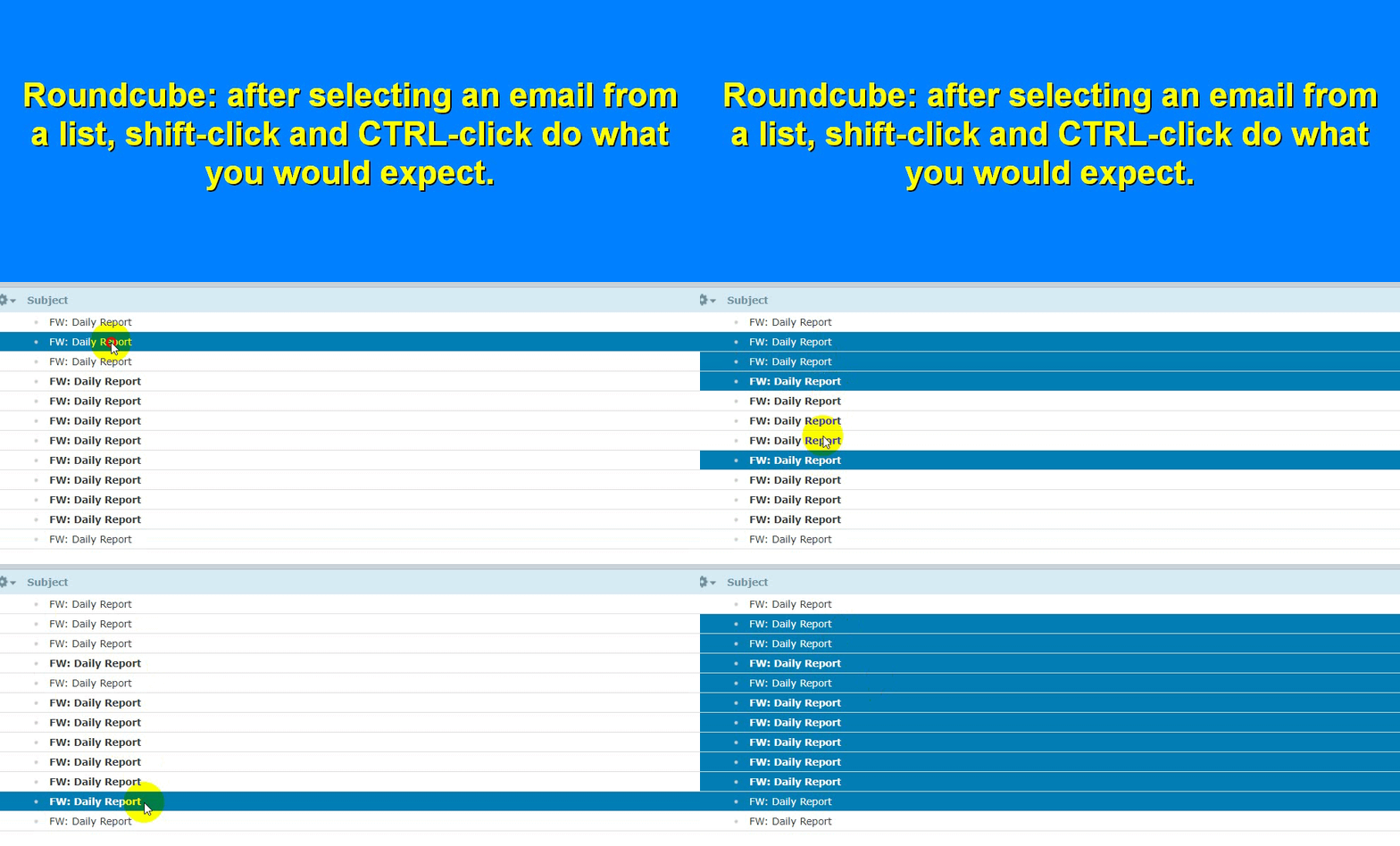
@jasonmunro commented on GitHub (Nov 17, 2019):
Not sure this applies entirely. Cypht uses checkboxes so I don't think control+click makes sense (?). I have pushed support for shift+click. Checking a checkbox with the shift key will select all items in the list since between the shift-click and the last checkbox to be checked.
@Yamakasi commented on GitHub (Nov 22, 2019):
@jasonmunro checkboxes are fine but you sometimes double click them faster or hit them not good enough. This is something usable but I think it also depends on user taste :)
Good job!
@marclaporte commented on GitHub (Feb 1, 2020):
@jasonmunro
Please see:
https://www.gyrocode.com/articles/jquery-datatables-row-selection-using-checkboxes-and-select-extension/
I like how you click anywhere on the row, and it selects the row.
My flow is:
@jasonmunro commented on GitHub (Feb 6, 2020):
click-anywhere-to-select should be easy enough, just need to make sure click-to-load is not adversely effected :) On my list to look into, as always thanks for the feedback.
@marclaporte commented on GitHub (Apr 2, 2020):
And also, once selected, we should be able to drag and drop to another folder: https://github.com/jasonmunro/cypht/issues/216
Thanks!
@NasserNgandu commented on GitHub (Nov 27, 2021):
Regarding the possibility of making the entire entry clickable.
https://user-images.githubusercontent.com/59774297/143689555-46488228-ee03-4a24-aecd-c666304d8477.mp4
It works but there is a problem with the area where there are links that point to mails by clicking on them instead of making a selection, the email will open.
Rouncube manages this with events: click only open mail, control clicks selection mail, shift clicks multiple selection of mails. I find that the solution to make all the entry clickable is to remove the links and manage the opening of mails with events like on Roundcube.
As it is a solution which would affect the ergonomics I would like to have your opinion.
@NasserNgandu commented on GitHub (Dec 3, 2021):
I could also make sure that the selection on all the entry is done only if we make ctr click or shift click. So if the ctr or shift key is pressed, I could make the links of the mails disable. And if it is released make them active.
So the selection on the whole entry will be done with either ctr or shift.
@torstenfabricius commented on GitHub (Dec 5, 2021):
Hello @jasonmunro @marclaporte and all,
thank you for the great work on Cypht and on the integration to Tiki as the new Tiki Webmail base.
I had a look at the discussion and the example from Marc: https://www.gyrocode.com/articles/jquery-datatables-row-selection-using-checkboxes-and-select-extension/
I agree so far, that as a user I would quite strongly hope, if not expect, that either "click" or "ctrl+click" for mulitiple single item selection and either "shift+click" or "ctrl+shift+click" for multiple grouped items should work for lists like this email list. Not because it is fancy, but simply it is saving nerves and a lot of time when you have to work with that stuff every day.
This is one of those features you never really realise, but that makes you feel quite comfortable whilst working and that you ever instantly miss, once you have to work without in another app. One of this little things that make one happy without really knowing why. It is one of theses things that are important to implement, if that is possible with reasonable effort (imho).
Whilst the gyrocode.com example is mainly looking nice, it is lacking the ctrl+shift+click multiselect option. On the other hand the click at any point in the row to select the item is really cool.
Here the tick-box plus the hover-color is reflecting the state of being selected, but has no function where you would need to hit a small tick box with a cursor or when iPhone or Android with a knobbly finger.
Very cool for mobile touch devices would be, to be able to stroke over the screen with the finger to multiselect groups of rows and to tap with the finger on the screen to select the single row or multiple single rows.
Just my thoughts - any feedback appreciated.
Best regards,
Torsten
@henrique-borba commented on GitHub (Dec 7, 2021):
I liked this idea of using CTRL and SHIFT, I don't think we need to add another library because I believe the best solution is to apply the events as proposed by @NasserNgandu.
Using one 'click' event is enough:
@dumblob commented on GitHub (Dec 23, 2021):
@henrique-borba does this register the click even if you're not hovering the row background but the text in foreground?
This problem is very common and always drives me mad, so I'd like to avoid it in Cypht.
@jasonmunro commented on GitHub (Jan 18, 2022):
Thanks to @marclaporte and team for working on this, however the PR had some compatibility issues with our codebase (which I detailed in the PR) so I took a stab at coding this myself. Changes are pushed to master. This maintains existing checkbox behavior while adding shift + click and ctrl + click support to anywhere on the message row. A simple click anywhere now loads the message. The only thing I did not include is shift+ctrl+click (not sure what that is even supposed to do!), but happy to implement it if we want it in addition to this.