[GH-ISSUE #348] Cypht behind Apache Proxy Configuration #299

Closed
opened 2026-02-25 21:34:41 +03:00 by kerem · 2 comments
Owner

Originally created by @FloWzoW on GitHub (Jun 14, 2019).
Original GitHub issue: https://github.com/cypht-org/cypht/issues/348

Originally assigned to: @jasonmunro on GitHub.

💬 Question

Hello,

i installed cypht on a virtual machine on Ubuntu 18.04 Server with running apache.
This is my apache-config on the vm:

<VirtualHost *:80>
    ServerName  cypht.example.com
    DocumentRoot /var/www/html/mail

    # Logging
    # Possible values include: debug, info, notice, warn, error, crit, alert, emerg.
    LogLevel  warn
    ErrorLog  /var/log/apache2/shaarli-error.log
    CustomLog /var/log/apache2/shaarli-access.log combined

</VirtualHost>

And this is my apache config-file on the root server running apache proxy:

<VirtualHost *:80>
        ServerName cypht.example.com
        ServerAlias cypht.example.com
        ServerAdmin webmaster@localhost

        #ErrorLog ${APACHE_LOG_DIR}/error.log
        #CustomLog ${APACHE_LOG_DIR}/access.log combined

        Redirect permanent / https://cypht.example.com

</VirtualHost>

<VirtualHost *:443>
        # Host-Einstellungen
        ServerName cypht.example.com
        ServerAlias cypht.example.com
        ServerAdmin webmaster@localhost

        # SSL
        SSLEngine on
        SSLCertificateFile      /etc/letsencrypt/live/example.com/cert.pem
        SSLCertificateKeyFile /etc/letsencrypt/live/example.com/privkey.pem
        # SSLCertificateChainFile /etc/letsencrypt/live/example.com/chain.pem
        # Include /etc/letsencrypt/options-ssl-apache.conf


        # System-Einstellungen
        LogLevel warn
        ErrorLog ${APACHE_LOG_DIR}/error.log
        CustomLog ${APACHE_LOG_DIR}/access.log combined

        # Anwendungsspezifisch
        RequestHeader set X-Forwarded-Proto "https"
        ProxyPreserveHost On

        # Proxy
        SSLProxyEngine On
        ProxyPass               /       http://192.168.2.107
        ProxyPassReverse        /       http://192.168.2.107

</VirtualHost>
# vim: syntax=apache ts=4 sw=4 sts=4 sr noet

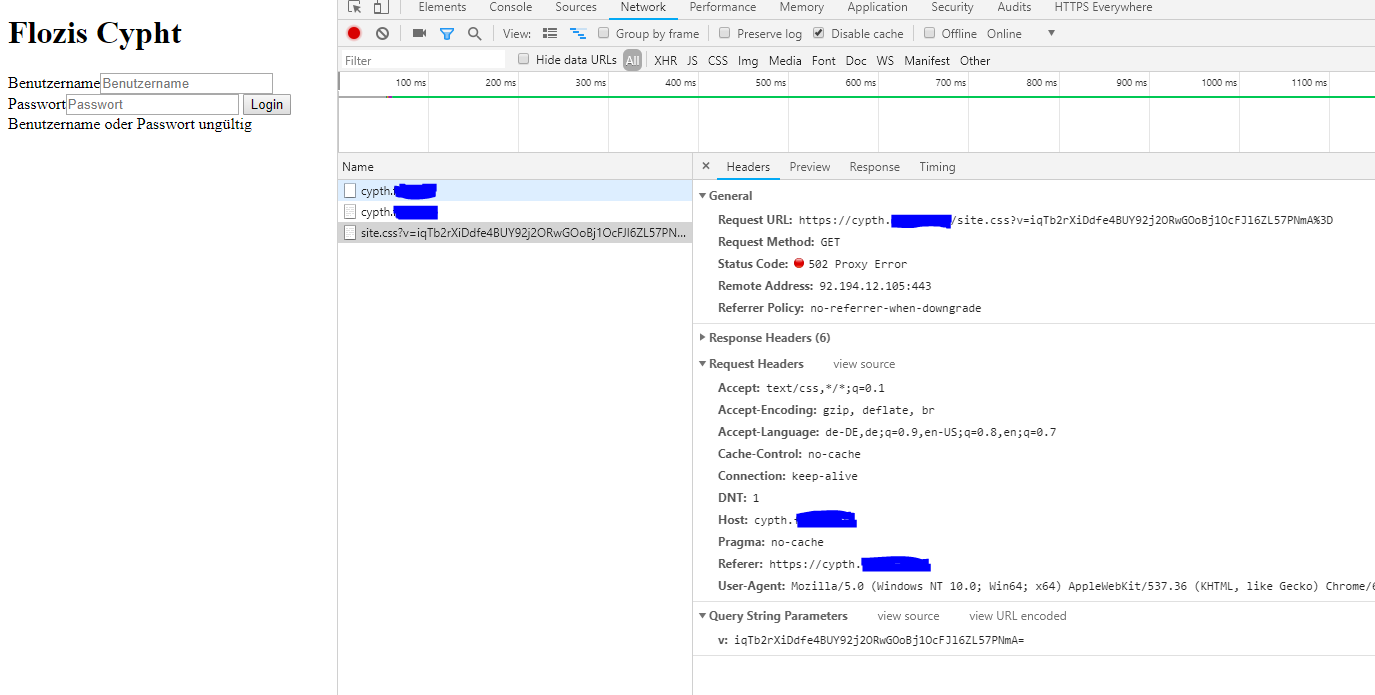
Now my problem: if i visit cypht.example.com it returns html markup but it cannot access css and i cannot login (login combination wrong).

See this screenshot:
image

Maybe someone can help me configure my root-apache-proxy? Maybe the problem is behind the https connection?

The app is working when i add 192.168.2.107 cypht.example.com in the hosts file of the client machine.

I already setted
disable_origin_check=true
and
cookie_domain=cypth.example.com
in my cypht configuration, it doesnt helped me.

Thanks, sorry for my bad english skills lol

Originally created by @FloWzoW on GitHub (Jun 14, 2019). Original GitHub issue: https://github.com/cypht-org/cypht/issues/348 Originally assigned to: @jasonmunro on GitHub. ## 💬 Question Hello, i installed cypht on a virtual machine on Ubuntu 18.04 Server with running apache. This is my apache-config on the vm: ``` <VirtualHost *:80> ServerName cypht.example.com DocumentRoot /var/www/html/mail # Logging # Possible values include: debug, info, notice, warn, error, crit, alert, emerg. LogLevel warn ErrorLog /var/log/apache2/shaarli-error.log CustomLog /var/log/apache2/shaarli-access.log combined </VirtualHost> ``` And this is my apache config-file on the root server running apache proxy: ``` <VirtualHost *:80> ServerName cypht.example.com ServerAlias cypht.example.com ServerAdmin webmaster@localhost #ErrorLog ${APACHE_LOG_DIR}/error.log #CustomLog ${APACHE_LOG_DIR}/access.log combined Redirect permanent / https://cypht.example.com </VirtualHost> <VirtualHost *:443> # Host-Einstellungen ServerName cypht.example.com ServerAlias cypht.example.com ServerAdmin webmaster@localhost # SSL SSLEngine on SSLCertificateFile /etc/letsencrypt/live/example.com/cert.pem SSLCertificateKeyFile /etc/letsencrypt/live/example.com/privkey.pem # SSLCertificateChainFile /etc/letsencrypt/live/example.com/chain.pem # Include /etc/letsencrypt/options-ssl-apache.conf # System-Einstellungen LogLevel warn ErrorLog ${APACHE_LOG_DIR}/error.log CustomLog ${APACHE_LOG_DIR}/access.log combined # Anwendungsspezifisch RequestHeader set X-Forwarded-Proto "https" ProxyPreserveHost On # Proxy SSLProxyEngine On ProxyPass / http://192.168.2.107 ProxyPassReverse / http://192.168.2.107 </VirtualHost> # vim: syntax=apache ts=4 sw=4 sts=4 sr noet ``` Now my problem: if i visit cypht.example.com it returns html markup but it cannot access css and i cannot login (login combination wrong). See this screenshot: ![image](https://user-images.githubusercontent.com/4496639/59539417-78703380-8efd-11e9-91e1-48a59f61bc80.png) Maybe someone can help me configure my root-apache-proxy? Maybe the problem is behind the https connection? The app is working when i add `192.168.2.107 cypht.example.com` in the hosts file of the client machine. I already setted `disable_origin_check=true` and `cookie_domain=cypth.example.com` in my cypht configuration, it doesnt helped me. Thanks, sorry for my bad english skills lol
kerem closed this issue 2026-02-25 21:34:41 +03:00
Author
Owner

@FloWzoW commented on GitHub (Jun 14, 2019):

oh my ..
i missed adding trailing slashes to my ProxyPass condition :-)

this is now my proxy configuration:

<VirtualHost *:80>
        ServerName cypht.example.com
        ServerAlias cypht.example.com
        ServerAdmin webmaster@localhost

        #ErrorLog ${APACHE_LOG_DIR}/error.log
        #CustomLog ${APACHE_LOG_DIR}/access.log combined

        Redirect permanent / https://cypht.example.com

</VirtualHost>

<VirtualHost *:443>
        # Host-Einstellungen
        ServerName cypht.example.com
        ServerAlias cypht.example.com
        ServerAdmin webmaster@localhost

        # SSL
        SSLEngine on
        SSLCertificateFile      /etc/letsencrypt/live/example.com/cert.pem
        SSLCertificateKeyFile /etc/letsencrypt/live/example.com/privkey.pem
        # SSLCertificateChainFile /etc/letsencrypt/live/example.com/chain.pem
        # Include /etc/letsencrypt/options-ssl-apache.conf


        # System-Einstellungen
        LogLevel warn
        ErrorLog ${APACHE_LOG_DIR}/error.log
        CustomLog ${APACHE_LOG_DIR}/access.log combined

        # Anwendungsspezifisch
        RequestHeader set X-Forwarded-Proto "https"
        ProxyPreserveHost On

        # Proxy
        SSLProxyEngine On
        ProxyPass               /       http://192.168.2.107/
        ProxyPassReverse        /       http://192.168.2.107/

</VirtualHost>
# vim: syntax=apache ts=4 sw=4 sts=4 sr noet

ok, but now, after login, it doesnt redirects me, it just reloads the login without any error-message. any help?

Edit: Solved, i just had a typo in /hm3.ini
You see it? cookie_domain=cypth.example.com
It must be: cookie_domain=cypht.example.com

issue can be closed :)

<!-- gh-comment-id:502294298 --> @FloWzoW commented on GitHub (Jun 14, 2019): oh my .. i missed adding trailing slashes to my ProxyPass condition :-) this is now my proxy configuration: ``` <VirtualHost *:80> ServerName cypht.example.com ServerAlias cypht.example.com ServerAdmin webmaster@localhost #ErrorLog ${APACHE_LOG_DIR}/error.log #CustomLog ${APACHE_LOG_DIR}/access.log combined Redirect permanent / https://cypht.example.com </VirtualHost> <VirtualHost *:443> # Host-Einstellungen ServerName cypht.example.com ServerAlias cypht.example.com ServerAdmin webmaster@localhost # SSL SSLEngine on SSLCertificateFile /etc/letsencrypt/live/example.com/cert.pem SSLCertificateKeyFile /etc/letsencrypt/live/example.com/privkey.pem # SSLCertificateChainFile /etc/letsencrypt/live/example.com/chain.pem # Include /etc/letsencrypt/options-ssl-apache.conf # System-Einstellungen LogLevel warn ErrorLog ${APACHE_LOG_DIR}/error.log CustomLog ${APACHE_LOG_DIR}/access.log combined # Anwendungsspezifisch RequestHeader set X-Forwarded-Proto "https" ProxyPreserveHost On # Proxy SSLProxyEngine On ProxyPass / http://192.168.2.107/ ProxyPassReverse / http://192.168.2.107/ </VirtualHost> # vim: syntax=apache ts=4 sw=4 sts=4 sr noet ``` ok, but now, after login, it doesnt redirects me, it just reloads the login without any error-message. any help? Edit: Solved, i just had a typo in `/hm3.ini` You see it? `cookie_domain=cypth.example.com` It must be: `cookie_domain=cypht.example.com` issue can be closed :)
Author
Owner

@jasonmunro commented on GitHub (Jun 18, 2019):

Glad to hear you got it sorted out. Thanks for posting your config, could be a useful reference for others!

<!-- gh-comment-id:503233213 --> @jasonmunro commented on GitHub (Jun 18, 2019): Glad to hear you got it sorted out. Thanks for posting your config, could be a useful reference for others!
Sign in to join this conversation.
No milestone
No project
No assignees
1 participant
Notifications
Due date
The due date is invalid or out of range. Please use the format "yyyy-mm-dd".

No due date set.

Dependencies

No dependencies set.

Reference
starred/cypht#299
No description provided.