mirror of
https://github.com/cypht-org/cypht.git
synced 2026-04-26 05:26:00 +03:00
[GH-ISSUE #228] Archive message #190
Labels
No labels
2fa
I18N
PGP
Security
Security
account
advanced_search
advanced_search
announcement
api_login
authentication
awaiting feedback
blocker
bug
bug
bug
calendar
config
contacts
core
core
devops
docker
docs
duplicate
dynamic_login
enhancement
epic
feature
feeds
framework
github
github
gmail_contacts
good first issue
help wanted
history
history
imap
imap_folders
inline_message
installation
keyboard_shortcuts
keyboard_shortcuts
ldap_contacts
mobile
need-ssh-access
new module set
nux
pop3
profiles
pull-request
question
refactor
release
research
saved_searches
smtp
strategic
tags
tests
themes
website
wordpress
No milestone
No project
No assignees
1 participant

Notifications
Due date
No due date set.
Dependencies
No dependencies set.
Reference
starred/cypht#190
Loading…
Add table
Add a link
Reference in a new issue
No description provided.
Delete branch "%!s()"
Deleting a branch is permanent. Although the deleted branch may continue to exist for a short time before it actually gets removed, it CANNOT be undone in most cases. Continue?
Originally created by @ovv on GitHub (Oct 13, 2017).
Original GitHub issue: https://github.com/cypht-org/cypht/issues/228
Originally assigned to: @jasonmunro on GitHub.
Hello,
I would like to request a new feature. There is an easy way to set a trash folder and delete a mail, would it be possible to do the same with an archive folder and add an archive button ?
I like keeping my inbox clean and usually heavily rely on the archive feature for that.
Thanks for this software 🥇
@dumblob commented on GitHub (Oct 13, 2017):
May I ask what are all differences between an usual folder and an archive folder (except for the label)? I can't see absolutely no difference, but I must be missing something.
@jasonmunro commented on GitHub (Oct 13, 2017):
@dumblob Good point :) I think the idea is more ease of use. For example, when you have a Trash folder enabled, "deleting" a message is the same thing as moving it to the trash. It should be pretty easy to code up since all the basic functionality is there. Just need to add a dialog to the imap folder management page and a button to the message list controls (that only shows up if an archive folder is set). One issue would be what to do if you select messages from 2 accounts, but only one has an archive folder configured?
@dumblob commented on GitHub (Oct 14, 2017):
Well, then I would definitely advocate for making this generic (the trash folder is too specific for a general-purpose email client). E.g. extend settings for individual folders to include option with which one can mimic the trash folder functionality (except for other functionality). I understood, that the only change is in a menu. In that case, I would add/allow edition of the message list controls. One could then add/edit the content of a submenu "Move to" or just add directly another item at a specific position in those controls as you proposed.
But I'll wait for @ovv's answer.
@ovv commented on GitHub (Oct 14, 2017):
I took the habit when I had a mail provider that would automatically delete mail in the archive folder when your quota was reached but I don't think any provider does that anymore.
A generic setting would be good too it's indeed for an easier use. At the moment when you want to move a mail you first have to check in which account it is to no move it to a different one.
As for accounts without the archive/custom folder present, you could not display the button when at least one email without the option configured is selected.
@marclaporte commented on GitHub (Feb 11, 2019):
Here are some ideas of archive settings from Kolab
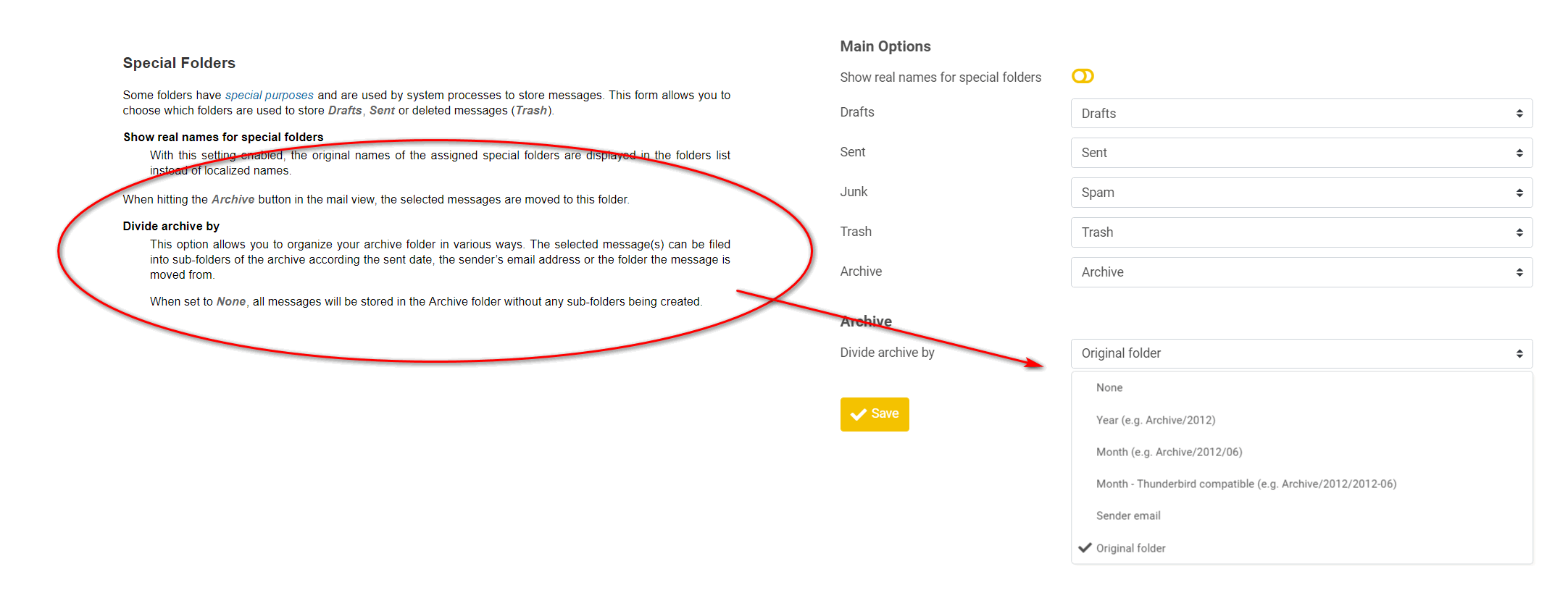
@marclaporte commented on GitHub (Oct 10, 2019):
I will explain more about the "Original Folder" use case:
Tons of emails come in. There are various server-side filters that move them to the right folders. All good.
Now, I need to review mails. I go through the various folders. When I click "Archive", it should no longer be in that folder (because I dealt with it), but findable if necessary. If all archived emails go to the same folder, I lose the information provided by the server-side filters (i.e.: in which folder this email ended up in)
Thanks!
@Yamakasi commented on GitHub (Oct 10, 2019):
This could be a nice feature but there needs to be checked how Kolab does that as it's a different beast.
Tagging can be helpful too in such cases as I think that archives with lots of folders can have their disadvantages server side or resource heavy when you need to search.
@yvesdaxmaz commented on GitHub (Oct 12, 2019):
I have some idea due to the fact that we have to keep the Original folder where the mail was before we archive It, I can create an Archive parent mailbox within which I will create sub mailbox with the name of each mailbox where archived mail was before.
@dumblob commented on GitHub (Oct 13, 2019):
I think tagging is the easiest thing to do here without introduction of anything complicated (to implement, learn, use).
But if we really wanted to play with concepts like Archiving etc., then I'd rather generalize it - the easiest would be exactly what @yvesdaxmaz proposed, but optimized under the hood somehow to avoid that much copying. Do you @marclaporte see any reasons why the solution of @yvesdaxmaz wouldn't match requirements? I can't find currently any significant downside.
@Yamakasi commented on GitHub (Oct 13, 2019):
Maybe an auto Archive Folder creation as option when creating a folder "Create Achrive Folder as well"
@dumblob commented on GitHub (Oct 13, 2019):
@Yamakasi sounds also like a good option (not difficult to implement and being really intuitive).
@marclaporte commented on GitHub (Oct 15, 2019):
@dumblob : What @yvesdaxmaz proposes is fine. It is one of the options in the screenshot: https://github.com/jasonmunro/cypht/issues/228#issuecomment-462213209
@jasonmunro commented on GitHub (Nov 13, 2019):
Many thanks to @yvesdaxmaz for coding this up. This is merged and I followed up with a few refactors and additions.