mirror of
https://github.com/cypht-org/cypht.git
synced 2026-04-25 21:15:56 +03:00
[GH-ISSUE #206] Cannot expand folder #170
Labels
No labels
2fa
I18N
PGP
Security
Security
account
advanced_search
advanced_search
announcement
api_login
authentication
awaiting feedback
blocker
bug
bug
bug
calendar
config
contacts
core
core
devops
docker
docs
duplicate
dynamic_login
enhancement
epic
feature
feeds
framework
github
github
gmail_contacts
good first issue
help wanted
history
history
imap
imap_folders
inline_message
installation
keyboard_shortcuts
keyboard_shortcuts
ldap_contacts
mobile
need-ssh-access
new module set
nux
pop3
profiles
pull-request
question
refactor
release
research
saved_searches
smtp
strategic
tags
tests
themes
website
wordpress
No milestone
No project
No assignees
1 participant

Notifications
Due date
No due date set.
Dependencies
No dependencies set.
Reference
starred/cypht#170
Loading…
Add table
Add a link
Reference in a new issue
No description provided.
Delete branch "%!s()"
Deleting a branch is permanent. Although the deleted branch may continue to exist for a short time before it actually gets removed, it CANNOT be undone in most cases. Continue?
Originally created by @hartois on GitHub (Jun 19, 2017).
Original GitHub issue: https://github.com/cypht-org/cypht/issues/206
Originally assigned to: @jasonmunro on GitHub.
In one of the accounts (Office 365) I cannot expand folder in the folders list.
I see "+" near folder, after clicking on it icon changed to "-", but subfolders are not displayed.
In web console I see request:
and response:
After clicking on "-" visualy nothing happens, but I see request:
and response:
Re-creating account not solved problem.
How can I debug this problem?
@jasonmunro commented on GitHub (Jun 19, 2017):
To debug this, we need to put Cypht into "debug" mode, and apply the following patch:
https://gist.github.com/jasonmunro/1ed2dc0d0df7d843a9240efdcf5221e5
This will output the IMAP conversation which should provide a clue as to what is going wrong. To put Cypht in debug mode, see section 6 of the install page (https://cypht.org/install.html). The output will be sent to wherever PHP is configured to log to. Keep in mind that folder lists are cached, so this will only output information the first time you try to expand the folder after login. Subsequent attempts will not connect to the IMAP server.
@hartois commented on GitHub (Jun 19, 2017):
@jasonmunro commented on GitHub (Jun 19, 2017):
Thanks for the feedback. Unfortunately this is not what I was hoping for :) According to this we are requesting the sub-folders under logs (only 1 level deep, not sub-folders of sub-folders) with this command:
LIST "logs/%" "%"
And the server is responding with "OK", so the command format is correct, it is just telling us no sub-folders exist under that parent folder.
Do you see sub-folders like this in other clients? Some desktop clients create "local" folders instead of on the IMAP server itself, which might explain why they are not showing up. I will need to test Office 365 specifically to see if I can reproduce the problem.
@hartois commented on GitHub (Jun 19, 2017):
Folder "logs" contain two subfolders: "mail logs" and "shrek".
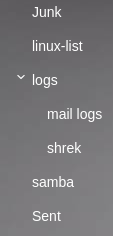
From Rainloop client:
@jasonmunro commented on GitHub (Jun 19, 2017):
Looks like exchange does not like the trailing '%' character on the folder name. Removing that seems to have fixed the issue for me. Could you update, logout and back in, and see if the problem is resolved for you? Thanks!
@hartois commented on GitHub (Jun 19, 2017):
This solved problem. Thanks