mirror of
https://github.com/dbeaver/cloudbeaver.git
synced 2026-04-25 13:46:02 +03:00
[GH-ISSUE #326] Can't edit existing connection details #85
Labels
No labels
AS
can't reproduce
can't reproduce
deployment
development
documentation
duplicate
duplicate
ee
enhancement
external
new driver
performance
pull-request
third party issue
wait for response
wait for review
wontfix
x:Oracle
x:cassandra
x:clickhouse
x:db2
x:duckdb
x:greenplum
x:h2
x:h2gis
x:hana
x:hive
x:intersystems
x:kyuubi
x:maria
x:mongo
x:mysql
x:postgresql
x:presto
x:sql server
x:sqlite
x:teradata
x:trino
xf:accessibility
xf:administration
xf:ai
xf:authentication
xf:aws
xf:commit-mode
xf:connection
xf:dark theme
xf:data editor
xf:datatransfer
xf:dba
xf:driver management
xf:erd
xf:filters
xf:i18n
xf:i18n
xf:installer
xf:json
xf:kerberos
xf:ldap
xf:local config
xf:log viewer
xf:metadata
xf:metadata editor
xf:navigator
xf:okta
xf:query manager
xf:resource manager
xf:scripts
xf:sql editor
xf:tasks
xf:ui/uix
xo: Firefox
xo:eclipse
xo:internet explorer
xo:macos
xp:major
xrn:internal
No milestone
No project
No assignees
1 participant

Notifications
Due date
No due date set.
Dependencies
No dependencies set.
Reference
starred/cloudbeaver#85
Loading…
Add table
Add a link
Reference in a new issue
No description provided.
Delete branch "%!s()"
Deleting a branch is permanent. Although the deleted branch may continue to exist for a short time before it actually gets removed, it CANNOT be undone in most cases. Continue?
Originally created by @ariestikto on GitHub (Mar 31, 2021).
Original GitHub issue: https://github.com/dbeaver/cloudbeaver/issues/326
How do I edit DB connection once its created? The user interface doesn't allow me to, all inputs are readonly, am I being dumb here?
@kseniiaguzeeva commented on GitHub (Mar 31, 2021):
Edit connection allows to edit connections which are created on the main page (Connection>Manual/From Template).
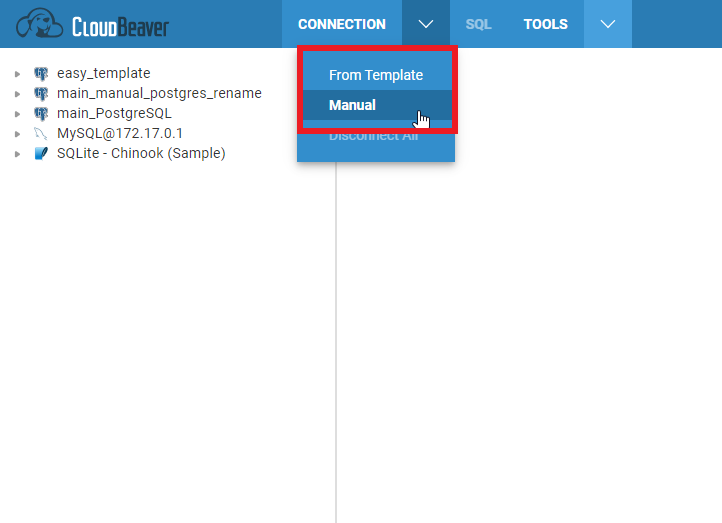
Connections settings are available in read-only mode for connections, created in Easy-configuration or Administration menu
@ariestikto commented on GitHub (Mar 31, 2021):
Ah I see, thanks!
Additional question, how to delete those readonly connections? is it not possible via web UI?
@kseniiaguzeeva commented on GitHub (Mar 31, 2021):
You can do it in Settings>Administration>Connection Management.

Administration menu is available only for users with admin role (It is a user who set CloudBeaver in Easy Configuration or another user who was given admin rights).
@ariestikto commented on GitHub (Mar 31, 2021):
Ah right perfect, thanks!