mirror of
https://github.com/dbeaver/cloudbeaver.git
synced 2026-04-25 13:46:02 +03:00
[GH-ISSUE #1469] How to turn off/minimal console logging #324
Labels
No labels
AS
can't reproduce
can't reproduce
deployment
development
documentation
duplicate
duplicate
ee
enhancement
external
new driver
performance
pull-request
third party issue
wait for response
wait for review
wontfix
x:Oracle
x:cassandra
x:clickhouse
x:db2
x:duckdb
x:greenplum
x:h2
x:h2gis
x:hana
x:hive
x:intersystems
x:kyuubi
x:maria
x:mongo
x:mysql
x:postgresql
x:presto
x:sql server
x:sqlite
x:teradata
x:trino
xf:accessibility
xf:administration
xf:ai
xf:authentication
xf:aws
xf:commit-mode
xf:connection
xf:dark theme
xf:data editor
xf:datatransfer
xf:dba
xf:driver management
xf:erd
xf:filters
xf:i18n
xf:i18n
xf:installer
xf:json
xf:kerberos
xf:ldap
xf:local config
xf:log viewer
xf:metadata
xf:metadata editor
xf:navigator
xf:okta
xf:query manager
xf:resource manager
xf:scripts
xf:sql editor
xf:tasks
xf:ui/uix
xo: Firefox
xo:eclipse
xo:internet explorer
xo:macos
xp:major
xrn:internal
No milestone
No project
No assignees
1 participant

Notifications
Due date
No due date set.
Dependencies
No dependencies set.
Reference
starred/cloudbeaver#324
Loading…
Add table
Add a link
Reference in a new issue
No description provided.
Delete branch "%!s()"
Deleting a branch is permanent. Although the deleted branch may continue to exist for a short time before it actually gets removed, it CANNOT be undone in most cases. Continue?
Originally created by @davidchingmy on GitHub (Feb 13, 2023).
Original GitHub issue: https://github.com/dbeaver/cloudbeaver/issues/1469
For context, I am using docker compose yml to run app and cloudbeaver community. I just want to see log for my app, how do I turn off or reduce cloudbeaver console logging?
@dariamarutkina commented on GitHub (Feb 22, 2023):
Hello @davidchingmy !
Could you clarify what exactly means "console logging" and what exactly you want to reduce? Also please share an example of logs. Can you please describe in more detail?
Thank you for your interest in CloudBeaver.
@davidchingmy commented on GitHub (Feb 23, 2023):
Hello @dariamarutkina ,
Thank you for your response!
I have this in my
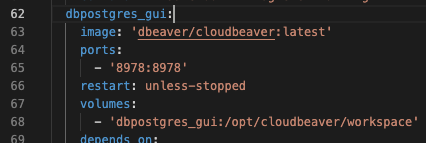
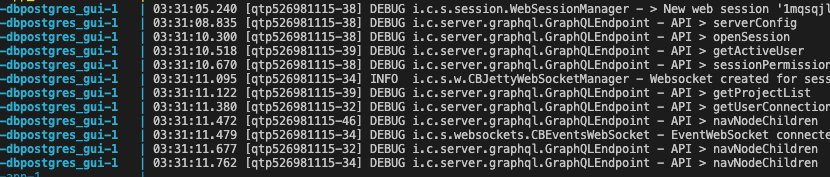
docker-compose.yml(see image below) and useddocker compose upto run cloudbeaver.I don't want to use docker's
--detachargument because this docker setup is purely for development purposes and I need to see my app's and db's logs.Here some sample logs from cloudbeaver.
@alexander-skoblikov commented on GitHub (Mar 23, 2023):
Hi, if you are building an application from source code, you can change this log config file, also in the future we plan to add support for custom logging configuration
@TatyanaSsau commented on GitHub (May 8, 2023):
Support for custom logging configuration via an external file has been added in 23.0.4
Thank you, @davidchingmy, for the interest in CloudBeaver!!!
@LonwoLonwo commented on GitHub (Oct 23, 2024):
As a result:
Custom cloudbeaver configuration is searched in conf/custom folder.
How to use it:
• create a folder in your local machine with custom
cloudbeaver.conforlogback.xmlfiles• how to customize
logback.xml- you can open it in Notepad and change the log pattern (date and time, for example, from {HH:mm:ss.SSS} to {HH:mm} )• Mount a new volume for the
/opt/cloudbeaver/customwith your local configuration folder where liescloudbeaver.conforlogback.xmland run docker image RESULT: logs format will be changed (if you set it as in the example, the time will have only hours and minutes)