mirror of
https://github.com/dbeaver/cloudbeaver.git
synced 2026-04-26 22:26:01 +03:00
[GH-ISSUE #820] SQL Server, visibility of system objects #203
Labels
No labels
AS
can't reproduce
can't reproduce
deployment
development
documentation
duplicate
duplicate
ee
enhancement
external
new driver
performance
pull-request
third party issue
wait for response
wait for review
wontfix
x:Oracle
x:cassandra
x:clickhouse
x:db2
x:duckdb
x:greenplum
x:h2
x:h2gis
x:hana
x:hive
x:intersystems
x:kyuubi
x:maria
x:mongo
x:mysql
x:postgresql
x:presto
x:sql server
x:sqlite
x:teradata
x:trino
xf:accessibility
xf:administration
xf:ai
xf:authentication
xf:aws
xf:commit-mode
xf:connection
xf:dark theme
xf:data editor
xf:datatransfer
xf:dba
xf:driver management
xf:erd
xf:filters
xf:i18n
xf:i18n
xf:installer
xf:json
xf:kerberos
xf:ldap
xf:local config
xf:log viewer
xf:metadata
xf:metadata editor
xf:navigator
xf:okta
xf:query manager
xf:resource manager
xf:scripts
xf:sql editor
xf:tasks
xf:ui/uix
xo: Firefox
xo:eclipse
xo:internet explorer
xo:macos
xp:major
xrn:internal
No milestone
No project
No assignees
1 participant

Notifications
Due date
No due date set.
Dependencies
No dependencies set.
Reference
starred/cloudbeaver#203
Loading…
Add table
Add a link
Reference in a new issue
No description provided.
Delete branch "%!s()"
Deleting a branch is permanent. Although the deleted branch may continue to exist for a short time before it actually gets removed, it CANNOT be undone in most cases. Continue?
Originally created by @riccardomessineo on GitHub (May 11, 2022).
Original GitHub issue: https://github.com/dbeaver/cloudbeaver/issues/820
Is your feature request related to a problem? Please describe.
Using Cloudbeaver with SQL Server, it seems dangerous to have system objects available to users.
I'm referring to system databases such as "master", "tempdb" and system schemas as "dbo", "INFORMATION_SCHEMA" and "sys".
Describe the solution you'd like
I'd like an option to enable or disable the system objects visibility in the connections
@riccardomessineo commented on GitHub (May 12, 2022):
If I am not mistaken, MS has an option to hide system objects on its SQL Server Management Studio:
https://docs.microsoft.com/en-us/sql/ssms/object/hide-system-objects-in-object-explorer?view=sql-server-ver15&viewFallbackFrom=sql-server-linux-2017
@kseniiaguzeeva commented on GitHub (May 12, 2022):
Thank you for your feature request. You can hide
msdbdatabase andINFORMATION_SCHEMA,sysschemas for now: disable Show system objects via the connection context menu in the Navigator tree.@riccardomessineo commented on GitHub (May 12, 2022):
Hello @kseniiaguzeeva ,
thanks for the support.
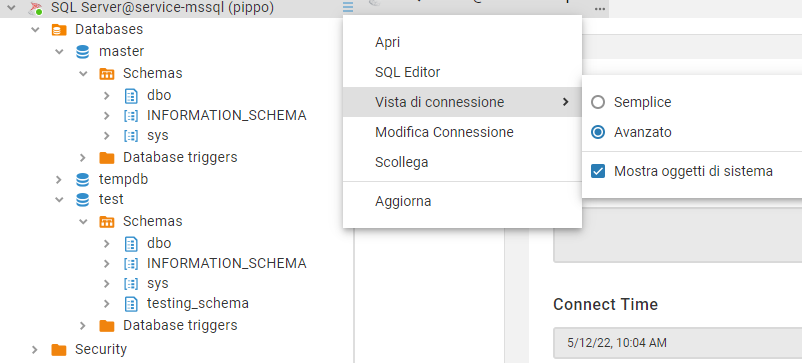
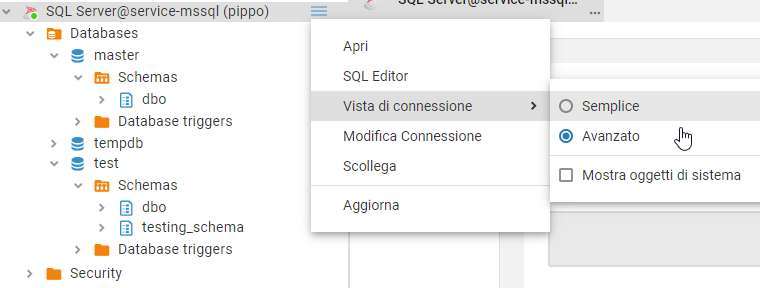
I tried the setting and tt hides "msdb" database, "information_schema" and "sys" schemas.
Is it "complete" though?
"master" and "tempdb" database and "dbo" schema are still displayed.
Setting on ("show system objects"):
Setting off ("hide system objects"):
@kseniiaguzeeva commented on GitHub (May 12, 2022):
I'm discussing the feature request with CloudBeaver team and give you an answer what can be done.
@serge-rider commented on GitHub (May 13, 2022):
Good point. Databases
master,tempdbandmodelmust be marked as system databases.Schema
dbois not a system schema. It is a default schema and it is widely used as a container of user tables.@kseniiaguzeeva commented on GitHub (May 23, 2022):
The improvement is available in the latest release 22.0.5.