mirror of
https://github.com/dbeaver/cloudbeaver.git
synced 2026-04-25 05:36:14 +03:00
[GH-ISSUE #527] Where can I set the session timeout of the webpage please? #157
Labels
No labels
AS
can't reproduce
can't reproduce
deployment
development
documentation
duplicate
duplicate
ee
enhancement
external
new driver
performance
pull-request
third party issue
wait for response
wait for review
wontfix
x:Oracle
x:cassandra
x:clickhouse
x:db2
x:duckdb
x:greenplum
x:h2
x:h2gis
x:hana
x:hive
x:intersystems
x:kyuubi
x:maria
x:mongo
x:mysql
x:postgresql
x:presto
x:sql server
x:sqlite
x:teradata
x:trino
xf:accessibility
xf:administration
xf:ai
xf:authentication
xf:aws
xf:commit-mode
xf:connection
xf:dark theme
xf:data editor
xf:datatransfer
xf:dba
xf:driver management
xf:erd
xf:filters
xf:i18n
xf:i18n
xf:installer
xf:json
xf:kerberos
xf:ldap
xf:local config
xf:log viewer
xf:metadata
xf:metadata editor
xf:navigator
xf:okta
xf:query manager
xf:resource manager
xf:scripts
xf:sql editor
xf:tasks
xf:ui/uix
xo: Firefox
xo:eclipse
xo:internet explorer
xo:macos
xp:major
xrn:internal
No milestone
No project
No assignees
1 participant

Notifications
Due date
No due date set.
Dependencies
No dependencies set.
Reference
starred/cloudbeaver#157
Loading…
Add table
Add a link
Reference in a new issue
No description provided.
Delete branch "%!s()"
Deleting a branch is permanent. Although the deleted branch may continue to exist for a short time before it actually gets removed, it CANNOT be undone in most cases. Continue?
Originally created by @praynise on GitHub (Nov 2, 2021).
Original GitHub issue: https://github.com/dbeaver/cloudbeaver/issues/527
version: cloudbeaver ce 21.1.4
jdk:adoptopenjdk 11.0.13
problem:the webpage alert 'session expired' to often,the session expired every minute,while i was still writing sql.i try to configure 'session lifetime' in adminstration but it does not work.where can i configure the session lifetime of the webpage?please advise,many thx
@kseniiaguzeeva commented on GitHub (Nov 2, 2021):
@N-ickJones commented on GitHub (Nov 3, 2021):
I'm having the same issue.
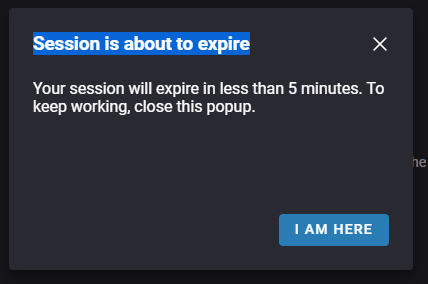
The popup will keep showing up even with the expireSessionAfterPeriod is set to 600000 in the .cloudbeaver.runtime.conf. I cannot find any indicators through the logs, as to what is triggering the popup.
I'm using docker-compose v.3.8 and the only modifications I've made are adding some templates to the workspace/GlobalConfiguration/.dbeaver/data-sources.json as show below
My .cloudbeaver.runtim.conf looks as follows
@kseniiaguzeeva commented on GitHub (Nov 3, 2021):
Could you please tell your CLoudBeaver version and try:
@N-ickJones commented on GitHub (Nov 3, 2021):
The session expired and I pressed 'Reload'. The logs show
I've just attempted to clear the cookies and waited. The session expired popup appeared after about 30-60 seconds.
My Dockerfile is using dbeaver/cloudbeaver:latest
@kseniiaguzeeva commented on GitHub (Nov 3, 2021):
Thank you for the details. Could you please provide me with server logs completely (you can find
server.logand.login your local config files:cloudbeaver\workspace\.metadata\)?@N-ickJones commented on GitHub (Nov 3, 2021):
Ok I'll get the server.log. I've been looking at the session token.
After restarting the container, I get the following log:
The cookie looks as follows:
.log
@N-ickJones commented on GitHub (Nov 3, 2021):
I see the message
Seems like I have an issue after modifying the workspace, where the application think's it needs to recover changes causing the reset of the ression?
@N-ickJones commented on GitHub (Nov 3, 2021):
I think I've got it working now. I had changed aka 10 minutes.
After, I had previous had it at 60 minutes and increased it without success. I think the issue I encountered is that when changing the workspace expireSessionAfterPeriod variable or when using the Administration > Server Configuration > Server Information > Session Lifetime feature, the cookie wasn't being reset? I'll continue to monitor it and see if the issue appears again.
@N-ickJones commented on GitHub (Nov 3, 2021):
Additionally, I have a docker compose volume binding that I changed during my troubleshooting which could have been the issue.
Original
While session is properly working
@kseniiaguzeeva commented on GitHub (Nov 8, 2021):
Thank you for the additional details. We are going to fix this issue.
@kseniiaguzeeva commented on GitHub (Nov 10, 2021):
@praynise @N-ickJones Could you please tell me your timezone? I'm trying to reproduce the issue.
@N-ickJones commented on GitHub (Nov 10, 2021):
@kseniiaguzeeva I'm in the CST timezone. I'll continue to try to recreate the issue and give you detailed steps once I accomplish that.
@kseniiaguzeeva commented on GitHub (Dec 10, 2021):
Please fell free to ask to reopen the ticket if the issue appears again.