mirror of
https://github.com/dbeaver/cloudbeaver.git
synced 2026-04-25 05:36:14 +03:00
[GH-ISSUE #431] Teradata connect error #129
Labels
No labels
AS
can't reproduce
can't reproduce
deployment
development
documentation
duplicate
duplicate
ee
enhancement
external
new driver
performance
pull-request
third party issue
wait for response
wait for review
wontfix
x:Oracle
x:cassandra
x:clickhouse
x:db2
x:duckdb
x:greenplum
x:h2
x:h2gis
x:hana
x:hive
x:intersystems
x:kyuubi
x:maria
x:mongo
x:mysql
x:postgresql
x:presto
x:sql server
x:sqlite
x:teradata
x:trino
xf:accessibility
xf:administration
xf:ai
xf:authentication
xf:aws
xf:commit-mode
xf:connection
xf:dark theme
xf:data editor
xf:datatransfer
xf:dba
xf:driver management
xf:erd
xf:filters
xf:i18n
xf:i18n
xf:installer
xf:json
xf:kerberos
xf:ldap
xf:local config
xf:log viewer
xf:metadata
xf:metadata editor
xf:navigator
xf:okta
xf:query manager
xf:resource manager
xf:scripts
xf:sql editor
xf:tasks
xf:ui/uix
xo: Firefox
xo:eclipse
xo:internet explorer
xo:macos
xp:major
xrn:internal
No milestone
No project
No assignees
1 participant

Notifications
Due date
No due date set.
Dependencies
No dependencies set.
Reference
starred/cloudbeaver#129
Loading…
Add table
Add a link
Reference in a new issue
No description provided.
Delete branch "%!s()"
Deleting a branch is permanent. Although the deleted branch may continue to exist for a short time before it actually gets removed, it CANNOT be undone in most cases. Continue?
Originally created by @wang-guanyi on GitHub (Aug 2, 2021).
Original GitHub issue: https://github.com/dbeaver/cloudbeaver/issues/431
I enabled the teradata in db list and built the cloudbeaver successfully. But when tried to connect, I got error message below
'{' ('7B'X) is not a valid Teradata SQL token.
@kseniiaguzeeva commented on GitHub (Aug 13, 2021):
It is a problem with driver version https://support.teradata.com/community?id=community_question&sys_id=c275876b1b57fb00682ca8233a4bcb33 according Teradata documentation. Could you please try to correct the connection configuration?
@wang-guanyi commented on GitHub (Aug 18, 2021):
I tried the latest version (17.10.00.18) of teradata jdbc driver and got the same error. The same version is working fine with DBeaver.
@kseniiaguzeeva commented on GitHub (Aug 19, 2021):
We are going to add Teradata driver to CB EE in 21.1.4 milestone, test it and make a fix, if it is on our side. Thank you for the report.
@kseniiaguzeeva commented on GitHub (Oct 14, 2021):
Teradata driver has been added to CloudBeaver Enterprise in the latest 21.2.0 release. It should work now.
@wang-guanyi commented on GitHub (Oct 16, 2021):
I tried the community edition 21.2.0 version and still got the same error. Is it only supported in enterprise edition?
@kseniiaguzeeva commented on GitHub (Oct 21, 2021):
Could you please tell me the details of your driver and server? It looks like the problem is in their compatibility.
@wang-guanyi commented on GitHub (Oct 22, 2021):
Hi Kseniia, please find the versions as below. The driver is working fine in DBeaver CE 21.1.1, but using same driver to connect to same db server in cloudbeaver CE 21.2.0 is not working.
@kseniiaguzeeva commented on GitHub (Oct 27, 2021):
Thank you for the additional info. I'll inform you as soon as the reason will be found and fixed.
@kseniiaguzeeva commented on GitHub (Nov 8, 2021):
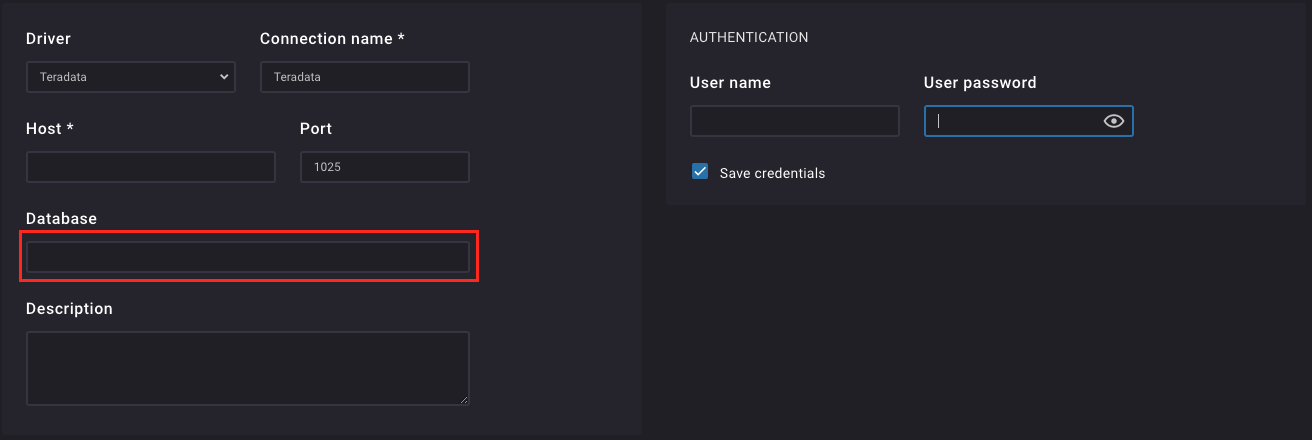
I managed to reproduce the error, when I did not fill database field in the connection parameters. Could you please try to fill it?
@wang-guanyi commented on GitHub (Nov 9, 2021):
Hi Kseniia, it works after I fill the database. Thank you very much for your help.
@kseniiaguzeeva commented on GitHub (Nov 9, 2021):
I'm glad to hear, that it works properly now. I close the ticket in this case. Please feel free to ask any other questions.