mirror of
https://github.com/dbeaver/cloudbeaver.git
synced 2026-04-25 13:46:02 +03:00
[GH-ISSUE #392] SQL Server different auth modes #114
Labels
No labels
AS
can't reproduce
can't reproduce
deployment
development
documentation
duplicate
duplicate
ee
enhancement
external
new driver
performance
pull-request
third party issue
wait for response
wait for review
wontfix
x:Oracle
x:cassandra
x:clickhouse
x:db2
x:duckdb
x:greenplum
x:h2
x:h2gis
x:hana
x:hive
x:intersystems
x:kyuubi
x:maria
x:mongo
x:mysql
x:postgresql
x:presto
x:sql server
x:sqlite
x:teradata
x:trino
xf:accessibility
xf:administration
xf:ai
xf:authentication
xf:aws
xf:commit-mode
xf:connection
xf:dark theme
xf:data editor
xf:datatransfer
xf:dba
xf:driver management
xf:erd
xf:filters
xf:i18n
xf:i18n
xf:installer
xf:json
xf:kerberos
xf:ldap
xf:local config
xf:log viewer
xf:metadata
xf:metadata editor
xf:navigator
xf:okta
xf:query manager
xf:resource manager
xf:scripts
xf:sql editor
xf:tasks
xf:ui/uix
xo: Firefox
xo:eclipse
xo:internet explorer
xo:macos
xp:major
xrn:internal
No milestone
No project
No assignees
1 participant

Notifications
Due date
No due date set.
Dependencies
No dependencies set.
Reference
starred/cloudbeaver#114
Loading…
Add table
Add a link
Reference in a new issue
No description provided.
Delete branch "%!s()"
Deleting a branch is permanent. Although the deleted branch may continue to exist for a short time before it actually gets removed, it CANNOT be undone in most cases. Continue?
Originally created by @hpolonskaya on GitHub (Jun 16, 2021).
Original GitHub issue: https://github.com/dbeaver/cloudbeaver/issues/392
Hi, I'm trying to connect Cloudbeaver to SQL server with sql server authentication . it's working with DBeaver,
but how to get it work with cloudbeaver.
Here is snippet what i'm talking about
@hpolonskaya commented on GitHub (Jun 18, 2021):
any updates?
@uslss commented on GitHub (Jun 21, 2021):
if I understand you right, you can connect to SQL server using SQL Server Authentication by filling in username and password in Authentication block in Connection settings. Could you check it and write back if it works for you.
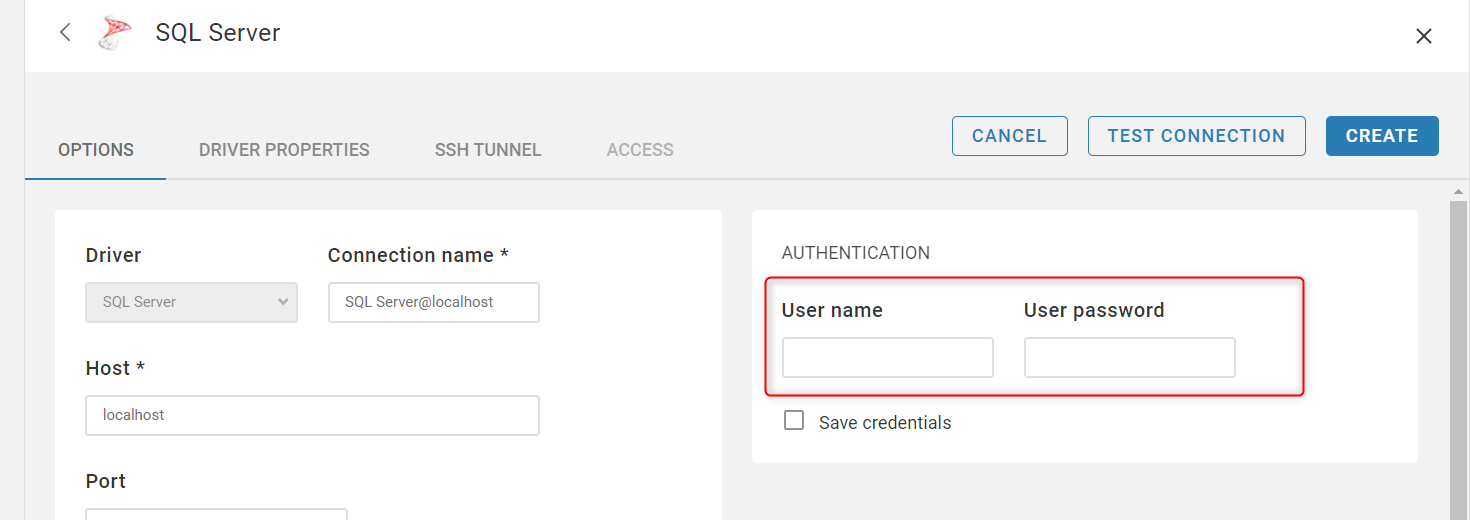
Sorry for the late response.
@hpolonskaya commented on GitHub (Jun 21, 2021):
Unfortunately it's not working I'm trying to connect with the same credentials using DBeaver ,select from authentication dropdown list -> sql server authentication > connect sucessfull
But clouldbeaver does not have the same dropdown just user/psw
and as result
Error connecting to database:
Connection failed:
The connection to the host emdc2sqm102.media.global.loc, named instance db102 failed. Error: "java.net.UnknownHostException: emdc2sqm102.media.global.loc". Verify the server and instance names and check that no firewall is blocking UDP traffic to port 1434. For SQL Server 2005 or later, verify that the SQL Server Browser Service is running on the host.
and Here is dbeaver connection test
@hpolonskaya commented on GitHub (Jun 22, 2021):
Hi any updates . Look like it's bug in Cloudbeaver UI for MS SQL connection.
@hpolonskaya commented on GitHub (Jun 24, 2021):
any updates on this issue
@serge-rider commented on GitHub (Jun 28, 2021):
It looks like your SQL Server instance is not accessible from the machine where CloudBeaver was deployed (UnknownHostException). Host name cannot be resolved.
You need to consult with your network administrator.
@hpolonskaya commented on GitHub (Jun 28, 2021):
Thank you Serge . it's working one more question.
what about Windows auth mode and the rest which dbeaver is supporting
@kseniiaguzeeva commented on GitHub (Jul 5, 2021):
Regarding your last comment I change your ticket status on a feature request.
@kseniiaguzeeva commented on GitHub (Jun 6, 2022):
SQL Server and NTLM authentication are available in the latest 22.1.0 release.