mirror of
https://github.com/brentvollebregt/auto-py-to-exe.git
synced 2026-04-25 11:45:49 +03:00
[GH-ISSUE #61] Cannot Identify Chrome Correctly to Run Application #60

Loading…
Add table
Add a link
Reference in a new issue
No description provided.
Delete branch "%!s()"
Deleting a branch is permanent. Although the deleted branch may continue to exist for a short time before it actually gets removed, it CANNOT be undone in most cases. Continue?
Originally created by @zeronobody0 on GitHub (Jun 12, 2019).
Original GitHub issue: https://github.com/brentvollebregt/auto-py-to-exe/issues/61
Originally assigned to: @brentvollebregt on GitHub.
I followed all of the instructions but it didn't work.
@brentvollebregt commented on GitHub (Jun 13, 2019):
This is extremely vague. What doesn't work; auto-py-to-exe, your executable, Python, pip? How doesn't it work? What did you expect to occur? What have you tried?
Could you please give details about what your are executing this on, an example of what you are trying to do (smallest reproducible example) and steps to reproduce your error.
@zeronobody0 commented on GitHub (Jun 14, 2019):
I downloaded it as instructed on https://pypi.org/project/auto-py-to-exe/'s Installing Via PyPI section, but when I tried to run it I got this error:
Traceback (most recent call last):
File "c:\users\saulr\appdata\local\programs\python\python37-32\lib\runpy.py", line 193, in run_module_as_main
"main", mod_spec) File "c:\users\saulr\appdata\local\programs\python\python37-32\lib\runpy.py", line 85, in run_code
exec(code, run_globals) File "C:\Users\Saulr\AppData\Local\Programs\Python\Python37-32\Scripts\auto-py-to-exe.exe_main.py", line 9, in
File "c:\users\saulr\appdata\local\programs\python\python37-32\lib\site-packages\auto_py_to_exe_main.py", line 371, in run
eel.start('main.html', size=(650, 612), options={'port': 0}) File "c:\users\saulr\appdata\local\programs\python\python37-32\lib\site-packages\eel_init_.py", line 120, in start
brw.open(start_urls, options) File "c:\users\saulr\appdata\local\programs\python\python37-32\lib\site-packages\eel\browsers.py", line 35, in open
chm.run(options, start_urls) File "c:\users\saulr\appdata\local\programs\python\python37-32\lib\site-packages\eel\chrome.py", line 11, in run
stdout=sps.PIPE, stderr=sps.PIPE, stdin=sps.PIPE) File "c:\users\saulr\appdata\local\programs\python\python37-32\lib\subprocess.py", line 775, in init
restore_signals, start_new_session) File "c:\users\saulr\appdata\local\programs\python\python37-32\lib\subprocess.py", line 1178, in _execute_child
startupinfo)FileNotFoundError: [WinError 2] The system cannot find the file specified
@brentvollebregt commented on GitHub (Jun 14, 2019):
What command are you executing?
@angryparizval commented on GitHub (Jul 23, 2019):
i am having the same issue, after doing the pip install for requirements i do "python -m auto_py-to_exe" and it gives me the exact same error except at the end i get "OSError: [WinError 87] The parameter is incorrect" instead of his "FileNotFoundError: [WinError 2] The system cannot find the file specified"
@brentvollebregt commented on GitHub (Jul 23, 2019):
The readme states to use
python -m auto_py_to_exeas the module isauto_py_to_exe@angryparizval commented on GitHub (Jul 23, 2019):
sorry typo in my comment that is exactly what im running ("python -m auto_py_to_exe"
@brentvollebregt commented on GitHub (Jul 23, 2019):
If you execute
diron Windows orlson Linux in the terminal you have open, what is the output?@brentvollebregt commented on GitHub (Jul 23, 2019):
In the exact same place you are trying to execute
python -m auto_py_to_exe@angryparizval commented on GitHub (Jul 23, 2019):
C:\Users\Ryan\Desktop\python2exe\auto-py-to-exe-master>dir
Volume in drive C has no label.
Volume Serial Number is D602-FFB0
Directory of C:\Users\Ryan\Desktop\python2exe\auto-py-to-exe-master
07/09/2019 04:41 AM
.07/09/2019 04:41 AM ..
07/09/2019 04:41 AM 63 .gitignore
07/23/2019 07:18 PM auto_py_to_exe
07/09/2019 04:41 AM 1,072 LICENSE
07/09/2019 04:41 AM 323 MANIFEST.in
07/09/2019 04:41 AM 5,049 README.md
07/23/2019 07:19 PM 30 requirements.txt
07/09/2019 04:41 AM 362 run.py
07/09/2019 04:41 AM 1,482 setup.py
7 File(s) 8,381 bytes
3 Dir(s) 329,568,256 bytes free
@brentvollebregt commented on GitHub (Jul 23, 2019):
So you are saying, if you execute
python -m auto_py_to_exewhen your working directory isC:\Users\Ryan\Desktop\python2exe\auto-py-to-exe-masteryou get an error? Could you please paste the full output here?@angryparizval commented on GitHub (Jul 24, 2019):
C:\Users\Ryan\Desktop\python2exe\auto-py-to-exe-master>python -m auto_py_to_exe
Traceback (most recent call last):
File "C:\Users\Ryan\AppData\Local\Programs\Python\Python37\lib\runpy.py", line 193, in run_module_as_main
"main", mod_spec) File "C:\Users\Ryan\AppData\Local\Programs\Python\Python37\lib\runpy.py", line 85, in run_code
exec(code, run_globals) File "C:\Users\Ryan\Desktop\python2exe\auto-py-to-exe-master\auto_py_to_exe_main.py", line 386, in
run() File "C:\Users\Ryan\Desktop\python2exe\auto-py-to-exe-master\auto_py_to_exe_main.py", line 376, in run
eel.start('main.html', size=(650, 612), options={'port': 0}) File "C:\Users\Ryan\AppData\Local\Programs\Python\Python37\lib\site-packages\eel_init_.py", line 120, in start
brw.open(start_urls, options) File "C:\Users\Ryan\AppData\Local\Programs\Python\Python37\lib\site-packages\eel\browsers.py", line 35, in open
chm.run(options, start_urls) File "C:\Users\Ryan\AppData\Local\Programs\Python\Python37\lib\site-packages\eel\chrome.py", line 11, in run
stdout=sps.PIPE, stderr=sps.PIPE, stdin=sps.PIPE) File "C:\Users\Ryan\AppData\Local\Programs\Python\Python37\lib\subprocess.py", line 775, in init
restore_signals, start_new_session) File "C:\Users\Ryan\AppData\Local\Programs\Python\Python37\lib\subprocess.py", line 1178, in _execute_child
startupinfo)OSError: [WinError 87] The parameter is incorrect
@brentvollebregt commented on GitHub (Jul 24, 2019):
If you execute
python -m auto_py_to_exe --no-chrome, what occurs?@angryparizval commented on GitHub (Jul 24, 2019):
i think it worked, is this correct?
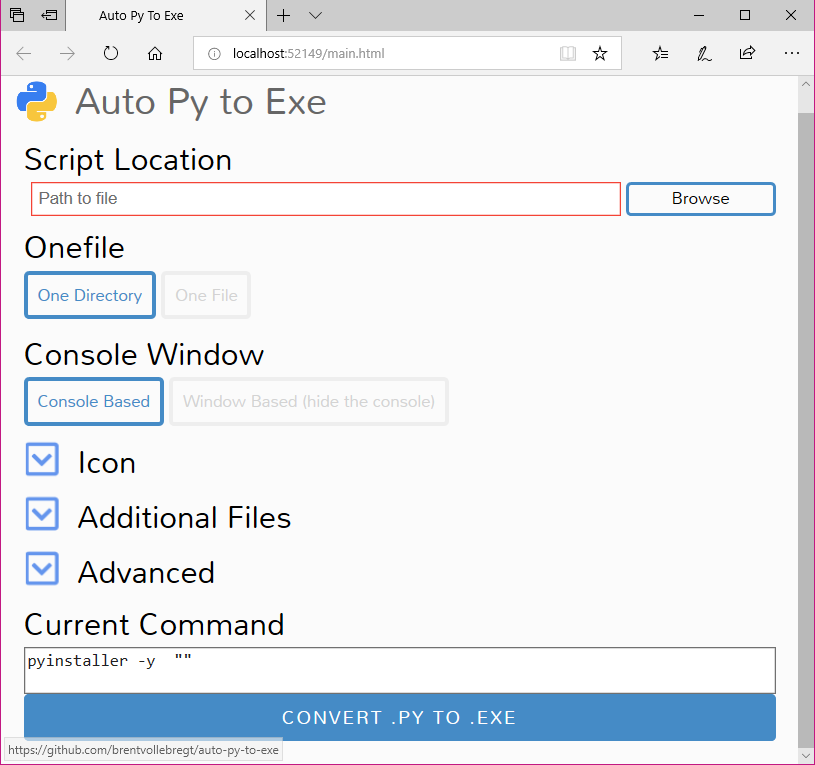
@brentvollebregt commented on GitHub (Jul 24, 2019):
Yep, that worked. Do you have Chrome installed? The issue here was that it could not start Chrome, I guess this as
chm.run(options, start_urls)was part of the stacktrace.@angryparizval commented on GitHub (Jul 24, 2019):
yeah i have chrome installed, Thanks for the help!
@brentvollebregt commented on GitHub (Jul 24, 2019):
Very interesting, it must not be in a place Eel expects. I'll look into adding some warnings for this; thank you very much for being so co-operative!
@angryparizval commented on GitHub (Jul 24, 2019):
i am always happy to help a fellow coder debug, nothing more satisfying then having a near perfect code!
@brentvollebregt commented on GitHub (Jul 24, 2019):
I'll leave this open until I add some sort of warning for the user. I'll close it when the changes are on PyPI.
@zeronobody0 commented on GitHub (Jul 24, 2019):
How do you mute a thread?
@brentvollebregt commented on GitHub (Jul 24, 2019):
You can unsubscribe from notifications for this issue by clicking "Unsubscribe" on the right hand side column on desktop.
@brentvollebregt commented on GitHub (Jul 24, 2019):
Hey @angryparizval could you get a value for me when you're free? Execute the following:
What is the output? I just curious what eel was picking up as the Chrome location for you. I have a feeling that the exe it is finding doesn't exist, hence then
os.path.existscall.@angryparizval commented on GitHub (Jul 25, 2019):
i get false
@angryparizval commented on GitHub (Jul 25, 2019):
C:\Users\Ryan\Desktop>thingie.py
eel.chrome.get_instance_path():
type: <class 'str'>
Path exsits?: False
@brentvollebregt commented on GitHub (Jul 25, 2019):
Oh! Very interesting; this is a bug in Eel. I'll account for this in the next commit.
Once again, thank you very much.