mirror of
https://github.com/brentvollebregt/auto-py-to-exe.git
synced 2026-04-26 04:05:49 +03:00
[GH-ISSUE #395] Exe file shows "No module named 'ctypes' " #320

Loading…
Add table
Add a link
Reference in a new issue
No description provided.
Delete branch "%!s()"
Deleting a branch is permanent. Although the deleted branch may continue to exist for a short time before it actually gets removed, it CANNOT be undone in most cases. Continue?
Originally created by @kcvinker on GitHub (May 4, 2023).
Original GitHub issue: https://github.com/brentvollebregt/auto-py-to-exe/issues/395
Hi all,
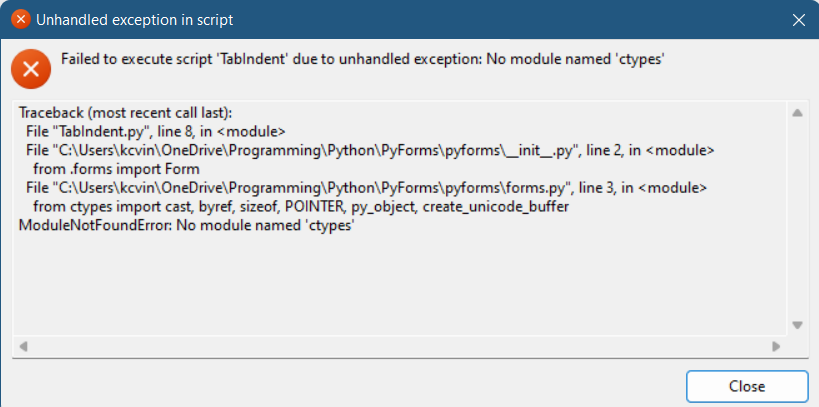
I wrote a gui library with ctypes and created a small program. Everything works fine. But after I created exe file with auto-py-to-exe, when I ran the exe file, it showed a message box. It says that No module named 'ctypes'
See this image.
@github-actions[bot] commented on GitHub (May 4, 2023):
👋 Hi, just a reminder that if you haven't read the help post yet, give it a read to see if your issue is covered in it and make sure to follow the debugging section.
Also please note, as stated in the README, if your issue is only associated with your application and not auto-py-to-exe itself, please do not create an issue in this repository - instead, comment on the help post, video or create a new discussion.
@kcvinker commented on GitHub (May 4, 2023):
Oh I see. Okay. Anyhow, I found the problem.
This is how I connect my gui library to my script.
I just commented it and copy pasted the script to "PyForms" directory. Then I compiled it an exe and it worked.