[GH-ISSUE #362] Unable to build an executable (Raspberry Pi 4 - Python 3.10.1) #300

Closed
opened 2026-02-26 12:21:07 +03:00 by kerem · 7 comments
Owner

Originally created by @Danny875 on GitHub (Feb 7, 2023).
Original GitHub issue: https://github.com/brentvollebregt/auto-py-to-exe/issues/362

Hi,

I have been struggling to build an executable out of one Python script, one txt file and one folder that contains images. At first, I have used the following version of Python: 3.10.0. Then, I noticed that "auto-py-to-exe" gave an indication that I should have a new version, therefore I have decided to upgrade to 3.10.1, which returned some errors as well.

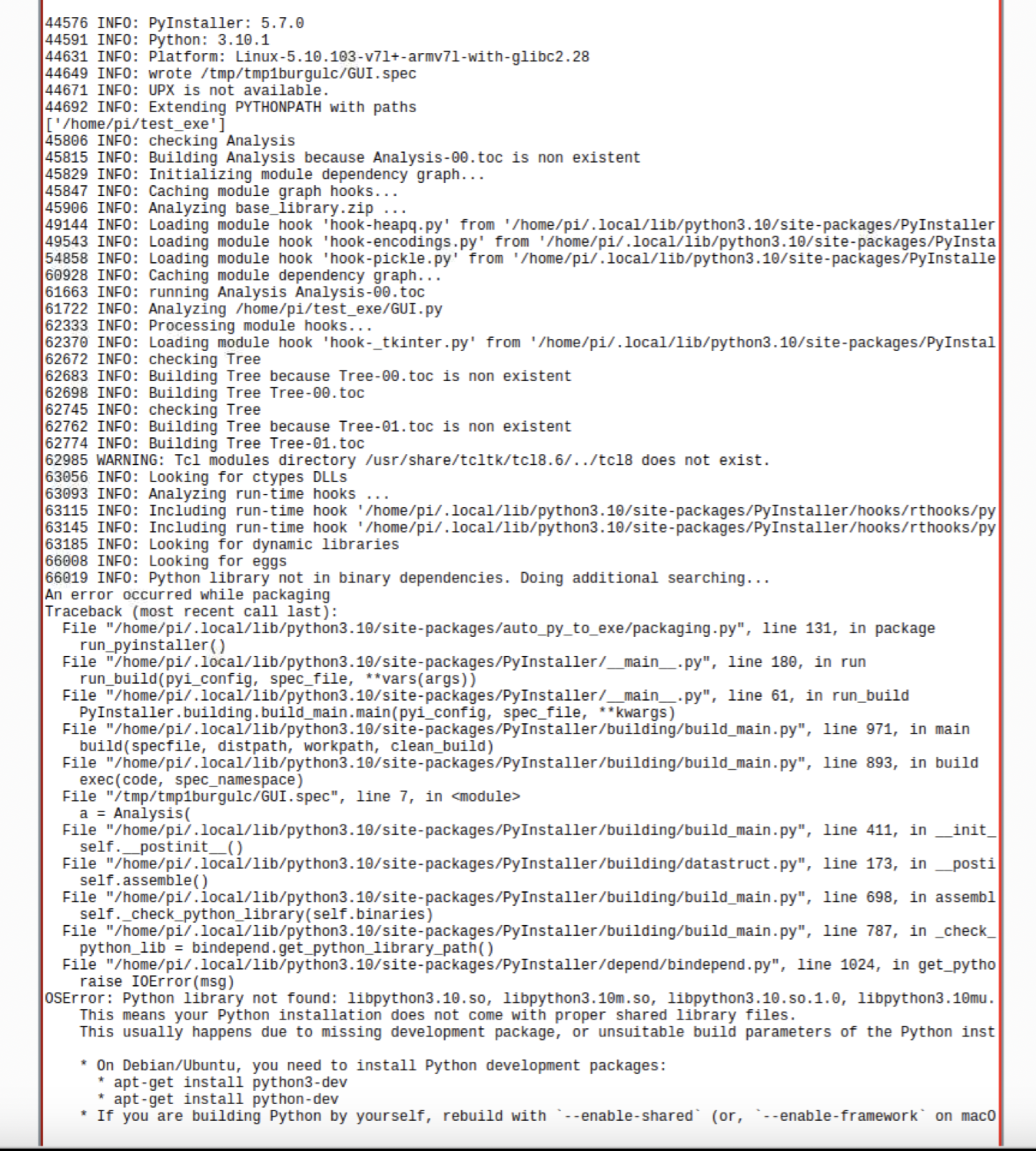
I have tried a lot of solutions presented on the internet, but none of them worked. Please find attached a screenshot with the errors I'm getting. I hope there is a way to solve them.

Python version (python --version): 3.10.1
auto-py-to-exe version (pip show auto-py-to-exe):2.29
PyInstaller version (pip show pyinstaller):5.7.0
Eel version (pip show eel): 0.14.0

Thank you in advance!

I am looking forward to hearing from you!
Screenshot 2023-02-07 at 1 00 43 PM

Originally created by @Danny875 on GitHub (Feb 7, 2023). Original GitHub issue: https://github.com/brentvollebregt/auto-py-to-exe/issues/362 Hi, I have been struggling to build an executable out of one Python script, one txt file and one folder that contains images. At first, I have used the following version of Python: 3.10.0. Then, I noticed that "auto-py-to-exe" gave an indication that I should have a new version, therefore I have decided to upgrade to 3.10.1, which returned some errors as well. I have tried a lot of solutions presented on the internet, but none of them worked. Please find attached a screenshot with the errors I'm getting. I hope there is a way to solve them. Python version (python --version): 3.10.1 auto-py-to-exe version (pip show auto-py-to-exe):2.29 PyInstaller version (pip show pyinstaller):5.7.0 Eel version (pip show eel): 0.14.0 Thank you in advance! I am looking forward to hearing from you! <img width="674" alt="Screenshot 2023-02-07 at 1 00 43 PM" src="https://user-images.githubusercontent.com/56266997/217231170-1dfa4711-aefa-424d-b108-d000bc0029d1.png">
kerem 2026-02-26 12:21:07 +03:00
  • closed this issue
  • added the
    Stale
    label
Author
Owner

@brentvollebregt commented on GitHub (Feb 7, 2023):

Have you installed the Python development packages like the error recommends you to?

<!-- gh-comment-id:1421367567 --> @brentvollebregt commented on GitHub (Feb 7, 2023): Have you installed the Python development packages like the error recommends you to?
Author
Owner

@Danny875 commented on GitHub (Feb 7, 2023):

Yes, I did, with no positive effect, unfortunately. :(

<!-- gh-comment-id:1421370280 --> @Danny875 commented on GitHub (Feb 7, 2023): Yes, I did, with no positive effect, unfortunately. :(
Author
Owner

@brentvollebregt commented on GitHub (Feb 7, 2023):

Those files that it says don't exist - do they? If not, then the Python development package may not have installed.

Unfortunately this is not an issue with auto-py-to-exe and more an issue with your environment sorry. There is nothing I can change in the application to remove this requirement.

<!-- gh-comment-id:1421662840 --> @brentvollebregt commented on GitHub (Feb 7, 2023): Those files that it says don't exist - do they? If not, then the Python development package may not have installed. Unfortunately this is not an issue with auto-py-to-exe and more an issue with your environment sorry. There is nothing I can change in the application to remove this requirement.
Author
Owner

@Danny875 commented on GitHub (Feb 8, 2023):

Thank you for your reply! Yes, they seem to exist, even in the virtual environment created for this application.

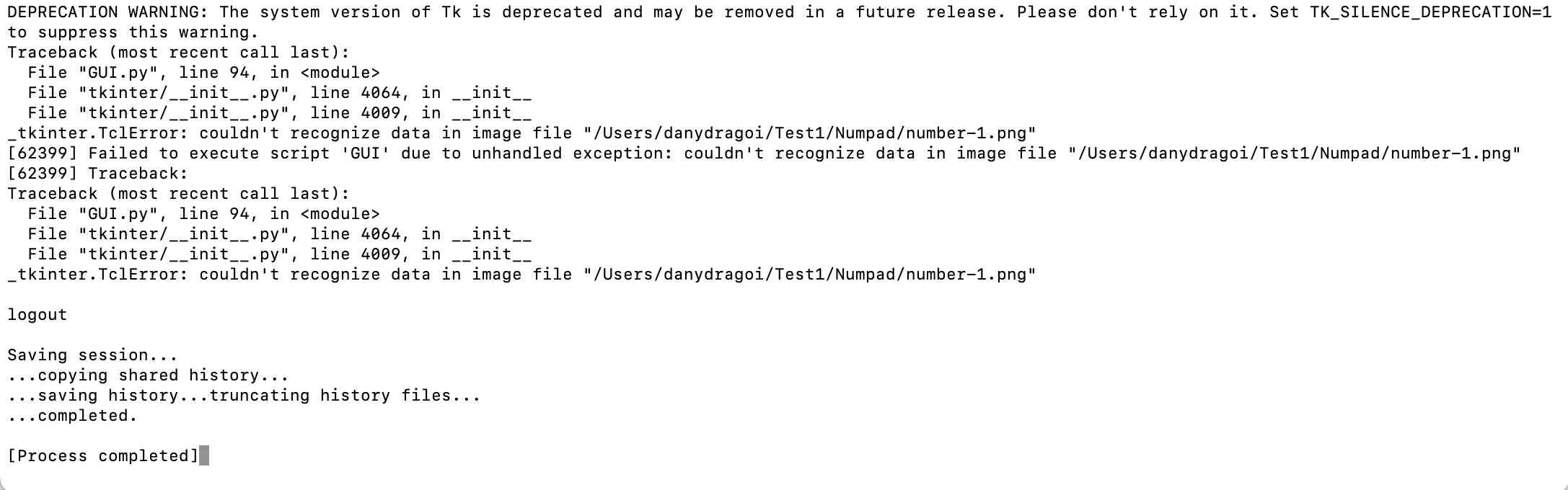
In the meantime, I have tested it on MacOS, and here I managed to proceed to the next step, and the executable GUI application was created. Unfortunately, it does not run, because I'm having an error related to some images that are placed in a specific folder, and I'm thinking that the path to it might not be in the right format accepted by the PyInstaller. I am going to attach a screenshot with the error that I'm getting. Is there something I can do to solve it?

I also have another question. Is it possible to create an executable of this application on MacOS, and the transfer it to RaspberryPi, without having to use the auto-py-to-exe?

Thank you in advance!

I am looking forward to hearing from you!
Screenshot 2023-02-08 at 9 41 59 AM

<!-- gh-comment-id:1422167802 --> @Danny875 commented on GitHub (Feb 8, 2023): Thank you for your reply! Yes, they seem to exist, even in the virtual environment created for this application. In the meantime, I have tested it on MacOS, and here I managed to proceed to the next step, and the executable GUI application was created. Unfortunately, it does not run, because I'm having an error related to some images that are placed in a specific folder, and I'm thinking that the path to it might not be in the right format accepted by the PyInstaller. I am going to attach a screenshot with the error that I'm getting. Is there something I can do to solve it? I also have another question. Is it possible to create an executable of this application on MacOS, and the transfer it to RaspberryPi, without having to use the auto-py-to-exe? Thank you in advance! I am looking forward to hearing from you! <img width="1087" alt="Screenshot 2023-02-08 at 9 41 59 AM" src="https://user-images.githubusercontent.com/56266997/217465650-f4264a71-bb7a-4ef4-9531-088c69eafc6d.png">
Author
Owner

@brentvollebregt commented on GitHub (Feb 8, 2023):

Thank you for your reply! Yes, they seem to exist, even in the virtual environment created for this application.

Unfortunately this issue lies outside of auto-py-to-exe, I recommend looking at PyInstaller's issues on this topic for better recommendations.

I'm thinking that the path to it might not be in the right format accepted by the PyInstaller

Have you read the help post? You should have been able to match the path in the error and the actual location of the file while following the debugging steps.

I also have another question. Is it possible to create an executable of this application on MacOS, and the transfer it to RaspberryPi, without having to use the auto-py-to-exe?

See https://pyinstaller.org/en/v5.7.0/index.html: "However, it is not a cross-compiler; to make a Windows app you run PyInstaller on Windows, and to make a Linux app you run it on Linux, etc."


Also would just like to add a reminder about this request in the README.

<!-- gh-comment-id:1422284740 --> @brentvollebregt commented on GitHub (Feb 8, 2023): > Thank you for your reply! Yes, they seem to exist, even in the virtual environment created for this application. Unfortunately this issue lies outside of auto-py-to-exe, I recommend looking at [PyInstaller's issues on this topic](https://github.com/pyinstaller/pyinstaller/issues?q=is%3Aissue+%22On+Debian%2FUbuntu%2C+you+would+need+to+install+Python+development+packages%22) for better recommendations. > I'm thinking that the path to it might not be in the right format accepted by the PyInstaller Have you read the help post? You should have been able to match the path in the error and the actual location of the file while following the debugging steps. > I also have another question. Is it possible to create an executable of this application on MacOS, and the transfer it to RaspberryPi, without having to use the auto-py-to-exe? See https://pyinstaller.org/en/v5.7.0/index.html: *"However, it is not a cross-compiler; to make a Windows app you run PyInstaller on Windows, and to make a Linux app you run it on Linux, etc."* --- Also would just like to add a reminder about [this request](https://github.com/brentvollebregt/auto-py-to-exe#issues-using-the-tool) in the README.
Author
Owner

@github-actions[bot] commented on GitHub (Mar 11, 2023):

This issue is stale because it has been open for 60 days with no activity. Remove stale label or comment on this issue or it will be closed in 5 days.

<!-- gh-comment-id:1464734874 --> @github-actions[bot] commented on GitHub (Mar 11, 2023): This issue is stale because it has been open for 60 days with no activity. Remove stale label or comment on this issue or it will be closed in 5 days.
Author
Owner

@github-actions[bot] commented on GitHub (Mar 16, 2023):

Closing issue due to no activity in more than 60 days.

<!-- gh-comment-id:1471121852 --> @github-actions[bot] commented on GitHub (Mar 16, 2023): Closing issue due to no activity in more than 60 days.
Sign in to join this conversation.
No milestone
No project
No assignees
1 participant
Notifications
Due date
The due date is invalid or out of range. Please use the format "yyyy-mm-dd".

No due date set.

Dependencies

No dependencies set.

Reference
starred/auto-py-to-exe#300
No description provided.