[GH-ISSUE #350] feature on new base terminal #291

Closed
opened 2026-02-26 12:21:06 +03:00 by kerem · 15 comments
Owner

Originally created by @xalteropsx on GitHub (Jan 3, 2023).
Original GitHub issue: https://github.com/brentvollebregt/auto-py-to-exe/issues/350

Originally assigned to: @xalteropsx on GitHub.

[textu](https://textual.textualize.io/getting_started/)

it cannot build on new window base terminal of terminal UI

can u add new terminal build cause console base terminal gone old :( and show css bug on terminal application

Originally created by @xalteropsx on GitHub (Jan 3, 2023). Original GitHub issue: https://github.com/brentvollebregt/auto-py-to-exe/issues/350 Originally assigned to: @xalteropsx on GitHub. ```[textu](https://textual.textualize.io/getting_started/) ``` it cannot build on new window base terminal of terminal UI can u add new terminal build cause console base terminal gone old :( and show css bug on terminal application
kerem 2026-02-26 12:21:06 +03:00
  • closed this issue
  • added the
    question
    label
Author
Owner

@xalteropsx commented on GitHub (Jan 3, 2023):

new window terminal https://apps.microsoft.com/store/detail/windows-terminal/9N0DX20HK701
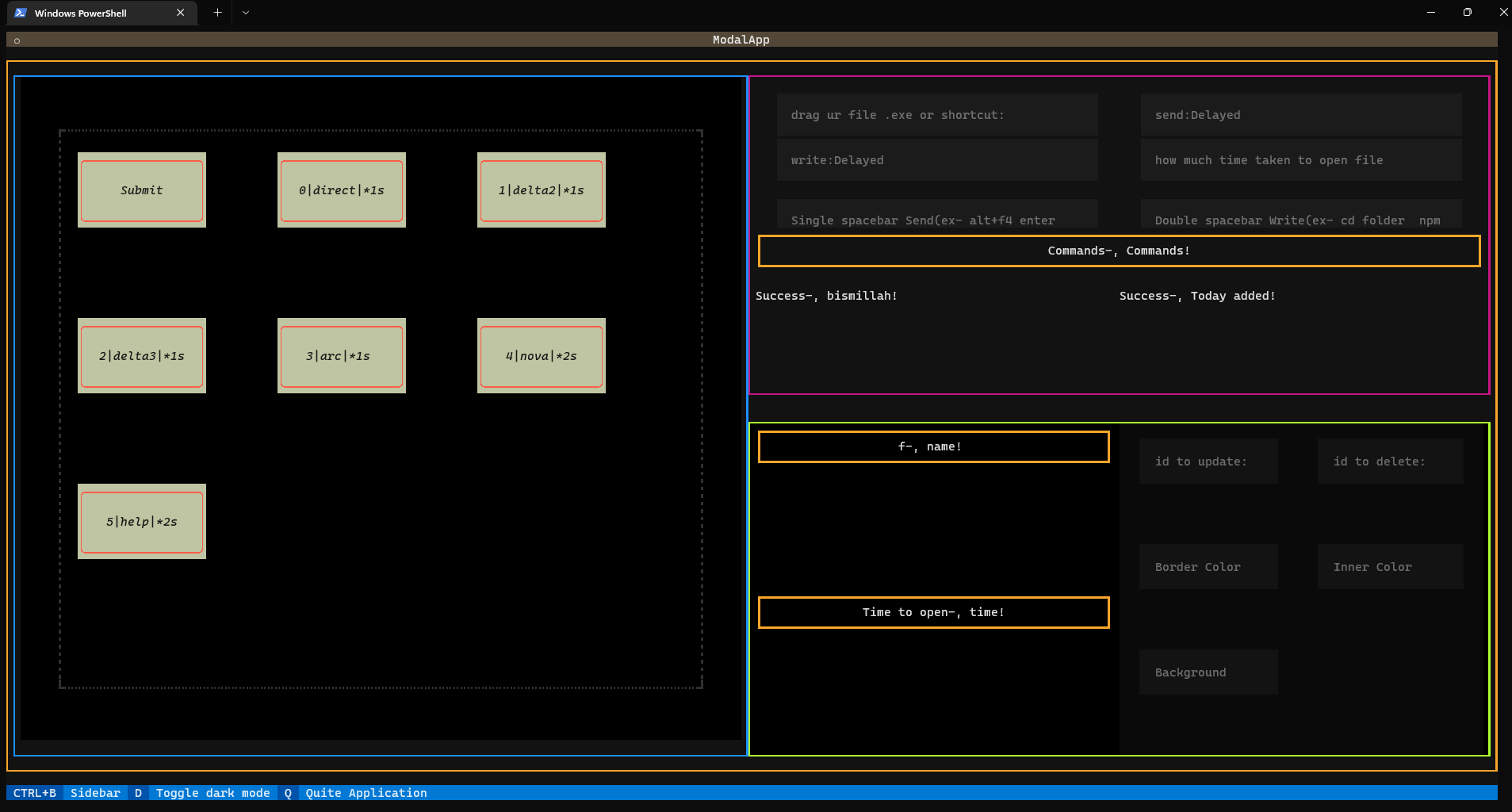
image

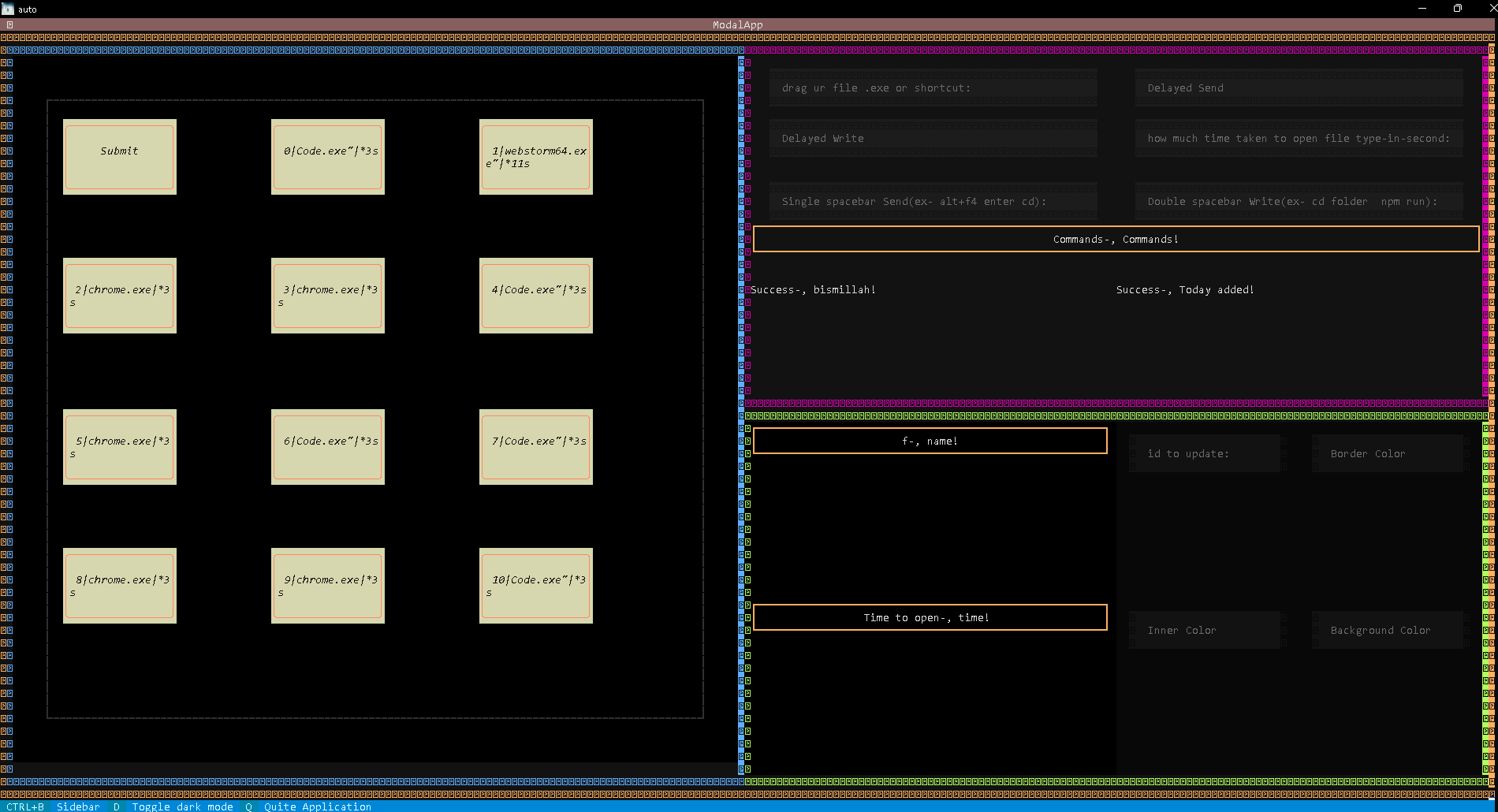
console terminal
image

<!-- gh-comment-id:1369418612 --> @xalteropsx commented on GitHub (Jan 3, 2023): new window terminal ```https://apps.microsoft.com/store/detail/windows-terminal/9N0DX20HK701``` ![image](https://user-images.githubusercontent.com/103671642/210306157-34747c16-e578-4582-9e5e-fbee597ced58.png) console terminal ![image](https://user-images.githubusercontent.com/103671642/210306190-201470f5-5440-45dc-bd82-927a4981e255.png)
Author
Owner

@brentvollebregt commented on GitHub (Jan 3, 2023):

Can you please fill out the issue template? It looks like your script packaged and that the issue lies in where you run it - hinting on implementation issues.

<!-- gh-comment-id:1369428808 --> @brentvollebregt commented on GitHub (Jan 3, 2023): Can you please fill out the issue template? It looks like your script packaged and that the issue lies in where you run it - hinting on implementation issues.
Author
Owner

@xalteropsx commented on GitHub (Jan 3, 2023):

its look like the application building on setting only for = console based and window based not on terminal based
C:\Program Files\WindowsApps\Microsoft.WindowsTerminal_1.12.10983.0_x64__8wekyb3d8bbwe

image

<!-- gh-comment-id:1369435011 --> @xalteropsx commented on GitHub (Jan 3, 2023): its look like the application building on setting only for = console based and window based not on terminal based C:\Program Files\WindowsApps\Microsoft.WindowsTerminal_1.12.10983.0_x64__8wekyb3d8bbwe ![image](https://user-images.githubusercontent.com/103671642/210312013-8466d553-97fe-4307-a9fb-ea083a9e3d34.png)
Author
Owner

@brentvollebregt commented on GitHub (Jan 3, 2023):

Can you please add your details in this issue so it persists after the issue is resolved. Also can you please fill in the template.

<!-- gh-comment-id:1369439076 --> @brentvollebregt commented on GitHub (Jan 3, 2023): Can you please add your details in this issue so it persists after the issue is resolved. Also can you please fill in the template.
Author
Owner

@xalteropsx commented on GitHub (Jan 3, 2023):

Can you please add your details in this issue so it persists after the issue is resolved. Also can you please fill in the template.

i dont understand what u mean by template

<!-- gh-comment-id:1369440546 --> @xalteropsx commented on GitHub (Jan 3, 2023): > Can you please add your details in this issue so it persists after the issue is resolved. Also can you please fill in the template. i dont understand what u mean by template
Author
Owner

@xalteropsx commented on GitHub (Jan 3, 2023):

index,js

<div>
	<h2>
		<span data-i18n="ui.title.consoleWindow">Console Window</span>
		<small>(--console / --windowed / --terminal)</small>
	</h2>
	<div>
		<button id="console-based-button" className="large" data-i18n="ui.button.consoleBased">
			Console Based
		</button>
		<button id="window-based-button" className="large" data-i18n="ui.button.windowBased">
			Window Based (hide the console)
		</button>
		<button id="terminal-based-button" className="large" data-i18n="ui.button.terminalBased">
			Terminal Based (hide the console)
		</button>

	</div>
</div>
<!-- gh-comment-id:1369444296 --> @xalteropsx commented on GitHub (Jan 3, 2023): index,js ``` <div> <h2> <span data-i18n="ui.title.consoleWindow">Console Window</span> <small>(--console / --windowed / --terminal)</small> </h2> <div> <button id="console-based-button" className="large" data-i18n="ui.button.consoleBased"> Console Based </button> <button id="window-based-button" className="large" data-i18n="ui.button.windowBased"> Window Based (hide the console) </button> <button id="terminal-based-button" className="large" data-i18n="ui.button.terminalBased"> Terminal Based (hide the console) </button> </div> </div>
Author
Owner

@xalteropsx commented on GitHub (Jan 3, 2023):

staticevent.js

/*
Handle user events
*/

// Top level inputs

const scriptLocationChange = async (event) => {
    colourInput(event.target, false, true, false);
    updateCurrentCommandDisplay();
};

const scriptLocationSearch = async (event) => {
    const entryScriptNode = document.getElementById('entry-script');
    const value = await askForFile('python');
    if (value !== null) {
        entryScriptNode.value = value;
        await scriptLocationChange({ target: entryScriptNode });
    }
};

const oneFileOptionChange = (option) => (event) => {
    const onefileAdditionalFilesNote = document.getElementById('onefileAdditionalFilesNote');
    onefileAdditionalFilesNote.style.display = option === 'one-file' ? 'block' : 'none'; // Show the note if one-file is being used
    const oneFileButton = document.getElementById('one-file-button');
    oneFileButton.classList.add(option === 'one-file' ? 'selected' : 'unselected');
    oneFileButton.classList.remove(option !== 'one-file' ? 'selected' : 'unselected');
    const oneDirectoryButton = document.getElementById('one-directory-button');
    oneDirectoryButton.classList.add(option === 'one-directory' ? 'selected' : 'unselected');
    oneDirectoryButton.classList.remove(option !== 'one-directory' ? 'selected' : 'unselected');
    updateCurrentCommandDisplay();
};

const consoleWindowOptionChange = (option) => (event) => {
    const consoleButton = document.getElementById('console-based-button');
    consoleButton.classList.add(option === 'console' ? 'selected' : 'unselected');
    consoleButton.classList.remove(option !== 'console' ? 'selected' : 'unselected');
    const windowButton = document.getElementById('window-based-button');
    windowButton.classList.add(option === 'window' ? 'selected' : 'unselected');
    windowButton.classList.remove(option !== 'window' ? 'selected' : 'unselected');
   	const terminalButton = document.getElementById('terminal-based-button');
    terminalButton.classList.add(option === 'terminal' ? 'selected' : 'unselected');
    terminalButton.classList.remove(option !== 'terminal' ? 'selected' : 'unselected');
    updateCurrentCommandDisplay();
};

const iconLocationChange = async (event) => {
    colourInput(event.target, true, true, false);
    updateCurrentCommandDisplay();
};

const iconLocationSearch = async (event) => {
    const iconPathNode = document.getElementById('icon-path');
    const value = await askForFile('icon');
    if (value !== null) {
        iconPathNode.value = value;
        await iconLocationChange({ target: iconPathNode });
    }
};

const additionalFilesAddFiles = async (event) => {
    const files = await askForFiles();
    if (files !== null) {
        const datasListNode = document.getElementById('datas-list');
        files.forEach(file => {
            addDoubleInputForSrcDst(datasListNode, 'datas', file, '.', true, true);
        });
    }
};

const additionalFilesAddFolder = async (event) => {
    const folder = await askForFolder();
    if (folder !== '') {
        const datasListNode = document.getElementById('datas-list');
        const destinationFolder = folder.split(/[/\\]/);
        addDoubleInputForSrcDst(datasListNode, 'datas', folder, `${destinationFolder[destinationFolder.length - 1]}/`, true, true);
    }
};

const additionalFilesAddBlank = (event) => {
    const datasListNode = document.getElementById('datas-list');
    addDoubleInputForSrcDst(datasListNode, 'datas', '', '.', true, true);
};

// Settings section events

const outputDirectorySearch = async (event) => {
    const folder = await askForFolder();
    if (folder !== '') {
        const outputDirectoryInput = document.getElementById('output-directory');
        outputDirectoryInput.value = folder;
    }
};

const recursionLimitToggle = (enabled) => {
    const button = document.getElementById('recursion-limit-switch');
    if (enabled) {
        button.classList.add('selected');
        button.classList.remove('unselected');
    } else {
        button.classList.remove('selected');
        button.classList.add('unselected');
    }
};

const rawArgumentsChange = (event) => {
    updateCurrentCommandDisplay();
};

const packageScript = async (event) => {
    if (packagingState === PACKAGING_STATE_PACKAGING) {  // Do not do anything while packaging
        return;
    }
    if (packagingState === PACKAGING_STATE_COMPLETE) { // This is now the clear output button
        setPackagingState(PACKAGING_STATE_READY);
        return;
    }

    // Pre-checks
    const currentConfiguration = getCurrentConfiguration();
    const entryScript = currentConfiguration.find(c => c.optionDest === 'filenames').value;

    if (entryScript === '') {
        alert(getTranslation('nonDom.alert.noScriptsLocationProvided'));
        return;
    }

    const willOverwrite = await eel.will_packaging_overwrite_existing(
        entryScript,
        currentConfiguration.find(c => c.optionDest === 'onefile').value,
        getNonPyinstallerConfiguration().outputDirectory
    )();
    if (willOverwrite && !confirm(getTranslation('nonDom.alert.overwritePreviousOutput'))) {
        return
    }

    // If checks have passed, package the script
    startPackaging();
};

const openOutputFolder = (event) => {
    eel.open_folder_in_explorer(getNonPyinstallerConfiguration().outputDirectory)();
};

const setupEvents = () => {
    // Script location
    document.getElementById('entry-script').addEventListener('input', scriptLocationChange);
    document.getElementById('entry-script-search').addEventListener('click', scriptLocationSearch);

    // Output bundle type
    document.getElementById('one-directory-button').addEventListener('click', oneFileOptionChange('one-directory'));
    document.getElementById('one-file-button').addEventListener('click', oneFileOptionChange('one-file'));

    // Console switch
    document.getElementById('console-based-button').addEventListener('click', consoleWindowOptionChange('console'));
    document.getElementById('window-based-button').addEventListener('click', consoleWindowOptionChange('window'));
    document.getElementById('terminal-based-button').addEventListener('click', consoleWindowOptionChange('terminal'));

    // Icon
    document.getElementById('icon-path').addEventListener('input', iconLocationChange);
    document.getElementById('icon-path-search').addEventListener('click', iconLocationSearch);

    // Additional files
    document.getElementById('additional-files-add-files-button').addEventListener('click', additionalFilesAddFiles);
    document.getElementById('additional-files-add-folder').addEventListener('click', additionalFilesAddFolder);
    document.getElementById('additional-files-add-blank').addEventListener('click', additionalFilesAddBlank);

    // Settings
    document.getElementById('output-directory-search').addEventListener('click', outputDirectorySearch);
    document.getElementById('recursion-limit-switch').addEventListener('click', e => recursionLimitToggle(e.target.classList.contains('unselected')));
    document.getElementById('raw-arguments').addEventListener('input', rawArgumentsChange);
    document.getElementById('configuration-import').addEventListener('click', () => onConfigurationImport());
    document.getElementById('configuration-export').addEventListener('click', () => onConfigurationExport());

    // Build buttons
    document.getElementById('package-button').addEventListener('click', packageScript);
    document.getElementById('open-output-folder-button').addEventListener('click', openOutputFolder);

    // Add configurationGetters
    const getEntryScript = () => (['filenames', document.getElementById('entry-script').value]);
    const getOnefile = () => (['onefile', document.getElementById('one-directory-button').classList.contains('unselected')]);
    const getConsole = () => (['console', document.getElementById('window-based-button').classList.contains('unselected')]);
    const getConsole = () => (['console', document.getElementById('terminal-based-button').classList.contains('unselected')]);

    const getIcon = () => {
        const path = document.getElementById('icon-path').value;
        return path === '' ? null : ['icon_file', path];
    };
    configurationGetters.push(getEntryScript);
    configurationGetters.push(getOnefile);
    configurationGetters.push(getConsole);
    configurationGetters.push(getIcon);

    // Add configurationSetters
    const setEntryScript = (value) => {
        document.getElementById('entry-script').value = value;
        scriptLocationChange({ target: document.getElementById('entry-script') });
    };
    const setOnefile = (value) => {
        if (value) {
            document.getElementById('one-directory-button').classList.add('unselected');
            document.getElementById('one-file-button').classList.remove('unselected');
        } else {
            document.getElementById('one-directory-button').classList.remove('unselected');
            document.getElementById('one-file-button').classList.add('unselected');
        }
    };
    const setConsole = (value) => {
        if (value) {
            document.getElementById('console-based-button').classList.remove('unselected');
            document.getElementById('window-based-button').classList.add('unselected');
            document.getElementById('terminal-based-button').classList.add('unselected');

        } else {
            document.getElementById('console-based-button').classList.add('unselected');
            document.getElementById('window-based-button').classList.remove('unselected');
            document.getElementById('terminal-based-button').classList.remove('unselected');
        }
    };
    const setAdditionalFile = (value) => {
        const datasListNode = document.getElementById('datas-list');
        const [val1, val2] = value.split(pathSeparator);
        addDoubleInputForSrcDst(datasListNode, 'datas', val1, val2, true, true);
    };
    const setIcon = (value) => {
        document.getElementById('icon-path').value = value;
        document.getElementById('icon-path').dispatchEvent(new Event('input'));
    };
    configurationSetters['filenames'] = setEntryScript;
    configurationSetters['onefile'] = setOnefile;
    configurationSetters['console'] = setConsole;
    configurationSetters['datas'] = setAdditionalFile;
    configurationSetters['icon_file'] = setIcon;

    configurationCleaners.push(() => setEntryScript('')); // filenames
    configurationCleaners.push(() => setOnefile(false)); // onefile
    configurationCleaners.push(() => setConsole(false)); // console
    configurationCleaners.push(() => setIcon('')); // icon_file

    // Soft initialise (to trigger any required initial events)
    setEntryScript('');
    setOnefile(false);
    setConsole(true);
};
<!-- gh-comment-id:1369452541 --> @xalteropsx commented on GitHub (Jan 3, 2023): staticevent.js ``` /* Handle user events */ // Top level inputs const scriptLocationChange = async (event) => { colourInput(event.target, false, true, false); updateCurrentCommandDisplay(); }; const scriptLocationSearch = async (event) => { const entryScriptNode = document.getElementById('entry-script'); const value = await askForFile('python'); if (value !== null) { entryScriptNode.value = value; await scriptLocationChange({ target: entryScriptNode }); } }; const oneFileOptionChange = (option) => (event) => { const onefileAdditionalFilesNote = document.getElementById('onefileAdditionalFilesNote'); onefileAdditionalFilesNote.style.display = option === 'one-file' ? 'block' : 'none'; // Show the note if one-file is being used const oneFileButton = document.getElementById('one-file-button'); oneFileButton.classList.add(option === 'one-file' ? 'selected' : 'unselected'); oneFileButton.classList.remove(option !== 'one-file' ? 'selected' : 'unselected'); const oneDirectoryButton = document.getElementById('one-directory-button'); oneDirectoryButton.classList.add(option === 'one-directory' ? 'selected' : 'unselected'); oneDirectoryButton.classList.remove(option !== 'one-directory' ? 'selected' : 'unselected'); updateCurrentCommandDisplay(); }; const consoleWindowOptionChange = (option) => (event) => { const consoleButton = document.getElementById('console-based-button'); consoleButton.classList.add(option === 'console' ? 'selected' : 'unselected'); consoleButton.classList.remove(option !== 'console' ? 'selected' : 'unselected'); const windowButton = document.getElementById('window-based-button'); windowButton.classList.add(option === 'window' ? 'selected' : 'unselected'); windowButton.classList.remove(option !== 'window' ? 'selected' : 'unselected'); const terminalButton = document.getElementById('terminal-based-button'); terminalButton.classList.add(option === 'terminal' ? 'selected' : 'unselected'); terminalButton.classList.remove(option !== 'terminal' ? 'selected' : 'unselected'); updateCurrentCommandDisplay(); }; const iconLocationChange = async (event) => { colourInput(event.target, true, true, false); updateCurrentCommandDisplay(); }; const iconLocationSearch = async (event) => { const iconPathNode = document.getElementById('icon-path'); const value = await askForFile('icon'); if (value !== null) { iconPathNode.value = value; await iconLocationChange({ target: iconPathNode }); } }; const additionalFilesAddFiles = async (event) => { const files = await askForFiles(); if (files !== null) { const datasListNode = document.getElementById('datas-list'); files.forEach(file => { addDoubleInputForSrcDst(datasListNode, 'datas', file, '.', true, true); }); } }; const additionalFilesAddFolder = async (event) => { const folder = await askForFolder(); if (folder !== '') { const datasListNode = document.getElementById('datas-list'); const destinationFolder = folder.split(/[/\\]/); addDoubleInputForSrcDst(datasListNode, 'datas', folder, `${destinationFolder[destinationFolder.length - 1]}/`, true, true); } }; const additionalFilesAddBlank = (event) => { const datasListNode = document.getElementById('datas-list'); addDoubleInputForSrcDst(datasListNode, 'datas', '', '.', true, true); }; // Settings section events const outputDirectorySearch = async (event) => { const folder = await askForFolder(); if (folder !== '') { const outputDirectoryInput = document.getElementById('output-directory'); outputDirectoryInput.value = folder; } }; const recursionLimitToggle = (enabled) => { const button = document.getElementById('recursion-limit-switch'); if (enabled) { button.classList.add('selected'); button.classList.remove('unselected'); } else { button.classList.remove('selected'); button.classList.add('unselected'); } }; const rawArgumentsChange = (event) => { updateCurrentCommandDisplay(); }; const packageScript = async (event) => { if (packagingState === PACKAGING_STATE_PACKAGING) { // Do not do anything while packaging return; } if (packagingState === PACKAGING_STATE_COMPLETE) { // This is now the clear output button setPackagingState(PACKAGING_STATE_READY); return; } // Pre-checks const currentConfiguration = getCurrentConfiguration(); const entryScript = currentConfiguration.find(c => c.optionDest === 'filenames').value; if (entryScript === '') { alert(getTranslation('nonDom.alert.noScriptsLocationProvided')); return; } const willOverwrite = await eel.will_packaging_overwrite_existing( entryScript, currentConfiguration.find(c => c.optionDest === 'onefile').value, getNonPyinstallerConfiguration().outputDirectory )(); if (willOverwrite && !confirm(getTranslation('nonDom.alert.overwritePreviousOutput'))) { return } // If checks have passed, package the script startPackaging(); }; const openOutputFolder = (event) => { eel.open_folder_in_explorer(getNonPyinstallerConfiguration().outputDirectory)(); }; const setupEvents = () => { // Script location document.getElementById('entry-script').addEventListener('input', scriptLocationChange); document.getElementById('entry-script-search').addEventListener('click', scriptLocationSearch); // Output bundle type document.getElementById('one-directory-button').addEventListener('click', oneFileOptionChange('one-directory')); document.getElementById('one-file-button').addEventListener('click', oneFileOptionChange('one-file')); // Console switch document.getElementById('console-based-button').addEventListener('click', consoleWindowOptionChange('console')); document.getElementById('window-based-button').addEventListener('click', consoleWindowOptionChange('window')); document.getElementById('terminal-based-button').addEventListener('click', consoleWindowOptionChange('terminal')); // Icon document.getElementById('icon-path').addEventListener('input', iconLocationChange); document.getElementById('icon-path-search').addEventListener('click', iconLocationSearch); // Additional files document.getElementById('additional-files-add-files-button').addEventListener('click', additionalFilesAddFiles); document.getElementById('additional-files-add-folder').addEventListener('click', additionalFilesAddFolder); document.getElementById('additional-files-add-blank').addEventListener('click', additionalFilesAddBlank); // Settings document.getElementById('output-directory-search').addEventListener('click', outputDirectorySearch); document.getElementById('recursion-limit-switch').addEventListener('click', e => recursionLimitToggle(e.target.classList.contains('unselected'))); document.getElementById('raw-arguments').addEventListener('input', rawArgumentsChange); document.getElementById('configuration-import').addEventListener('click', () => onConfigurationImport()); document.getElementById('configuration-export').addEventListener('click', () => onConfigurationExport()); // Build buttons document.getElementById('package-button').addEventListener('click', packageScript); document.getElementById('open-output-folder-button').addEventListener('click', openOutputFolder); // Add configurationGetters const getEntryScript = () => (['filenames', document.getElementById('entry-script').value]); const getOnefile = () => (['onefile', document.getElementById('one-directory-button').classList.contains('unselected')]); const getConsole = () => (['console', document.getElementById('window-based-button').classList.contains('unselected')]); const getConsole = () => (['console', document.getElementById('terminal-based-button').classList.contains('unselected')]); const getIcon = () => { const path = document.getElementById('icon-path').value; return path === '' ? null : ['icon_file', path]; }; configurationGetters.push(getEntryScript); configurationGetters.push(getOnefile); configurationGetters.push(getConsole); configurationGetters.push(getIcon); // Add configurationSetters const setEntryScript = (value) => { document.getElementById('entry-script').value = value; scriptLocationChange({ target: document.getElementById('entry-script') }); }; const setOnefile = (value) => { if (value) { document.getElementById('one-directory-button').classList.add('unselected'); document.getElementById('one-file-button').classList.remove('unselected'); } else { document.getElementById('one-directory-button').classList.remove('unselected'); document.getElementById('one-file-button').classList.add('unselected'); } }; const setConsole = (value) => { if (value) { document.getElementById('console-based-button').classList.remove('unselected'); document.getElementById('window-based-button').classList.add('unselected'); document.getElementById('terminal-based-button').classList.add('unselected'); } else { document.getElementById('console-based-button').classList.add('unselected'); document.getElementById('window-based-button').classList.remove('unselected'); document.getElementById('terminal-based-button').classList.remove('unselected'); } }; const setAdditionalFile = (value) => { const datasListNode = document.getElementById('datas-list'); const [val1, val2] = value.split(pathSeparator); addDoubleInputForSrcDst(datasListNode, 'datas', val1, val2, true, true); }; const setIcon = (value) => { document.getElementById('icon-path').value = value; document.getElementById('icon-path').dispatchEvent(new Event('input')); }; configurationSetters['filenames'] = setEntryScript; configurationSetters['onefile'] = setOnefile; configurationSetters['console'] = setConsole; configurationSetters['datas'] = setAdditionalFile; configurationSetters['icon_file'] = setIcon; configurationCleaners.push(() => setEntryScript('')); // filenames configurationCleaners.push(() => setOnefile(false)); // onefile configurationCleaners.push(() => setConsole(false)); // console configurationCleaners.push(() => setIcon('')); // icon_file // Soft initialise (to trigger any required initial events) setEntryScript(''); setOnefile(false); setConsole(true); };
Author
Owner

@xalteropsx commented on GitHub (Jan 3, 2023):

image
expected result

code here = https://drive.google.com/drive/folders/15j9buKwkl4LaZI0u-vUTRWrgBORG3-MX?usp=sharing

<!-- gh-comment-id:1369458499 --> @xalteropsx commented on GitHub (Jan 3, 2023): ![image](https://user-images.githubusercontent.com/103671642/210314511-597143e1-5cc8-447e-9de7-46edc4c24412.png) expected result code here = https://drive.google.com/drive/folders/15j9buKwkl4LaZI0u-vUTRWrgBORG3-MX?usp=sharing
Author
Owner

@xalteropsx commented on GitHub (Jan 3, 2023):

@brentvollebregt i guess only this much i can do cause i am not the owner of textualize.io but it open source with less documentation :(

<!-- gh-comment-id:1369459403 --> @xalteropsx commented on GitHub (Jan 3, 2023): @brentvollebregt i guess only this much i can do cause i am not the owner of textualize.io but it open source with less documentation :(
Author
Owner

@brentvollebregt commented on GitHub (Jan 4, 2023):

i dont understand what u mean by template

When you were creating this issue, there is a template that you follow when clicking "Get Started" (unless you clicked "Open a blank issue."). You can find the template here: bug_report.md.

Also why are you pasting code snippets from this application's source code?

<!-- gh-comment-id:1370472370 --> @brentvollebregt commented on GitHub (Jan 4, 2023): > i dont understand what u mean by template When you were creating this issue, there is a template that you follow when clicking "Get Started" (unless you clicked "Open a blank issue."). You can find the template here: [bug_report.md](https://github.com/brentvollebregt/auto-py-to-exe/blob/master/.github/ISSUE_TEMPLATE/bug_report.md). Also why are you pasting code snippets from this application's source code?
Author
Owner

@xalteropsx commented on GitHub (Jan 7, 2023):

@brentvollebregt its not an bug its a feature recommended
i dont know if u help me or not but i will create terminal base myself it not that hard

<!-- gh-comment-id:1374374563 --> @xalteropsx commented on GitHub (Jan 7, 2023): @brentvollebregt its not an bug its a feature recommended i dont know if u help me or not but i will create terminal base myself it not that hard
Author
Owner

@brentvollebregt commented on GitHub (Jan 7, 2023):

You asked "can u add new terminal build" - I'm sorry, but there seems to be some context I'm missing to understand what you're requesting.

I'm assuming when you say "terminal" you are talking about the console running your application? This tool will not affect how the output binary works between different terminals.

<!-- gh-comment-id:1374376855 --> @brentvollebregt commented on GitHub (Jan 7, 2023): You asked "can u add new terminal build" - I'm sorry, but there seems to be some context I'm missing to understand what you're requesting. I'm assuming when you say "terminal" you are talking about the console running your application? This tool will not affect how the output binary works between different terminals.
Author
Owner

@xalteropsx commented on GitHub (Jan 7, 2023):

actually the terminal is similar like console but newer version of command panel which add more support for terminal application like u can say terminal and console different thing now more like powershell

<!-- gh-comment-id:1374487995 --> @xalteropsx commented on GitHub (Jan 7, 2023): actually the terminal is similar like console but newer version of command panel which add more support for terminal application like u can say terminal and console different thing now more like powershell
Author
Owner

@brentvollebregt commented on GitHub (Jan 7, 2023):

auto-py-to-exe packages your Python script to a binary application. Any terminal/cmd/powershell variant can run the binary - even your updated terminal can still run the exes built by this tool.

You asking for me to make this tool support the new windows terminal is a bit irrelevant as it does already work with the new windows terminal and all exes built with it can be run with the new windows terminal.

Maybe you could give a code snippet that when built with auto-py-to-exe, cannot be run with the new windows terminal - there may be something I'm unaware of that is stopping execution.

<!-- gh-comment-id:1374577781 --> @brentvollebregt commented on GitHub (Jan 7, 2023): auto-py-to-exe packages your Python script to a binary application. Any terminal/cmd/powershell variant can run the binary - even your updated terminal can still run the exes built by this tool. You asking for me to make this tool support the new windows terminal is a bit irrelevant as it does already work with the new windows terminal and all exes built with it can be run with the new windows terminal. Maybe you could give a code snippet that when built with auto-py-to-exe, cannot be run with the new windows terminal - there may be something I'm unaware of that is stopping execution.
Author
Owner

@xalteropsx commented on GitHub (Jan 23, 2023):

i think terminal has setting to switch from console host to new terminal u dont need to worry it window related problem fixed

<!-- gh-comment-id:1399778936 --> @xalteropsx commented on GitHub (Jan 23, 2023): i think terminal has setting to switch from console host to new terminal u dont need to worry it window related problem fixed
Sign in to join this conversation.
No milestone
No project
No assignees
1 participant
Notifications
Due date
The due date is invalid or out of range. Please use the format "yyyy-mm-dd".

No due date set.

Dependencies

No dependencies set.

Reference
starred/auto-py-to-exe#291
No description provided.