mirror of
https://github.com/brentvollebregt/auto-py-to-exe.git
synced 2026-04-25 19:55:49 +03:00
[GH-ISSUE #344] [Suggestion] 'Open Output Folder' button could focus output file or folder #286

Loading…
Add table
Add a link
Reference in a new issue
No description provided.
Delete branch "%!s()"
Deleting a branch is permanent. Although the deleted branch may continue to exist for a short time before it actually gets removed, it CANNOT be undone in most cases. Continue?
Originally created by @sunflyfairy on GitHub (Dec 15, 2022).
Original GitHub issue: https://github.com/brentvollebregt/auto-py-to-exe/issues/344
When I press the 'Open Output Folder' button ,I suggest that the file or folder just created can be selected, the normal code is like below.
@brentvollebregt commented on GitHub (Dec 15, 2022):
Which input does this relate to? These buttons usually help you find your data and files - making it create folders for you seems a bit pointless? Maybe I'm thinking about this the wrong way.
@sunflyfairy commented on GitHub (Dec 16, 2022):
@brentvollebregt commented on GitHub (Dec 16, 2022):
Your issue description first said "Open Folder" and now says "Open Output Folder" - this is very confusing. Are you able to add a screenshot with the button you are talking about circled please?
@sunflyfairy commented on GitHub (Dec 21, 2022):
I'm sorry, I made a mistake at first time. it's this button as above. when I press the button, the output folder will not activate.
It's just my suggest, thanks.
@brentvollebregt commented on GitHub (Dec 21, 2022):
Are you saying the output folder that this button typically opens is not being created after your script is packaged?
@sunflyfairy commented on GitHub (Dec 30, 2022):
The code in utils.py line 31 is : os.startfile(folder_directory, 'explore')
My suggestion is :
@brentvollebregt commented on GitHub (Dec 30, 2022):
@sunflyfairy that is not compatible with Mac or Linux.
@sunflyfairy commented on GitHub (Dec 30, 2022):
Can you only modify it on windows?
I see you have a judge on line 30.
@brentvollebregt commented on GitHub (Jan 4, 2023):
I'm starting to see the issue here - is that button not working for you at all? When pressing it, it should open the output directory which was created automatically (if the button is showing).What OS are you on? Potentially this only works on Windows now that I look at the docs.Looking at the existing code properly now and I see the OS checks are already there. Are you saying
os.startfile(folder_directory, 'explore')is not working on Windows?@sunflyfairy commented on GitHub (Jan 5, 2023):
I use win10 and it works well. when you press the button, it will open the folder , but the folder won't be activated.
If you can modify it as my code in windows, the output folder will activate and the folder you created will be selected.
This will be helpful when there are many files or folders in output folder.
@brentvollebregt commented on GitHub (Jan 5, 2023):
What do you mean it won't be "activated"? You mean the file explorer window will not open? You just said it works well on Windows so I'm confused.
@sunflyfairy commented on GitHub (Jan 5, 2023):
It can open the output folder, but it is not the currently activate window.
@brentvollebregt commented on GitHub (Jan 5, 2023):
I see, so when you press the "Open Output Folder" button, it opens a windows explorer window in the correct directory but it's not focused? (I assume the opened window is flashing in the taskbar). Is this the issue?
@github-actions[bot] commented on GitHub (Feb 5, 2023):
This issue is stale because it has been open for 60 days with no activity. Remove stale label or comment on this issue or it will be closed in 5 days.
@sunflyfairy commented on GitHub (Feb 6, 2023):
Yes, it's the issue. And if there are many folders or files in the output Folder, I will cost a few minutes to find the one just created.
@brentvollebregt commented on GitHub (Feb 6, 2023):
If the explorer window isn't focused, Windows will flash its icon yellow on the taskbar by default. You can click on the taskbar item and the folder will be open.
This sounds like a completely different concern? You want the output file or folder to be highlighted when the Windows explorer window is opened?
Always happy to look at a PR with your recommended fix 👍
@sunflyfairy commented on GitHub (Feb 6, 2023):
You can test my code, then you will see the effect.
Thanks for your feedback.
@brentvollebregt commented on GitHub (Feb 6, 2023):
@sunflyfairy I have created the branch feature/344-highlight-output-file-in-windows with the changes. Pull that down, run it and see if it does what you're expecting.
@brentvollebregt commented on GitHub (Feb 12, 2023):
@sunflyfairy did the changes do what you expected? If so, I can merge them in for everyone.
@sunflyfairy commented on GitHub (Feb 14, 2023):
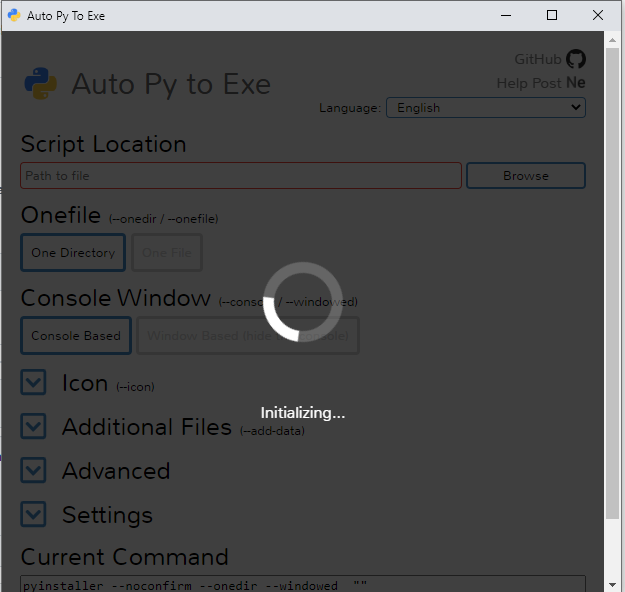
Thanks, I just got back to the office today. I download the #344,then the program is not responding.
@brentvollebregt commented on GitHub (Feb 14, 2023):
Two days ago that branch would have worked but now it's facing the same issue as https://github.com/brentvollebregt/auto-py-to-exe/issues/364.
I have just rebased the branch to include the fix.
@sunflyfairy commented on GitHub (Feb 14, 2023):
I have just tested it. It is just what I want, thanks.
@brentvollebregt commented on GitHub (Feb 20, 2023):
This was added in v2.30.0 within
6df771eb8e