mirror of
https://github.com/brentvollebregt/auto-py-to-exe.git
synced 2026-04-26 04:05:49 +03:00
[GH-ISSUE #303] Auto-py-to-exe not accepting self-made Rust package. IDE works as expected #265

Loading…
Add table
Add a link
Reference in a new issue
No description provided.
Delete branch "%!s()"
Deleting a branch is permanent. Although the deleted branch may continue to exist for a short time before it actually gets removed, it CANNOT be undone in most cases. Continue?
Originally created by @nednoodlehead on GitHub (Aug 19, 2022).
Original GitHub issue: https://github.com/brentvollebregt/auto-py-to-exe/issues/303
Originally assigned to: @nednoodlehead on GitHub.
Quick Checks For You
Describe the bug
When using a package made in Rust (that I created), py-auto-to-exe does not detect it, and it not imported
To Reproduce
Steps to reproduce the behavior:
📦 Built wheel for CPython 3.10 to C:\Users\my_name\AppData\Local\Temp.tmpVTa6wc\rust-0.1.0-cp310-none-win_amd64.whl
🛠 Installed rust-0.1.0
YOU SHOULD NOW HAVE WORKING RUST BINDS IN PYTHON
in main.py
import tkinter
import balling
def print_answer(num1, num2):
print(balling.sum_as_string(num1, num2))
root = tkinter.Tk()
root.geometry('500x500')
root.configure(background='#202020')
tkinter.Label(root, text='Ayo!!!').pack()
tkinter.Button(root, text='rust!', command=lambda: print_answer(1, 3)).pack()
root.mainloop()
In main.rs
use pyo3::prelude::*;
/// Formats the sum of two numbers as string.
#[pyfunction]
fn sum_as_string(a: usize, b: usize) -> PyResult {
Ok((a + b).to_string())
}
/// A Python module implemented in Rust.
#[pymodule]
fn balling(_py: Python, m: &PyModule) -> PyResult<()> {
m.add_function(wrap_pyfunction!(sum_as_string, m)?)?;
Ok(())
}
Expected behavior
py-auto-to-exe should detect rust bindings, as they are an installed package. It does not do this.
Screenshots
just the one above
Your Environment:
Additional context
There is no mention of 'balling' in the output it gives on the auto-py GUI
@brentvollebregt commented on GitHub (Aug 20, 2022):
Due to this being in the build process - this is definitely a PyInstaller issue. This issue does look very specific to
maturinand it would be cool if the creator(s) could give some tips on packaging their stuff but if they don't know how PyInstaller works, it might not be an easy thing to offer.However, we may be able to check why PyInstaller isn't picking up the library. First of all, I don't know how
maturinworks. After runningmaturin develop, apparently it installs the built module in the current virtualenv - are you able to obtain and provide what this file structure looks like? Hopefully it's in the site-packages folder.@nednoodlehead commented on GitHub (Aug 20, 2022):
The file structure is:
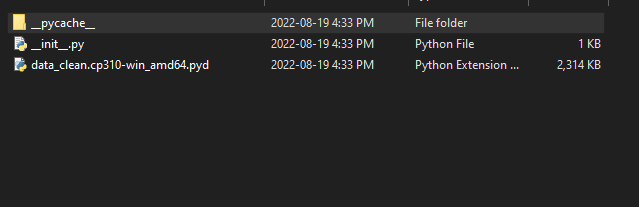
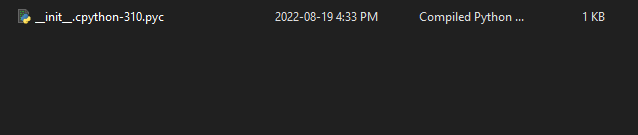
Inside of pycache :
the only readable file according to notepad++ is init.py, which looks like:
from .data_clean import *
doc = data_clean.doc
if hasattr(data_clean, "all"):
all = data_clean.all
end
Also, these files are based on my real project, 'data_clean' is the module name.
@brentvollebregt commented on GitHub (Aug 20, 2022):
Are you able to provide the output within auto-py-to-exe when packaging
@nednoodlehead commented on GitHub (Aug 20, 2022):
@brentvollebregt commented on GitHub (Aug 20, 2022):
We don't see an
ERROR: Hidden import 'data_clean' not foundlog, so PyInstaler must have found it (or it is picking up some other library named the exact same thing).Unfortunately, this looks like something I cannot offer help on as PyInstaler has detected the library. I recommend copying the "Current Command" out of the UI and raising an issue in the PyInstaler with the details you have given.
Aside: not sure why you are seeing double of every message - I do not get this.
@nednoodlehead commented on GitHub (Aug 21, 2022):
Yeah, as far as I can tell, this issue lies almost completely within pyo3 (aka Maturin)'s hands. As I can't even open the project outside of the virtual environment. I'll close this as I can say with relative confidence that auto-py-to-exe has no hand in the matter.