[GH-ISSUE #294] The app is frozen on the start screen #257

Closed
opened 2026-02-26 12:20:58 +03:00 by kerem · 6 comments
Owner

Originally created by @congdan-62 on GitHub (Aug 5, 2022).
Original GitHub issue: https://github.com/brentvollebregt/auto-py-to-exe/issues/294

Originally assigned to: @congdan-62 on GitHub.

Quick Checks For You

  • I have read/searched in the help post
  • I have searched other issues looking for an issue similar to mine
  • I have made sure my applicaiton/script runs before trying to package

Describe the bug
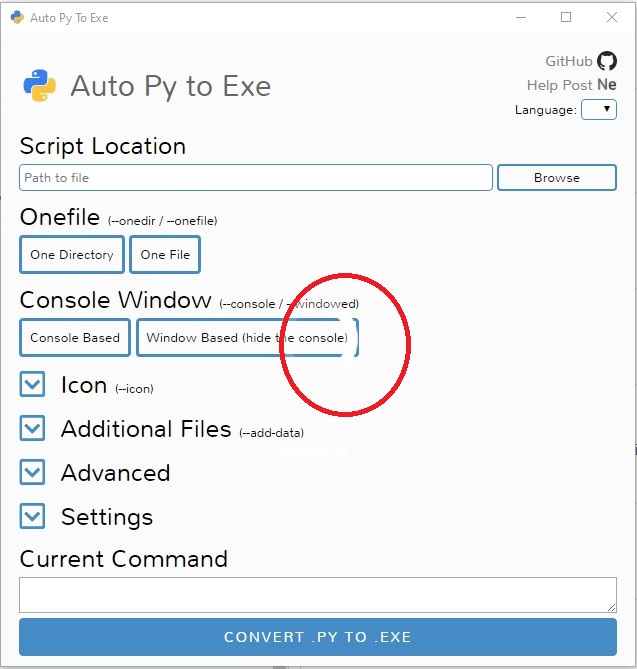
The app is frozen on the start screen. The start screen with a white half circle running forever.
To Reproduce
Steps to reproduce the behavior:
I uninstalled app then install again but the issue not gone

If you have example code, please provide a minimal reproducible example.

Expected behavior

Screenshots
Screenshot 2022-08-04 213148

If applicable, add screenshots to help explain your problem.

Your Environment:

  • Python version (python --version): python v 3.10.4
  • auto-py-to-exe version (pip show auto-py-to-exe): 2.21.1
  • PyInstaller version (pip show pyinstaller): 5.1
  • Eel version (pip show eel): 0.14.0

Additional context
Add any other context about the problem here.

Originally created by @congdan-62 on GitHub (Aug 5, 2022). Original GitHub issue: https://github.com/brentvollebregt/auto-py-to-exe/issues/294 Originally assigned to: @congdan-62 on GitHub. **Quick Checks For You** - [x] I have read/searched in the [help post](https://nitratine.net/blog/post/issues-when-using-auto-py-to-exe) - [ ] I have [searched other issues](https://github.com/brentvollebregt/auto-py-to-exe/issues?q=is%3Aissue+) looking for an issue similar to mine - [ ] I have made sure my applicaiton/script runs before trying to package **Describe the bug** The app is frozen on the start screen. The start screen with a white half circle running forever. **To Reproduce** Steps to reproduce the behavior: I uninstalled app then install again but the issue not gone > If you have example code, please provide a [minimal reproducible example](https://en.wikipedia.org/wiki/Minimal_reproducible_example). **Expected behavior** **Screenshots** ![Screenshot 2022-08-04 213148](https://user-images.githubusercontent.com/25891295/183002472-df5a5db3-3dd3-4413-a25b-30e39eef00d4.jpg) If applicable, add screenshots to help explain your problem. **Your Environment:** - Python version (`python --version`): python v 3.10.4 - auto-py-to-exe version (`pip show auto-py-to-exe`): 2.21.1 - PyInstaller version (`pip show pyinstaller`): 5.1 - Eel version (`pip show eel`): 0.14.0 **Additional context** Add any other context about the problem here.
kerem 2026-02-26 12:20:58 +03:00
Author
Owner

@brentvollebregt commented on GitHub (Aug 5, 2022):

Are there any errors in the DevTools console (F12)? Also are there any errors in the console where you started auto-py-to-exe from?

<!-- gh-comment-id:1206044311 --> @brentvollebregt commented on GitHub (Aug 5, 2022): Are there any errors in the DevTools console (F12)? Also are there any errors in the console where you started auto-py-to-exe from?
Author
Owner

@congdan-62 commented on GitHub (Aug 5, 2022):

I don't know. I just start this app by enter 'auto-py-to-exe' in cmd window. My OS is win 10. By the way, when I use pyinstaller to convert py to exe, it is good job without any error.

<!-- gh-comment-id:1206055833 --> @congdan-62 commented on GitHub (Aug 5, 2022): I don't know. I just start this app by enter 'auto-py-to-exe' in cmd window. My OS is win 10. By the way, when I use pyinstaller to convert py to exe, it is good job without any error.
Author
Owner

@congdan-62 commented on GitHub (Aug 5, 2022):

Are there any errors in the DevTools console (F12)? Also are there any errors in the console where you started auto-py-to-exe from?

I don't know, but in cmd window I just enter auto-py-to-exe and the app start then frozen on the start screen, event on vs code the result is same. I use pyinstaller to convert py file to exe file have no error.

<!-- gh-comment-id:1206070213 --> @congdan-62 commented on GitHub (Aug 5, 2022): > Are there any errors in the DevTools console (F12)? Also are there any errors in the console where you started auto-py-to-exe from? I don't know, but in cmd window I just enter auto-py-to-exe and the app start then frozen on the start screen, event on vs code the result is same. I use pyinstaller to convert py file to exe file have no error.
Author
Owner

@brentvollebregt commented on GitHub (Aug 5, 2022):

Unless you can pass what is in the DevTools console, there isn't much I can help with sorry

<!-- gh-comment-id:1206072994 --> @brentvollebregt commented on GitHub (Aug 5, 2022): Unless you can pass what is in the DevTools console, there isn't much I can help with sorry
Author
Owner

@github-actions[bot] commented on GitHub (Sep 26, 2022):

This issue is stale because it has been open for 60 days with no activity. Remove stale label or comment on this issue or it will be closed in 5 days.

<!-- gh-comment-id:1257370773 --> @github-actions[bot] commented on GitHub (Sep 26, 2022): This issue is stale because it has been open for 60 days with no activity. Remove stale label or comment on this issue or it will be closed in 5 days.
Author
Owner

@github-actions[bot] commented on GitHub (Oct 1, 2022):

Closing issue due to no activity in more than 60 days.

<!-- gh-comment-id:1264196100 --> @github-actions[bot] commented on GitHub (Oct 1, 2022): Closing issue due to no activity in more than 60 days.
Sign in to join this conversation.
No milestone
No project
No assignees
1 participant
Notifications
Due date
The due date is invalid or out of range. Please use the format "yyyy-mm-dd".

No due date set.

Dependencies

No dependencies set.

Reference
starred/auto-py-to-exe#257
No description provided.