mirror of
https://github.com/brentvollebregt/auto-py-to-exe.git
synced 2026-04-25 11:45:49 +03:00
[GH-ISSUE #290] Importing config file duplicates additional files #255

Loading…
Add table
Add a link
Reference in a new issue
No description provided.
Delete branch "%!s()"
Deleting a branch is permanent. Although the deleted branch may continue to exist for a short time before it actually gets removed, it CANNOT be undone in most cases. Continue?
Originally created by @TheGeeKing on GitHub (Jul 26, 2022).
Original GitHub issue: https://github.com/brentvollebregt/auto-py-to-exe/issues/290
Originally assigned to: @brentvollebregt on GitHub.
Quick Checks For You
Describe the bug
Importing a configuration file doesn't reset the additional files fields and add/duplicate files.
To Reproduce
Steps to reproduce the behavior:
SettingsExpected behavior
The additional files fields should be cleared as stated when importing the config file:
Override current configuration? All previously inserted values will be erased.Screenshots

State 0:
After imported a config file:
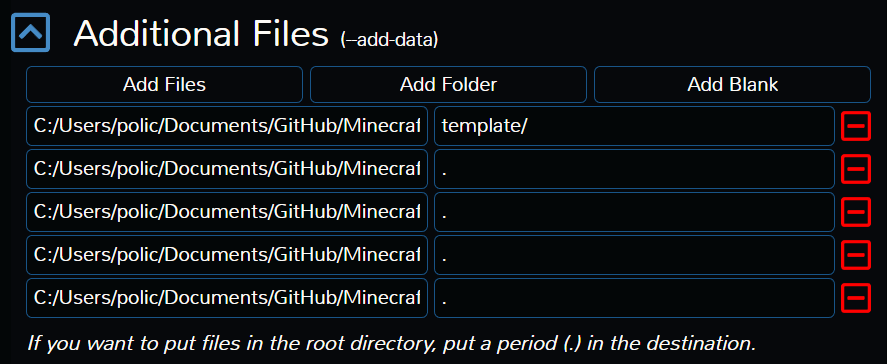
If you import once again a config file:

Your Environment:
python --version): 3.10.4pip show auto-py-to-exe): 2.21.0pip show pyinstaller): 5.1pip show eel): 0.14.0@brentvollebregt commented on GitHub (Jul 27, 2022):
Ah yep, I see the issue here. There are also many other places like "Advanced -> What to bundle, where to search" that will have a similar issue.
I feel like the best method would be to re-initialise the UI to clear everything before applying the configuration.
@brentvollebregt commented on GitHub (Aug 3, 2022):
@TheGeeKing sorry for the delay on this - I have a proposed change in bugfix/290-import-config-not-clearing-values.
A couple of things worth noting:
@TheGeeKing commented on GitHub (Aug 3, 2022):
Hi @brentvollebregt,
No problem for the delay.
Yeah, I think this solution is perfect, it simply reset the window by reloading it and doesn't need extra step to validate them. It requires less code and makes it error proof for future updates.
Thanks for this great tool!
@brentvollebregt commented on GitHub (Aug 3, 2022):
This has just been merged into master and has been released as part of auto-py-to-exe v2.21.1.
Thank you very much for the clear bug report, it really makes a difference!