mirror of
https://github.com/brentvollebregt/auto-py-to-exe.git
synced 2026-04-25 19:55:49 +03:00
[GH-ISSUE #273] auto-py-to-exe ImportError #241

Loading…
Add table
Add a link
Reference in a new issue
No description provided.
Delete branch "%!s()"
Deleting a branch is permanent. Although the deleted branch may continue to exist for a short time before it actually gets removed, it CANNOT be undone in most cases. Continue?
Originally created by @Envases on GitHub (May 19, 2022).
Original GitHub issue: https://github.com/brentvollebregt/auto-py-to-exe/issues/273
Hi Guys
I have recently tried to install auto-py-to-exe and had no errors at this step. The problem comes when I try to run the code. I get an error as follows:
ImportError: cannot import name 'chrome' from 'eel'
Complete Trace Log
C:>auto-py-to-exe
Traceback (most recent call last):
File "C:\Users\ANaberan\AppData\Local\Programs\Python\Python310\lib\runpy.py", line 196, in _run_module_as_main
return run_code(code, main_globals, None,
File "C:\Users\ANaberan\AppData\Local\Programs\Python\Python310\lib\runpy.py", line 86, in run_code
exec(code, run_globals)
File "C:\Users\ANaberan\AppData\Local\Programs\Python\Python310\Scripts\auto-py-to-exe.exe_main.py", line 4, in
File "C:\Users\ANaberan\AppData\Local\Programs\Python\Python310\lib\site-packages\auto_py_to_exe_main.py", line 10, in
from . import ui
File "C:\Users\ANaberan\AppData\Local\Programs\Python\Python310\lib\site-packages\auto_py_to_exe\ui.py", line 8, in
from . import utils
File "C:\Users\ANaberan\AppData\Local\Programs\Python\Python310\lib\site-packages\auto_py_to_exe\utils.py", line 8, in
from eel import chrome
ImportError: cannot import name 'chrome' from 'eel' (unknown location)
C:>
Just to let you know.
@Envases commented on GitHub (May 19, 2022):
Forhot to add, I have installed auto-py-to-exe 2.19.0 with Python 3.10
@Envases commented on GitHub (May 19, 2022):
and Pyinstaller 5.1 installed
@brentvollebregt commented on GitHub (May 19, 2022):
What version of Eel do you have installed?
@Envases commented on GitHub (May 19, 2022):
I had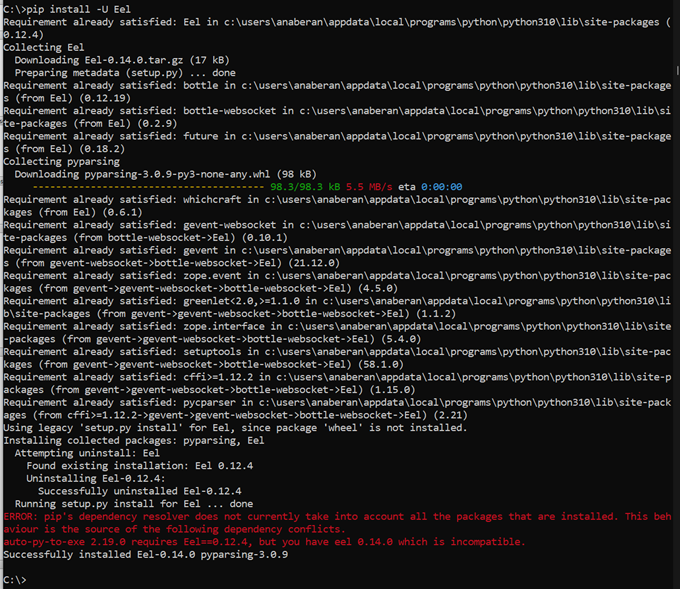 0.12.4 installed. I tried to update it as you mentioned it to 0.14.0, but in doing so, it notifies me that it is incompatible with auto-py-to-exe 2.19.0. I have attached an image capture of the log.
@Envases commented on GitHub (May 19, 2022):
Must I uninstall Eel 0.14.0?
@Envases commented on GitHub (May 19, 2022):
In spite of this, now it works or at least the application turns up.
@brentvollebregt commented on GitHub (May 20, 2022):
This project requires Eel 0.14.0 - this is enforced in requirements.txt and the setup script.
Looking at your screenshot, before you ran
pip install -U Eel, you had 0.12.4 installed. The screenshot also shows you have now installed 0.14.0 - thus why it is working now.