[GH-ISSUE #25] Got fatal error after running the compiled .exe file #24

Closed
opened 2026-02-26 12:20:13 +03:00 by kerem · 15 comments
Owner

Originally created by @ghanteyyy on GitHub (Sep 6, 2018).
Original GitHub issue: https://github.com/brentvollebregt/auto-py-to-exe/issues/25

I compiled my python script with auto-py-to-exe but got Fatal error Failed to execute Spyder (my script name) when I ran the output .exe file in my another machine where there is no python or pyinstaller or auto-py-to-exe installed. I chose noconsole, onefile options in auto-py-to-exe window. How can I fix this error?

Originally created by @ghanteyyy on GitHub (Sep 6, 2018). Original GitHub issue: https://github.com/brentvollebregt/auto-py-to-exe/issues/25 I compiled my python script with auto-py-to-exe but got **Fatal error Failed to execute Spyder (my script name)** when I ran the output .exe file in my another machine where there is no python or pyinstaller or auto-py-to-exe installed. I chose noconsole, onefile options in auto-py-to-exe window. How can I fix this error?
kerem 2026-02-26 12:20:13 +03:00
  • closed this issue
  • added the
    not-a-bug
    label
Author
Owner

@brentvollebregt commented on GitHub (Sep 6, 2018):

Regarding that the python script runs properly by itself then this would have been caused by incorrect configuration or third party modules. The best way to find what the issue is, is to select the -d flag's button in the advanced tab and then re-package it. This will mean the exe is now in a debugging mode. Open up cmd and then run the exe using cmd e.g. "C:/folder/path/myexe.exe". Any errors will be preserved in the console which you were previously missing.

What is the error that you are getting? (there will 100% be one if the message you are stating is appearing)

I have had people complain to be about this error a crazy amount of times and I haven't had a situation yet where is isn't misconfiguration or referencing of files that clearly don't exist.

<!-- gh-comment-id:419234404 --> @brentvollebregt commented on GitHub (Sep 6, 2018): Regarding that the python script runs properly by itself then this would have been caused by incorrect configuration or third party modules. The best way to find what the issue is, is to select the -d flag's button in the advanced tab and then re-package it. This will mean the exe is now in a debugging mode. Open up cmd and then run the exe using cmd e.g. "C:/folder/path/myexe.exe". Any errors will be preserved in the console which you were previously missing. What is the error that you are getting? (there will 100% be one if the message you are stating is appearing) I have had people complain to be about this error a crazy amount of times and I haven't had a situation yet where is isn't misconfiguration or referencing of files that clearly don't exist.
Author
Owner

@ghanteyyy commented on GitHub (Sep 7, 2018):

Using -d flag I got following result:

debug_file_1
debug_file_2
debug_file_3
debug_file_4
debug_file_5
debug_file_6
debug_file_7
debug_file_8
debug_file_9
debug_file_10
debug_file_11
debug_file_12
debug_file_13
debug_file_14
debug_file_15
debug_file_16
debug_file_17
debug_file_18
debug_file_19
debug_file_20
debug_file_21
debug_file_22
debug_file_23
debug_file_24
debug_file_25
debug_file_26
debug_file_27
debug_file_28
debug_file_29
debug_file_30
debug_file_31
debug_file_32
debug_file_33
debug_file_34
debug_file_35
debug_file_36
debug_file_37
debug_file_38
debug_file_39
debug_file_40
debug_file_41
debug_file_42
debug_file_43
debug_file_44
debug_file_45
debug_file_46
debug_file_47
debug_file_48
debug_file_49
debug_file_50
debug_file_51
debug_file_52
debug_file_53
debug_file_54

How can I solve this problem so that my executable file work fine?

<!-- gh-comment-id:419335288 --> @ghanteyyy commented on GitHub (Sep 7, 2018): Using -d flag I got following result: ![debug_file_1](https://user-images.githubusercontent.com/22255426/45201614-e9f7c300-b295-11e8-987d-499a4f52a13b.jpg) ![debug_file_2](https://user-images.githubusercontent.com/22255426/45201615-e9f7c300-b295-11e8-895e-22fdc6726cb9.jpg) ![debug_file_3](https://user-images.githubusercontent.com/22255426/45201617-e9f7c300-b295-11e8-9f03-c2c982bd0041.jpg) ![debug_file_4](https://user-images.githubusercontent.com/22255426/45201618-ea905980-b295-11e8-8189-023bf3e1664e.jpg) ![debug_file_5](https://user-images.githubusercontent.com/22255426/45201619-ea905980-b295-11e8-9f82-07ed0b75c335.jpg) ![debug_file_6](https://user-images.githubusercontent.com/22255426/45201620-ea905980-b295-11e8-93aa-eb39bd1e9616.jpg) ![debug_file_7](https://user-images.githubusercontent.com/22255426/45201621-eb28f000-b295-11e8-811d-bbc490cf58da.jpg) ![debug_file_8](https://user-images.githubusercontent.com/22255426/45201622-eb28f000-b295-11e8-82ce-a92cc9c2b030.jpg) ![debug_file_9](https://user-images.githubusercontent.com/22255426/45201623-ebc18680-b295-11e8-86a0-b2d442865ae3.jpg) ![debug_file_10](https://user-images.githubusercontent.com/22255426/45201624-ebc18680-b295-11e8-8599-876e26625fd4.jpg) ![debug_file_11](https://user-images.githubusercontent.com/22255426/45201626-ebc18680-b295-11e8-9aa1-70a5c1f90b47.jpg) ![debug_file_12](https://user-images.githubusercontent.com/22255426/45201627-ec5a1d00-b295-11e8-8dab-801e987fcc16.jpg) ![debug_file_13](https://user-images.githubusercontent.com/22255426/45201629-ec5a1d00-b295-11e8-990b-3f0cd29262b9.jpg) ![debug_file_14](https://user-images.githubusercontent.com/22255426/45201630-ec5a1d00-b295-11e8-93f8-01871ce71004.jpg) ![debug_file_15](https://user-images.githubusercontent.com/22255426/45201632-ecf2b380-b295-11e8-9018-eb39465a072a.jpg) ![debug_file_16](https://user-images.githubusercontent.com/22255426/45201633-ecf2b380-b295-11e8-9489-f2c1b70248fc.jpg) ![debug_file_17](https://user-images.githubusercontent.com/22255426/45201634-ecf2b380-b295-11e8-8267-de6011815ee1.jpg) ![debug_file_18](https://user-images.githubusercontent.com/22255426/45201636-ed8b4a00-b295-11e8-84f7-c38ee5141598.jpg) ![debug_file_19](https://user-images.githubusercontent.com/22255426/45201637-ed8b4a00-b295-11e8-8bf7-fe1ae82ab5f7.jpg) ![debug_file_20](https://user-images.githubusercontent.com/22255426/45201638-ed8b4a00-b295-11e8-9bd8-6126ce906e2d.jpg) ![debug_file_21](https://user-images.githubusercontent.com/22255426/45201640-ee23e080-b295-11e8-8167-6dcaa0ec9c24.jpg) ![debug_file_22](https://user-images.githubusercontent.com/22255426/45201641-ee23e080-b295-11e8-8466-f8a268161be0.jpg) ![debug_file_23](https://user-images.githubusercontent.com/22255426/45201642-ee23e080-b295-11e8-805c-2f3318444f81.jpg) ![debug_file_24](https://user-images.githubusercontent.com/22255426/45201643-eebc7700-b295-11e8-8aeb-5a44ae01f8cb.jpg) ![debug_file_25](https://user-images.githubusercontent.com/22255426/45201644-eebc7700-b295-11e8-983a-30d438e50b86.jpg) ![debug_file_26](https://user-images.githubusercontent.com/22255426/45201645-eebc7700-b295-11e8-8681-52e6db6a4bd1.jpg) ![debug_file_27](https://user-images.githubusercontent.com/22255426/45201646-ef550d80-b295-11e8-8375-b62b8184f1a1.jpg) ![debug_file_28](https://user-images.githubusercontent.com/22255426/45201648-ef550d80-b295-11e8-9c60-4c450ec8b45e.jpg) ![debug_file_29](https://user-images.githubusercontent.com/22255426/45201649-ef550d80-b295-11e8-8ba0-3eab13e49f7f.jpg) ![debug_file_30](https://user-images.githubusercontent.com/22255426/45201651-efeda400-b295-11e8-8388-9646d6f255b6.jpg) ![debug_file_31](https://user-images.githubusercontent.com/22255426/45201652-efeda400-b295-11e8-9080-30be05ee74d4.jpg) ![debug_file_32](https://user-images.githubusercontent.com/22255426/45201653-f0863a80-b295-11e8-8121-c1c1144dadc9.jpg) ![debug_file_33](https://user-images.githubusercontent.com/22255426/45201654-f0863a80-b295-11e8-87c9-6a556170a046.jpg) ![debug_file_34](https://user-images.githubusercontent.com/22255426/45201655-f0863a80-b295-11e8-95c7-0e352a70d06e.jpg) ![debug_file_35](https://user-images.githubusercontent.com/22255426/45201656-f11ed100-b295-11e8-9a7b-6203b71f12ec.jpg) ![debug_file_36](https://user-images.githubusercontent.com/22255426/45201657-f11ed100-b295-11e8-9de0-85dc821a9abe.jpg) ![debug_file_37](https://user-images.githubusercontent.com/22255426/45201658-f11ed100-b295-11e8-93d2-d1e28784d491.jpg) ![debug_file_38](https://user-images.githubusercontent.com/22255426/45201659-f1b76780-b295-11e8-9c35-07cadafdc4ae.jpg) ![debug_file_39](https://user-images.githubusercontent.com/22255426/45201660-f1b76780-b295-11e8-8de8-1d9ee7fbb9b9.jpg) ![debug_file_40](https://user-images.githubusercontent.com/22255426/45201661-f1b76780-b295-11e8-9b16-826301240e0d.jpg) ![debug_file_41](https://user-images.githubusercontent.com/22255426/45201664-f24ffe00-b295-11e8-8aca-32ff0334090f.jpg) ![debug_file_42](https://user-images.githubusercontent.com/22255426/45201666-f24ffe00-b295-11e8-8cdc-7be96fcf3c2d.jpg) ![debug_file_43](https://user-images.githubusercontent.com/22255426/45201668-f24ffe00-b295-11e8-9bf6-28ebd2eaa07b.jpg) ![debug_file_44](https://user-images.githubusercontent.com/22255426/45201669-f2e89480-b295-11e8-8b0e-bbbcc2388414.jpg) ![debug_file_45](https://user-images.githubusercontent.com/22255426/45201670-f2e89480-b295-11e8-8947-c54ee96c6e75.jpg) ![debug_file_46](https://user-images.githubusercontent.com/22255426/45201672-f2e89480-b295-11e8-879a-852fd1e4503c.jpg) ![debug_file_47](https://user-images.githubusercontent.com/22255426/45201673-f3812b00-b295-11e8-9a67-a37961e74aa7.jpg) ![debug_file_48](https://user-images.githubusercontent.com/22255426/45201674-f3812b00-b295-11e8-8289-c0a6469a81ba.jpg) ![debug_file_49](https://user-images.githubusercontent.com/22255426/45201676-f3812b00-b295-11e8-8346-fe9d994abe0a.jpg) ![debug_file_50](https://user-images.githubusercontent.com/22255426/45201678-f419c180-b295-11e8-944f-21d6c7c65503.jpg) ![debug_file_51](https://user-images.githubusercontent.com/22255426/45201679-f419c180-b295-11e8-921f-34bd76c1c227.jpg) ![debug_file_52](https://user-images.githubusercontent.com/22255426/45201680-f419c180-b295-11e8-8931-a264d0719be5.jpg) ![debug_file_53](https://user-images.githubusercontent.com/22255426/45201682-f4b25800-b295-11e8-9237-515c13ba2cef.jpg) ![debug_file_54](https://user-images.githubusercontent.com/22255426/45201683-f4b25800-b295-11e8-9975-e43fda1416f4.jpg) **How can I solve this problem so that my executable file work fine?**
Author
Owner

@brentvollebregt commented on GitHub (Sep 7, 2018):

Please do not use windowed mode. Use the default console model so errors don't appear in new windows for each line. It makes it very very hard to read. Also as stated before, the error should be in the console.

<!-- gh-comment-id:419369790 --> @brentvollebregt commented on GitHub (Sep 7, 2018): Please do not use windowed mode. Use the default console model so errors don't appear in new windows for each line. It makes it very very hard to read. Also as stated before, the error should be in the console.
Author
Owner

@ghanteyyy commented on GitHub (Sep 7, 2018):

Ops sorry for that. After using the default console model I got:

[6516] PyInstaller Bootloader 3.x
[6516] LOADER: executable is C:\Users\6292s\Desktop\PP\Setup_File\Open CV -no console\Spyder.exe
[6516] LOADER: homepath is C:\Users\6292s\Desktop\PP\Setup_File\Open CV -no console
[6516] LOADER: _MEIPASS2 is NULL
[6516] LOADER: archivename is C:\Users\6292s\Desktop\PP\Setup_File\Open CV -no console\Spyder.exe
[6516] LOADER: Extracting binaries
[6516] LOADER: Executing self as child
[6516] LOADER: set _MEIPASS2 to C:\Users\6292s\AppData\Local\Temp\_MEI65162
[6516] LOADER: Setting up to run child
[6516] LOADER: Creating child process
[6516] LOADER: Waiting for child process to finish...
[1128] PyInstaller Bootloader 3.x
[1128] LOADER: executable is C:\Users\6292s\Desktop\PP\Setup_File\Open CV -no console\Spyder.exe
[1128] LOADER: homepath is C:\Users\6292s\Desktop\PP\Setup_File\Open CV -no console
[1128] LOADER: _MEIPASS2 is C:\Users\6292s\AppData\Local\Temp\_MEI65162
[1128] LOADER: archivename is C:\Users\6292s\Desktop\PP\Setup_File\Open CV -no console\Spyder.exe
[1128] LOADER: SetDllDirectory(C:\Users\6292s\AppData\Local\Temp\_MEI65162)
[1128] LOADER: Already in the child - running user's code.
[1128] LOADER: manifestpath: C:\Users\6292s\AppData\Local\Temp\_MEI65162\Spyder.exe.manifest
[1128] LOADER: Activation context created
[1128] LOADER: Activation context activated
[1128] LOADER: Python library: C:\Users\6292s\AppData\Local\Temp\_MEI65162\python27.dll
[1128] LOADER: Loaded functions from Python library.
[1128] LOADER: Manipulating environment (sys.path, sys.prefix)
[1128] LOADER: sys.prefix is C:\Users\6292s\AppData\Local\Temp\_MEI65~1
[1128] LOADER: Setting runtime options
[1128] LOADER: Bootloader option: pyi-windows-manifest-filename Spyder.exe.manifest
[1128] LOADER: Initializing python
[1128] LOADER: Overriding Python's sys.path
[1128] LOADER: Post-init sys.path is C:\Users\6292s\AppData\Local\Temp\_MEI65162
[1128] LOADER: Setting sys.argv
[1128] LOADER: setting sys._MEIPASS
[1128] LOADER: importing modules from CArchive
[1128] LOADER: extracted struct
[1128] LOADER: callfunction returned...
[1128] LOADER: extracted pyimod01_os_path
[1128] LOADER: callfunction returned...
[1128] LOADER: extracted pyimod02_archive
[1128] LOADER: callfunction returned...
[1128] LOADER: extracted pyimod03_importers
[1128] LOADER: callfunction returned...
[1128] LOADER: Installing PYZ archive with Python modules.
[1128] LOADER: PYZ archive: out00-PYZ.pyz
[1128] LOADER: Running pyiboot01_bootstrap.py
[1128] LOADER: Running pyi_rth_pkgres.py
[1128] LOADER: Running pyi_rth_win32comgenpy.py
[1128] LOADER: Running pyi_rth_multiprocessing.py
[1128] LOADER: Running pyi_rth__tkinter.py
[1128] LOADER: Running Spyder.py
[ WARN:0] videoio(MSMF): OnReadSample() is called with error status: -1072873821
[ WARN:0] videoio(MSMF): async ReadSample() call is failed with error status: -1072873821
[ WARN:1] videoio(MSMF): OnReadSample() is called with error status: -1072873821
[ WARN:1] videoio(MSMF): async ReadSample() call is failed with error status: -1072873821
[ WARN:2] videoio(MSMF): OnReadSample() is called with error status: -1072873821
[ WARN:2] videoio(MSMF): async ReadSample() call is failed with error status: -1072873821

So there is the error. How can solve this problem?

<!-- gh-comment-id:419428841 --> @ghanteyyy commented on GitHub (Sep 7, 2018): Ops sorry for that. After using the default console model I got: ``` [6516] PyInstaller Bootloader 3.x [6516] LOADER: executable is C:\Users\6292s\Desktop\PP\Setup_File\Open CV -no console\Spyder.exe [6516] LOADER: homepath is C:\Users\6292s\Desktop\PP\Setup_File\Open CV -no console [6516] LOADER: _MEIPASS2 is NULL [6516] LOADER: archivename is C:\Users\6292s\Desktop\PP\Setup_File\Open CV -no console\Spyder.exe [6516] LOADER: Extracting binaries [6516] LOADER: Executing self as child [6516] LOADER: set _MEIPASS2 to C:\Users\6292s\AppData\Local\Temp\_MEI65162 [6516] LOADER: Setting up to run child [6516] LOADER: Creating child process [6516] LOADER: Waiting for child process to finish... [1128] PyInstaller Bootloader 3.x [1128] LOADER: executable is C:\Users\6292s\Desktop\PP\Setup_File\Open CV -no console\Spyder.exe [1128] LOADER: homepath is C:\Users\6292s\Desktop\PP\Setup_File\Open CV -no console [1128] LOADER: _MEIPASS2 is C:\Users\6292s\AppData\Local\Temp\_MEI65162 [1128] LOADER: archivename is C:\Users\6292s\Desktop\PP\Setup_File\Open CV -no console\Spyder.exe [1128] LOADER: SetDllDirectory(C:\Users\6292s\AppData\Local\Temp\_MEI65162) [1128] LOADER: Already in the child - running user's code. [1128] LOADER: manifestpath: C:\Users\6292s\AppData\Local\Temp\_MEI65162\Spyder.exe.manifest [1128] LOADER: Activation context created [1128] LOADER: Activation context activated [1128] LOADER: Python library: C:\Users\6292s\AppData\Local\Temp\_MEI65162\python27.dll [1128] LOADER: Loaded functions from Python library. [1128] LOADER: Manipulating environment (sys.path, sys.prefix) [1128] LOADER: sys.prefix is C:\Users\6292s\AppData\Local\Temp\_MEI65~1 [1128] LOADER: Setting runtime options [1128] LOADER: Bootloader option: pyi-windows-manifest-filename Spyder.exe.manifest [1128] LOADER: Initializing python [1128] LOADER: Overriding Python's sys.path [1128] LOADER: Post-init sys.path is C:\Users\6292s\AppData\Local\Temp\_MEI65162 [1128] LOADER: Setting sys.argv [1128] LOADER: setting sys._MEIPASS [1128] LOADER: importing modules from CArchive [1128] LOADER: extracted struct [1128] LOADER: callfunction returned... [1128] LOADER: extracted pyimod01_os_path [1128] LOADER: callfunction returned... [1128] LOADER: extracted pyimod02_archive [1128] LOADER: callfunction returned... [1128] LOADER: extracted pyimod03_importers [1128] LOADER: callfunction returned... [1128] LOADER: Installing PYZ archive with Python modules. [1128] LOADER: PYZ archive: out00-PYZ.pyz [1128] LOADER: Running pyiboot01_bootstrap.py [1128] LOADER: Running pyi_rth_pkgres.py [1128] LOADER: Running pyi_rth_win32comgenpy.py [1128] LOADER: Running pyi_rth_multiprocessing.py [1128] LOADER: Running pyi_rth__tkinter.py [1128] LOADER: Running Spyder.py [ WARN:0] videoio(MSMF): OnReadSample() is called with error status: -1072873821 [ WARN:0] videoio(MSMF): async ReadSample() call is failed with error status: -1072873821 [ WARN:1] videoio(MSMF): OnReadSample() is called with error status: -1072873821 [ WARN:1] videoio(MSMF): async ReadSample() call is failed with error status: -1072873821 [ WARN:2] videoio(MSMF): OnReadSample() is called with error status: -1072873821 [ WARN:2] videoio(MSMF): async ReadSample() call is failed with error status: -1072873821 ``` **So there is the error. How can solve this problem?**
Author
Owner

@brentvollebregt commented on GitHub (Sep 8, 2018):

Searching the last line, Google provides the first search result linking to stackoverflow.com/q/51181828. Looking at this question, even though it is regarding Java, OpenCV is the culprit. This means that there is something wrong with OpenCV - you most likely haven't added files that OpenCV needs. An answer to the question states that the path variable was incorrect, so you will most likely need to pack the files that OpenCV was looking for using the path variable.

If you feel I have looked at this incorrectly, feel free to say. This seems not to be an issue with auto-py-to-exe or PyInstaller.

<!-- gh-comment-id:419601402 --> @brentvollebregt commented on GitHub (Sep 8, 2018): Searching the last line, Google provides the first search result linking to [stackoverflow.com/q/51181828](https://stackoverflow.com/q/51181828). Looking at this question, even though it is regarding Java, OpenCV is the culprit. This means that there is something wrong with OpenCV - you most likely haven't added files that OpenCV needs. An answer to the question states that the path variable was incorrect, so you will most likely need to pack the files that OpenCV was looking for using the path variable. If you feel I have looked at this incorrectly, feel free to say. This seems not to be an issue with auto-py-to-exe or PyInstaller.
Author
Owner

@niteshJyo commented on GitHub (Dec 31, 2019):

Please do not use windowed mode. Use the default console model so errors don't appear in new windows for each line. It makes it very very hard to read. Also as stated before, the error should be in the console.

After doing this my application showing just an cmd window but not running as it should be ?? What can i do ?

<!-- gh-comment-id:569921983 --> @niteshJyo commented on GitHub (Dec 31, 2019): > Please do not use windowed mode. Use the default console model so errors don't appear in new windows for each line. It makes it very very hard to read. Also as stated before, the error should be in the console. After doing this my application showing just an cmd window but not running as it should be ?? What can i do ?
Author
Owner

@brentvollebregt commented on GitHub (Jan 1, 2020):

@niteshJyo could you please explain what you are trying to do and how you are doing it?

<!-- gh-comment-id:570015811 --> @brentvollebregt commented on GitHub (Jan 1, 2020): @niteshJyo could you please explain what you are trying to do and how you are doing it?
Author
Owner

@niteshJyo commented on GitHub (Jan 1, 2020):

@niteshJyo could you please explain what you are trying to do and how you are doing it?

Converting this into .exe file
#Creating Scroll text widgt
import tkinter as tk
import Download as dw
from tkinter import scrolledtext ,messagebox
from tkinter import Menu
import youtube_dl

#Functions
def downloadVideo():
s = entry.get()
dw.downloads(s)

def about():
messagebox._show('About' , "App is designed by Nitesh")

root = tk.Tk()

#Define GUI Window
root.title("YouTube Downloader")
root.wm_iconbitmap(".img\youtube.ico")
Width,height = 405,300
root.geometry(f"{Width}x{height}")
root.resizable(0,0)

#Button
photo= tk.PhotoImage(file=".img\add.png" )
button = tk.Button(root ,textvariable = 'submit',image = photo,width = 50 , height = 40,relief = 'flat' , command = downloadVideo)
button.grid(row=0,column = 1)

#Entry
entry = tk.StringVar()
Entry = tk.Entry(root,textvariable = entry,width = 22 , font = ('Arial',20) , relief = 'flat' )
Entry.focus() # Place cursor into Entry
Entry.grid(row = 0,column = 0 , padx = 8)
#Scroll Bar
scr = scrolledtext.ScrolledText(root,width= 46 ,height = 14, wrap = tk.WORD )
scr.grid(row = 1,column = 0,columnspan = 2)

#Menu bar
mainMenu = Menu(root)

#File Menu
fileMenu = Menu(mainMenu,tearoff = 0)
fileMenu.add_command(label = "New")
fileMenu.add_separator()
fileMenu.add_command(label = "Exit",command = quit)
mainMenu.add_cascade(label = "File",menu = fileMenu)

#Download Menu
downloads = Menu(mainMenu , tearoff = 0 )
mainMenu.add_cascade(label = 'Downloads' , menu = downloads)

#Help Menu
helpMenu = Menu(mainMenu,tearoff=0)
helpMenu.add_command(label ="About" , command = about)
mainMenu.add_cascade(label = "Help",menu = helpMenu)

root.config(menu = mainMenu)
root.mainloop()

<!-- gh-comment-id:570036882 --> @niteshJyo commented on GitHub (Jan 1, 2020): > @niteshJyo could you please explain what you are trying to do and how you are doing it? Converting this into .exe file #Creating Scroll text widgt import tkinter as tk import Download as dw from tkinter import scrolledtext ,messagebox from tkinter import Menu import youtube_dl #Functions def downloadVideo(): s = entry.get() dw.downloads(s) def about(): messagebox._show('About' , "App is designed by Nitesh") root = tk.Tk() #Define GUI Window root.title("YouTube Downloader") root.wm_iconbitmap(".img\\youtube.ico") Width,height = 405,300 root.geometry(f"{Width}x{height}") root.resizable(0,0) #Button photo= tk.PhotoImage(file=".img\\add.png" ) button = tk.Button(root ,textvariable = 'submit',image = photo,width = 50 , height = 40,relief = 'flat' , command = downloadVideo) button.grid(row=0,column = 1) #Entry entry = tk.StringVar() Entry = tk.Entry(root,textvariable = entry,width = 22 , font = ('Arial',20) , relief = 'flat' ) Entry.focus() # Place cursor into Entry Entry.grid(row = 0,column = 0 , padx = 8) #Scroll Bar scr = scrolledtext.ScrolledText(root,width= 46 ,height = 14, wrap = tk.WORD ) scr.grid(row = 1,column = 0,columnspan = 2) #Menu bar mainMenu = Menu(root) #File Menu fileMenu = Menu(mainMenu,tearoff = 0) fileMenu.add_command(label = "New") fileMenu.add_separator() fileMenu.add_command(label = "Exit",command = quit) mainMenu.add_cascade(label = "File",menu = fileMenu) #Download Menu downloads = Menu(mainMenu , tearoff = 0 ) mainMenu.add_cascade(label = 'Downloads' , menu = downloads) #Help Menu helpMenu = Menu(mainMenu,tearoff=0) helpMenu.add_command(label ="About" , command = about) mainMenu.add_cascade(label = "Help",menu = helpMenu) root.config(menu = mainMenu) root.mainloop()
Author
Owner

@brentvollebregt commented on GitHub (Jan 1, 2020):

Can you please what is going wrong? You haven't explained the configuration you are using and any errors you are getting.

<!-- gh-comment-id:570080201 --> @brentvollebregt commented on GitHub (Jan 1, 2020): Can you please what is going wrong? You haven't explained the configuration you are using and any errors you are getting.
Author
Owner

@yasharth291 commented on GitHub (Apr 11, 2020):

@brentvollebregt
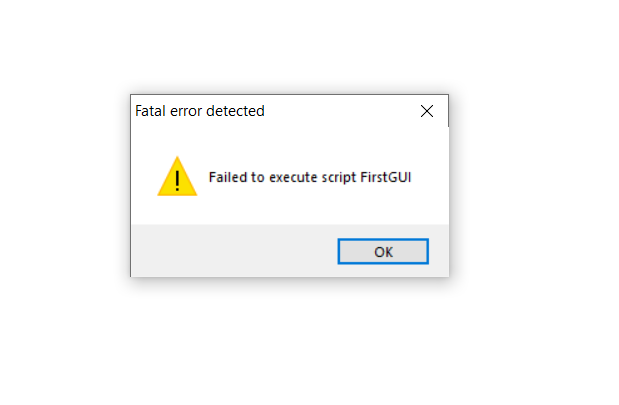
My code is running in IDE but giving fatal error failed to execute the script.
Capture

and my code is all right.

<!-- gh-comment-id:612345255 --> @yasharth291 commented on GitHub (Apr 11, 2020): @brentvollebregt My code is running in IDE but giving fatal error failed to execute the script. ![Capture](https://user-images.githubusercontent.com/55004621/79037173-6b3ed680-7bec-11ea-9c3e-9723f073c1fc.PNG) and my code is all right.
Author
Owner

@brentvollebregt commented on GitHub (Apr 11, 2020):

@yasharth291 this issue is closed. Please create a new issue if you believe there is an issue with auto-py-to-exe.

If this is not an issue with auto-py-to-exe, comment on my blog post or YouTube video linked in the README with details for some help.

<!-- gh-comment-id:612347028 --> @brentvollebregt commented on GitHub (Apr 11, 2020): @yasharth291 this issue is closed. Please create a new issue if you believe there is an issue with auto-py-to-exe. If this is not an issue with auto-py-to-exe, comment on my blog post or YouTube video linked in the README with details for some help.
Author
Owner

@DevEmmy commented on GitHub (Jul 1, 2020):

@brentvollebregt
My code is running in IDE but giving fatal error failed to execute the script.
Capture

and my code is all right.

I've same problem as well.

<!-- gh-comment-id:652505951 --> @DevEmmy commented on GitHub (Jul 1, 2020): > @brentvollebregt > My code is running in IDE but giving fatal error failed to execute the script. > ![Capture](https://user-images.githubusercontent.com/55004621/79037173-6b3ed680-7bec-11ea-9c3e-9723f073c1fc.PNG) > > and my code is all right. I've same problem as well.
Author
Owner

@brentvollebregt commented on GitHub (Jul 1, 2020):

@Veen-123 this issue is closed. Please create a new issue if you believe there is an issue with auto-py-to-exe.

If this is not an issue with auto-py-to-exe, comment on my blog post or YouTube video linked in the README with details for some help.

<!-- gh-comment-id:652610933 --> @brentvollebregt commented on GitHub (Jul 1, 2020): @Veen-123 this issue is closed. Please create a new issue if you believe there is an issue with auto-py-to-exe. If this is not an issue with auto-py-to-exe, comment on my blog post or YouTube video linked in the README with details for some help.
Author
Owner

@ghanteyyy commented on GitHub (Jul 3, 2020):

Oh my god. This issue is still getting comment after almost 2 years. Just to make update there is no any bug in auto-py-to-exe. The error was in cv2 itself. cv2 needs cv2.cp37-win32.pyd in the same directory of the executable generated by auto-py-to-exe. So after copying cv2.cp37-win32.pyd from C:\Python37-32\Lib\site-packages\cv2 to my .exe directory; the problem was solved.

So anybody who gets the Fatal Error. Make executable in console mode with debug mode enabled then you will get the exact place where the error occurred and just copy the error message in google then search and I am pretty sure that you will solve your error.

<!-- gh-comment-id:653397935 --> @ghanteyyy commented on GitHub (Jul 3, 2020): Oh my god. This issue is still getting comment after almost 2 years. Just to make update there is no any bug in **auto-py-to-exe**. The error was in **cv2** itself. **cv2** needs **cv2.cp37-win32.pyd** in the same directory of the executable generated by **auto-py-to-exe**. So after copying **cv2.cp37-win32.pyd** from **C:\Python37-32\Lib\site-packages\cv2** to my **.exe** directory; the problem was solved. So anybody who gets the **Fatal Error**. Make executable in console mode with debug mode enabled then you will get the exact place where the error occurred and just copy the error message in google then search and I am pretty sure that you will solve your error.
Author
Owner

@akshaysuresh123 commented on GitHub (May 26, 2021):

to all the people who are getting error while running exe file and its wrking perfctly in py file the issue that i faced was that the directory in which the exe file is created it does not have all the modules that we are using so u can actualy find the missing modules by just reading the traceback carefully or an easier way is to just copy the whole packages inside ur sitepackages folder from your main python directory to the directory where your exe file is right now and it should solve all your problems.
also copy the share folder in the exe directory

<!-- gh-comment-id:848775784 --> @akshaysuresh123 commented on GitHub (May 26, 2021): to all the people who are getting error while running exe file and its wrking perfctly in py file the issue that i faced was that the directory in which the exe file is created it does not have all the modules that we are using so u can actualy find the missing modules by just reading the traceback carefully or an easier way is to just copy the whole packages inside ur sitepackages folder from your main python directory to the directory where your exe file is right now and it should solve all your problems. also copy the share folder in the exe directory
Sign in to join this conversation.
No milestone
No project
No assignees
1 participant
Notifications
Due date
The due date is invalid or out of range. Please use the format "yyyy-mm-dd".

No due date set.

Dependencies

No dependencies set.

Reference
starred/auto-py-to-exe#24
No description provided.