mirror of
https://github.com/brentvollebregt/auto-py-to-exe.git
synced 2026-04-25 11:45:49 +03:00
[GH-ISSUE #148] my .exe file is not working #141

Loading…
Add table
Add a link
Reference in a new issue
No description provided.
Delete branch "%!s()"
Deleting a branch is permanent. Although the deleted branch may continue to exist for a short time before it actually gets removed, it CANNOT be undone in most cases. Continue?
Originally created by @ghost on GitHub (Dec 16, 2020).
Original GitHub issue: https://github.com/brentvollebregt/auto-py-to-exe/issues/148
there was problem in my script.
@ghost commented on GitHub (Dec 16, 2020):
I have created my .exe from auto-py-to-exe but it gives error.
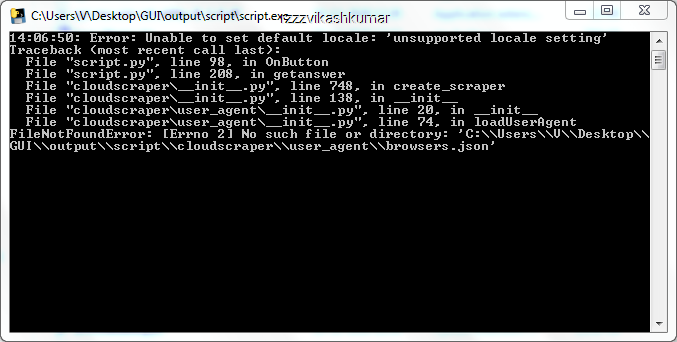
Then i created in onedir mode and it also gives error.
To resolve this i copy cloudscraper folder from other sources to its output/script/ and it works.
But how to do same thing when i create single .exe file instead of one directory.
I have also try the command hidden import.
pyinstaller --noconfirm --onedir --console --hidden-import "cloudscraper" "C:/Users/V/Desktop/GUI/xamhelper.py"and
pyinstaller --noconfirm --onedir --console --hidden-import "idna" --hidden-import "certifi" --hidden-import "chardet" --hidden-import "urllib3" --hidden-import "requests" --hidden-import "reques ts-toolbelt" --hidden-import "pyparsing" --hidden-import "cloudscraper" "C:/Users/V/Desktop/GUI/xamhelper.py"@unbeatable-101 commented on GitHub (Dec 16, 2020):
https://stackoverflow.com/a/64586862/14509818
try this
@AndresQuiVal commented on GitHub (Dec 16, 2020):
Give a check on this:
https://stackoverflow.com/questions/65046032/error-creating-exe-pyinstaller-with-cloudscraper-module-python/65332172#65332172
@ghost commented on GitHub (Dec 17, 2020):
This worked.