mirror of
https://github.com/brentvollebregt/auto-py-to-exe.git
synced 2026-04-27 12:45:50 +03:00
[GH-ISSUE #121] Not able to get images in exe generated from python code. #115

Loading…
Add table
Add a link
Reference in a new issue
No description provided.
Delete branch "%!s()"
Deleting a branch is permanent. Although the deleted branch may continue to exist for a short time before it actually gets removed, it CANNOT be undone in most cases. Continue?
Originally created by @mchaudh4 on GitHub (Sep 1, 2020).
Original GitHub issue: https://github.com/brentvollebregt/auto-py-to-exe/issues/121
I am stuck with an unusual problem. I have a GUI code written in Python PyQt5. It has images, put inside an image folder and many python files. This GUI is working fine in Pycharm. I am able to generate a standalone executable file for this project using auto-py-to-exe. When i the run the exe, i am able to see buttons, lineedits, but no images are visible in GUI. I have really tried hard and searched a lot of internet, but still could not understand the concept of getting the images. The auto-py-to-exe application looks as shown.Please give me the solution of this problem.
@brentvollebregt commented on GitHub (Sep 1, 2020):
I am going to assume you have read the linked post "Issues When Using auto-py-to-exe". After using one directory mode, were the images that you added in the additional files section where you expected them to be?
@mchaudh4 commented on GitHub (Sep 1, 2020):
I read the "Issues when using auto-py-to-exe later. I will test the exe tomorrow after going to office tomorrow. Please make a video regarding all the possible scenario. Your software is GREAT.
@brentvollebregt commented on GitHub (Sep 1, 2020):
No, I will not make a video for your specific situation. That post is linked in the readme, in the description of the video associated with this tool and is linked twice in the UI. I expect that you have tried to do some of your own research before you ask me what's wrong.
@mchaudh4 commented on GitHub (Sep 2, 2020):
Hi , i read all the documents. The executable is generated. But, I am getting the error:
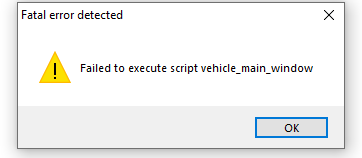
Do you have any idea, why i am getting this error, failed to execute script.
@mchaudh4 commented on GitHub (Sep 2, 2020):
I resolved the issue. The software did not included the python-can library, which was essential for my software to work. How will the user know, which library the software will include, and which libraries you have to add it yourself?
Also, when i tried to generate a single file executable, the images are not included.
@brentvollebregt commented on GitHub (Sep 3, 2020):
Using the debugging instructions would have helped you identify the issue quite quickly.
You will know which libraries will be included automatically and which need to be added manually by running the application and looking at the output for any errors.
Are you 100% sure your images are not included? Or are you referencing them incorrectly? Did you read the help post I have provided - it discusses this issue in great depth.
@mchaudh4 commented on GitHub (Sep 5, 2020):
The images were not included when i generated the single file executable. The images were included when i generated the folder kind of executable.
Also, there was no error i could observe related to python- can library in the executable. I debugged the error by matching the the libraries in executable generated and the imported libraries used in the code.
@brentvollebregt commented on GitHub (Sep 5, 2020):
How are you sure that the images have not been included? What steps have you performed to validate this?
@mchaudh4 commented on GitHub (Sep 5, 2020):
I tested it thoroughly. When i tried generated a single file executable,
the images were not visible when the GUI runs. When i tried generating a
folder kind of executable, the images are visible.
On Sat, Sep 5, 2020 at 2:19 AM Brent Vollebregt notifications@github.com
wrote:
@brentvollebregt commented on GitHub (Sep 5, 2020):
Regarding you're keeping all the parameters in the tool the same, I do not see why they wouldn't be there.
Are you using the "The one-file Resource Wrapper" snippet that I provided? You haven't said anything about it? I believe those files are there but you're not looking for them in the right place. Simply running the exe and the images not appearing in the GUI is not enough proof to tell me they're not there.
What was your thorough testing?
In the help post I extensively link I state:
Lets do some checking where we actually look at the folder:
Step 6 should prove that your images are coming through. Just because we are bundling a different script doesn't mean that this will change which files are output (aside from Python script).
@brentvollebregt commented on GitHub (Dec 24, 2020):
There has been no response by @mchaudh4 in more than three months so I'm going to assume this was resolved.
@Akashmsagar0707 commented on GitHub (Dec 24, 2023):
I am stuck with this issue please help me
@brentvollebregt commented on GitHub (Dec 24, 2023):
@Akashmsagar0707 please create a new issue and fill out the complete issue template - make sure to include a minimal reproducible example.