[GH-ISSUE #163] Asynqmon Web UI Does not support redis #390

Closed
opened 2026-03-07 22:14:59 +03:00 by kerem · 9 comments
Owner

Originally created by @Jamie-Jan on GitHub (Sep 28, 2021).
Original GitHub issue: https://github.com/hibiken/asynqmon/issues/163

docker run --rm \
    --name asynqmon \
    -p 8080:8080 \
    hibiken/asynqmon --redis-addr=127.0.0.1:6379
Asynqmon Web UI Does not support redis

image

image
image

Originally created by @Jamie-Jan on GitHub (Sep 28, 2021). Original GitHub issue: https://github.com/hibiken/asynqmon/issues/163 ``` docker run --rm \ --name asynqmon \ -p 8080:8080 \ hibiken/asynqmon --redis-addr=127.0.0.1:6379 ``` Asynqmon Web UI Does not support redis ![image](https://user-images.githubusercontent.com/38001458/135053299-1c6167fb-b931-41a5-a643-d9bffe4798f7.png) ![image](https://user-images.githubusercontent.com/38001458/135053440-08059c9f-2217-4ecd-a9df-c60542bb8aca.png) ![image](https://user-images.githubusercontent.com/38001458/135053473-28267cf8-3f0c-472c-a5a8-ea2812a7f6bf.png)
kerem closed this issue 2026-03-07 22:14:59 +03:00
Author
Owner

@hibiken commented on GitHub (Sep 30, 2021):

@TankJam thank you for opening an issue! Where is your redis process running? Is in a docker container? or on the host machine?

If redis-server is running directly on the host machine you should provide --redis-addr=host.docker.internal:6379 (Mac and Windows)

<!-- gh-comment-id:931327825 --> @hibiken commented on GitHub (Sep 30, 2021): @TankJam thank you for opening an issue! Where is your redis process running? Is in a docker container? or on the host machine? If redis-server is running directly on the host machine you should provide `--redis-addr=host.docker.internal:6379` (Mac and Windows)
Author
Owner

@justpoypoy commented on GitHub (Oct 4, 2021):

@TankJam thank you for opening an issue! Where is your redis process running? Is in a docker container? or on the host machine?

If redis-server is running directly on the host machine you should provide --redis-addr=host.docker.internal:6379 (Mac and Windows)

hi @hibiken i am got same issue on my dev server, my redis server running on host machine in centos 7. i am running asynqmon use docker with default config

<!-- gh-comment-id:933097583 --> @justpoypoy commented on GitHub (Oct 4, 2021): > > > @TankJam thank you for opening an issue! Where is your redis process running? Is in a docker container? or on the host machine? > > If redis-server is running directly on the host machine you should provide `--redis-addr=host.docker.internal:6379` (Mac and Windows) hi @hibiken i am got same issue on my dev server, my redis server running on host machine in centos 7. i am running asynqmon use docker with default config
Author
Owner

@Jamie-Jan commented on GitHub (Oct 8, 2021):

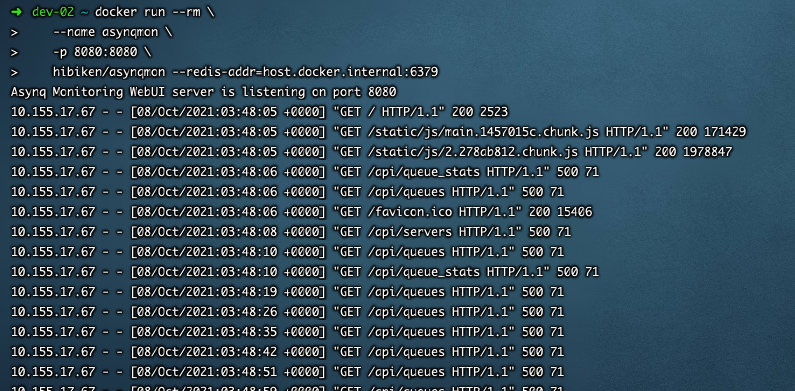
I tried what you said,But it still can't be solved

I Execute the following command:

docker run --rm
--name asynqmon
-p 8080:8080
hibiken/asynqmon --redis-addr=host.docker.internal:6379

result:
image

<!-- gh-comment-id:938321215 --> @Jamie-Jan commented on GitHub (Oct 8, 2021): I tried what you said,But it still can't be solved I Execute the following command: docker run --rm \ --name asynqmon \ -p 8080:8080 \ hibiken/asynqmon --redis-addr=host.docker.internal:6379 result: ![image](https://user-images.githubusercontent.com/38001458/136495410-d55fcd24-9366-46b7-a40c-259f5d560c98.png)
Author
Owner

@Jamie-Jan commented on GitHub (Oct 8, 2021):

@TankJam thank you for opening an issue! Where is your redis process running? Is in a docker container? or on the host machine?

If redis-server is running directly on the host machine you should provide --redis-addr=host.docker.internal:6379 (Mac and Windows)
I tried what you said,But it still can't be solved

I Execute the following command:

docker run --rm
--name asynqmon
-p 8080:8080
hibiken/asynqmon --redis-addr=host.docker.internal:6379

image

<!-- gh-comment-id:938321427 --> @Jamie-Jan commented on GitHub (Oct 8, 2021): > @TankJam thank you for opening an issue! Where is your redis process running? Is in a docker container? or on the host machine? > > If redis-server is running directly on the host machine you should provide `--redis-addr=host.docker.internal:6379` (Mac and Windows) I tried what you said,But it still can't be solved I Execute the following command: docker run --rm --name asynqmon -p 8080:8080 hibiken/asynqmon --redis-addr=host.docker.internal:6379 ![image](https://user-images.githubusercontent.com/38001458/136495492-d0eb394c-9aef-45db-9b61-41666e312a42.png)
Author
Owner

@hibiken commented on GitHub (Oct 8, 2021):

Sorry to hear.

What OS are you using? And where is your redis-server running?

<!-- gh-comment-id:938825429 --> @hibiken commented on GitHub (Oct 8, 2021): Sorry to hear. What OS are you using? And where is your redis-server running?
Author
Owner

@elvinRoehl commented on GitHub (Oct 14, 2021):

I have same issue, too. I am using MacOS & running my redis-server & asynqmon on docker container.

$ docker run --rm \
    --name asynqmon \
    -p 8081:8080 \
    hibiken/asynqmon --redis-addr=172.17.0.2:6379

^These are my commands. I have check my redis-server is running and able to be connected by successfully sending msgs with asynq client & consuming with asynq server.

<!-- gh-comment-id:943414877 --> @elvinRoehl commented on GitHub (Oct 14, 2021): I have same issue, too. I am using MacOS & running my redis-server & asynqmon on docker container. ``` $ docker run --rm \ --name asynqmon \ -p 8081:8080 \ hibiken/asynqmon --redis-addr=172.17.0.2:6379 ``` ^These are my commands. I have check my redis-server is running and able to be connected by successfully sending msgs with asynq client & consuming with asynq server.
Author
Owner

@hibiken commented on GitHub (Oct 14, 2021):

@elvinRoehl

If you are running redis in a docker container, can you try running a command like this?

# with Docker (connect to a Redis server running in the Docker container)
docker run --rm \
    --name asynqmon \
    --network dev-network \
    -p 8080:8080 \
    hibiken/asynqmon --redis-addr=dev-redis:6379```
<!-- gh-comment-id:943505595 --> @hibiken commented on GitHub (Oct 14, 2021): @elvinRoehl If you are running redis in a docker container, can you try running a command like this? ```sh # with Docker (connect to a Redis server running in the Docker container) docker run --rm \ --name asynqmon \ --network dev-network \ -p 8080:8080 \ hibiken/asynqmon --redis-addr=dev-redis:6379```
Author
Owner

@justpoypoy commented on GitHub (Oct 15, 2021):

@TankJam thank you for opening an issue! Where is your redis process running? Is in a docker container? or on the host machine?
If redis-server is running directly on the host machine you should provide --redis-addr=host.docker.internal:6379 (Mac and Windows)

hi @hibiken i am got same issue on my dev server, my redis server running on host machine in centos 7. i am running asynqmon use docker with default config

Updated:
it turns out that the version of redis on my server is still version 3. So i am upgraded latest version of redis 6.2.6. So currently is no problem.

<!-- gh-comment-id:943951385 --> @justpoypoy commented on GitHub (Oct 15, 2021): > > @TankJam thank you for opening an issue! Where is your redis process running? Is in a docker container? or on the host machine? > > If redis-server is running directly on the host machine you should provide `--redis-addr=host.docker.internal:6379` (Mac and Windows) > > hi @hibiken i am got same issue on my dev server, my redis server running on host machine in centos 7. i am running asynqmon use docker with default config Updated: it turns out that the version of redis on my server is still version 3. So i am upgraded latest version of redis 6.2.6. So currently is no problem.
Author
Owner

@hibiken commented on GitHub (Oct 22, 2021):

I'm closing this since this seems to be version skew issue.
Feel free to re-open if you encounter similar errors.

<!-- gh-comment-id:949655602 --> @hibiken commented on GitHub (Oct 22, 2021): I'm closing this since this seems to be version skew issue. Feel free to re-open if you encounter similar errors.
Sign in to join this conversation.
No milestone
No project
No assignees
1 participant
Notifications
Due date
The due date is invalid or out of range. Please use the format "yyyy-mm-dd".

No due date set.

Dependencies

No dependencies set.

Reference
starred/asynqmon#390
No description provided.