[GH-ISSUE #286] [BUG] The task is always active #1129

Closed
opened 2026-03-07 22:06:10 +03:00 by kerem · 22 comments
Owner

Originally created by @GoneGo1ng on GitHub (Jun 29, 2021).
Original GitHub issue: https://github.com/hibiken/asynq/issues/286

Originally assigned to: @hibiken on GitHub.

Describe the bug
When the task is active, the worker shutdown, then the task will always be active.

To Reproduce
Steps to reproduce the behavior:

  1. Set task sleep times.
func HandleWelcomeEmailTask(ctx context.Context, t *asynq.Task) error {
	id, err := t.Payload.GetInt("user_id")
	if err != nil {
		return err
	}
	fmt.Printf("[%s] - [Start] Send Welcome Email to User %d\n", time.Now().String(), id)
	time.Sleep(10*time.Second)
	fmt.Printf("[%s] - [ End ] Send Welcome Email to User %d\n", time.Now().String(), id)
	return nil
}
  1. Start the worker.
  2. Start the scheduler.
  3. When the task is active, shutdown the worker.
  4. The task will always be active.

Expected behavior
I think the task should change the state to failed based on Timeout, MaxRetry, etc.

Screenshots
If applicable, add screenshots to help explain your problem.

Environment (please complete the following information):

  • OS: Windows
  • Version of asynq package: v0.17.2
Originally created by @GoneGo1ng on GitHub (Jun 29, 2021). Original GitHub issue: https://github.com/hibiken/asynq/issues/286 Originally assigned to: @hibiken on GitHub. **Describe the bug** When the task is active, the worker shutdown, then the task will always be active. **To Reproduce** Steps to reproduce the behavior: 1. Set task sleep times. ``` func HandleWelcomeEmailTask(ctx context.Context, t *asynq.Task) error { id, err := t.Payload.GetInt("user_id") if err != nil { return err } fmt.Printf("[%s] - [Start] Send Welcome Email to User %d\n", time.Now().String(), id) time.Sleep(10*time.Second) fmt.Printf("[%s] - [ End ] Send Welcome Email to User %d\n", time.Now().String(), id) return nil } ``` 2. Start the worker. 3. Start the scheduler. 4. When the task is active, shutdown the worker. 5. The task will always be active. **Expected behavior** I think the task should change the state to failed based on Timeout, MaxRetry, etc. **Screenshots** If applicable, add screenshots to help explain your problem. **Environment (please complete the following information):** - OS: Windows - Version of `asynq` package: v0.17.2
kerem 2026-03-07 22:06:10 +03:00
  • closed this issue
  • added the
    bug
    label
Author
Owner

@crossworth commented on GitHub (Jun 29, 2021):

Hello, are you sure that the task is not recovered after 1 minute?

On pull request https://github.com/hibiken/asynq/pull/181 was added support for task recovery on worker crash.

The way the crash recovery works it's quite simple, on server (worker) startup after 1 minute
github.com/hibiken/asynq@2516c4baba/server.go (L376)

A routine is executed to list all the "DeadlineExceeded" tasks:
github.com/hibiken/asynq@2516c4baba/recoverer.go (L70)

And the retry/archive is executed based on the task Retry/Retried value:
github.com/hibiken/asynq@2516c4baba/recoverer.go (L77-L81)

if the task should be retried, a delay function is used as well:
github.com/hibiken/asynq@2516c4baba/recoverer.go (L89-L95)

the default delay function used is this:
github.com/hibiken/asynq@2516c4baba/server.go (L261-L268)

If you don't provide a timeout and deadline the default 30 minutes timeout will be used.
github.com/hibiken/asynq@63ce9ed0f9/client.go (L238)

NOTE: if you set asynq.MaxRetry(0) when using Enqueue and the worker crash, no retry will be executed.

The recovery only works when you start the worker, so if are inspecting the redis directly you will not see the task been recovered unless you start the server (worker).

<!-- gh-comment-id:870209427 --> @crossworth commented on GitHub (Jun 29, 2021): Hello, are you sure that the task is not recovered after 1 minute? On pull request https://github.com/hibiken/asynq/pull/181 was added support for task recovery on worker crash. The way the crash recovery works it's quite simple, on server (worker) startup after 1 minute https://github.com/hibiken/asynq/blob/2516c4babac835a04b59822eebb9a0016351e177/server.go#L376 A routine is executed to list all the "DeadlineExceeded" tasks: https://github.com/hibiken/asynq/blob/2516c4babac835a04b59822eebb9a0016351e177/recoverer.go#L70 And the retry/archive is executed based on the task Retry/Retried value: https://github.com/hibiken/asynq/blob/2516c4babac835a04b59822eebb9a0016351e177/recoverer.go#L77-L81 if the task should be retried, a delay function is used as well: https://github.com/hibiken/asynq/blob/2516c4babac835a04b59822eebb9a0016351e177/recoverer.go#L89-L95 the default delay function used is this: https://github.com/hibiken/asynq/blob/2516c4babac835a04b59822eebb9a0016351e177/server.go#L261-L268 If you don't provide a timeout and deadline the default 30 minutes timeout will be used. https://github.com/hibiken/asynq/blob/63ce9ed0f925912bd95c8464d1ee9dfae4ddf109/client.go#L238 NOTE: if you set `asynq.MaxRetry(0)` when using `Enqueue` and the worker crash, no retry will be executed. The recovery only works when you start the worker, so if are inspecting the redis directly you will not see the task been recovered unless you start the server (worker).
Author
Owner

@GoneGo1ng commented on GitHub (Jun 29, 2021):

This is my worker, I mean, I shutdown it. I'm pretty sure it didn't recover or retry. It's been more than two hours now.

// worker.go
srv := asynq.NewServer(r, asynq.Config{
	Concurrency: 10,
	Queues: map[string]int{
		"default": 1,
		"myqueue": 1,
	},
})

mux := asynq.NewServeMux()
mux.HandleFunc(tasks.WelcomeEmail, tasks.HandleWelcomeEmailTask)
mux.HandleFunc(tasks.ReminderEmail, tasks.HandleReminderEmailTask)

if err := srv.Run(mux); err != nil {
	log.Fatal(err)
}
Using config file: asynq.yaml
Task Count by State
active      pending   scheduled  retry  archived
----------  --------  ---------  -----  ----
2           0         0          0      0

Task Count by Queue
myqueue  default
-------  -------
1        1

Daily Stats 2021-06-29 UTC
processed  failed  error rate
---------  ------  ----------
8          0       0.00%

Redis Info
version  uptime  connections  memory usage  peak memory usage
-------  ------  -----------  ------------  -----------------
5.0.10   0 days  3            904.09KB      1.20MB

<!-- gh-comment-id:870275900 --> @GoneGo1ng commented on GitHub (Jun 29, 2021): This is my worker, I mean, I shutdown it. I'm pretty sure it didn't recover or retry. It's been more than two hours now. ```go // worker.go srv := asynq.NewServer(r, asynq.Config{ Concurrency: 10, Queues: map[string]int{ "default": 1, "myqueue": 1, }, }) mux := asynq.NewServeMux() mux.HandleFunc(tasks.WelcomeEmail, tasks.HandleWelcomeEmailTask) mux.HandleFunc(tasks.ReminderEmail, tasks.HandleReminderEmailTask) if err := srv.Run(mux); err != nil { log.Fatal(err) } ``` ``` Using config file: asynq.yaml Task Count by State active pending scheduled retry archived ---------- -------- --------- ----- ---- 2 0 0 0 0 Task Count by Queue myqueue default ------- ------- 1 1 Daily Stats 2021-06-29 UTC processed failed error rate --------- ------ ---------- 8 0 0.00% Redis Info version uptime connections memory usage peak memory usage ------- ------ ----------- ------------ ----------------- 5.0.10 0 days 3 904.09KB 1.20MB ```
Author
Owner

@hibiken commented on GitHub (Jun 29, 2021):

@GoneGo1ng Thank you for opening this bug!
@crossworth thank you for helping out here!

Can you provide what you are seeing in your logs on Server shutdown?

As documented in this wiki, you should send a TERM signal to the server process to shutdown the server. Upon receiving a TERM signal, the server waits for duration specified by ShutdownTimeout field (https://github.com/hibiken/asynq/blob/master/server.go#L127) and pushes back any tasks that didn't complete within that window (the tasks will be in pending state after pushed back).
As @crossworth mentioned, if worker didn't get to push back the task (e.g. worker crashed, or killed by KILL signal) then tasks will be recovered on server restart.

<!-- gh-comment-id:870753530 --> @hibiken commented on GitHub (Jun 29, 2021): @GoneGo1ng Thank you for opening this bug! @crossworth thank you for helping out here! Can you provide what you are seeing in your logs on Server shutdown? As documented in [this wiki](https://github.com/hibiken/asynq/wiki/Signals), you should send a TERM signal to the server process to shutdown the server. Upon receiving a TERM signal, the server waits for duration specified by `ShutdownTimeout` field (https://github.com/hibiken/asynq/blob/master/server.go#L127) and pushes back any tasks that didn't complete within that window (the tasks will be in pending state after pushed back). As @crossworth mentioned, if worker didn't get to push back the task (e.g. worker crashed, or killed by KILL signal) then tasks will be recovered on server restart.
Author
Owner

@GoneGo1ng commented on GitHub (Jun 30, 2021):

Thank you for reminding me. I didn't read the document carefully. TERM signal gracefully shut down background process.

<!-- gh-comment-id:871039237 --> @GoneGo1ng commented on GitHub (Jun 30, 2021): Thank you for reminding me. I didn't read the document carefully. TERM signal gracefully shut down background process.
Author
Owner

@thanhps42 commented on GitHub (Jun 30, 2021):

@GoneGo1ng Thank you for opening this bug!
@crossworth thank you for helping out here!

Can you provide what you are seeing in your logs on Server shutdown?

As documented in this wiki, you should send a TERM signal to the server process to shutdown the server. Upon receiving a TERM signal, the server waits for duration specified by ShutdownTimeout field (https://github.com/hibiken/asynq/blob/master/server.go#L127) and pushes back any tasks that didn't complete within that window (the tasks will be in pending state after pushed back).
As @crossworth mentioned, if worker didn't get to push back the task (e.g. worker crashed, or killed by KILL signal) then tasks will be recovered on server restart.

@hibiken
Sometimes we can't send a TERM signal to server process. I run worker process in my laptop, but I the worker maybe exit unexpected (such as: windows auto update, electric-power-off,...). I was set the timeout for task, but it never fire.

P/s: sorry for my English.

<!-- gh-comment-id:871073934 --> @thanhps42 commented on GitHub (Jun 30, 2021): > @GoneGo1ng Thank you for opening this bug! > @crossworth thank you for helping out here! > > Can you provide what you are seeing in your logs on Server shutdown? > > As documented in [this wiki](https://github.com/hibiken/asynq/wiki/Signals), you should send a TERM signal to the server process to shutdown the server. Upon receiving a TERM signal, the server waits for duration specified by `ShutdownTimeout` field (https://github.com/hibiken/asynq/blob/master/server.go#L127) and pushes back any tasks that didn't complete within that window (the tasks will be in pending state after pushed back). > As @crossworth mentioned, if worker didn't get to push back the task (e.g. worker crashed, or killed by KILL signal) then tasks will be recovered on server restart. @hibiken Sometimes we can't send a TERM signal to server process. I run worker process in my laptop, but I the worker maybe exit unexpected (such as: windows auto update, electric-power-off,...). I was set the timeout for task, but it never fire. P/s: sorry for my English.
Author
Owner

@hibiken commented on GitHub (Jun 30, 2021):

@thanhps42 thanks for the question.
Like @crossworth mentioned in the comment, deadline exceeded tasks (i.e. timed out tasks) are recovered when you restart the server. If you run multiple worker servers, it may help to minimize the time before the timed out tasks get recovered.

For example:

  • Server1 and Server2 are consuming tasks from QueueX.
  • Server1 starts processing Task1 (with timeout set to 60 seconds)
  • Server1 crashes before Task1 is fully processed
  • After 60 seconds, Task1 times out (i.e. deadline exceeded)
  • Server2 recovers Task1

Let me know if you have questions on this.

<!-- gh-comment-id:871382148 --> @hibiken commented on GitHub (Jun 30, 2021): @thanhps42 thanks for the question. Like @crossworth mentioned in the comment, deadline exceeded tasks (i.e. timed out tasks) are recovered when you restart the server. If you run multiple worker servers, it may help to minimize the time before the timed out tasks get recovered. For example: - Server1 and Server2 are consuming tasks from QueueX. - Server1 starts processing Task1 (with timeout set to 60 seconds) - Server1 crashes before Task1 is fully processed - After 60 seconds, Task1 times out (i.e. deadline exceeded) - Server2 recovers Task1 Let me know if you have questions on this.
Author
Owner

@thanhps42 commented on GitHub (Jul 2, 2021):

@thanhps42 thanks for the question.
Like @crossworth mentioned in the comment, deadline exceeded tasks (i.e. timed out tasks) are recovered when you restart the server. If you run multiple worker servers, it may help to minimize the time before the timed out tasks get recovered.

For example:

  • Server1 and Server2 are consuming tasks from QueueX.
  • Server1 starts processing Task1 (with timeout set to 60 seconds)
  • Server1 crashes before Task1 is fully processed
  • After 60 seconds, Task1 times out (i.e. deadline exceeded)
  • Server2 recovers Task1

Let me know if you have questions on this.

I was set deadline for Task1, but it never get timeout. No deadline exceeded even Timeout was set.

<!-- gh-comment-id:872732931 --> @thanhps42 commented on GitHub (Jul 2, 2021): > @thanhps42 thanks for the question. > Like @crossworth mentioned in the comment, deadline exceeded tasks (i.e. timed out tasks) are recovered when you restart the server. If you run multiple worker servers, it may help to minimize the time before the timed out tasks get recovered. > > For example: > > * Server1 and Server2 are consuming tasks from QueueX. > * Server1 starts processing Task1 (with timeout set to 60 seconds) > * Server1 crashes before Task1 is fully processed > * After 60 seconds, Task1 times out (i.e. deadline exceeded) > * Server2 recovers Task1 > > Let me know if you have questions on this. I was set deadline for Task1, but it never get timeout. No deadline exceeded even Timeout was set.
Author
Owner

@crossworth commented on GitHub (Jul 2, 2021):

@thanhps42 could you describe the exact process you are doing to test this behaviour?

Are you sure that the worker is running?

The recovery process will not happen if the worker is stopped.

If I create a task with timeout of 1 minute , enqueue it, the worker starts processing it but crashes, the task will be in Active state until I start the worker again.

<!-- gh-comment-id:872970238 --> @crossworth commented on GitHub (Jul 2, 2021): @thanhps42 could you describe the exact process you are doing to test this behaviour? Are you sure that the worker is running? The recovery process will not happen if the worker is stopped. If I create a task with timeout of 1 minute , enqueue it, the worker starts processing it but crashes, the task will be in Active state until I start the worker again.
Author
Owner

@thanhps42 commented on GitHub (Jul 2, 2021):

@crossworth
When I start the worker again, it process new pending task, these old active task still stay there (and "Started" status always "just now").

image

<!-- gh-comment-id:873049985 --> @thanhps42 commented on GitHub (Jul 2, 2021): @crossworth When I start the worker again, it process new pending task, these old active task still stay there (and "Started" status always "just now"). ![image](https://user-images.githubusercontent.com/11658963/124290876-29e27000-db7e-11eb-80be-2d19d0e1d02f.png)
Author
Owner

@hibiken commented on GitHub (Jul 2, 2021):

@thanhps42 Thank you for reporting this!
@crossworth thank you for following up to this issue!

I can reproduce this bug, and it seems like RDB.ListDeadlineExceeded is not returning the deadline exceeded messages.
I'll look into this bug in the next few days, but feel free to open a PR for the bug fix if anyone else is interested in this.

<!-- gh-comment-id:873150862 --> @hibiken commented on GitHub (Jul 2, 2021): @thanhps42 Thank you for reporting this! @crossworth thank you for following up to this issue! I can reproduce this bug, and it seems like `RDB.ListDeadlineExceeded` is not returning the deadline exceeded messages. I'll look into this bug in the next few days, but feel free to open a PR for the bug fix if anyone else is interested in this.
Author
Owner

@hibiken commented on GitHub (Jul 2, 2021):

Sorry, I take it back!
It's working as intended, but I overlooked that by default tasks' timeout is set to 30mins.

@thanhps42 I'm suspecting you are encountering the same thing.
From the screenshot you provided, it seems that you are setting the task timeout to 20mins. So the abandoned active tasks are not going to be recovered until they hit their deadline (which is set to time.Now() + task.Timeout). So after 20mins or so if you have a server running, those active tasks will be recovered and put back in pending state.

I'll close this bug, but please let me know if you have any questions!

<!-- gh-comment-id:873306601 --> @hibiken commented on GitHub (Jul 2, 2021): Sorry, I take it back! It's working as intended, but I overlooked that by default tasks' timeout is set to 30mins. @thanhps42 I'm suspecting you are encountering the same thing. From the screenshot you provided, it seems that you are setting the task timeout to 20mins. So the abandoned active tasks are not going to be recovered until they hit their deadline (which is set to `time.Now() + task.Timeout`). So after 20mins or so if you have a server running, those active tasks will be recovered and put back in pending state. I'll close this bug, but please let me know if you have any questions!
Author
Owner

@thanhps42 commented on GitHub (Jul 2, 2021):

@hibiken The task timeout is 20mins. After many hours, 1 task is recover, and 1 task still there?

image

<!-- gh-comment-id:873308816 --> @thanhps42 commented on GitHub (Jul 2, 2021): @hibiken The task timeout is 20mins. After many hours, 1 task is recover, and 1 task still there? ![image](https://user-images.githubusercontent.com/11658963/124337254-d6970e80-dbcb-11eb-9880-aa973db345ef.png)
Author
Owner

@hibiken commented on GitHub (Jul 3, 2021):

That's strange.

Would you mind running this command and paste provide the output here?

redis-cli zrange asynq:{<qname>}:deadlines 0 -1 withscores (where <qname> is your queue name)

Also, did you recently migrate from Asynq v0.17 to v0.18?

<!-- gh-comment-id:873322859 --> @hibiken commented on GitHub (Jul 3, 2021): That's strange. Would you mind running this command and paste provide the output here? `redis-cli zrange asynq:{<qname>}:deadlines 0 -1 withscores` (where `<qname>` is your queue name) Also, did you recently migrate from Asynq v0.17 to v0.18?
Author
Owner

@thanhps42 commented on GitHub (Jul 3, 2021):

I was pause the queue 1 hour ago, the task still there.

image

127.0.0.1:6379>  zrange asynq:{default}:deadlines 0 -1 withscores
1) "{\"Type\":\"xxxxx\",\"Payload\":{\"xxxx\":\"xxxxxxxx\"},\"ID\":\"c28634c2-59aa-48e8-acda-d76dff6407eb\",\"Queue\":\"default\",\"Retry\":0,\"Retried\":0,\"ErrorMsg\":\"\",\"Timeout\":1200,\"Deadline\":0,\"UniqueKey\":\"\"}"
2) "1625237029"

My asynq version is v0.17.2. I have no update/migrate.

<!-- gh-comment-id:873341048 --> @thanhps42 commented on GitHub (Jul 3, 2021): I was pause the queue 1 hour ago, the task still there. ![image](https://user-images.githubusercontent.com/11658963/124342564-eb38ce00-dbee-11eb-996c-5e4a3b827585.png) ``` 127.0.0.1:6379> zrange asynq:{default}:deadlines 0 -1 withscores 1) "{\"Type\":\"xxxxx\",\"Payload\":{\"xxxx\":\"xxxxxxxx\"},\"ID\":\"c28634c2-59aa-48e8-acda-d76dff6407eb\",\"Queue\":\"default\",\"Retry\":0,\"Retried\":0,\"ErrorMsg\":\"\",\"Timeout\":1200,\"Deadline\":0,\"UniqueKey\":\"\"}" 2) "1625237029" ``` My asynq version is v0.17.2. I have no update/migrate.
Author
Owner

@hibiken commented on GitHub (Jul 3, 2021):

Would you mind running:

redis-cli lrange asynq:{default}:active 0 -1

and paste in the output here?

<!-- gh-comment-id:873404384 --> @hibiken commented on GitHub (Jul 3, 2021): Would you mind running: ``` redis-cli lrange asynq:{default}:active 0 -1 ``` and paste in the output here?
Author
Owner

@thanhps42 commented on GitHub (Jul 4, 2021):

Would you mind running:

redis-cli lrange asynq:{default}:active 0 -1

and paste in the output here?

127.0.0.1:6379> lrange asynq:{default}:active 0 -1
1) "{\"Type\":\"xxxx\",\"Payload\":{\"xxxx\":\"xxxxxx\"},\"ID\":\"c28634c2-59aa-48e8-acda-d76dff6407eb\",\"Queue\":\"default\",\"Retry\":0,\"Retried\":0,\"ErrorMsg\":\"\",\"Timeout\":1200,\"Deadline\":0,\"UniqueKey\":\"\"}"

P/s: sorry for my delay

<!-- gh-comment-id:873503578 --> @thanhps42 commented on GitHub (Jul 4, 2021): > Would you mind running: > > ``` > redis-cli lrange asynq:{default}:active 0 -1 > ``` > > and paste in the output here? ``` 127.0.0.1:6379> lrange asynq:{default}:active 0 -1 1) "{\"Type\":\"xxxx\",\"Payload\":{\"xxxx\":\"xxxxxx\"},\"ID\":\"c28634c2-59aa-48e8-acda-d76dff6407eb\",\"Queue\":\"default\",\"Retry\":0,\"Retried\":0,\"ErrorMsg\":\"\",\"Timeout\":1200,\"Deadline\":0,\"UniqueKey\":\"\"}" ``` P/s: sorry for my delay
Author
Owner

@thanhps42 commented on GitHub (Jul 4, 2021):

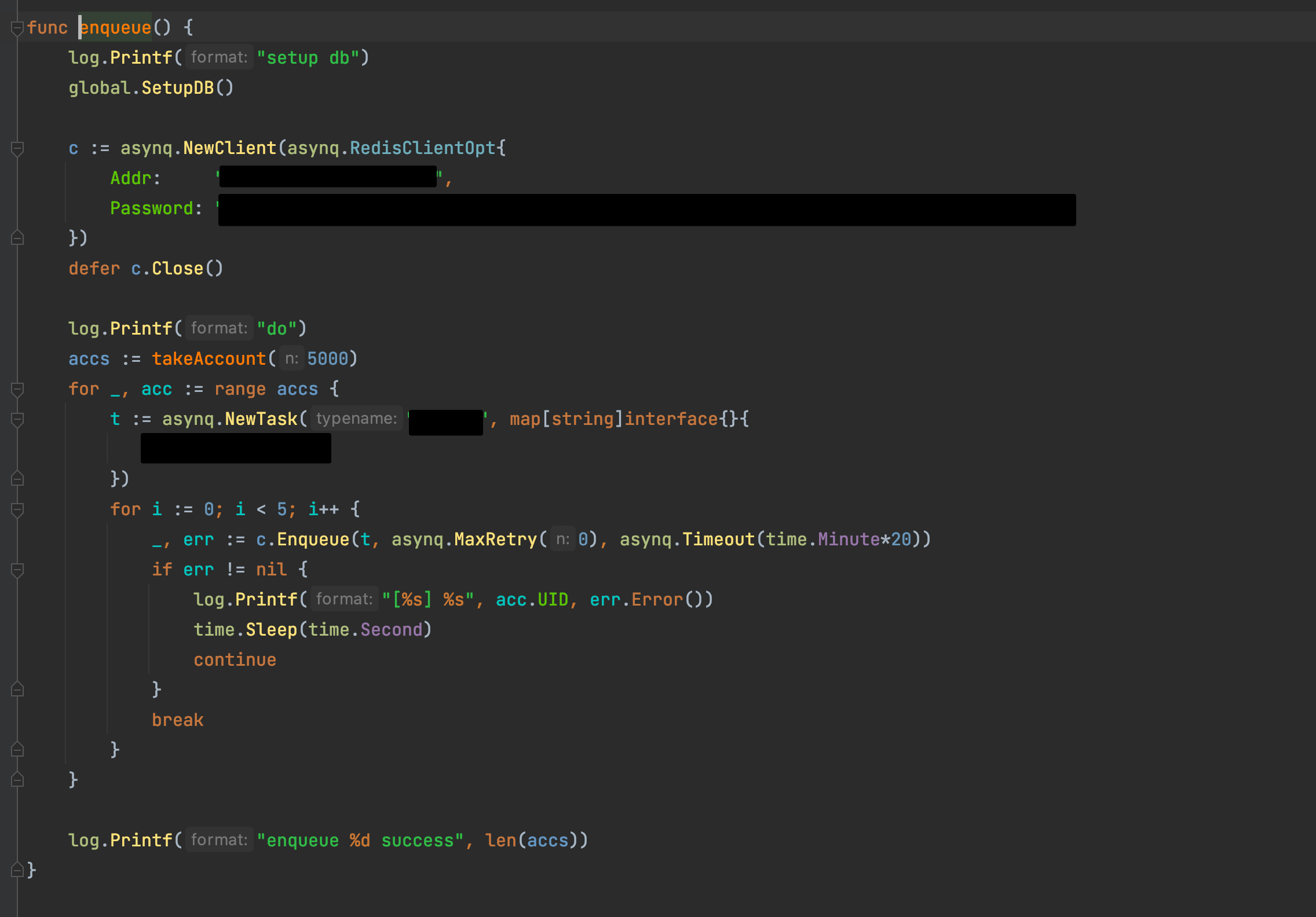
#client:
image

<!-- gh-comment-id:873503855 --> @thanhps42 commented on GitHub (Jul 4, 2021): #client: ![image](https://user-images.githubusercontent.com/11658963/124371502-893e9e00-dcac-11eb-8abd-11f6e6d1ea8d.png)
Author
Owner

@hibiken commented on GitHub (Jul 4, 2021):

Ok that seems normal to me. Thank you for providing the info.

Would you mind running the server and keep it running for at least one minute? (You need to keep it running for one minute since current implementation only execute task-recovering logic every minute).
If recoverer is failing, you'll see some warning logs like these:
https://github.com/hibiken/asynq/blob/master/recoverer.go#L72
https://github.com/hibiken/asynq/blob/master/recoverer.go#L93
https://github.com/hibiken/asynq/blob/master/recoverer.go#L99

Please let me know what you see in your logs :)

<!-- gh-comment-id:873518327 --> @hibiken commented on GitHub (Jul 4, 2021): Ok that seems normal to me. Thank you for providing the info. Would you mind running the server and keep it running for at least one minute? (You need to keep it running for one minute since current implementation only execute task-recovering logic every minute). If recoverer is failing, you'll see some warning logs like these: https://github.com/hibiken/asynq/blob/master/recoverer.go#L72 https://github.com/hibiken/asynq/blob/master/recoverer.go#L93 https://github.com/hibiken/asynq/blob/master/recoverer.go#L99 Please let me know what you see in your logs :)
Author
Owner

@thanhps42 commented on GitHub (Jul 4, 2021):

After start and stop the worker many times, the active task was gone. I don't know why.

image

<!-- gh-comment-id:873540495 --> @thanhps42 commented on GitHub (Jul 4, 2021): After start and stop the worker many times, the active task was gone. I don't know why. ![image](https://user-images.githubusercontent.com/11658963/124377589-d33c7980-dcd6-11eb-901f-fce707a0fdcd.png)
Author
Owner

@crossworth commented on GitHub (Jul 4, 2021):

Would you mind running the server and keep it running for at least one minute? (You need to keep it running for one minute since current implementation only execute task-recovering logic every minute).

@hibiken I would like to clarify something, you said "task-recovering logic every minute", but a Timer.NewTimer is used, this means that it only happens one time: https://golang.org/pkg/time/#Timer

Is this the default behaviour, or was intended to execute every minute, if so maybe is better to use a time.NewTicker: https://golang.org/pkg/time/#Ticker or call reset like on healthcheck.go and heartbeat.go.

<!-- gh-comment-id:873580664 --> @crossworth commented on GitHub (Jul 4, 2021): > Would you mind running the server and keep it running for at least one minute? (You need to keep it running for one minute since current implementation only execute task-recovering logic every minute). @hibiken I would like to clarify something, you said "task-recovering logic every minute", but a `Timer.NewTimer` [is used](https://github.com/hibiken/asynq/blob/d5e9f3b1bd6ec64b5bf8ed55b0310d95a13bbe54/recoverer.go#L60), this means that it only happens one time: https://golang.org/pkg/time/#Timer Is this the default behaviour, or was intended to execute every minute, if so maybe is better to use a `time.NewTicker`: https://golang.org/pkg/time/#Ticker or call `reset` like on [`healthcheck.go`](https://github.com/hibiken/asynq/blob/99c7ebeef260ed156af09ad3a8b3bc76ef882830/healthcheck.go#L76) and [`heartbeat.go`](https://github.com/hibiken/asynq/blob/99c7ebeef260ed156af09ad3a8b3bc76ef882830/heartbeat.go#L125).
Author
Owner

@hibiken commented on GitHub (Jul 4, 2021):

@thanhps42 Even though we couldn't get to the bottom of this, this was a good opportunity to take another look at task recovering logic, so thank you 🙏 And please let me know if you see the issue again.

@crossworth Thank you for spotting! Yes, we should call Timer.Reset in recoverer. My reasoning behind using the Timer instead of Ticker is because I wanted to ensure that we start counting after the current execution is done. See the example below.

		for {
			select {
			case <-r.done:
				r.logger.Debug("Recoverer done")
				timer.Stop()
				return
			case <-timer.C:
                                 Do() // Potentially time-consuming operation
                                 timer.Reset(r.interval)
			}
		}

But I'm open to suggestions. Let me know if you have thoughts on this!

<!-- gh-comment-id:873586912 --> @hibiken commented on GitHub (Jul 4, 2021): @thanhps42 Even though we couldn't get to the bottom of this, this was a good opportunity to take another look at task recovering logic, so thank you 🙏 And please let me know if you see the issue again. @crossworth Thank you for spotting! Yes, we should call `Timer.Reset` in recoverer. My reasoning behind using the `Timer` instead of `Ticker` is because I wanted to ensure that we start counting **after** the current execution is done. See the example below. ```go for { select { case <-r.done: r.logger.Debug("Recoverer done") timer.Stop() return case <-timer.C: Do() // Potentially time-consuming operation timer.Reset(r.interval) } } ``` But I'm open to suggestions. Let me know if you have thoughts on this!
Author
Owner

@crossworth commented on GitHub (Jul 4, 2021):

I see, thats makes sense, I think a Timer is a better solution for this case.

<!-- gh-comment-id:873588842 --> @crossworth commented on GitHub (Jul 4, 2021): I see, thats makes sense, I think a Timer is a better solution for this case.
Sign in to join this conversation.
No milestone
No project
No assignees
1 participant
Notifications
Due date
The due date is invalid or out of range. Please use the format "yyyy-mm-dd".

No due date set.

Dependencies

No dependencies set.

Reference
starred/asynq#1129
No description provided.