mirror of
https://github.com/RD17/ambar.git
synced 2026-04-25 07:25:55 +03:00
[GH-ISSUE #77] Ambar is loading ... #76
Labels
No labels
$$ Paid Support
bug
bug
enhancement
help wanted
invalid
pull-request
question
question
wontfix
No milestone
No project
No assignees
1 participant

Notifications
Due date
No due date set.
Dependencies
No dependencies set.
Reference
starred/ambar#76
Loading…
Add table
Add a link
Reference in a new issue
No description provided.
Delete branch "%!s()"
Deleting a branch is permanent. Although the deleted branch may continue to exist for a short time before it actually gets removed, it CANNOT be undone in most cases. Continue?
Originally created by @andychoi on GitHub (Sep 23, 2017).
Original GitHub issue: https://github.com/RD17/ambar/issues/77
I followed the step-by-step with same environment, ubuntu server 16.04LTS.
Docker CE version 17.06.2
However, I got "Ambar is loading..." "Oops something went wrong" message.
I saw same error message in closed issue. Please advise.
@andychoi commented on GitHub (Sep 23, 2017):
Here is docker logs for ambar_es_1
@isido993 commented on GitHub (Sep 24, 2017):
@andychoi please post
docker logs ambar_webapi_1logs here. Thnx.@andychoi commented on GitHub (Sep 24, 2017):
Here is docker logs on Ubuntu 16.04LTS
Here is docker logs on CentOS 7. Same problem.
@isido993 commented on GitHub (Sep 24, 2017):
Back end seems to be ok. Looks like a net issue. Please post your browser's console when receiving 'Oops something went wrong' message.
@andychoi commented on GitHub (Sep 24, 2017):
@andychoi commented on GitHub (Sep 24, 2017):
The error is happening in NAT networking in Virtualbox. If the network is bridged, no error.
Do you use any special port to access from/to external server? I did port forwarding VM 80 to Host 8080 in NAT to test your product. Please advise it.
@isido993 commented on GitHub (Sep 25, 2017):
@andychoi by default Ambar uses only 80 port, so you should forward VM's 80 port to host's 80 port.
@sochix commented on GitHub (Sep 29, 2017):
@andychoi did it helps?
@imperian commented on GitHub (Oct 1, 2017):
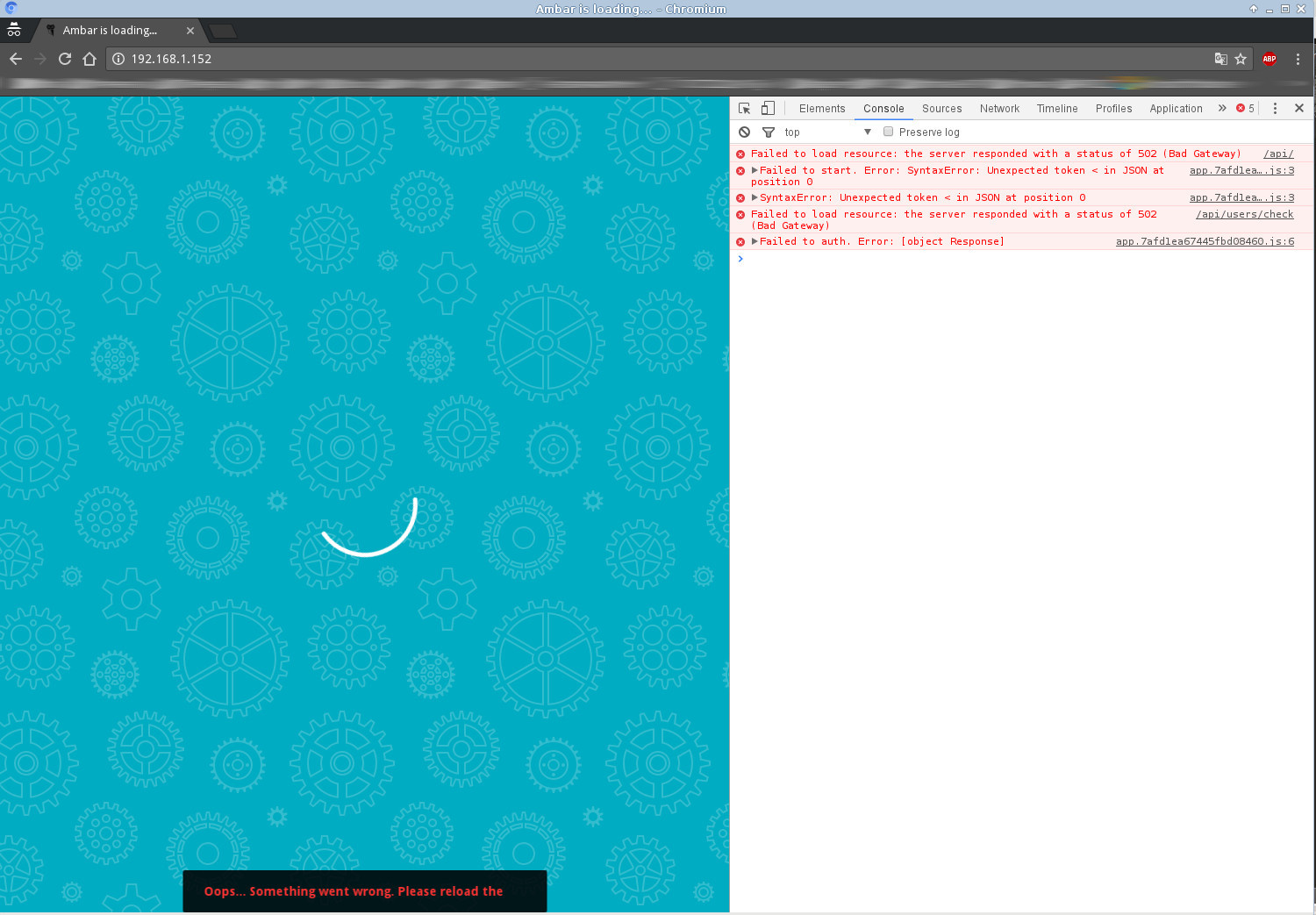
I'm having the same issue. The es and webapi logs look the same as above. My console shows
VM111:1 GET http://10.0.0.1:8081/api/ 502 (Bad Gateway) (anonymous) @ VM111:1 (anonymous) @ app.e102917ba60db91d4fa5.js:5 t @ app.e102917ba60db91d4fa5.js:5 x @ app.e102917ba60db91d4fa5.js:5 (anonymous) @ app.e102917ba60db91d4fa5.js:5 app.e102917ba60db91d4fa5.js:5 Failed to start. Error: SyntaxError: Unexpected token < in JSON at position 0 (anonymous) @ app.e102917ba60db91d4fa5.js:5 Promise rejected (async) (anonymous) @ app.e102917ba60db91d4fa5.js:5 (anonymous) @ app.e102917ba60db91d4fa5.js:52 (anonymous) @ vendor.728b3b1c29700b90277d.js:5 value @ app.e102917ba60db91d4fa5.js:28 e.notifyAll @ app.e102917ba60db91d4fa5.js:27 close @ app.e102917ba60db91d4fa5.js:51 closeAll @ app.e102917ba60db91d4fa5.js:7 perform @ app.e102917ba60db91d4fa5.js:7 perform @ app.e102917ba60db91d4fa5.js:7 perform @ app.e102917ba60db91d4fa5.js:5 C @ app.e102917ba60db91d4fa5.js:5 closeAll @ app.e102917ba60db91d4fa5.js:7 perform @ app.e102917ba60db91d4fa5.js:7 batchedUpdates @ app.e102917ba60db91d4fa5.js:28 l @ app.e102917ba60db91d4fa5.js:5 r @ app.e102917ba60db91d4fa5.js:8 enqueueSetState @ app.e102917ba60db91d4fa5.js:8 r.setState @ vendor.728b3b1c29700b90277d.js:2 (anonymous) @ vendor.728b3b1c29700b90277d.js:5 (anonymous) @ vendor.728b3b1c29700b90277d.js:2 (anonymous) @ vendor.728b3b1c29700b90277d.js:2 r @ vendor.728b3b1c29700b90277d.js:2 (anonymous) @ vendor.728b3b1c29700b90277d.js:2 (anonymous) @ app.e102917ba60db91d4fa5.js:29 window.webpackJsonp @ vendor.728b3b1c29700b90277d.js:1 (anonymous) @ 2.searchPage.37654496fa9353ee17be.js:1 app.e102917ba60db91d4fa5.js:5 SyntaxError: Unexpected token < in JSON at position 0 at app.e102917ba60db91d4fa5.js:5 at <anonymous> o @ app.e102917ba60db91d4fa5.js:5 (anonymous) @ app.e102917ba60db91d4fa5.js:5 Promise rejected (async) (anonymous) @ app.e102917ba60db91d4fa5.js:5 (anonymous) @ app.e102917ba60db91d4fa5.js:52 (anonymous) @ vendor.728b3b1c29700b90277d.js:5 value @ app.e102917ba60db91d4fa5.js:28 e.notifyAll @ app.e102917ba60db91d4fa5.js:27 close @ app.e102917ba60db91d4fa5.js:51 closeAll @ app.e102917ba60db91d4fa5.js:7 perform @ app.e102917ba60db91d4fa5.js:7 perform @ app.e102917ba60db91d4fa5.js:7 perform @ app.e102917ba60db91d4fa5.js:5 C @ app.e102917ba60db91d4fa5.js:5 closeAll @ app.e102917ba60db91d4fa5.js:7 perform @ app.e102917ba60db91d4fa5.js:7 batchedUpdates @ app.e102917ba60db91d4fa5.js:28 l @ app.e102917ba60db91d4fa5.js:5 r @ app.e102917ba60db91d4fa5.js:8 enqueueSetState @ app.e102917ba60db91d4fa5.js:8 r.setState @ vendor.728b3b1c29700b90277d.js:2 (anonymous) @ vendor.728b3b1c29700b90277d.js:5 (anonymous) @ vendor.728b3b1c29700b90277d.js:2 (anonymous) @ vendor.728b3b1c29700b90277d.js:2 r @ vendor.728b3b1c29700b90277d.js:2 (anonymous) @ vendor.728b3b1c29700b90277d.js:2 (anonymous) @ app.e102917ba60db91d4fa5.js:29 window.webpackJsonp @ vendor.728b3b1c29700b90277d.js:1 (anonymous) @ 2.searchPage.37654496fa9353ee17be.js:1 VM111:1 GET http://10.0.0.1:8081/api/users/check 502 (Bad Gateway) (anonymous) @ VM111:1 (anonymous) @ app.e102917ba60db91d4fa5.js:6 t @ app.e102917ba60db91d4fa5.js:5 p @ app.e102917ba60db91d4fa5.js:6 (anonymous) @ app.e102917ba60db91d4fa5.js:6 (anonymous) @ app.e102917ba60db91d4fa5.js:52 (anonymous) @ vendor.728b3b1c29700b90277d.js:5 value @ app.e102917ba60db91d4fa5.js:28 e.notifyAll @ app.e102917ba60db91d4fa5.js:27 close @ app.e102917ba60db91d4fa5.js:51 closeAll @ app.e102917ba60db91d4fa5.js:7 perform @ app.e102917ba60db91d4fa5.js:7 perform @ app.e102917ba60db91d4fa5.js:7 perform @ app.e102917ba60db91d4fa5.js:5 C @ app.e102917ba60db91d4fa5.js:5 closeAll @ app.e102917ba60db91d4fa5.js:7 perform @ app.e102917ba60db91d4fa5.js:7 batchedUpdates @ app.e102917ba60db91d4fa5.js:28 l @ app.e102917ba60db91d4fa5.js:5 r @ app.e102917ba60db91d4fa5.js:8 enqueueSetState @ app.e102917ba60db91d4fa5.js:8 r.setState @ vendor.728b3b1c29700b90277d.js:2 a.handleChange @ vendor.728b3b1c29700b90277d.js:4 f @ vendor.728b3b1c29700b90277d.js:3 (anonymous) @ vendor.728b3b1c29700b90277d.js:5 (anonymous) @ app.e102917ba60db91d4fa5.js:52 dispatch @ vendor.728b3b1c29700b90277d.js:5 (anonymous) @ app.e102917ba60db91d4fa5.js:5 Promise rejected (async) (anonymous) @ app.e102917ba60db91d4fa5.js:5 (anonymous) @ app.e102917ba60db91d4fa5.js:52 (anonymous) @ vendor.728b3b1c29700b90277d.js:5 value @ app.e102917ba60db91d4fa5.js:28 e.notifyAll @ app.e102917ba60db91d4fa5.js:27 close @ app.e102917ba60db91d4fa5.js:51 closeAll @ app.e102917ba60db91d4fa5.js:7 perform @ app.e102917ba60db91d4fa5.js:7 perform @ app.e102917ba60db91d4fa5.js:7 perform @ app.e102917ba60db91d4fa5.js:5 C @ app.e102917ba60db91d4fa5.js:5 closeAll @ app.e102917ba60db91d4fa5.js:7 perform @ app.e102917ba60db91d4fa5.js:7 batchedUpdates @ app.e102917ba60db91d4fa5.js:28 l @ app.e102917ba60db91d4fa5.js:5 r @ app.e102917ba60db91d4fa5.js:8 enqueueSetState @ app.e102917ba60db91d4fa5.js:8 r.setState @ vendor.728b3b1c29700b90277d.js:2 (anonymous) @ vendor.728b3b1c29700b90277d.js:5 (anonymous) @ vendor.728b3b1c29700b90277d.js:2 (anonymous) @ vendor.728b3b1c29700b90277d.js:2 r @ vendor.728b3b1c29700b90277d.js:2 (anonymous) @ vendor.728b3b1c29700b90277d.js:2 (anonymous) @ app.e102917ba60db91d4fa5.js:29 window.webpackJsonp @ vendor.728b3b1c29700b90277d.js:1 (anonymous) @ 2.searchPage.37654496fa9353ee17be.js:1 app.e102917ba60db91d4fa5.js:6 Failed to auth. Error: [object Response]What's strange is that I had it working on this machine before. I must have messed something up in there.
Also worth noting that if I direct the web browser directly to these locations (e.g. http://10.0.0.1:8081/api/) it works just fine and gives json output as expected.
@imperian commented on GitHub (Oct 2, 2017):
Playing with this more, I'm pretty sure this has something to do with how the local network is configured (at least for me). Ambar won't work from the local network, but if I connect to the server with a VPN and then go to the website things seem to work.
Question: is ambar trying to connect to the proxy server through an ajax call from the browser or is it trying to connect from a docker container? I'd guess it was an ajax call, but if not that might explain why I can connect to the /api/ directly from the browser without problem.
@BrendonUnland commented on GitHub (Oct 3, 2017):
I'm having the same issue. It worked for a while when I followed another post I changed sysctl vm.max_map_count = 262144. However, after running a crawler for 1.5 days, I got the same response when using a browser. Now, even after changing the setting, I get the 'Oops...Something went wrong message.'
I attached console from browser.
@hronus commented on GitHub (Nov 13, 2017):
Ubuntu 16.04, docker-engine-1.13.1-0~ubuntu-xenial, latest docker-compose.
I'm having the same issue.
I think port 8080 do not passthrough out.
But next lines do not contain port 8080.
I do not understand how docker network is working, but I can provide more information.
@sochix commented on GitHub (Nov 16, 2017):
@hronus we will fix this issue in the next release (this week)
@hronus commented on GitHub (Nov 17, 2017):
many thanks