[GH-ISSUE #678] Issue: Checkout fails on 0.2.22 - "Input required and not supplied: token" #433

Closed
opened 2026-03-01 21:43:18 +03:00 by kerem · 42 comments
Owner

Originally created by @Lexmark-peachj on GitHub (May 7, 2021).
Original GitHub issue: https://github.com/nektos/act/issues/678

Originally assigned to: @catthehacker on GitHub.

Act version

0.2.22

Expected behaviour

The checkout action's behavior is different between 0.2.21 and 0.22.22. In 0.2.21, checkout seemed to docker cp the repository into the image rather than perform an actual checkout. This was desirable because local changes to actions and associated scripts were properly consumed without having to push them to the repository.

Actual behaviour

act 0.2.22 actually checks out the repo. This has two immediate downsides:

  1. The repo now seems to require a token when it did not before.
  2. Even if I supply a token, I now don't have any other local changes I have to scripts that support my actions because the code was actually cloned instead of cp'd from my local workspace.

Workflow and/or repository

My checkout action was this:

  - name: Check out code
    uses: actions/checkout@v2

act output

Log
[create-terraform-resources/build] ⭐  Run Check out code
[create-terraform-resources/build]   ☁  git clone 'https://github.com/actions/checkout' # ref=v2
[create-terraform-resources/build]   🐳  docker cp src=/root/.cache/act/actions-checkout@v2/ dst=/home/sre/sre/_actions/actions-checkout@v2/
[create-terraform-resources/build]   ❓  ::save-state name=isPost,::true
[create-terraform-resources/build]   💬  ::debug::GITHUB_WORKSPACE = '/home/sre/sre'
[create-terraform-resources/build]   💬  ::debug::qualified repository = 'LexmarkDevOps/SRE'
[create-terraform-resources/build]   💬  ::debug::ref = 'refs/heads/feature/create-terraform-resources-action'
[create-terraform-resources/build]   💬  ::debug::commit = '0d9d65062e5eacaea789c88c7e081cd5c963452a'
[create-terraform-resources/build]   💬  ::debug::clean = true
[create-terraform-resources/build]   💬  ::debug::fetch depth = 1
[create-terraform-resources/build]   💬  ::debug::lfs = false
[create-terraform-resources/build]   💬  ::debug::submodules = false
[create-terraform-resources/build]   💬  ::debug::recursive submodules = false
[create-terraform-resources/build]   ❗  ::error::Input required and not supplied: token
[create-terraform-resources/build]   ❌  Failure - Check out code

Note: I'm new to using act and GitHub Actions, so please let me know if I should do something differently in my workflow.

Originally created by @Lexmark-peachj on GitHub (May 7, 2021). Original GitHub issue: https://github.com/nektos/act/issues/678 Originally assigned to: @catthehacker on GitHub. <!-- - Make sure you are able to reproduce it on the [latest version](https://github.com/nektos/act/releases) - Search the existing issues. - Refer to [README](https://github.com/nektos/act/blob/master/README.md). --> ## Act version <!-- - Paste output of `act --version` inside the code block below - If you've built `act` yourself, please provide commit hash --> ``` 0.2.22 ``` ## Expected behaviour <!-- - Describe how whole process should go and finish --> The checkout action's behavior is different between 0.2.21 and 0.22.22. In 0.2.21, checkout seemed to `docker cp` the repository into the image rather than perform an actual checkout. This was desirable because local changes to actions and associated scripts were properly consumed without having to push them to the repository. ## Actual behaviour act 0.2.22 actually checks out the repo. This has two immediate downsides: 1. The repo now seems to require a token when it did not before. 2. Even if I supply a token, I now don't have any other local changes I have to scripts that support my actions because the code was actually cloned instead of cp'd from my local workspace. <!-- - Describe the issue --> ## Workflow and/or repository My checkout action was this: ``` - name: Check out code uses: actions/checkout@v2 ``` <!-- - Provide workflow with which we can reproduce the issue OR - Provide link to your GitHub repository that contains the workflow <details> <summary>workflow</summary> ```none name: example workflow on: [push] jobs: [...] ``` </details> ## Steps to reproduce <!-- - Make sure to include full command with parameters you used to run `act`, example: 1. Clone example repo (https://github.com/cplee/github-actions-demo) 2. Enter cloned repo directory 3. Run `act -s SUPER_SECRET=im-a-value` --> ## `act` output <!-- - Use `act` with `-v`/`--verbose` and paste output from your terminal in code block below --> <details> <summary>Log</summary> ``` [create-terraform-resources/build] ⭐ Run Check out code [create-terraform-resources/build] ☁ git clone 'https://github.com/actions/checkout' # ref=v2 [create-terraform-resources/build] 🐳 docker cp src=/root/.cache/act/actions-checkout@v2/ dst=/home/sre/sre/_actions/actions-checkout@v2/ [create-terraform-resources/build] ❓ ::save-state name=isPost,::true [create-terraform-resources/build] 💬 ::debug::GITHUB_WORKSPACE = '/home/sre/sre' [create-terraform-resources/build] 💬 ::debug::qualified repository = 'LexmarkDevOps/SRE' [create-terraform-resources/build] 💬 ::debug::ref = 'refs/heads/feature/create-terraform-resources-action' [create-terraform-resources/build] 💬 ::debug::commit = '0d9d65062e5eacaea789c88c7e081cd5c963452a' [create-terraform-resources/build] 💬 ::debug::clean = true [create-terraform-resources/build] 💬 ::debug::fetch depth = 1 [create-terraform-resources/build] 💬 ::debug::lfs = false [create-terraform-resources/build] 💬 ::debug::submodules = false [create-terraform-resources/build] 💬 ::debug::recursive submodules = false [create-terraform-resources/build] ❗ ::error::Input required and not supplied: token [create-terraform-resources/build] ❌ Failure - Check out code ``` </details> Note: I'm new to using act and GitHub Actions, so please let me know if I should do something differently in my workflow.
Author
Owner

@catthehacker commented on GitHub (May 7, 2021):

Broken as of github.com/nektos/act@0f049426f6

<!-- gh-comment-id:834864849 --> @catthehacker commented on GitHub (May 7, 2021): Broken as of https://github.com/nektos/act/commit/0f049426f6320fab3dd19f4f90954daad590fa33
Author
Owner

@catthehacker commented on GitHub (May 7, 2021):

cc @JustinGrote

<!-- gh-comment-id:834866271 --> @catthehacker commented on GitHub (May 7, 2021): cc @JustinGrote
Author
Owner

@JustinGrote commented on GitHub (May 8, 2021):

Spotted and fixed as part of another, I'll hot fix this real quick.

<!-- gh-comment-id:834890706 --> @JustinGrote commented on GitHub (May 8, 2021): Spotted and fixed as part of another, I'll hot fix this real quick.
Author
Owner

@catthehacker commented on GitHub (May 8, 2021):

I told you we did not need GITHUB_TOKEN before 😋

<!-- gh-comment-id:834893074 --> @catthehacker commented on GitHub (May 8, 2021): I told you we did not need `GITHUB_TOKEN` before 😋
Author
Owner

@JustinGrote commented on GitHub (May 8, 2021):

I actually broke this indirectly, this != should be ==
github.com/nektos/act@0f049426f6 (diff-c057d66dc9)

<!-- gh-comment-id:835411085 --> @JustinGrote commented on GitHub (May 8, 2021): I actually broke this indirectly, this != should be == https://github.com/nektos/act/commit/0f049426f6320fab3dd19f4f90954daad590fa33#diff-c057d66dc9657d8428e290c69871596e2b567bb8fecad62a99cab54398131a84R555-R558
Author
Owner

@JustinGrote commented on GitHub (May 10, 2021):

@Lexmark-peachj can you test this build and see if it fixes your use case?
https://github.com/nektos/act/suites/2686549445/artifacts/59224642

<!-- gh-comment-id:836094304 --> @JustinGrote commented on GitHub (May 10, 2021): @Lexmark-peachj can you test this build and see if it fixes your use case? https://github.com/nektos/act/suites/2686549445/artifacts/59224642
Author
Owner

@Lexmark-peachj commented on GitHub (May 11, 2021):

Works great, thanks for your help!

<!-- gh-comment-id:838419360 --> @Lexmark-peachj commented on GitHub (May 11, 2021): Works great, thanks for your help!
Author
Owner

@cyc115 commented on GitHub (May 18, 2021):

Hi there! Can there be a minor release for this?

<!-- gh-comment-id:843597282 --> @cyc115 commented on GitHub (May 18, 2021): Hi there! Can there be a minor release for this?
Author
Owner

@catthehacker commented on GitHub (May 18, 2021):

@cplee

<!-- gh-comment-id:843599756 --> @catthehacker commented on GitHub (May 18, 2021): @cplee
Author
Owner

@bixu commented on GitHub (May 19, 2021):

I concur with @cyc115 -- my teams love Act, but we've had to pause using it until this fix gets released.

<!-- gh-comment-id:843907225 --> @bixu commented on GitHub (May 19, 2021): I concur with @cyc115 -- my teams _love_ Act, but we've had to pause using it until this fix gets released.
Author
Owner

@catthehacker commented on GitHub (May 19, 2021):

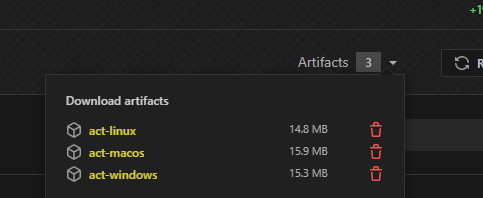
You can always get snapshot build https://github.com/nektos/act/pull/680/checks?check_run_id=2535655295
image

<!-- gh-comment-id:843919366 --> @catthehacker commented on GitHub (May 19, 2021): You can always get snapshot build https://github.com/nektos/act/pull/680/checks?check_run_id=2535655295 ![image](https://user-images.githubusercontent.com/31106839/118789078-b4079b00-b894-11eb-81fc-6f38eee78086.png)
Author
Owner

@bixu commented on GitHub (May 19, 2021):

@catthehacker, good call!

Is it possible to do this with Brew? I can use the snapshot build personally but will have a hard time propagating this across team workflows :)

<!-- gh-comment-id:844042138 --> @bixu commented on GitHub (May 19, 2021): @catthehacker, good call! Is it possible to do this with Brew? I can use the snapshot build personally but will have a hard time propagating this across team workflows :)
Author
Owner

@catthehacker commented on GitHub (May 19, 2021):

I think it's not possible to get build at specific commit, but correct me if I'm wrong. I've used brew just couple times in my life.

<!-- gh-comment-id:844052757 --> @catthehacker commented on GitHub (May 19, 2021): I think it's not possible to get build at specific commit, but correct me if I'm wrong. I've used `brew` just couple times in my life.
Author
Owner

@nathanagez commented on GitHub (May 28, 2021):

Same issue, installed via brew

<!-- gh-comment-id:850096277 --> @nathanagez commented on GitHub (May 28, 2021): Same issue, installed via brew
Author
Owner

@akrabat commented on GitHub (May 28, 2021):

Will installing act using curl https://raw.githubusercontent.com/nektos/act/master/install.sh | sudo bash result in a version that has this fix?

<!-- gh-comment-id:850224571 --> @akrabat commented on GitHub (May 28, 2021): Will installing act using `curl https://raw.githubusercontent.com/nektos/act/master/install.sh | sudo bash` result in a version that has this fix?
Author
Owner

@catthehacker commented on GitHub (May 28, 2021):

Will installing act using curl https://raw.githubusercontent.com/nektos/act/master/install.sh | sudo bash result in a version that has this fix?

Unfortunately it will not.

<!-- gh-comment-id:850226814 --> @catthehacker commented on GitHub (May 28, 2021): > Will installing act using `curl https://raw.githubusercontent.com/nektos/act/master/install.sh | sudo bash` result in a version that has this fix? Unfortunately it will not.
Author
Owner

@akrabat commented on GitHub (May 28, 2021):

Thanks.

Update: On Mac, just do brew unlink act && brew install act --HEAD as per https://github.com/nektos/act/issues/678#issuecomment-850466260

So, the way to get the snapshot to work on Mac appears to be:

1. Go to https://github.com/nektos/act/pull/680/checks?check_run_id=2535655295 and click on the "Artifacts" dropdown on the right.
2. Click on act-macos to download the zip file containing the binary
3. unzip act-macos.zip to create a file call act
4. In a Terminal, navigate to where you unzipped act-macos.zip and add executable permissions to the act file typing: chmod a+x act
5. Bypass MacOS gatekeeper by typing open act. This will open a Terminal window. Close it when it says "[Process completed]".
6. Move act to a directory on your path. e.g. mv act /usr/local/bin

When the next version of act is released, delete usr/local/bin/act and then install the new version.

<!-- gh-comment-id:850230379 --> @akrabat commented on GitHub (May 28, 2021): Thanks. Update: On Mac, just do `brew unlink act && brew install act --HEAD` as per https://github.com/nektos/act/issues/678#issuecomment-850466260 ~So, the way to get the snapshot to work on Mac appears to be:~ ~1. Go to https://github.com/nektos/act/pull/680/checks?check_run_id=2535655295 and click on the "Artifacts" dropdown on the right.~ ~2. Click on [act-macos](https://github.com/nektos/act/suites/2686549445/artifacts/59224643) to download the zip file containing the binary~ ~3. unzip act-macos.zip to create a file call `act`~ ~4. In a Terminal, navigate to where you unzipped act-macos.zip and add executable permissions to the `act` file typing: `chmod a+x act`~ ~5. Bypass MacOS gatekeeper by typing `open act`. This will open a Terminal window. Close it when it says "[Process completed]".~ ~6. Move `act` to a directory on your path. e.g. `mv act /usr/local/bin`~ ~When the next version of act is released, delete `usr/local/bin/act` and then install the new version.~
Author
Owner

@catthehacker commented on GitHub (May 28, 2021):

That's correct, other option is you can install previous version of act which doesn't have that issue.

<!-- gh-comment-id:850234216 --> @catthehacker commented on GitHub (May 28, 2021): That's correct, other option is you can install previous version of `act` which doesn't have that issue.
Author
Owner

@TonalidadeHidrica commented on GitHub (May 28, 2021):

This info is outdated. Actually there's a better way for `brew`.
  • Run brew edit act. It will open a file named act.rb, so add the following lines:
diff --git a/Formula/act.rb b/Formula/act.rb
index 71f23c75e2..150bb615e9 100644
--- a/Formula/act.rb
+++ b/Formula/act.rb
@@ -12,6 +12,10 @@ class Act < Formula
     sha256 cellar: :any_skip_relocation, mojave:        "907341331521809d5822597a8ec000d6b0fa5a0c400807b5b76fa546de6c5b91"
   end

+  head do
+    url "https://github.com/nektos/act.git"
+  end
+
   depends_on "go" => :build

   def install
  • Now brew unlink act and brew install --HEAD act. You've got a fixed latest version! Hooray!
<!-- gh-comment-id:850427639 --> @TonalidadeHidrica commented on GitHub (May 28, 2021): <details><summary>This info is outdated.</summary> Actually there's a better way for `brew`. * Run `brew edit act`. It will open a file named `act.rb`, so add the following lines: ```diff diff --git a/Formula/act.rb b/Formula/act.rb index 71f23c75e2..150bb615e9 100644 --- a/Formula/act.rb +++ b/Formula/act.rb @@ -12,6 +12,10 @@ class Act < Formula sha256 cellar: :any_skip_relocation, mojave: "907341331521809d5822597a8ec000d6b0fa5a0c400807b5b76fa546de6c5b91" end + head do + url "https://github.com/nektos/act.git" + end + depends_on "go" => :build def install ``` * Now `brew unlink act` and `brew install --HEAD act`. You've got a fixed latest version! Hooray! </details>
Author
Owner

@TonalidadeHidrica commented on GitHub (May 28, 2021):

I updated the Homebrew formula, so now the HEAD version is available via brew install act --HEAD (after brew update and maybe brew unlink act).

<!-- gh-comment-id:850466260 --> @TonalidadeHidrica commented on GitHub (May 28, 2021): I updated the Homebrew formula, so now the HEAD version is available via `brew install act --HEAD` (after `brew update` and maybe `brew unlink act`).
Author
Owner

@catthehacker commented on GitHub (May 28, 2021):

cc @akrabat @nathanagez @bixu

<!-- gh-comment-id:850475386 --> @catthehacker commented on GitHub (May 28, 2021): cc @akrabat @nathanagez @bixu
Author
Owner

@akrabat commented on GitHub (May 28, 2021):

Fantastic. Thanks @TonalidadeHidrica!

<!-- gh-comment-id:850534335 --> @akrabat commented on GitHub (May 28, 2021): Fantastic. Thanks @TonalidadeHidrica!
Author
Owner

@notmatthancock commented on GitHub (Jun 2, 2021):

I'm on Ubuntu 20.04. I downloaded the Linux tar.gz for the previous release of v0.2.20 here. After unzipping and extracting the act executable from the tar.gz file, I'm able to execute the examples in the demo repo without the error described in this issue.

<!-- gh-comment-id:853291270 --> @notmatthancock commented on GitHub (Jun 2, 2021): I'm on Ubuntu 20.04. I downloaded the Linux tar.gz for the previous release of v0.2.20 [here](https://github.com/nektos/act/releases/tag/v0.2.20). After unzipping and extracting the `act` executable from the tar.gz file, I'm able to execute the examples in the [demo repo](https://github.com/cplee/github-actions-demo) without the error described in this issue.
Author
Owner

@saniales commented on GitHub (Jun 4, 2021):

Still not working on my side (v 0.2.22)

<!-- gh-comment-id:854659750 --> @saniales commented on GitHub (Jun 4, 2021): Still not working on my side (v 0.2.22)
Author
Owner

@TonalidadeHidrica commented on GitHub (Jun 4, 2021):

@saniales v0.2.22 does not include the fix made 25 days ago, since it was released 29 days ago. You have to install manually the latest build on master branch, which you can obtain by the several ways described above.

<!-- gh-comment-id:854663607 --> @TonalidadeHidrica commented on GitHub (Jun 4, 2021): @saniales `v0.2.22` does not include the fix made 25 days ago, since it was released 29 days ago. You have to install manually the latest build on `master` branch, which you can obtain by the several ways described above.
Author
Owner

@catthehacker commented on GitHub (Jun 4, 2021):

Or you can get binary from artefacts in https://github.com/nektos/act/pull/680

<!-- gh-comment-id:854722974 --> @catthehacker commented on GitHub (Jun 4, 2021): Or you can get binary from artefacts in https://github.com/nektos/act/pull/680
Author
Owner

@saniales commented on GitHub (Jun 4, 2021):

ATM i am ok is using v 0.2.20 version, which works, but thank you <3

<!-- gh-comment-id:854727236 --> @saniales commented on GitHub (Jun 4, 2021): ATM i am ok is using v 0.2.20 version, which works, but thank you <3
Author
Owner

@marnix commented on GitHub (Jun 5, 2021):

For anyone interested, I observed this as well, using 0.2.22 via Nix on Ubuntu. Found out how to install 0.2.21 via https://lazamar.co.uk/nix-versions/?package=act&version=0.2.21&fullName=act-0.2.21&keyName=act&revision=c92ca95afb5043bc6faa0d526460584eccff2277&channel=nixpkgs-unstable#instructions , that resolved this issue for me.

<!-- gh-comment-id:855239821 --> @marnix commented on GitHub (Jun 5, 2021): For anyone interested, I observed this as well, using 0.2.22 via Nix on Ubuntu. Found out how to install 0.2.21 via https://lazamar.co.uk/nix-versions/?package=act&version=0.2.21&fullName=act-0.2.21&keyName=act&revision=c92ca95afb5043bc6faa0d526460584eccff2277&channel=nixpkgs-unstable#instructions , that resolved this issue for me.
Author
Owner

@JustinGrote commented on GitHub (Jun 5, 2021):

@marnix you can also just download the prerelease artifact from the PR: https://github.com/nektos/act/suites/2686549445/artifacts/59224642

<!-- gh-comment-id:855254422 --> @JustinGrote commented on GitHub (Jun 5, 2021): @marnix you can also just download the prerelease artifact from the PR: https://github.com/nektos/act/suites/2686549445/artifacts/59224642
Author
Owner

@righel commented on GitHub (Jun 9, 2021):

If I add the "with:" property I have the same token error, if I remove it works ok (using the latest version).
sample:

jobs:
  test:
    runs-on: ubuntu-latest
    steps:
      - name: Checkout 
        uses: actions/checkout@v2
        with:
          ref: 'custom-branch'

output:

[CI/test]   ❗  ::error::Input required and not supplied: token
[CI/test]   ❌  Failure - Checkout
Error: exit with `FAILURE`: 1

<!-- gh-comment-id:857750089 --> @righel commented on GitHub (Jun 9, 2021): If I add the "with:" property I have the same token error, if I remove it works ok (using the latest version). sample: ```yaml jobs: test: runs-on: ubuntu-latest steps: - name: Checkout uses: actions/checkout@v2 with: ref: 'custom-branch' ``` output: ``` [CI/test] ❗ ::error::Input required and not supplied: token [CI/test] ❌ Failure - Checkout Error: exit with `FAILURE`: 1 ```
Author
Owner

@catthehacker commented on GitHub (Jun 9, 2021):

@righel because then you want to checkout specific version instead of what you have in your workdir so you need token

<!-- gh-comment-id:857851310 --> @catthehacker commented on GitHub (Jun 9, 2021): @righel because then you want to checkout specific version instead of what you have in your workdir so you need token
Author
Owner

@catthehacker commented on GitHub (Jun 11, 2021):

v0.2.23 has been released that includes fix for this issue.

<!-- gh-comment-id:859225840 --> @catthehacker commented on GitHub (Jun 11, 2021): [`v0.2.23`](https://github.com/nektos/act/releases/tag/v0.2.23) has been released that includes fix for this issue.
Author
Owner

@lucasdemarchi commented on GitHub (Jul 1, 2021):

Just tested master branch with github.com/git-pile/playground@f2e5a12a83 and it seems broken for me:

[main/test-pile-application] 🚀  Start image=catthehacker/ubuntu:act-20.04
[main/test-pile-application]   🐳  docker run image=catthehacker/ubuntu:act-20.04 platform= entrypoint=["/usr/bin/tail" "-f" "/dev/null"] cmd=[]
[main/test-pile-application]   🐳  docker exec cmd=[mkdir -m 0777 -p /var/run/act] user=root
[main/test-pile-application] ⭐  Run Setup git
[main/test-pile-application]   🐳  docker exec cmd=[bash --noprofile --norc -e -o pipefail /home/lucas/p/git-pile-playground/patches/workflow/0] user=
[main/test-pile-application]   ✅  Success - Setup git
[main/test-pile-application] ⭐  Run Fetch git-pile
INFO[0002]   ☁  git clone 'https://github.com/actions/checkout' # ref=v2 
[main/test-pile-application]   🐳  docker cp src=/home/lucas/.cache/act/actions-checkout@v2/ dst=/var/run/act/actions/actions-checkout@v2/
[main/test-pile-application]   🐳  docker exec cmd=[mkdir -p /var/run/act/actions/actions-checkout@v2/] user=
[main/test-pile-application]   🐳  docker exec cmd=[node /var/run/act/actions/actions-checkout@v2/dist/index.js] user=
[main/test-pile-application]   ❓  ::save-state name=isPost,::true
[main/test-pile-application]   💬  ::debug::GITHUB_WORKSPACE = '/home/lucas/p/git-pile-playground/patches'
[main/test-pile-application]   💬  ::debug::qualified repository = 'git-pile/git-pile'
[main/test-pile-application]   💬  ::debug::ref = 'tip'
[main/test-pile-application]   💬  ::debug::commit = 'undefined'
[main/test-pile-application]   💬  ::debug::clean = true
[main/test-pile-application]   💬  ::debug::fetch depth = 1
[main/test-pile-application]   💬  ::debug::lfs = false
[main/test-pile-application]   💬  ::debug::submodules = false
[main/test-pile-application]   💬  ::debug::recursive submodules = false
[main/test-pile-application]   ❗  ::error::Input required and not supplied: token
[main/test-pile-application]   ❌  Failure - Fetch git-pile
Error: exit with `FAILURE`: 1

Note that in that workflow it's trying to checkout a specific branch of another (public) repository

<!-- gh-comment-id:872464163 --> @lucasdemarchi commented on GitHub (Jul 1, 2021): Just tested master branch with https://github.com/git-pile/playground/tree/f2e5a12a837896ce9087d6d087b693009f2f0e48 and it seems broken for me: ``` [main/test-pile-application] 🚀 Start image=catthehacker/ubuntu:act-20.04 [main/test-pile-application] 🐳 docker run image=catthehacker/ubuntu:act-20.04 platform= entrypoint=["/usr/bin/tail" "-f" "/dev/null"] cmd=[] [main/test-pile-application] 🐳 docker exec cmd=[mkdir -m 0777 -p /var/run/act] user=root [main/test-pile-application] ⭐ Run Setup git [main/test-pile-application] 🐳 docker exec cmd=[bash --noprofile --norc -e -o pipefail /home/lucas/p/git-pile-playground/patches/workflow/0] user= [main/test-pile-application] ✅ Success - Setup git [main/test-pile-application] ⭐ Run Fetch git-pile INFO[0002] ☁ git clone 'https://github.com/actions/checkout' # ref=v2 [main/test-pile-application] 🐳 docker cp src=/home/lucas/.cache/act/actions-checkout@v2/ dst=/var/run/act/actions/actions-checkout@v2/ [main/test-pile-application] 🐳 docker exec cmd=[mkdir -p /var/run/act/actions/actions-checkout@v2/] user= [main/test-pile-application] 🐳 docker exec cmd=[node /var/run/act/actions/actions-checkout@v2/dist/index.js] user= [main/test-pile-application] ❓ ::save-state name=isPost,::true [main/test-pile-application] 💬 ::debug::GITHUB_WORKSPACE = '/home/lucas/p/git-pile-playground/patches' [main/test-pile-application] 💬 ::debug::qualified repository = 'git-pile/git-pile' [main/test-pile-application] 💬 ::debug::ref = 'tip' [main/test-pile-application] 💬 ::debug::commit = 'undefined' [main/test-pile-application] 💬 ::debug::clean = true [main/test-pile-application] 💬 ::debug::fetch depth = 1 [main/test-pile-application] 💬 ::debug::lfs = false [main/test-pile-application] 💬 ::debug::submodules = false [main/test-pile-application] 💬 ::debug::recursive submodules = false [main/test-pile-application] ❗ ::error::Input required and not supplied: token [main/test-pile-application] ❌ Failure - Fetch git-pile Error: exit with `FAILURE`: 1 ``` Note that in that workflow it's trying to checkout a specific branch of another (public) repository
Author
Owner

@Siddharth-Ashri commented on GitHub (Jul 2, 2021):

Trying it locally gives it the same error as above repo is private though

Just tested master branch with github.com/git-pile/playground@f2e5a12a83 and it seems broken for me:

[main/test-pile-application] 🚀  Start image=catthehacker/ubuntu:act-20.04
[main/test-pile-application]   🐳  docker run image=catthehacker/ubuntu:act-20.04 platform= entrypoint=["/usr/bin/tail" "-f" "/dev/null"] cmd=[]
[main/test-pile-application]   🐳  docker exec cmd=[mkdir -m 0777 -p /var/run/act] user=root
[main/test-pile-application] ⭐  Run Setup git
[main/test-pile-application]   🐳  docker exec cmd=[bash --noprofile --norc -e -o pipefail /home/lucas/p/git-pile-playground/patches/workflow/0] user=
[main/test-pile-application]   ✅  Success - Setup git
[main/test-pile-application] ⭐  Run Fetch git-pile
INFO[0002]   ☁  git clone 'https://github.com/actions/checkout' # ref=v2 
[main/test-pile-application]   🐳  docker cp src=/home/lucas/.cache/act/actions-checkout@v2/ dst=/var/run/act/actions/actions-checkout@v2/
[main/test-pile-application]   🐳  docker exec cmd=[mkdir -p /var/run/act/actions/actions-checkout@v2/] user=
[main/test-pile-application]   🐳  docker exec cmd=[node /var/run/act/actions/actions-checkout@v2/dist/index.js] user=
[main/test-pile-application]   ❓  ::save-state name=isPost,::true
[main/test-pile-application]   💬  ::debug::GITHUB_WORKSPACE = '/home/lucas/p/git-pile-playground/patches'
[main/test-pile-application]   💬  ::debug::qualified repository = 'git-pile/git-pile'
[main/test-pile-application]   💬  ::debug::ref = 'tip'
[main/test-pile-application]   💬  ::debug::commit = 'undefined'
[main/test-pile-application]   💬  ::debug::clean = true
[main/test-pile-application]   💬  ::debug::fetch depth = 1
[main/test-pile-application]   💬  ::debug::lfs = false
[main/test-pile-application]   💬  ::debug::submodules = false
[main/test-pile-application]   💬  ::debug::recursive submodules = false
[main/test-pile-application]   ❗  ::error::Input required and not supplied: token
[main/test-pile-application]   ❌  Failure - Fetch git-pile
Error: exit with `FAILURE`: 1

Note that in that workflow it's trying to checkout a specific branch of another (public) repository

<!-- gh-comment-id:873144186 --> @Siddharth-Ashri commented on GitHub (Jul 2, 2021): Trying it locally gives it the same error as above repo is private though > Just tested master branch with https://github.com/git-pile/playground/tree/f2e5a12a837896ce9087d6d087b693009f2f0e48 and it seems broken for me: > > ``` > [main/test-pile-application] 🚀 Start image=catthehacker/ubuntu:act-20.04 > [main/test-pile-application] 🐳 docker run image=catthehacker/ubuntu:act-20.04 platform= entrypoint=["/usr/bin/tail" "-f" "/dev/null"] cmd=[] > [main/test-pile-application] 🐳 docker exec cmd=[mkdir -m 0777 -p /var/run/act] user=root > [main/test-pile-application] ⭐ Run Setup git > [main/test-pile-application] 🐳 docker exec cmd=[bash --noprofile --norc -e -o pipefail /home/lucas/p/git-pile-playground/patches/workflow/0] user= > [main/test-pile-application] ✅ Success - Setup git > [main/test-pile-application] ⭐ Run Fetch git-pile > INFO[0002] ☁ git clone 'https://github.com/actions/checkout' # ref=v2 > [main/test-pile-application] 🐳 docker cp src=/home/lucas/.cache/act/actions-checkout@v2/ dst=/var/run/act/actions/actions-checkout@v2/ > [main/test-pile-application] 🐳 docker exec cmd=[mkdir -p /var/run/act/actions/actions-checkout@v2/] user= > [main/test-pile-application] 🐳 docker exec cmd=[node /var/run/act/actions/actions-checkout@v2/dist/index.js] user= > [main/test-pile-application] ❓ ::save-state name=isPost,::true > [main/test-pile-application] 💬 ::debug::GITHUB_WORKSPACE = '/home/lucas/p/git-pile-playground/patches' > [main/test-pile-application] 💬 ::debug::qualified repository = 'git-pile/git-pile' > [main/test-pile-application] 💬 ::debug::ref = 'tip' > [main/test-pile-application] 💬 ::debug::commit = 'undefined' > [main/test-pile-application] 💬 ::debug::clean = true > [main/test-pile-application] 💬 ::debug::fetch depth = 1 > [main/test-pile-application] 💬 ::debug::lfs = false > [main/test-pile-application] 💬 ::debug::submodules = false > [main/test-pile-application] 💬 ::debug::recursive submodules = false > [main/test-pile-application] ❗ ::error::Input required and not supplied: token > [main/test-pile-application] ❌ Failure - Fetch git-pile > Error: exit with `FAILURE`: 1 > ``` > > Note that in that workflow it's trying to checkout a specific branch of another (public) repository
Author
Owner

@lucasdemarchi commented on GitHub (Jul 6, 2021):

@Siddharth-Ashri repo I'm referencing is not private

<!-- gh-comment-id:874969104 --> @lucasdemarchi commented on GitHub (Jul 6, 2021): @Siddharth-Ashri repo I'm referencing is not private
Author
Owner

@FrancescoSaverioZuppichini commented on GitHub (Oct 6, 2021):

same error here

<!-- gh-comment-id:936113103 --> @FrancescoSaverioZuppichini commented on GitHub (Oct 6, 2021): same error here
Author
Owner

@catthehacker commented on GitHub (Oct 7, 2021):

@Siddharth-Ashri repo I'm referencing is not private

if you checkout specific branch/commit/etc. token is required no matter if it's private or not

same error here

works for everyone else

<!-- gh-comment-id:937603350 --> @catthehacker commented on GitHub (Oct 7, 2021): > @Siddharth-Ashri repo I'm referencing is not private if you checkout specific branch/commit/etc. token is required no matter if it's private or not > same error here works for everyone else
Author
Owner

@francisco-gs-colpal commented on GitHub (Oct 19, 2021):

I had the same problem but running the workflow in dry mode and passing github token it works
I read it from here https://github.com/nektos/act/issues/779#issuecomment-932997696

act -n -W my-workflow.yml -s GITHUB_TOKEN=$GITHUB_TOKEN
<!-- gh-comment-id:946883376 --> @francisco-gs-colpal commented on GitHub (Oct 19, 2021): I had the same problem but running the workflow in dry mode and passing github token it works I read it from here https://github.com/nektos/act/issues/779#issuecomment-932997696 ```bash act -n -W my-workflow.yml -s GITHUB_TOKEN=$GITHUB_TOKEN ```
Author
Owner

@epignatelli commented on GitHub (Sep 13, 2022):

Dryrun only checks for correctness (https://github.com/nektos/act/issues/268#issuecomment-1056000096), it does not run the workflow.

<!-- gh-comment-id:1245169306 --> @epignatelli commented on GitHub (Sep 13, 2022): Dryrun only checks for correctness (https://github.com/nektos/act/issues/268#issuecomment-1056000096), it does not run the workflow.
Author
Owner

@epignatelli commented on GitHub (Sep 13, 2022):

@Siddharth-Ashri repo I'm referencing is not private

if you checkout specific branch/commit/etc. token is required no matter if it's private or not

same error here

works for everyone else

How is this solved?

  1. Still throws the same error, i.e. does not work for everyone else
  2. Without check a specific branch or commit.

This issue should be re-opened.

<!-- gh-comment-id:1245174085 --> @epignatelli commented on GitHub (Sep 13, 2022): > > @Siddharth-Ashri repo I'm referencing is not private > > if you checkout specific branch/commit/etc. token is required no matter if it's private or not > > > same error here > > works for everyone else How is this solved? 1. Still throws the same error, i.e. does not work for everyone else 1. Without check a specific branch or commit. This issue should be re-opened.
Author
Owner

@till commented on GitHub (Nov 20, 2022):

@epignatelli did you manage to resolve this, or do you still have that problem?

I have this in my steps:

      - name: clone example
        uses: actions/checkout@v3
        with:
          repository: public/repository

Yields:

[e2e/deploy_app] ⭐ Run Main clone example
[e2e/deploy_app]   🐳  docker cp src=/Users/till/.cache/act/actions-checkout@v3/ dst=/var/run/act/actions/actions-checkout@v3/
[e2e/deploy_app]   🐳  docker exec cmd=[node /var/run/act/actions/actions-checkout@v3/dist/index.js] user= workdir=
[e2e/deploy_app]   💬  ::debug::GITHUB_WORKSPACE = '/Users/till/Documents/workspaces/local/path'
[e2e/deploy_app]   💬  ::debug::qualified repository = 'public/repository'
[e2e/deploy_app]   💬  ::debug::ref = ''
[e2e/deploy_app]   💬  ::debug::commit = 'undefined'
[e2e/deploy_app]   💬  ::debug::clean = true
[e2e/deploy_app]   💬  ::debug::fetch depth = 1
[e2e/deploy_app]   💬  ::debug::lfs = false
[e2e/deploy_app]   💬  ::debug::submodules = false
[e2e/deploy_app]   💬  ::debug::recursive submodules = false
[e2e/deploy_app]   ❗  ::error::Input required and not supplied: token
[e2e/deploy_app]   ❌  Failure - Main clone example
[e2e/deploy_app] exitcode '1': failure

Maybe it changed with v3 to require this always? I guess for completeness, I am cloning inside a workflow run of a private repository. The initial clone works, but this one doesn't. Also tried setting an empty token to no avail.

<!-- gh-comment-id:1321220127 --> @till commented on GitHub (Nov 20, 2022): @epignatelli did you manage to resolve this, or do you still have that problem? I have this in my steps: ```yaml - name: clone example uses: actions/checkout@v3 with: repository: public/repository ``` Yields: ``` [e2e/deploy_app] ⭐ Run Main clone example [e2e/deploy_app] 🐳 docker cp src=/Users/till/.cache/act/actions-checkout@v3/ dst=/var/run/act/actions/actions-checkout@v3/ [e2e/deploy_app] 🐳 docker exec cmd=[node /var/run/act/actions/actions-checkout@v3/dist/index.js] user= workdir= [e2e/deploy_app] 💬 ::debug::GITHUB_WORKSPACE = '/Users/till/Documents/workspaces/local/path' [e2e/deploy_app] 💬 ::debug::qualified repository = 'public/repository' [e2e/deploy_app] 💬 ::debug::ref = '' [e2e/deploy_app] 💬 ::debug::commit = 'undefined' [e2e/deploy_app] 💬 ::debug::clean = true [e2e/deploy_app] 💬 ::debug::fetch depth = 1 [e2e/deploy_app] 💬 ::debug::lfs = false [e2e/deploy_app] 💬 ::debug::submodules = false [e2e/deploy_app] 💬 ::debug::recursive submodules = false [e2e/deploy_app] ❗ ::error::Input required and not supplied: token [e2e/deploy_app] ❌ Failure - Main clone example [e2e/deploy_app] exitcode '1': failure ``` Maybe it changed with `v3` to require this always? I guess for completeness, I am cloning inside a workflow run of a private repository. The initial clone works, but this one doesn't. Also tried setting an empty token to no avail.
Author
Owner

@zhongweiy commented on GitHub (Aug 25, 2023):

I'm on version act version 0.2.34 and using actions/checkout@v2 on a public repo. The error still exists.

The workaround is replacing uses: actions/checkout@v2 with a pure git clone run: git clone https://github.com/example/example.git, like this commit. It is inconvenient if you need to do other things by checkout@v2, you have to do it manually by shell commands.

<!-- gh-comment-id:1693751996 --> @zhongweiy commented on GitHub (Aug 25, 2023): I'm on version `act version 0.2.34` and using `actions/checkout@v2` on a public repo. The error still exists. The workaround is replacing `uses: actions/checkout@v2` with a pure git clone `run: git clone https://github.com/example/example.git`, like [this commit](https://github.com/icon-community/drogon/pull/7/commits/2d8f389d1539add0d9573c01fcaefdbd3c813cbc). It is inconvenient if you need to do other things by `checkout@v2`, you have to do it manually by shell commands.
Sign in to join this conversation.
No milestone
No project
No assignees
1 participant
Notifications
Due date
The due date is invalid or out of range. Please use the format "yyyy-mm-dd".

No due date set.

Dependencies

No dependencies set.

Reference
starred/act#433
No description provided.