[GH-ISSUE #882] How to add an image to the Captive Portal? #745

Open
opened 2026-02-28 01:26:52 +03:00 by kerem · 16 comments
Owner

Originally created by @gitnwana on GitHub (May 8, 2019).
Original GitHub issue: https://github.com/tzapu/WiFiManager/issues/882

Description

I've been trying to add an image to the captive portal of the library, but can't. I've tried modifying the source file by adding another variable parameter for the image but it doesn't seem to work. Any help will be appreciated.

Originally created by @gitnwana on GitHub (May 8, 2019). Original GitHub issue: https://github.com/tzapu/WiFiManager/issues/882 ### Description I've been trying to add an image to the captive portal of the library, but can't. I've tried modifying the source file by adding another variable parameter for the image but it doesn't seem to work. Any help will be appreciated.
Author
Owner

@CanerSonmez commented on GitHub (May 11, 2019):

you can use this link https://www.base64-image.de , your image should be base64 format then
add this code:
#logo {background:url('your base64 format') }

<img id="logo"/>

<!-- gh-comment-id:491503524 --> @CanerSonmez commented on GitHub (May 11, 2019): you can use this link https://www.base64-image.de , your image should be base64 format then add this code: #logo {background:url(\'your base64 format\') }<div><img id=\"logo\"/></div>
Author
Owner

@gitnwana commented on GitHub (May 13, 2019):

Do I add this in the source file or my Arduino script?

<!-- gh-comment-id:491696436 --> @gitnwana commented on GitHub (May 13, 2019): Do I add this in the source file or my Arduino script?
Author
Owner

@CanerSonmez commented on GitHub (May 14, 2019):

you should examine the WifiManager.h for this and you will see how to do this

<!-- gh-comment-id:492359354 --> @CanerSonmez commented on GitHub (May 14, 2019): you should examine the WifiManager.h for this and you will see how to do this
Author
Owner

@gitnwana commented on GitHub (May 30, 2019):

@CanerSonmez I tried that it still doesn't work.

<!-- gh-comment-id:497312035 --> @gitnwana commented on GitHub (May 30, 2019): @CanerSonmez I tried that it still doesn't work.
Author
Owner

@xtech007 commented on GitHub (Apr 5, 2020):

Hi!
has anyone been able to add an image to the Wifimanager?
If so, can you show how and where to do it correctly. The image convertion I understand why it has to be this way, but where do add it?
On the WifiManager.h under;
const char HTTP_STYLE[] PROGMEM there is a line that its kinda similar to what CanerSonmez commented,
.l{background: url('data:image/png;base64,DATA') no-repeat left center;background-size: 1em}
I have no coding experience and so far what I have learned is based on guides and awesome forums like this one!
Any guides are appreciated!

<!-- gh-comment-id:609422340 --> @xtech007 commented on GitHub (Apr 5, 2020): Hi! has anyone been able to add an image to the Wifimanager? If so, can you show how and where to do it correctly. The image convertion I understand why it has to be this way, but where do add it? On the **WifiManager.h** under; **const char HTTP_STYLE[] PROGMEM** there is a line that its kinda similar to what CanerSonmez commented, .l{background: url('data:image/png;base64,DATA') no-repeat left center;background-size: 1em} I have no coding experience and so far what I have learned is based on guides and awesome forums like this one! Any guides are appreciated!
Author
Owner

@bwjohns4 commented on GitHub (Apr 5, 2020):

Here is how I was able to add a logo. You'll to to use search/find to find the relevant places in these files to make additions. I think this covers everything I did to get this to work. Mine definitely work, let me know if this gives you any trouble.

I added include image.h right after the HTTP_END[] line where all the HTML is specified:

const char HTTP_END[] PROGMEM             = "</div></body></html>";
#include "image.h" //logo_jpg is in image.h file, converted from http://tomeko.net/online_tools/file_to_hex.php?lang=en`

I just used http://tomeko.net/online_tools/file_to_hex.php?lang=en and made a separate image.h file in the same directory as WiFiManager with these contents:

const char logo_jpg[] PROGMEM = { 0x89, 0x50, 0x4E, 0x47, 0x0D, 0x0A, 0x1A, 0x0A, 0x00, 0x00, 0x00, 0x0D, 0x49, 0x48, 0x44, 0x52, 
0x00, 0x00, 0x01, 0x3B, 0x00, 0x00, 0x00, 0xE7, 0x08, 0x06, 0x00, 0x00, 0x00, 0x61, 0x57, 0xF1, 
0x27, 0x00, 0x00, 0x00, 0x09, 0x70, 0x48, 0x59, 0x73, 0x00, 0x00, 0x0B, 0x12, 0x00, 0x00, 0x0B, 
0x12, 0x01, 0xD2, 0xDD, 0x7E, 0xFC, 0x00, 0x00, 0x1C, 0x71, 0x49, 0x44, 0x41, 0x54, 0x78, 0x9C, 
0xED, 0x9D, 0x5D, 0xAC, 0x56, 0x55, 0x7A, 0xC7, 0x97, 0x08, 0x8A, 0xC0, 0x41, 0x24, 0x0A, 0x72, 
0x50, 0x29, 0x68, 0xC1, 0x56, ....................... tons of lines of this....................... }

Then added a prototype in this section:

    void          handleRoot();
    void          handleLogo(); //this is what I added
    void          handleWifi(boolean scan);
    void          handleWifiSave();
    void          handleInfo();
    void          handleReset();
    void          handleNotFound();
    void          handle204();
    boolean       captivePortal();
    boolean       configPortalHasTimeout();

Modifications to the cpp file

void WiFiManager::handleRoot() {
  DEBUG_WM(F("Handle root"));
  if (captivePortal()) { // If caprive portal redirect instead of displaying the page.
    return;
  }

  String page = FPSTR(HTTP_HEADER);
  page.replace("{v}", "Options");
  page += FPSTR(HTTP_SCRIPT);
  page += FPSTR(HTTP_STYLE);
  page += _customHeadElement;
  page += FPSTR(HTTP_HEADER_END);
  page += "<img src=\"/logo.jpg\"/>"; //added this to serve the logo
  page += String(F("<h1>"));
  //page += _apName;
  page += String(F("</h1>"));
  page += String(F("<h3>WiFi Setup</h3>"));
  page += FPSTR(HTTP_PORTAL_OPTIONS);
  page += FPSTR(HTTP_END);

  server->sendHeader("Content-Length", String(page.length()));
  server->send(200, "text/html", page);
?

Also added this function to send the logo when the html requests it. Put it near the other handleXXX() functions.

void WiFiManager::handleLogo(){
  //server->sendHeader("Content-Length", String(sizeof(logo_jpg)));
  server->send_P(200, PSTR("image/png"), logo_jpg, sizeof(logo_jpg));
  //webserver.send_P(200, PSTR("image/png"), logo_jpg, sizeof(logo_jpeg));
}

Finally, I added the server->on piece to the section below to register the handleLogo() function to be called to supply the logo file:

//* Setup web pages: root, wifi config pages, SO captive portal detectors and not found. */
  server->on(String(F("/")).c_str(), std::bind(&WiFiManager::handleRoot, this));
  server->on(String(F("/logo.jpg")).c_str(), std::bind(&WiFiManager::handleLogo, this));
  server->on(String(F("/wifi")).c_str(), std::bind(&WiFiManager::handleWifi, this, true));
  server->on(String(F("/0wifi")).c_str(), std::bind(&WiFiManager::handleWifi, this, false));
  server->on(String(F("/wifisave")).c_str(), std::bind(&WiFiManager::handleWifiSave, this));
  server->on(String(F("/i")).c_str(), std::bind(&WiFiManager::handleInfo, this));
  server->on(String(F("/r")).c_str(), std::bind(&WiFiManager::handleReset, this));
  //server->on("/generate_204", std::bind(&WiFiManager::handle204, this));  //Android/Chrome OS captive portal check.
  server->on(String(F("/fwlink")).c_str(), std::bind(&WiFiManager::handleRoot, this));  //Microsoft captive portal. Maybe not needed. Might be handled by notFound handler.
  server->onNotFound (std::bind(&WiFiManager::handleNotFound, this));
  server->begin(); // Web server start
  DEBUG_WM(F("HTTP server started"));
<!-- gh-comment-id:609446365 --> @bwjohns4 commented on GitHub (Apr 5, 2020): Here is how I was able to add a logo. You'll to to use search/find to find the relevant places in these files to make additions. I think this covers everything I did to get this to work. Mine definitely work, let me know if this gives you any trouble. I added include image.h right after the HTTP_END[] line where all the HTML is specified: ``` const char HTTP_END[] PROGMEM = "</div></body></html>"; #include "image.h" //logo_jpg is in image.h file, converted from http://tomeko.net/online_tools/file_to_hex.php?lang=en` ``` I just used http://tomeko.net/online_tools/file_to_hex.php?lang=en and made a separate image.h file in the same directory as WiFiManager with these contents: ``` const char logo_jpg[] PROGMEM = { 0x89, 0x50, 0x4E, 0x47, 0x0D, 0x0A, 0x1A, 0x0A, 0x00, 0x00, 0x00, 0x0D, 0x49, 0x48, 0x44, 0x52, 0x00, 0x00, 0x01, 0x3B, 0x00, 0x00, 0x00, 0xE7, 0x08, 0x06, 0x00, 0x00, 0x00, 0x61, 0x57, 0xF1, 0x27, 0x00, 0x00, 0x00, 0x09, 0x70, 0x48, 0x59, 0x73, 0x00, 0x00, 0x0B, 0x12, 0x00, 0x00, 0x0B, 0x12, 0x01, 0xD2, 0xDD, 0x7E, 0xFC, 0x00, 0x00, 0x1C, 0x71, 0x49, 0x44, 0x41, 0x54, 0x78, 0x9C, 0xED, 0x9D, 0x5D, 0xAC, 0x56, 0x55, 0x7A, 0xC7, 0x97, 0x08, 0x8A, 0xC0, 0x41, 0x24, 0x0A, 0x72, 0x50, 0x29, 0x68, 0xC1, 0x56, ....................... tons of lines of this....................... } ``` Then added a prototype in this section: ``` void handleRoot(); void handleLogo(); //this is what I added void handleWifi(boolean scan); void handleWifiSave(); void handleInfo(); void handleReset(); void handleNotFound(); void handle204(); boolean captivePortal(); boolean configPortalHasTimeout(); ``` Modifications to the cpp file ``` void WiFiManager::handleRoot() { DEBUG_WM(F("Handle root")); if (captivePortal()) { // If caprive portal redirect instead of displaying the page. return; } String page = FPSTR(HTTP_HEADER); page.replace("{v}", "Options"); page += FPSTR(HTTP_SCRIPT); page += FPSTR(HTTP_STYLE); page += _customHeadElement; page += FPSTR(HTTP_HEADER_END); page += "<img src=\"/logo.jpg\"/>"; //added this to serve the logo page += String(F("<h1>")); //page += _apName; page += String(F("</h1>")); page += String(F("<h3>WiFi Setup</h3>")); page += FPSTR(HTTP_PORTAL_OPTIONS); page += FPSTR(HTTP_END); server->sendHeader("Content-Length", String(page.length())); server->send(200, "text/html", page); ? ``` Also added this function to send the logo when the html requests it. Put it near the other handleXXX() functions. ``` void WiFiManager::handleLogo(){ //server->sendHeader("Content-Length", String(sizeof(logo_jpg))); server->send_P(200, PSTR("image/png"), logo_jpg, sizeof(logo_jpg)); //webserver.send_P(200, PSTR("image/png"), logo_jpg, sizeof(logo_jpeg)); } ``` Finally, I added the server->on piece to the section below to register the handleLogo() function to be called to supply the logo file: ``` //* Setup web pages: root, wifi config pages, SO captive portal detectors and not found. */ server->on(String(F("/")).c_str(), std::bind(&WiFiManager::handleRoot, this)); server->on(String(F("/logo.jpg")).c_str(), std::bind(&WiFiManager::handleLogo, this)); server->on(String(F("/wifi")).c_str(), std::bind(&WiFiManager::handleWifi, this, true)); server->on(String(F("/0wifi")).c_str(), std::bind(&WiFiManager::handleWifi, this, false)); server->on(String(F("/wifisave")).c_str(), std::bind(&WiFiManager::handleWifiSave, this)); server->on(String(F("/i")).c_str(), std::bind(&WiFiManager::handleInfo, this)); server->on(String(F("/r")).c_str(), std::bind(&WiFiManager::handleReset, this)); //server->on("/generate_204", std::bind(&WiFiManager::handle204, this)); //Android/Chrome OS captive portal check. server->on(String(F("/fwlink")).c_str(), std::bind(&WiFiManager::handleRoot, this)); //Microsoft captive portal. Maybe not needed. Might be handled by notFound handler. server->onNotFound (std::bind(&WiFiManager::handleNotFound, this)); server->begin(); // Web server start DEBUG_WM(F("HTTP server started")); ```
Author
Owner

@xtech007 commented on GitHub (Apr 6, 2020):

bwjohns4, I will definitely try it sometime today!
Thank you 🙏 so much for the guide, and sample.
Do you have it working?
Can we see the results?

<!-- gh-comment-id:609866931 --> @xtech007 commented on GitHub (Apr 6, 2020): bwjohns4, I will definitely try it sometime today! Thank you 🙏 so much for the guide, and sample. Do you have it working? Can we see the results?
Author
Owner

@dknop97 commented on GitHub (Apr 7, 2020):

I don't have a model to show this, sorry... but in a near past, I has used images in the header of the Captive Portal. To do this, I just copied all de HTML of the WiFiManager.h, inside the variables HTTP_HEADER, HTTP_STYLE, HTTP_SCRIPT, HTTP_HEADER_END, ..., HTTP_END, and make a normal HTML file. So, I put my image in the same folder of the sketch, format my image were I want in the portal and return the HTML to the variables in the WiFiManager.h, following the original fragmentation of the HTML in the this variables.
This tatical has been used in the #999 issue to, were I made a similar indication.
Sorry about my English, I'm improving it yet 😄

<!-- gh-comment-id:610380355 --> @dknop97 commented on GitHub (Apr 7, 2020): I don't have a model to show this, sorry... but in a near past, I has used images in the header of the Captive Portal. To do this, I just copied all de HTML of the *WiFiManager.h*, inside the variables HTTP_HEADER, HTTP_STYLE, HTTP_SCRIPT, HTTP_HEADER_END, ..., HTTP_END, and make a normal HTML file. So, I put my image in the same folder of the sketch, format my image were I want in the portal and return the HTML to the variables in the *WiFiManager.h*, following the original fragmentation of the HTML in the this variables. This tatical has been used in the #999 issue to, were I made a [similar indication.](https://github.com/tzapu/WiFiManager/issues/999#issuecomment-579219890) Sorry about my English, I'm improving it yet 😄
Author
Owner

@tablatronix commented on GitHub (Apr 7, 2020):

Just use the development branch and change the html in strings.h
base64 encode the image or use svg

<!-- gh-comment-id:610461568 --> @tablatronix commented on GitHub (Apr 7, 2020): Just use the development branch and change the html in strings.h base64 encode the image or use svg
Author
Owner

@tablatronix commented on GitHub (Apr 7, 2020):

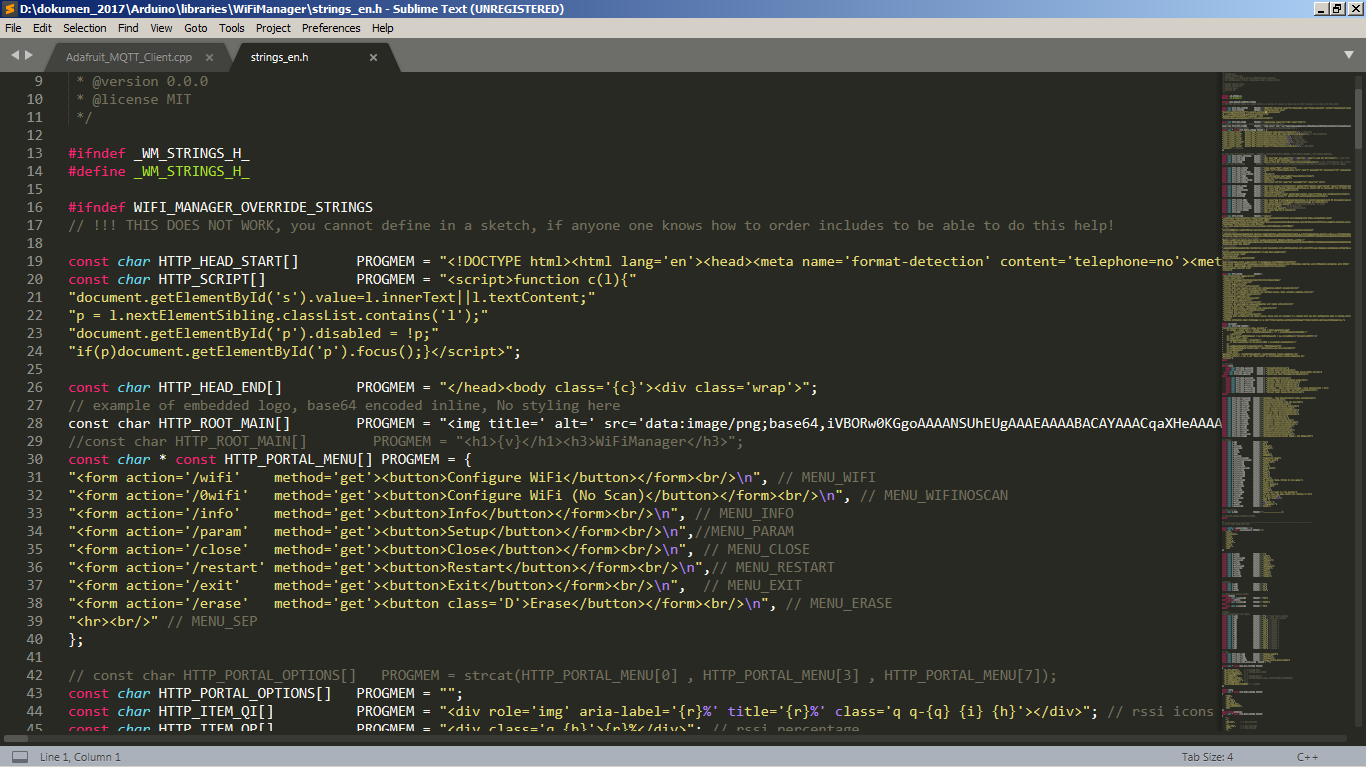
// const char HTTP_ROOT_MAIN[]        PROGMEM = "<h1>{v}</h1><h3>WiFiManager</h3>";

const char HTTP_ROOT_MAIN[]        PROGMEM = "<img title=' alt=' src='data:image/png;base64,iVBORw0KGgoAAAANSUhEUgAAADAAAAAwCAYAAABXAvmHAAADQElEQVRoQ+2YjW0VQQyE7Q6gAkgFkAogFUAqgFQAVACpAKiAUAFQAaECQgWECggVGH1PPrRvn3dv9/YkFOksoUhhfzwz9ngvKrc89JbnLxuA/63gpsCmwCADWwkNEji8fVNgotDM7osI/x777x5l9F6JyB8R4eeVql4P0y8yNsjM7KGIPBORp558T04A+CwiH1UVUItiUQmZ2XMReSEiAFgjAPBeVS96D+sCYGaUx4cFbLfmhSpnqnrZuqEJgJnd8cQplVLciAgX//Cf0ToIeOB9wpmloLQAwpnVmAXgdf6pwjpJIz+XNoeZQQZlODV9vhc1Tuf6owrAk/8qIhFbJH7eI3eEzsvydQEICqBEkZwiALfF70HyHPpqScPV5HFjeFu476SkRA0AzOfy4hYwstj2ZkDgaphE7m6XqnoS7Q0BOPs/sw0kDROzjdXcCMFCNwzIy0EcRcOvBACfh4k0wgOmBX4xjfmk4DKTS31hgNWIKBCI8gdzogTgjYjQWFMw+o9LzJoZ63GUmjWm2wGDc7EvDDOj/1IVMIyD9SUAL0WEhpriRlXv5je5S+U1i2N88zdPuoVkeB+ls4SyxCoP3kVm9jsjpEsBLoOBNC5U9SwpGdakFkviuFP1keblATkTENTYcxkzgxTKOI3jyDxqLkQT87pMA++H3XvJBYtsNbBN6vuXq5S737WqHkW1VgMQNXJ0RshMqbbT33sJ5kpHWymzcJjNTeJIymJZtSQd9NHQHS1vodoFoTMkfbJzpRnLzB2vi6BZAJxWaCr+62BC+jzAxVJb3dmmiLzLwZhZNPE5e880Suo2AZgB8e8idxherqUPnT3brBDTlPxO3Z66rVwIwySXugdNd+5ejhqp/+NmgIwGX3Py3QBmlEi54KlwmjkOytQ+iJrLJj23S4GkOeecg8G091no737qvRRdzE+HLALQoMTBbJgBsCj5RSWUlUVJiZ4SOljb05eLFWgoJ5oY6yTyJp62D39jDANoKKcSocPJD5dQYzlFAFZJflUArgTPZKZwLXAnHmerfJquUkKZEgyzqOb5TuDt1P3nwxobqwPocZA11m4A1mBx5IxNgRH21ti7KbAGiyNn3HoF/gJ0w05A8xclpwAAAABJRU5ErkJggg==' /><h1>{v}</h1><h3>WiFiManager</h3>";

Screen Shot 2020-04-07 at 11 29 17 AM

<!-- gh-comment-id:610493944 --> @tablatronix commented on GitHub (Apr 7, 2020): ```C++ // const char HTTP_ROOT_MAIN[] PROGMEM = "<h1>{v}</h1><h3>WiFiManager</h3>"; const char HTTP_ROOT_MAIN[] PROGMEM = "<img title=' alt=' src='data:image/png;base64,iVBORw0KGgoAAAANSUhEUgAAADAAAAAwCAYAAABXAvmHAAADQElEQVRoQ+2YjW0VQQyE7Q6gAkgFkAogFUAqgFQAVACpAKiAUAFQAaECQgWECggVGH1PPrRvn3dv9/YkFOksoUhhfzwz9ngvKrc89JbnLxuA/63gpsCmwCADWwkNEji8fVNgotDM7osI/x777x5l9F6JyB8R4eeVql4P0y8yNsjM7KGIPBORp558T04A+CwiH1UVUItiUQmZ2XMReSEiAFgjAPBeVS96D+sCYGaUx4cFbLfmhSpnqnrZuqEJgJnd8cQplVLciAgX//Cf0ToIeOB9wpmloLQAwpnVmAXgdf6pwjpJIz+XNoeZQQZlODV9vhc1Tuf6owrAk/8qIhFbJH7eI3eEzsvydQEICqBEkZwiALfF70HyHPpqScPV5HFjeFu476SkRA0AzOfy4hYwstj2ZkDgaphE7m6XqnoS7Q0BOPs/sw0kDROzjdXcCMFCNwzIy0EcRcOvBACfh4k0wgOmBX4xjfmk4DKTS31hgNWIKBCI8gdzogTgjYjQWFMw+o9LzJoZ63GUmjWm2wGDc7EvDDOj/1IVMIyD9SUAL0WEhpriRlXv5je5S+U1i2N88zdPuoVkeB+ls4SyxCoP3kVm9jsjpEsBLoOBNC5U9SwpGdakFkviuFP1keblATkTENTYcxkzgxTKOI3jyDxqLkQT87pMA++H3XvJBYtsNbBN6vuXq5S737WqHkW1VgMQNXJ0RshMqbbT33sJ5kpHWymzcJjNTeJIymJZtSQd9NHQHS1vodoFoTMkfbJzpRnLzB2vi6BZAJxWaCr+62BC+jzAxVJb3dmmiLzLwZhZNPE5e880Suo2AZgB8e8idxherqUPnT3brBDTlPxO3Z66rVwIwySXugdNd+5ejhqp/+NmgIwGX3Py3QBmlEi54KlwmjkOytQ+iJrLJj23S4GkOeecg8G091no737qvRRdzE+HLALQoMTBbJgBsCj5RSWUlUVJiZ4SOljb05eLFWgoJ5oY6yTyJp62D39jDANoKKcSocPJD5dQYzlFAFZJflUArgTPZKZwLXAnHmerfJquUkKZEgyzqOb5TuDt1P3nwxobqwPocZA11m4A1mBx5IxNgRH21ti7KbAGiyNn3HoF/gJ0w05A8xclpwAAAABJRU5ErkJggg==' /><h1>{v}</h1><h3>WiFiManager</h3>"; ``` ![Screen Shot 2020-04-07 at 11 29 17 AM](https://user-images.githubusercontent.com/807787/78695984-7203db80-78c4-11ea-9a37-ff14e6719c8a.png)
Author
Owner

@Munnu62 commented on GitHub (Apr 14, 2020):

@tablatronix Hey, I've tried but I couldn't able to load the image in my web portal! Same procedure has been followed! In string_en.h Changes as been told in HTTP_ROOT_MAIN[] but, Couldn't able to load image in web portal! using base64 image! I've tried above code with my system, It's working fine, But as I try to upload my logo, it didn't respond to that!

<!-- gh-comment-id:613384517 --> @Munnu62 commented on GitHub (Apr 14, 2020): @tablatronix Hey, I've tried but I couldn't able to load the image in my web portal! Same procedure has been followed! In string_en.h Changes as been told in HTTP_ROOT_MAIN[] but, Couldn't able to load image in web portal! using base64 image! I've tried above code with my system, It's working fine, But as I try to upload my logo, it didn't respond to that!
Author
Owner

@Munnu62 commented on GitHub (Apr 14, 2020):

Here's Screenshot!

SS

<!-- gh-comment-id:613393713 --> @Munnu62 commented on GitHub (Apr 14, 2020): Here's Screenshot! ![SS](https://user-images.githubusercontent.com/46473448/79222294-e5818c00-7e74-11ea-979e-9ab6e96b2087.jpeg)
Author
Owner

@tablatronix commented on GitHub (Apr 14, 2020):

open ip in a browser and use development mode to see what the code is spitting out?
Does the sample I posted above work if you uncomment it ?

<!-- gh-comment-id:613508836 --> @tablatronix commented on GitHub (Apr 14, 2020): open ip in a browser and use development mode to see what the code is spitting out? Does the sample I posted above work if you uncomment it ?
Author
Owner

@sohaibilyas commented on GitHub (Sep 9, 2020):

@tablatronix you mentioned to simply update strings.h but next time if library is updates it overwrites strings.h so is there any better way to update html without changing library files, thanks.

<!-- gh-comment-id:689844888 --> @sohaibilyas commented on GitHub (Sep 9, 2020): @tablatronix you mentioned to simply update strings.h but next time if library is updates it overwrites strings.h so is there any better way to update html without changing library files, thanks.
Author
Owner

@tablatronix commented on GitHub (Sep 10, 2020):

Not at this time

<!-- gh-comment-id:689909813 --> @tablatronix commented on GitHub (Sep 10, 2020): Not at this time
Author
Owner

@joko2020 commented on GitHub (Jul 18, 2021):

// const char HTTP_ROOT_MAIN[]

I do like instruction from @tablatronix as follow
image

@tablatronix Thanks .... for me it's work fine, but I don't know how to justify the img relative to center of screen.

<!-- gh-comment-id:882082033 --> @joko2020 commented on GitHub (Jul 18, 2021): > ```c++ > // const char HTTP_ROOT_MAIN[] > ``` I do like instruction from @tablatronix as follow ![image](https://user-images.githubusercontent.com/76042786/126075039-0c2e252b-c37f-4f59-b0b6-ae0c945a23b8.png) @tablatronix Thanks .... for me it's work fine, but I don't know how to justify the img relative to center of screen.
Sign in to join this conversation.
No milestone
No project
No assignees
1 participant
Notifications
Due date
The due date is invalid or out of range. Please use the format "yyyy-mm-dd".

No due date set.

Dependencies

No dependencies set.

Reference
starred/WiFiManager#745
No description provided.